Microsoft Entra setup
Microsoft Graph access is optional. Add it when users need Entra users, groups, application registrations, service principals, credential-expiry, MFA, audit-log, role, or Conditional Access context.
Alongside the Azure MCP server, the application integrates the EntraID MCP Server. It is spawned over stdio and its tools flow into the same provider tool-calling loop, so they work with every LLM provider. It authenticates to Graph with the default Azure connection’s credentials (tenant ID, client ID, and client secret or certificate).
Microsoft permission names and consent requirements can change; verify them in Microsoft documentation before approval.
The Entra ID posture feature is consented separately, in three read-only tiers, and has its own coverage diagnostics. See Entra setup and coverage and Set up and run the first Entra collection.
Prerequisites
- An application administrator who can configure Graph application permissions.
- A tenant administrator who can grant admin consent.
- An Azure Support Agent connection using the intended managed identity or service principal.
settings.writeto enable default assistant tools, or permission to edit the relevant sub-agent.
Required Microsoft Graph permissions
Grant these Application permissions to the app registration used by the connection, then grant admin consent.
| API / Permission | Type | Description |
|---|---|---|
AuditLog.Read.All | Application | Read all audit log data |
AuthenticationContext.Read.All | Application | Read all authentication context information |
DeviceManagementManagedDevices.Read.All | Application | Read Microsoft Intune devices |
Directory.Read.All | Application | Read directory data |
Group.Read.All | Application | Read all groups |
GroupMember.Read.All | Application | Read all group memberships |
Group.ReadWrite.All | Application | Create, update, delete groups; manage group members and owners |
Policy.Read.All | Application | Read your organization’s policies |
RoleManagement.Read.Directory | Application | Read all directory RBAC settings |
User.Read.All | Application | Read all users’ full profiles |
User-PasswordProfile.ReadWrite.All | Application | Least privileged permission to update the passwordProfile property |
UserAuthenticationMethod.Read.All | Application | Read all users’ authentication methods |
Application.ReadWrite.All | Application | Create, update, and delete applications (app registrations) and service principals |
The read-only permissions are sufficient for most queries. Grant a *.ReadWrite.All permission only when an approved workflow needs group, password, or application management.
Configure Graph access
- Identify the application identity used by the default Azure connection.
- In Microsoft Entra, add only the Application permissions required by planned features.
- For read-oriented identity posture, start with the directory, user, group, policy, role-management, authentication-method, and audit-log reads above.
- Grant tenant admin consent.
- Return to Azure Support Agent and open Settings → EntraID MCP Tools.
- Enable the required tools for the default assistant. For a sub-agent, select “Also allow all EntraID (Microsoft Graph) tools (MCP)” in that agent’s editor instead.
- Test with a non-sensitive read request and verify the tenant and connection used.
Identify the connection before granting consent
Use Settings → Azure Tenants to identify the tenant and application identity that the Graph permissions must belong to. Microsoft Entra admin consent is a separate step, not an effect of saving this form.
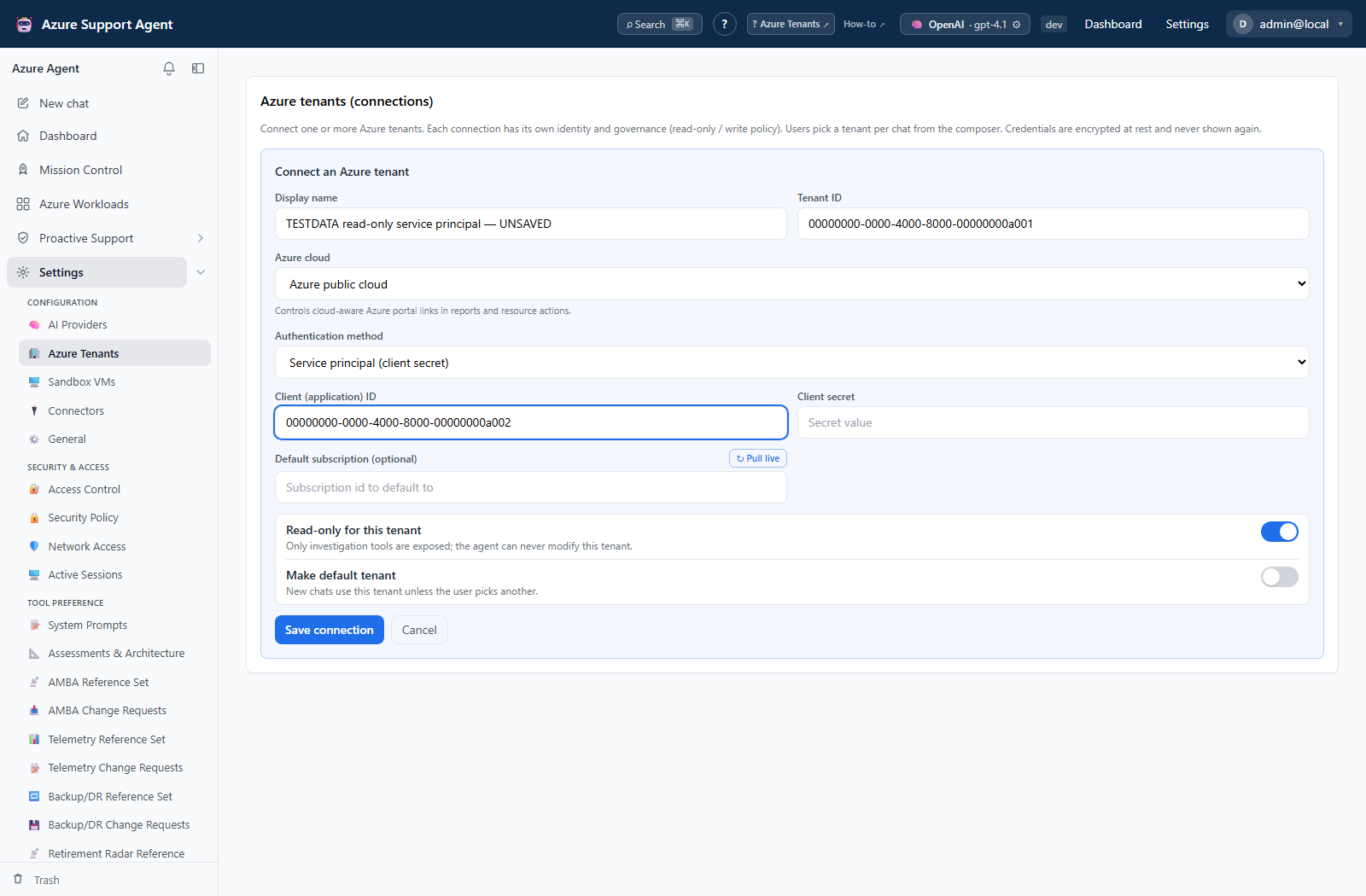
Write permissions
The *.ReadWrite.All permissions listed above are not required for most queries. Add them only when an approved workflow needs those operations. Write tools (create, update, delete, reset) remain gated behind the application’s approval policy.
Application-side approval gates do not replace Microsoft Graph least privilege. Both layers must be configured correctly.
How the MCP server is launched
The Graph SDK has very deep file paths, so its dependencies live in a dedicated virtual environment to avoid the Windows 260-character path limit. The backend spawns the server using ENTRA_MCP_COMMAND (that environment’s Python) and ENTRA_MCP_ARGS (the stdio launcher third_party/entraid-mcp-server/run_server.py). Override both with environment variables if the paths differ. Administrators can list the loaded tools at /api/admin/entra/tools on the backend.
DEV_AUTH=true injects a fake administrator identity so a local developer can use chat and the admin dashboard without an external identity provider (DEV_AUTH_ROLE=user tests the non-administrator view). It disables authentication entirely and must never be set on a deployed instance. Configure real OIDC or SAML SSO under Settings → Access Control.
Interpret results
- A successful tool listing confirms that the MCP process loaded; it does not prove every Graph permission is consented.
- A successful read in one area does not imply access to audit logs, authentication methods, or policies.
- Empty results can be legitimate. Compare the requested tenant, time range, and Graph permission before concluding that data is absent.
- Directory results may contain sensitive personal and security information. Handle exports and chat transcripts accordingly.
Safety
- Never publish tenant IDs, client IDs, secrets, certificates, tokens, user data, or Graph responses.
- Prefer read-only permissions. Separate a write-capable identity if operational segregation is required.
- Review admin consent periodically and remove unused permissions.
- Keep password reset, app-registration mutation, and group mutation behind explicit application permissions and approvals.
Troubleshooting
| Symptom | What to check |
|---|---|
| Entra tools do not appear | Feature toggle, sub-agent tool selection, MCP process configuration, and application role |
| Graph returns 403 | Exact Application permission, admin consent, and whether the active connection uses the configured identity |
| Authentication-method or audit data is missing | The specialized permissions above; broad directory read does not cover those APIs |
| Data comes from the wrong tenant | Default Azure connection and its tenant/service-principal configuration |
| Local Windows server fails to start | The dedicated Entra MCP virtual environment and the configured ENTRA_MCP_COMMAND / ENTRA_MCP_ARGS |