User guide
Use this guide to understand every major application area, its prerequisites, workflow, outputs, and safety boundaries. Each area also has numbered procedures in the How-to guides; the third column links straight to them.
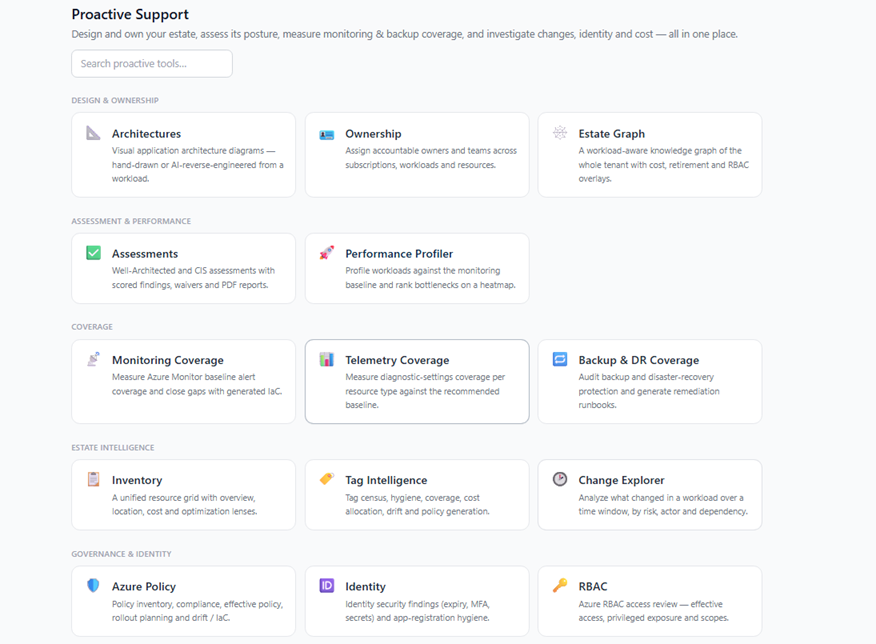
| Area | What it covers | Procedures |
|---|---|---|
| Core experience | Dashboard, Chat, Deep Investigation, the Proactive Support directory, Monitor, and Stats | Core and workload recipes |
| Workloads | Fleet, Autopilot discovery, workload detail, groups, and overlaps | Core and workload recipes |
| Mission Control | Coordinated multi-system workload sweeps | Run a Mission Control sweep |
| Design & Ownership | AI Insight Packs, Architectures, Know-Me, Ownership, Estate Graph, sandbox diagnostics, and network/DNS diagnostics | Design and assessment recipes |
| Assessment & Performance | Assessments, Performance Profiler, and FMEA | Design and assessment recipes |
| Coverage | Monitoring Coverage, Alerts Manager, Telemetry Coverage, Backup & DR Coverage, Backup Manager, and Connection Capability | Coverage recipes |
| Estate Intelligence | Inventory, Tag Intelligence, and Change Explorer | Estate intelligence recipes |
| Governance & Identity | Azure Policy; Entra ID posture, Conditional Access, privileged access, applications, guests, findings, and blast radius; IAM effective access, access paths, reviews and PIM, and change simulation | Governance and identity recipes |
| Lifecycle & Investigation | Retirement Radar, Reservations Monitor, Quota Monitor, Telemetry Intelligence, Evidence Locker, and Case Files | Lifecycle and investigation recipes |
| Automations | Scheduled Tasks, Sub Agents, Workbooks, Playbooks, and Notifications | Automations and connector recipes |
Configuration, access control, reference sets, and observability live in Administration.
A reliable operating pattern
- Select the intended Azure connection and workload or subscription scope.
- Check data freshness, permissions, and any partial-result indicators.
- Refresh only when current Azure state is required.
- Validate AI narratives against displayed source evidence.
- Preview generated changes and preserve approval gates.
- Re-scan after remediation and record verification.