Maintain reference sets and change requests
Prerequisites
- Product permission
coverage.manage. - A reviewed Azure Monitor Baseline Alerts source and representative resource scope.
- Approval capability shown by the change-request page.
- A request with source, scope, gap count, and IaC preview available for review.
- Reviewed diagnostic-category and destination requirements.
- Approval capability shown by the page.
- A reviewed pending request and destination data-boundary approval.
- Reviewed protection, job, restore-test, replication, and severity requirements.
- A reviewed request and an owner for the external protection change.
- Product permissions
radar.readandradar.managefor Retirement Radar reference changes. The route/history reads useradar.read; save, restore, and reset useradar.manage. - Authoritative retirement/breaking-change sources and reviewed model lifecycle dates.
Route
- Open
/admin/amba. - Open
/admin/ambachanges. - Open
/admin/backupdr. - Open
/admin/backupdrchanges. - Open
/admin/radar. - Open
/admin/telemetry. - Open
/admin/telemetrychanges.
How to update the AMBA Reference Set
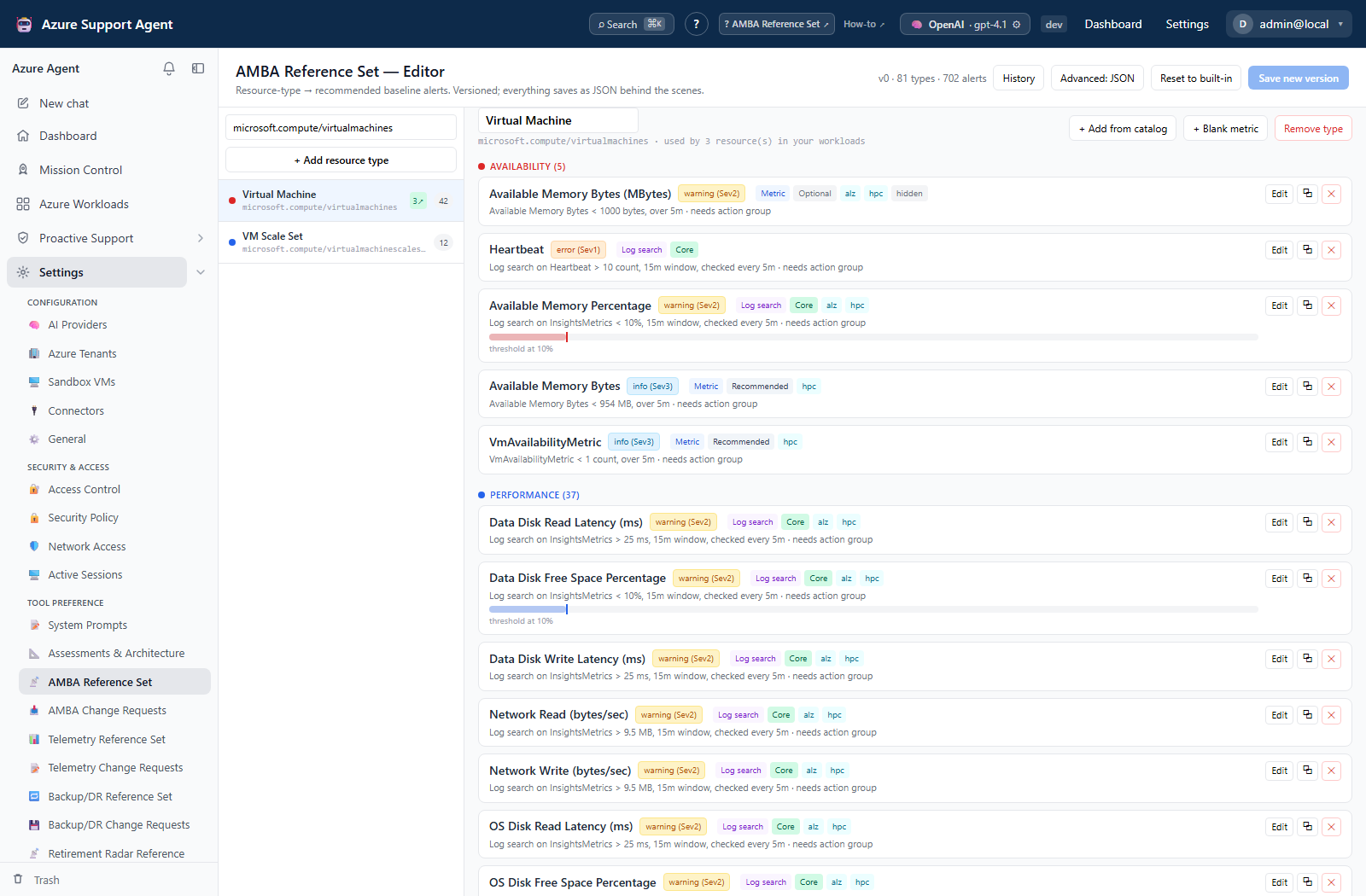
- Review the current reference version and the resource types/rules affected.
- Edit only fields shown by the editor, such as recommended alert signal/metric, operator, threshold/unit, aggregation/window, severity, or classification.
- Check for duplicate or conflicting recommendations and regional/API support.
- Save a new revision using the page’s version/history controls.
- Run a bounded Monitoring Coverage scan for an affected resource type.
- Record the revision and effective date with the changed baseline.
Expected result: A new AMBA reference revision becomes current and changes coverage interpretation without deploying an Azure alert.
Verification: Compare the representative scan with the prior baseline and inspect reference history. Generated remediation remains an artifact until separately approved/applied.
How to decide an AMBA Change Request
- Open a pending request and confirm requester, scope, gaps, format, and creation time.
- Expand the IaC preview and compare it with the current AMBA reference and target scope.
- Select Approve or Reject according to policy.
- After an external deployment is independently verified, select Mark applied when offered.
- Delete an inbox record only under retention policy.
Expected result: The request moves through pending to approved/rejected and, when externally completed, applied. The decision itself does not deploy Azure resources.
Verification: Correlate the decision with Audit Log and any external pipeline/Azure Activity Log evidence.
How to update the Telemetry Reference Set
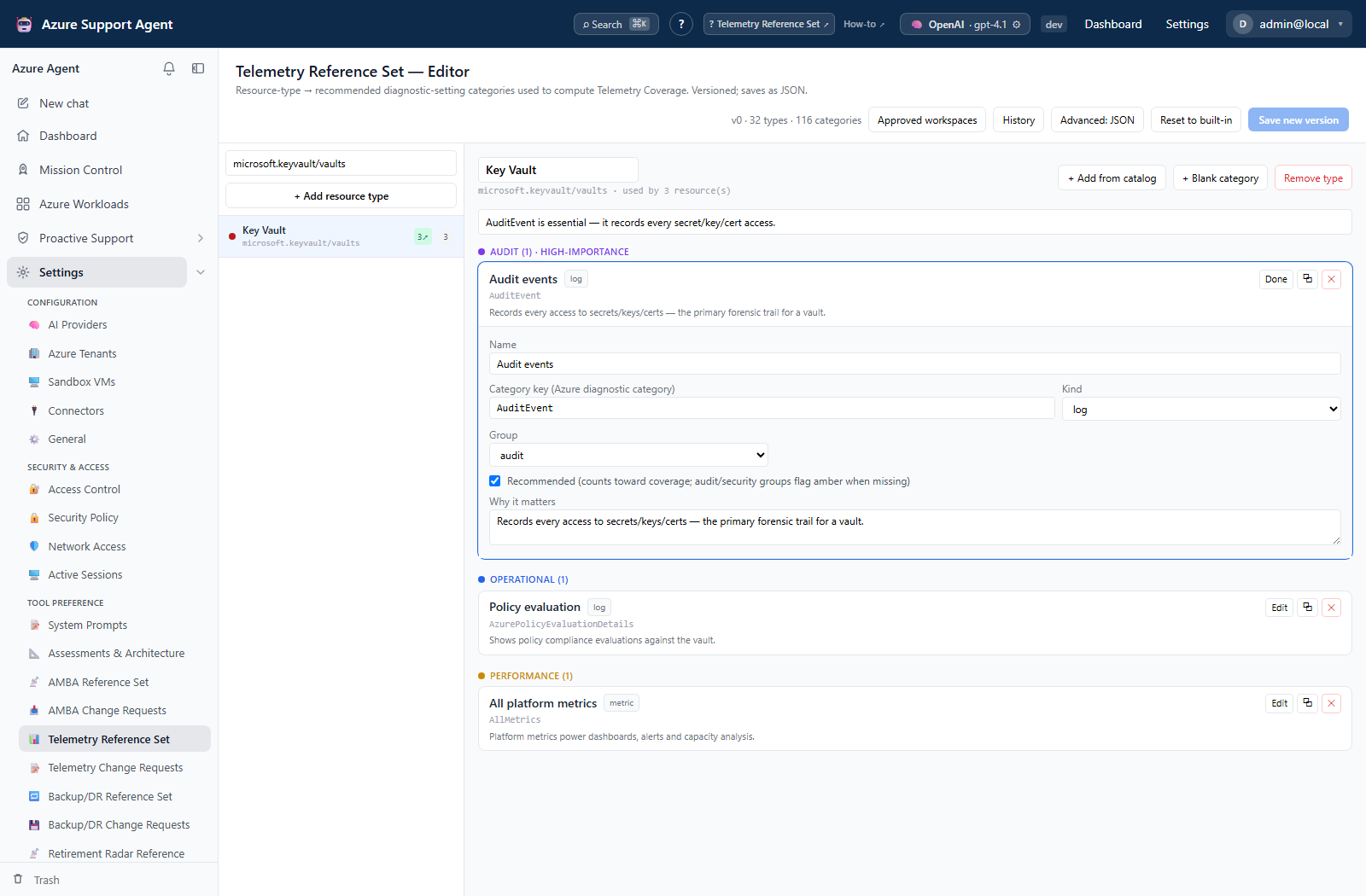
- Review the current version and affected resource types.
- Edit only visible log/metric category and destination expectations.
- Check category support and the approved Log Analytics workspace list exposed by the Telemetry workflow.
- Save a new revision.
- Run a representative Telemetry Coverage scan.
- Record changed baseline behavior.
Expected result: The current telemetry reference reflects reviewed expectations without creating diagnostic settings in Azure.
Verification: Compare category/destination findings before and after the revision and inspect revision history.
How to decide a Telemetry Change Request
- Review requester, scope, gap count, format, and IaC preview.
- Confirm categories, destinations, retention implications, and current reference.
- Select Approve or Reject.
- Mark applied only after independent Azure/pipeline verification.
- Rerun Telemetry Coverage for the affected scope.
Expected result: The request has a recorded decision and any applied state is backed by external evidence.
Verification: Check Audit Log, external deployment records, and a post-change coverage scan.
How to update the BackupDR Reference Set
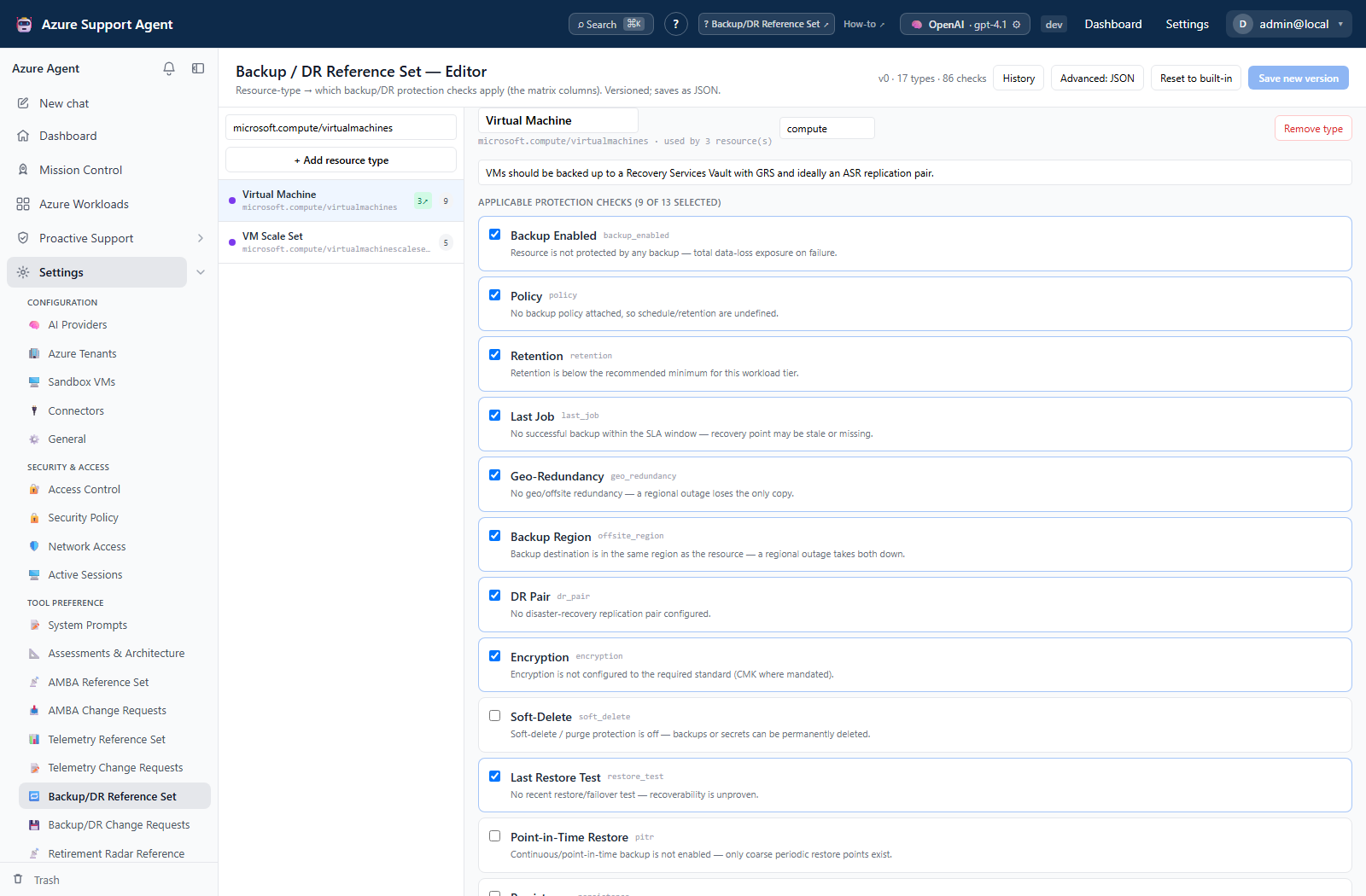
- Review the current version and affected resource types.
- Edit only visible protection checks and semantics.
- Validate service support, expected SLA/age, and scope.
- Save a new revision.
- Run a bounded Backup & DR Coverage scan.
- Document baseline changes.
Expected result: The versioned reference represents approved resilience expectations but does not configure vaults, policies, replication, or tests.
Verification: Inspect revision history and compare the representative coverage findings with actual Azure protection evidence.
How to decide a BackupDR Change Request
- Review requester, target scope, gaps, format, and remediation preview.
- Confirm recovery objectives, vault/policy ownership, regional support, and operational impact.
- Select Approve or Reject.
- Mark applied only after the external owner verifies configuration and a protection job/test where appropriate.
- Refresh Backup & DR Coverage.
Expected result: The decision is recorded and applied status reflects verified external work, not merely approval.
Verification: Correlate Audit Log, deployment/vault evidence, and the new coverage snapshot.
How to maintain the Retirement Radar Reference
- Review current version, classification rules, model lifecycle rows, and last editor.
- Select Edit JSON and change only the displayed reference structure for classification rules and model lifecycle.
- Validate model, version, stage, retirement date, replacement, and migration information that are present in the current structure.
- Select Save new version.
- Review Retirement Radar output and digest preview for affected services/models.
- Use revision restore for a prior version or Reset to built-in when required.
Expected result: A new version classifies relevant retirement events and model stages without changing Azure resources or model deployments.
Verification: Inspect version history and a representative Radar event/digest. Confirm dates and links against the authoritative source.
Safety and rollback
Approval records human sign-off; it is not execution. Reject an unsafe pending request. If an approved artifact must be withdrawn, stop the external pipeline and create a reviewed compensating change.
Restore a previous revision or reset to the built-in reference, then rerun the same scan. Never add a workspace identifier that has not been approved for telemetry routing.
The app does not auto-apply the request. Stop unapproved external execution; roll back an applied Azure diagnostic setting through the owning deployment process.
Restore a prior revision or built-in seed and rerun the same scan. Do not interpret a reference edit as completed protection.
The request does not perform the change. Roll back applied protection through the service’s approved procedure; never remove protection merely to make a scan match an older baseline.
Invalid or over-broad rules can create noise or hide events. Keep source evidence and restore a prior revision if classification regresses. Reset discards custom current content in favor of the built-in seed.
Reference changes can alter scores and generated IaC but do not directly change Azure. Restore a prior revision or use the built-in reset control to roll back; rerun the same scan afterward.
Troubleshooting
| Symptom | Resolution |
|---|---|
| Approval controls are absent | Confirm the action-specific approval capability and request status. |
| Applied state cannot be proven | Obtain external deployment and post-change scan evidence before marking it applied. |
| Category is always reported missing | Verify that the category exists for that resource provider/type and region. |
| Destination drift is unexpected | Check the approved workspace list and selected connection/scope. |
| Preview targets the wrong workspace | Reject and correct the reference/approved workspace configuration before resubmission. |
| Coverage remains unchanged | Refresh the scoped scan and verify the deployment, categories, and destination. |
| Check is not applicable | Confirm resource type and supported protection mechanism. |
| Recent job/test appears stale | Check timestamps, configured SLA/age settings, timezone, and collector access. |
| Request omits recovery impact | Reject or hold until RPO/RTO and restore-test implications are reviewed. |
| Applied request still shows gaps | Verify job state, collector permissions, cache/scan time, and reference revision. |
| JSON save fails | Validate the exact current schema and field types shown by the editor. |
| Event is misclassified | Narrow conflicting keywords/rules and save a new version. |
| Lifecycle date is absent | Verify the authoritative source; do not invent dates or replacements. |
| Coverage changed unexpectedly | Compare reference revision, threshold tolerance, discovered resources, and scan timestamp. |
| Rule is unsupported | Verify resource type, metric/signal, region, API support, and source version. |