Access control
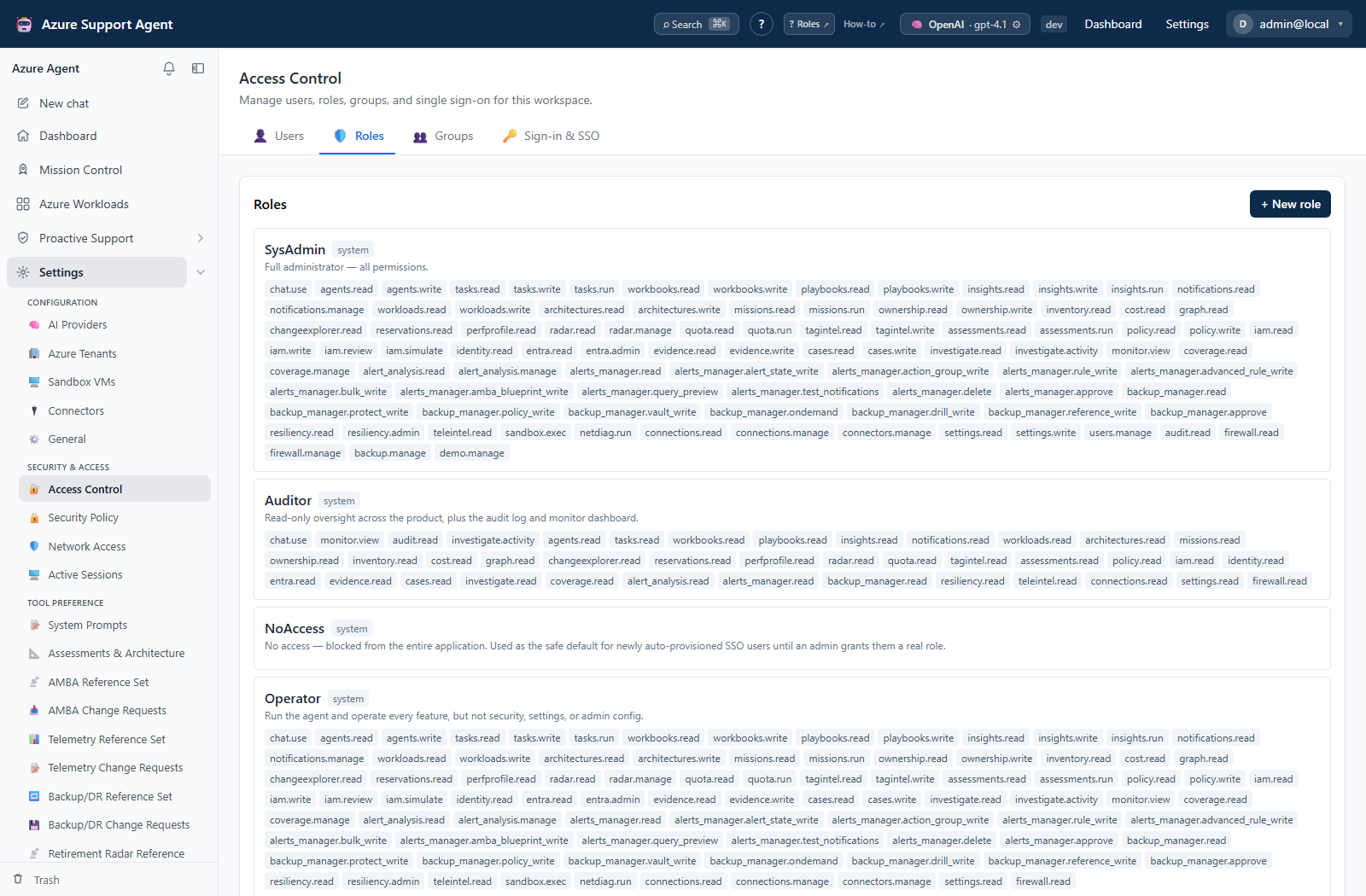
API endpoints check explicit capability strings. Built-in roles are seeded from the live catalog and cannot be edited or deleted. Custom roles select exact capabilities from that same catalog.
| Stored role | UI label | Effective capability set |
|---|---|---|
admin | SysAdmin | Every product permission. Administrators pass every require_permission guard. |
operator | Operator | Every permission except settings.write, users.manage, audit.read, firewall.manage, backup.manage, and demo.manage. The role can still inspect settings and Network Access through their read capabilities. |
auditor | Auditor | Every capability ending in .read, plus chat.use, monitor.view, audit.read, and the read-only behavioral-data capability investigate.activity. It has no write, manage, approve, delete, execute, or run capability. |
user | User | chat.use, ownership.read, workloads.read, and architectures.read. |
noaccess | NoAccess | No product permissions. This is the safe default for an unreviewed account. |
users.manage is deliberately an administrator capability. A custom role containing it is treated as an effective administrator by both the API and client and therefore passes all product-permission checks. Do not add it to a narrowly scoped custom role.
Effective permissions and active roles
Assigned roles come from direct assignments and role-bearing groups. Before a session is explicitly scoped, the backend computes the union of those roles. The displayed default/highest role is a label for that session state; it does not remove capabilities contributed by other assigned roles.
Selecting Active Role chooses one role the user already holds and restricts the session to that role’s permissions. It cannot select an unassigned role. The client then reloads /api/auth/me, invalidates cached feature queries, and immediately re-gates navigation and actions. The user can switch to another assigned role in the same session; a new session starts without the prior session’s explicit selection. Default Role controls the role label used for a new unscoped session.
Navigation follows effective permissions
The left navigation, Dashboard shortcuts, Settings and Proactive Support landing cards, and command palette all use the effective permission set returned by /api/auth/me. They do not infer access from a role name. This is important for custom roles and for users who combine direct and group-assigned roles.
- A menu group appears when at least one child page is accessible.
- A child link appears only when its read capability is present.
- Settings sections with a declared read/write split, the Network Access editor, Monitor dashboard authoring, and read-only Automation sections disable or hide mutation controls when the write capability is absent. Other feature writes still rely on their explicit backend guard, so a visible action is never proof that it is authorized.
- A direct URL uses the same capability contract and shows Access not granted before the feature component makes protected API calls.
- A zero-permission principal sees a dedicated no-access wall, account/role switcher, and sign-out control. Normal application queries do not run.
The command palette is a navigation surface, even when a destination label starts with a verb. Press Ctrl + K on Windows/Linux or ⌘ + K on macOS, then search label, group, or keywords. Every space-separated search token must match. The palette removes destinations whose route requirement is not satisfied; an admin badge is descriptive metadata and does not replace the capability check. Opening a result navigates to its route and never submits the labeled action by itself.
| Built-in role | Navigation outcome |
|---|---|
SysAdmin (admin) | Every page and configuration action. |
| Operator | Operational pages and configuration it can manage; Access Control, Audit Log, whole-app backup, Demo Data, and reserved write configuration are hidden. Readable Settings and Network Access entries remain visible. |
| Auditor | Read surfaces across the product, Monitor/Stats, Audit Log, and readable configuration such as Network Access; mutations are hidden or disabled. |
| User | Chat, Azure Workloads, Architectures/Know-Me/FMEA, and Ownership. |
| NoAccess | No application navigation; contact-admin guidance, role switching, and sign out only. |
Backend permission checks remain authoritative; hiding a link is a usability control, not the security boundary.
Read/write splits used by shared surfaces
| Surface | Route/navigation capability | Additional mutation capability | UI behavior |
|---|---|---|---|
| Application configuration | settings.read | settings.write | AI Providers, General, System Prompts, and Assessments & Architecture remain readable and display a read-only state without write access. MCP catalog reads also use settings.read; their setting updates are still rejected by the backend without settings.write. |
| Monitor and Stats | monitor.view | settings.write for dashboard authoring | Saved dashboards and widgets remain readable. Create, customize, save, save-as, delete, set-default, AI authoring, and revision restore require the write capability. |
| Usage | monitor.view | None | Read-only token and estimated-cost aggregation. |
| Audit and SIEM | audit.read | settings.write for SIEM destination changes | Audit rows, exports, and stored destinations remain readable. Add, edit, delete, test, flush, and reset-cursor controls require the write capability. |
| Network Access | firewall.read | firewall.manage | Policy, address resolution, and block history remain readable; policy changes, enforcement confirmation, and block-history clearing are disabled without manage access. |
| Retirement Radar | radar.read | radar.manage | Cached radar/reference/history reads remain available; refresh, state, runbook, finding, ticket, demo, and reference mutations require manage access. |
| Notifications | notifications.read for the personal center | notifications.manage for global rules | Feed/read state and routing rules are independent surfaces. Grant both only when one role needs both workflows. |
| Chat | chat.use | None at the route level | Chat history, lifecycle, turns, and streams require the capability; downstream tools retain their own safety and Azure authorization checks. |
For a custom role that must operate a split editor through the UI, grant both the route/read capability and its mutation capability. Mutation endpoints enforce their own write key, but a write key alone does not make the read-gated route appear in navigation.
OIDC authorization code with PKCE and SAML 2.0 are implemented. JIT provisioning can create users, but should assign noaccess until reviewed. Authentication proves identity; authorization still comes from product roles and Azure/Graph permissions.
Direct routes and the NoAccess wall
The client evaluates the same route requirement used for navigation before mounting a protected feature. A shared or manually entered URL without the required capability shows Access not granted and does not mount that feature component. The backend independently returns 403 when its API guard is called without the capability.
A principal with no effective permissions is blocked server-side from all application APIs except the minimal identity, profile, active-role, auth-configuration, and sign-out paths needed to display the NoAccess wall and avoid trapping the user. The wall does not start normal application queries. If another role is assigned, use the account menu to switch; otherwise an administrator must grant an approved role.
Least-privilege layers
- Product permission permits an application action.
- Connection disabled/read-only policy controls availability and writes.
- Azure RBAC/Graph application permissions constrain external data/action.
- Tool write classification and approval controls gate execution.
- Destination account/token controls constrain connector behavior.
A product admin does not automatically have Azure Owner. Conversely, a powerful Azure credential can make a narrow-looking tool dangerous; scope both layers.
Troubleshooting
| Symptom | Cause and resolution |
|---|---|
| A permitted link disappears after a role switch | The selected active role is a session downscope. Switch to another assigned role that contains the capability, or start a new session to return to the unscoped assignment union. |
| A direct URL shows Access not granted | The active permission set does not satisfy that route. Request the exact capability shown on the feature page; changing the URL does not bypass the backend guard. |
| The NoAccess wall appears after successful sign-in | The active role has no permissions, or the account has no effective roles. Switch to another assigned role from the account menu or ask an administrator to grant one. |
| A custom role unexpectedly opens every page | It contains users.manage, which makes the principal an effective administrator. Remove that capability unless full administration was intended. |
| A page is readable but Save is disabled | The active role has the read capability but lacks the page’s write/manage capability. Use a separately approved role rather than broadening the read role. |
| A custom role has a write key but the editor is absent | The route itself is read-gated. Add the matching read key as well—for example monitor.view with settings.write, or firewall.read with firewall.manage. |