Assessments
Purpose
Assessments evaluate a workload against selected control packs and pillars, calculate posture scores, map controls to frameworks, and retain runs for trend and portfolio review. They help teams prioritize findings; they are not a certification or substitute for an auditor.
Application routes: /assessments and /assessments/:id.
Common use cases
- Establish a Well-Architected or security posture baseline.
- Review control failures by pillar, severity, framework, or resource.
- Compare a workload with a pinned baseline or previous run.
- Assign findings, create time-bound waivers, and hand off tickets.
- Review the latest score across a workload portfolio.
- Add organization-specific custom checks.
Prerequisites, permissions, and data
assessments.readpermits catalog, run, waiver, trend, and portfolio viewing.assessments.runis required to enqueue runs and perform mutating assessment actions, including finding state, waivers, and custom checks.- Scheduling uses the separate
tasks.read(preview/history),tasks.write(create/edit/pause), andtasks.run(Run now) capabilities. An assessment run grant alone does not grant schedule administration. - A workload and current resource inventory are required.
- Controls use Resource Graph, Azure Monitor metrics, Azure Advisor recommendations, Microsoft Graph identity-policy reads, ARM REST configuration reads, or manual attestations. Each source requires its own connection access; Azure Reader does not supply Microsoft Graph application permissions.
- AI summaries and AI-generated custom checks require a configured provider; the underlying deterministic control results remain the primary evidence.
Registered controls, packs, and targets
The shipped catalog version 2026.06.3 registers 167 controls, before custom checks and the optional Recovery Readiness contribution. WAF, WARA, and WASA are pillar presets, not separate engines or additional check inventories.
| Pillar | Shipped controls | Pack membership |
|---|---|---|
| Security | 116 | WAF, WASA |
| Reliability | 28 | WAF, WARA |
| Cost Optimization | 8 | WAF |
| Operational Excellence | 8 | WAF |
| Performance Efficiency | 7 | WAF |
| Total | 167 | WAF runs all five pillars |
| Evaluator kind | Controls | What is evaluated |
|---|---|---|
graph | 134 | Resource Graph violation queries or subscription-level presence checks |
metric | 2 | VM CPU: peak below 5% for idle cost, or average above 85% for saturation, over seven days at hourly grain |
manual | 20 | Reviewer attestations, including recovery objectives/drills, management locks, blob protection, and selected identity/data-plane settings |
signal | 1 | Open Azure Advisor High Availability recommendations joined to workload resources |
graph_api | 5 | Microsoft Graph tenant identity policies |
arm_rest | 5 | Subscription diagnostic settings and resource diagnostic/HTTP-log configuration |
Launch targets are workloads, but finding subjects can be resources, subscriptions, or the Entra tenant. An empty resource-type list does not mean N/A: governance controls can apply to the whole subscription or tenant. A narrow workload therefore does not make every control resource-local.
Enabling the optional Recovery Readiness contribution adds three Reliability controls from a stored recovery analysis: no recovery path, redundant-but-logically-unprotected resources, and recovery-target breaches. It is off by default; with it enabled WAF has 170 and WARA 31 shipped/contributed controls before custom checks. Missing recovery analysis makes those three N/A. Catalog viewing includes saved custom controls, including disabled ones; execution adds only enabled custom controls for selected pillars. Report totals need not equal the base catalog count.
Landing-page views and tabs
The top-level views are Assessments, Fleet, and Cleanup. Inside Assessments are Run & history, Portfolio, Custom controls, and Trash. Fleet reads saved posture for every active workload, with newest-attempt status separate from the latest successful score. Cleanup reviews active and trashed runs across workloads.
Run
Select one or more workloads, the desired pillars or packs, and whether to generate an AI summary. Run & history submits a durable batch (at most 500 workload IDs). The history table shows status, score, failed count, pillars, time, and trend, with date-window, latest-per-workload, grouping, and sorting controls. Its normal request returns the newest 50 runs; a history filter does not load unlimited older records. In-flight cancellation is cooperative, not an undo of completed work.
Portfolio
The portfolio shows the latest completed result per workload: overall score, pillar scores, failed controls, trend, and last-run time. Select a row to open the run, but compare run scope and catalog version before ranking workloads.
Custom
Create organization-specific controls manually or from a natural-language AI draft. Review title, description, pillar, severity, query, and framework mappings before enabling the check. Test custom queries against a limited scope first.
Trash
Restore soft-deleted runs or permanently purge them. Emptying Trash is irreversible.
Run-detail tabs and actions
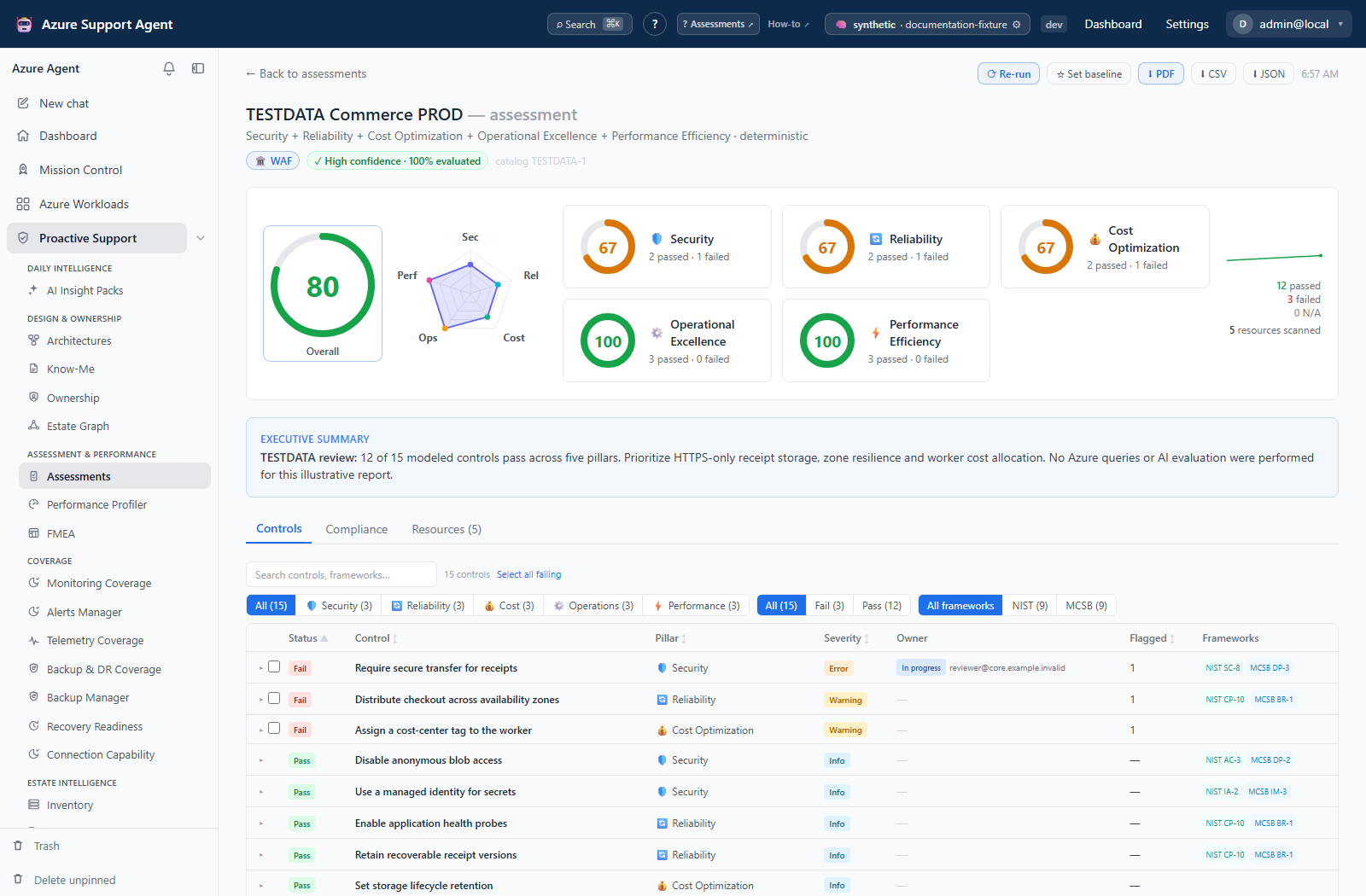
The header shows workload, pillars, AI status, trigger, evidence completeness/confidence, and buttons to Re-run, Set baseline, and export PDF, CSV, or JSON.
Controls
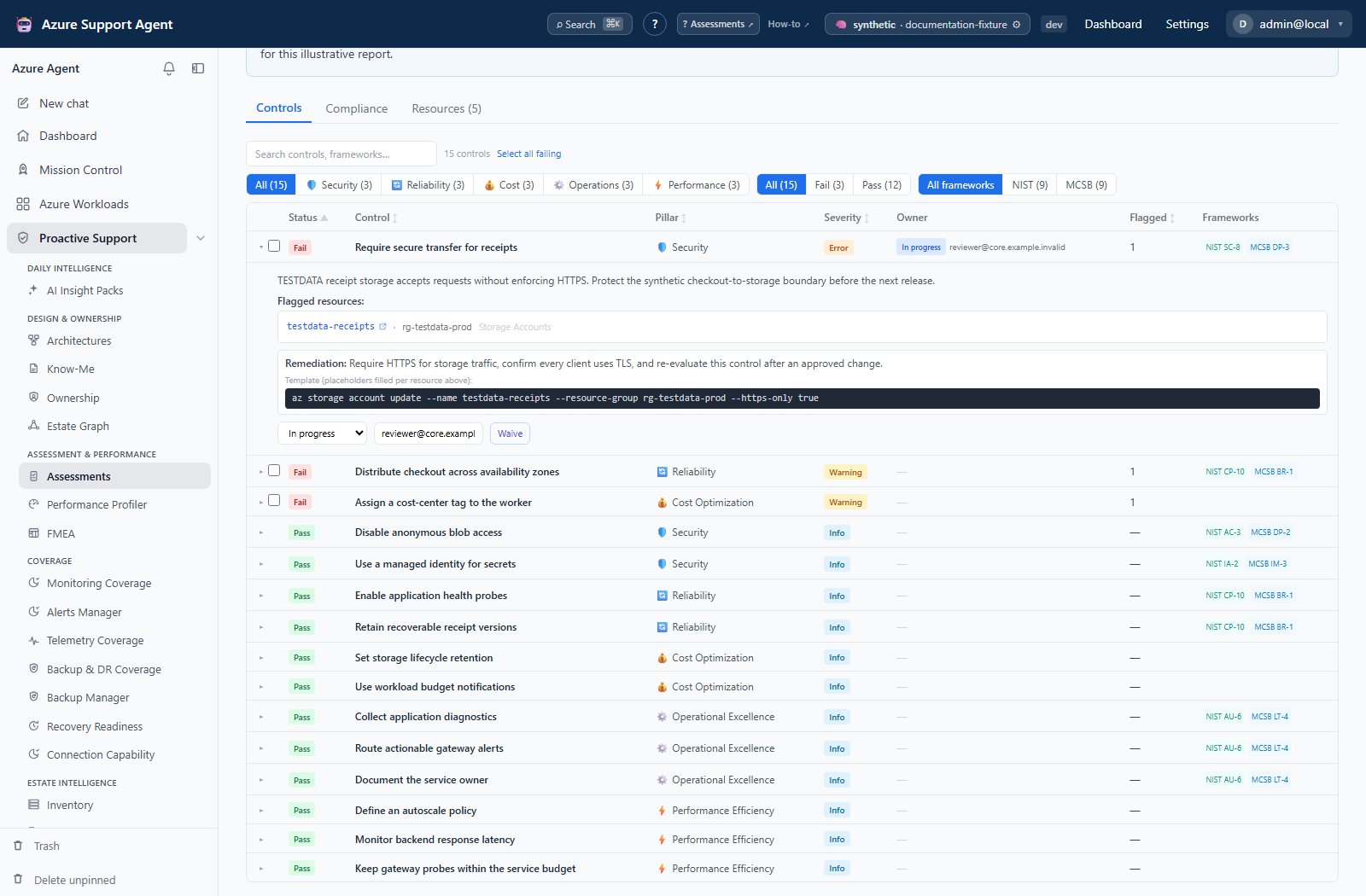
Search and filter by pillar, result status, and framework (multiple framework selections use OR). Sort findings and expand a row for description, AI impact, flagged resources, remediation text, waiver reason, or error. Result statuses are pass, fail, error, manual, waived, and not applicable; severity labels are Critical, Error, Warning, and Info.
Finding lifecycle is separate: Open, In progress, Resolved, Waived, or Risk accepted, with an assignee and ticket reference. These records are keyed by workload/check, so a lifecycle change also appears when viewing another run of that check; it does not change its measured pass/fail result. Bulk selection is exposed for failed findings with resource types, not every row. The Policy handoff opens Safe-Rollout Planner with detection/remediation context; it does not apply a policy.
A remediation command is a suggestion. Review scope, syntax, side effects, and rollback before execution outside the product.
Compliance
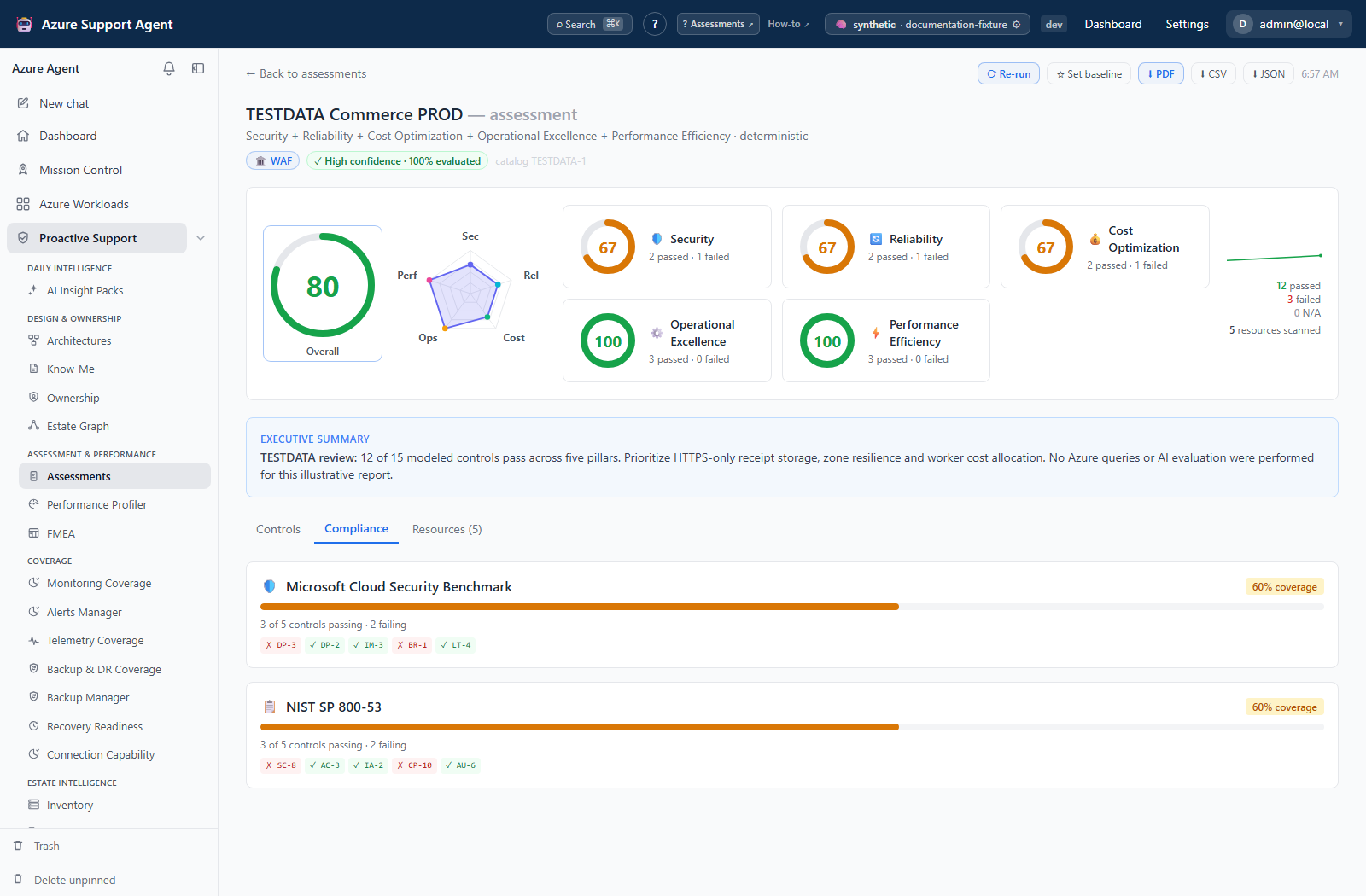
Review framework coverage for available mappings such as CIS, NIST, ISO, Microsoft Cloud Security Benchmark, and PCI. Coverage indicates mapped control outcomes, not formal certification.
Resources
Inspect the resources scanned in the run, including type, group, region, and Azure portal link. A displayed list may be capped even when the total scanned count is larger.
Workflow
- Confirm workload inventory, connection, and required source permissions.
- Select workloads and only the relevant packs/pillars.
- Enqueue the run and monitor queued, running, succeeded, failed, or cancelled status.
- Open a completed result and check completeness before the score.
- Review critical and high-severity failures, errors, and manual controls.
- Assign findings or create tickets; use waivers only with justification, approver, and expiry.
- Pin a reviewed baseline and compare later runs.
- Export evidence and re-run after remediation.
Interpret scores and findings
Pillar scores are severity-weighted pass percentages; the overall score averages the scored pillars. Default weights are critical 10, error 6, warning 3, and info 1, with administrator overrides. N/A, pending manual, and waived findings are excluded. Error is excluded from the optimistic score but lowers completeness; worst-case scoring treats errored controls as failures.
Completeness is evaluated controls divided by evaluated-plus-errored controls. Pending attestations, waivers, and resource sampling are not a complete audit of that percentage. Default confidence bands are high at 98%+, medium at 83%+, and low below 83%; these thresholds are configurable. Even succeeded can contain errors or exhausted-budget controls, so read the trust bar before the score.
Waivers are applied when a new run evaluates a failing control. Creating or revoking a waiver does not rewrite a historical report. The UI requires justification but permits blank approver/expiry; enter both under your governance policy. The approver is recorded text, not a separate enforced approval workflow. Manual attestation likewise takes effect on the next run.
The baseline diff highlights new failures and resolved findings. Verify that apparent improvements were not caused by missing resources, permission loss, catalog changes, or a narrower scope.
Baseline selection is per workload, not per pillar set/catalog version, and the diff can label a newly waived failure as resolved. Compare technical evidence before claiming remediation. A profiler-registered Performance finding run has no overall score and is not equivalent to a full WAF assessment.
Exports, history, and integrations
- PDF is suitable for a rendered stakeholder report.
- CSV emits one row per stored flagged resource (or one row for a control without resources). It is not one row per control and cannot recover resources omitted from the stored sample.
- JSON preserves structured run data for automation or evidence processing.
- Trend and Portfolio use historical completed runs; a pinned baseline gives a deliberate comparison point.
- Ticket connectors can hand findings to configured external systems.
- Action-plan handoff can prepare Azure Policy enforcement context; it does not remove the need for staged policy review.
- Manual control attestations and waiver history form part of the run’s governance context.
- The API also exposes prioritized action plans, per-resource failure rollups, waiver revocation, and manual-attestation updates. These are not extra tabs or a waiver-manager dialog in the current report UI.
Collection and display limits
- Each finding stores at most 25 flagged resources; the report’s Resources list stores at most 1,000. Totals may be larger, and partial counts may be lower bounds.
- Metric checks and resource-specific ARM checks probe at most 40 resources per check. A passing sampled check does not establish complete fleet coverage.
- Default execution is 6 controls concurrently, 90 seconds per control, and a 1,800-second check-phase budget. Administrator ranges are 1–16, 10–600 seconds, and 60–7,200 seconds respectively. Budget exhaustion marks unfinished controls error, not pass.
- Run listing defaults to 50 and caps at 200; Trash lists at most 200; trend defaults to 30 and caps at 100 points. Cleanup is the cross-workload retention view.
Safety and limitations
- Results are point-in-time and bounded by scope, permissions, catalog, and source freshness.
- Framework mappings are informational and do not provide certification.
- AI summaries and custom-check drafts can be wrong; verify against control evidence.
- Waivers reduce visible failure treatment but do not remove technical risk.
- Resource or remediation links may expose sensitive identifiers.
- Purge is permanent; preserve required evidence before deleting.
Troubleshooting
| Symptom | Checks |
|---|---|
| Run remains queued | Check worker health and queue load; avoid enqueuing duplicates. |
| Controls show error | Expand the error, verify source permission/query support, and rerun after correction. |
| Score changed unexpectedly | Compare scope, catalog/packs, N/A counts, permissions, and baseline. |
| Waiver saved but an old report still fails | Outcomes are persisted snapshots. Run the same scope/pillars again; verify active waiver and expiry rather than repeatedly creating waivers. |
| 100% completeness but many manual or sampled controls | Completeness measures returned control verdicts, not every resource or human review. Inspect manual/N/A/waived counts and the 25/1,000/40-resource limits separately. |
| Missing resources | Refresh workload inventory and verify subscription/resource-group scope. |
| PDF export is slow | Keep the export dialog open, allow report generation to finish, and retry after run completion. |
| Custom check fails | Validate the Resource Graph query, supported fields, result shape, and limited-scope behavior. |