Create and manage Sub Agents
Prerequisites
agents.readto inspect/export agents;agents.writeto create, edit, enable/disable, delete, import, or use AI design. The current panel disables even export controls without write permission.chat.useto launch a chat. Agent definitions are deployment-wide, not isolated per application tenant.- A tested AI provider for draft and enhancement generation.
- Tested, enabled connectors for connector-backed tools.
settings.readfor the provider/model pickers and saved tool-policy diagnostic; Azure/Entra permissions remain separate from these application capabilities.
Route
Open /automations/agents.
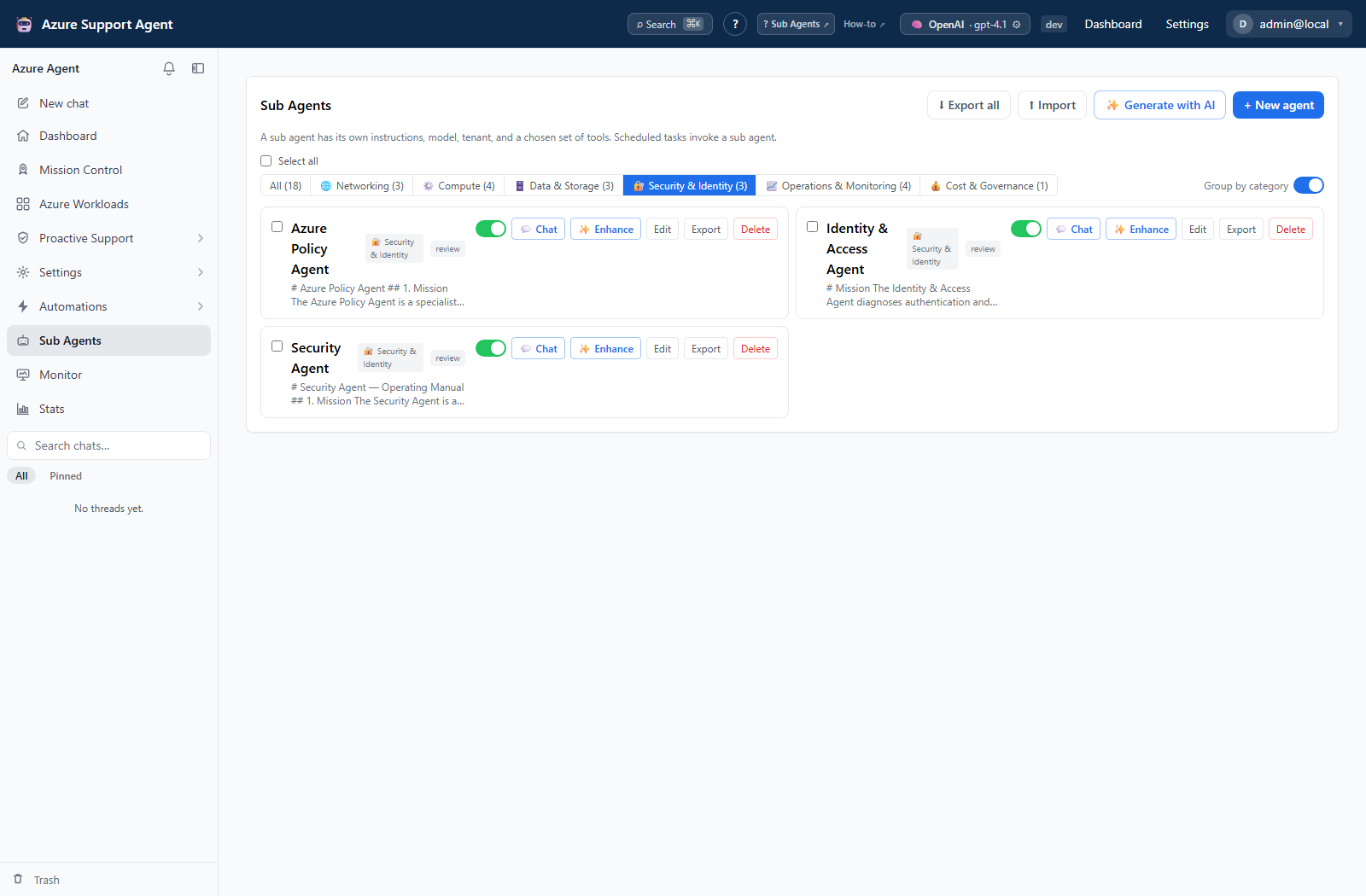
How to create and verify a Sub Agent
- Select New agent and enter a clear name, category, and instructions. Alternatively, select Generate with AI, describe the goal, and submit answers with Continue; Generate now skips questions and omits unsubmitted current-step answers.
- Select the intended provider/model or defaults. The editor does not expose a connection selector; review imported connection references and the actual chat scope separately.
- Choose Review for initial validation. Autonomous removes the interactive gate for write-classified tool calls; it is not just a faster review mode.
- Search/filter Connector tools and select the minimum needed. These are tool-name selections, not a unique choice of destination when several connectors offer the same tool.
- Turn off complete Azure catalog routing and select appropriate bundles/exact names when a narrow scope suffices. Opt into Entra only when needed through its bundles/names or complete-catalog control. Review retained policies, not only the visible checkbox.
- Select Save. New agents default to enabled; use the card switch to disable an agent awaiting review. Enable after review and select its Chat action, or choose it from the chat picker.
- Issue a harmless read-only verification prompt and inspect actual connection, tool activity, and response.
Expected result: The enabled agent appears in the chat picker and responds using its saved configuration.
Verification: Confirm the selected agent name, target scope, and actual tool calls. A saved tool-policy preview is diagnostic, not a live test of unsaved changes or proof that every eligible tool was initially exposed.
How to enhance or disable an agent
- Pause schedules using this agent before changes that could alter their behavior. Select Edit for direct changes or Enhance for the assessment/interview.
- Submit answers with Continue, or use Enhance now to skip remaining questions. Inspect What changed, run-mode changes, and Compare before / after.
- Select Review & save to open the normal editor; this does not yet persist the draft. Review instructions/tools again, then select Save. Regenerate makes another draft; Cancel leaves the stored definition unchanged.
- Disable the agent when it should disappear from new-chat selectors, and clear it from affected existing chats. Disable does not halt scheduled or existing-chat references.
- Delete only after schedules and chat references have been reviewed. Confirm Delete knowing there is no trash/restore action; a missing scheduled agent can fall back to default behavior rather than stopping.
Expected result: Saved edits affect later turns/runs; disabled agents disappear from launch selectors without being deleted. Independently paused schedules do not automatically dispatch further work.
Verification: Reopen Edit to verify persistence, check new-chat selector behavior, and inspect referencing schedules explicitly. Disabling the agent alone is not verification that automation stopped.
How to change models for selected agents
- Select the intended agent checkboxes. Select all includes the whole library, even when a category filter is active; check the selected count.
- In Set model for N, choose the provider and model or provider default.
- Select Apply to N, then reopen the affected agents to verify model settings and preserved instructions/tool policies.
- If an error occurs, inspect each selected agent before repeating the operation: updates are separate requests and can partly succeed.
Expected result: Selected agents receive the new provider/model without replacing their saved instructions.
Verification: Check a later controlled chat turn. In chat, an agent forces its model only when both provider and model are set; otherwise chat/global model selection applies.
How to export and import agents
- Use a card’s Export, Export selected, or Export all. The bundle contains instructions, provider/model, connection reference, tool policies, run mode, and enabled state, but not category or server IDs/timestamps.
- Inspect the definition and remove secrets/environment identifiers before sharing. Connector credentials are not packaged, but the instructions and references are not automatically sanitized.
- Pause affected schedules on the destination first. Review naming and enabled state before import: the UI immediately updates an existing agent with the same name, rather than opening a staging/preview dialog. Use a distinct reviewed name for a separate copy; set
enabledfalse in a reviewed import when it must arrive disabled. - Select Import and choose the reviewed single/bulk bundle. Read the created/updated counts. Unknown connector tools are dropped; records without a meaningful name/instructions are skipped or rejected.
- Open the resulting agent and review model, run mode, MCP bundles/names, connector tools, and category. Use Export to inspect its stored connection reference, which has no editor field. Reassign category manually because it is omitted from export.
- After review, enable the agent and perform a harmless read-only chat check before re-enabling its schedules.
Expected result: Reviewed definitions are created or updated by name without importing connector credentials. Enabled state follows the imported value, defaulting to true.
Verification: Open the imported agent, verify model and tool mappings, and run a harmless read-only prompt.
Safety and rollback
Creation, edits, imports, and enablement change application configuration. AI drafting/enhancement calls the configured provider; execution can invoke Azure/external tools. Review mode gates classified writes, but Autonomous explicitly removes that interactive gate. Downstream authorization is still required.
There is no agent-definition version history, restore, execution-cancel, or retry-failed control. Reimporting a previous reviewed definition may update a same-named agent but does not undo prior external effects or restore deleted IDs. Pause schedules and clear affected chat selection before disabling/deleting; never rely on the enabled flag as a runtime kill switch. Inspect each result after bulk operations or imports because partial changes can persist.
Troubleshooting
| Symptom | Cause and resolution |
|---|---|
| Generate action fails | A provider failure or unusable draft response can stop generation. Check the active provider and simplify the goal; wizard Retry regenerates a draft, not a prior execution. |
| Imported tools are unavailable | Configure and enable the matching connector, then edit the tool selection. |
| Agent behaves too broadly | Pause its schedules and stop using it in existing chats, then reduce instructions and tool policy. Disabling only hides launch choices. Verify with a read-only prompt after review. |
| User cannot edit | Assign agents.write; agents.read is intentionally view-only. |
| Model/diagnostic choices absent | Those requests use settings.read; ask an administrator to check access and active provider availability. |
| Import replaced an agent or lost category/tools | Same-name overwrite is the UI default; category is not portable and unknown connector tools are dropped. Inspect all imported settings and restore only reviewed values. |
| Draft ignores the current answers | Generate now/Enhance now use previously submitted answers. Submit current answers with Continue before skipping remaining questions. |