Entra ID
Product permissions: entra.read for the Entra shell and native posture reads; entra.admin for refresh, permission rechecks, finding state, break-glass confirmation, scanner runs, application sign-in backfill and Conditional Access simulation. Embedded Identity hygiene, JIT hygiene and Application Registrations use identity.read. Investigate uses investigate.read and separately investigate.activity for behavioral history.
The standalone Identity screen was absorbed by Entra ID. Its three tabs now live here: identity hygiene under Findings & scanners, JIT hygiene under Privileged Access, and registrations under Applications.
Purpose
App routes: /entra, /entra/:tab and /entra/:tab/:sub
Every tab and sub-tab is addressable, so a reload, a bookmark, a shared link or the browser back button all return to the exact screen you were reading — /entra/privileged/activations, not the first sub-tab of the section.
Entra ID is a read-only tenant posture surface over Microsoft Graph. One background collection builds a point-in-time snapshot of the directory; every tab then reads that snapshot rather than calling Graph per click. It answers three questions: how healthy is the tenant, who can do what, and what breaks if you change it.
The native posture endpoints do not write to the directory: they do not rotate credentials, change Conditional Access, activate roles or resolve risky users. Collection, scanner baselines, workflow state, audit records and saved simulations write product-local data. Embedded Identity hygiene can create an external Jira/ServiceNow ticket. Its Chat handoff enters a separate feature with its own execution policy; do not generalize posture’s read-only boundary to Chat.
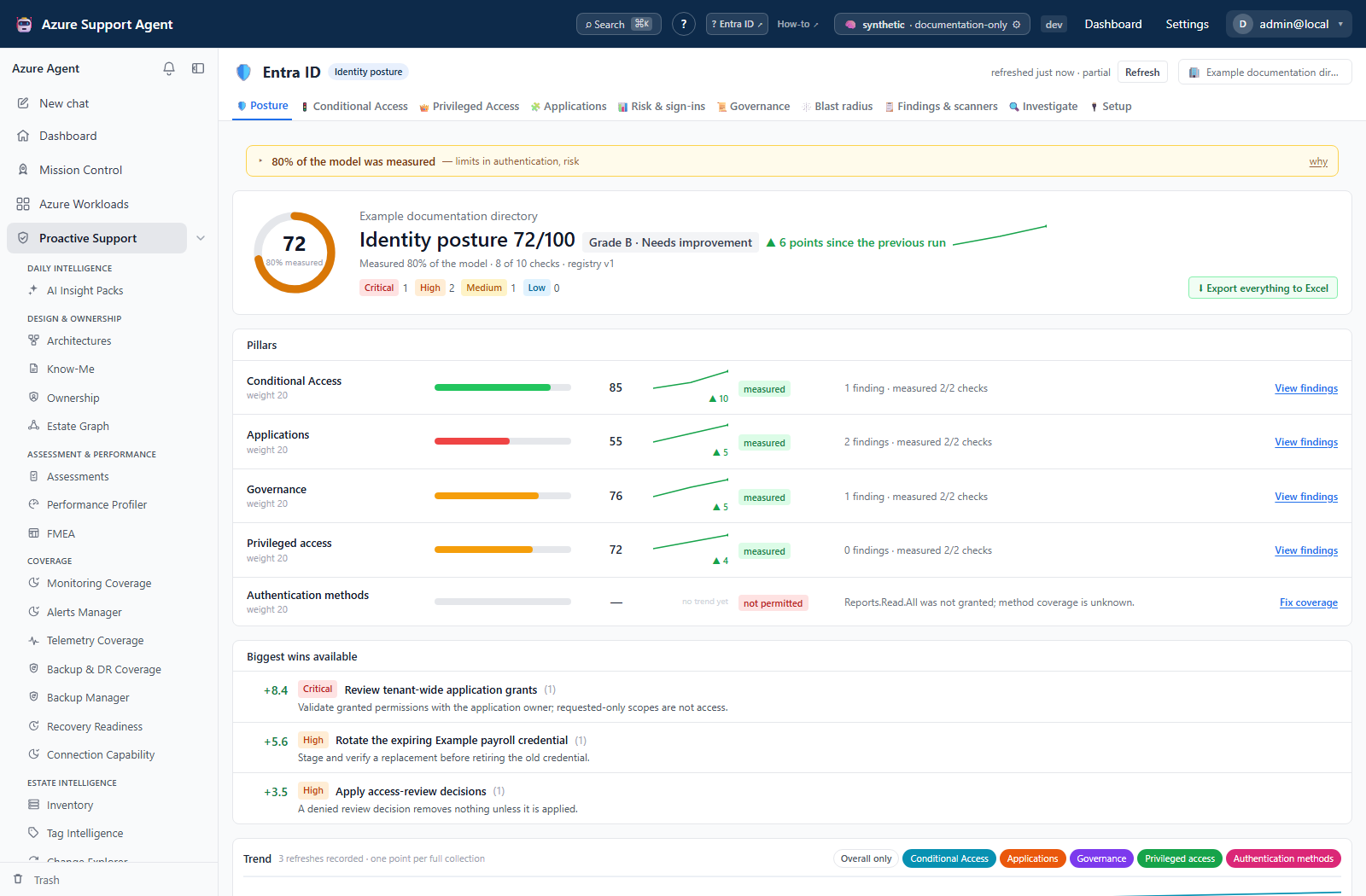
Screenshot notes: This overview uses a synthetic browser fixture, not a live collection or backend-computed assessment. Its simplified pillar set, weights and scores illustrate the layout, not the actual eight-pillar model documented below.
Prerequisites and data sources
- A connection that can obtain a Microsoft Graph application token for the tenant.
- Admin-consented, read-only Graph application permissions. Consent is organized into three tiers; the tenant is usable at tier 1 and complete at tier 3. See Entra setup and coverage.
- Entra ID P1 for Conditional Access and relevant sign-in data; appropriate P2/ID Governance licensing for PIM and governance. Lifecycle workflows require ID Governance; workload-identity risk has its own premium requirement. Read each collector’s license result rather than assuming one tier enables everything.
- Optional: an Azure ARM connection for the cross-plane and blast-radius views, and a Jira or ServiceNow connector for ticket handoff.
Missing permission or license produces an honestly labeled blind spot, never a silent zero. A pillar that could not be measured is excluded from the score instead of scoring 0.
Tabs and actions
| Tab | Route | What it answers | Deep dive |
|---|---|---|---|
| 🛡️ Posture | /entra | What is the tenant score, which pillars carry it, what changed since the last collection | Posture and score |
| 🚦 Conditional Access | /entra/conditional-access | Which cohorts and app classes are actually covered, which policies conflict, what a change would do | Conditional Access |
| 👑 Privileged Access | /entra/privileged | Standing versus eligible privilege, PIM configuration health, who elevated and what they did | Privileged access |
| 🧩 Applications | /entra/applications | App and service-principal risk, credential expiry, ownership, granted Graph permissions, consent posture | Applications and consent |
| 📊 Risk & sign-ins | /entra/signals | MFA registration truth, legacy authentication, failure clusters, Identity Protection risk, sign-in patterns | Risk and sign-ins |
| 📜 Governance | /entra/governance | Access reviews, entitlement expiry, lifecycle workflows, guest (B2B) lifecycle and partner organizations, what is governed at all | Governance · Guests (B2B) |
| 🕸️ Blast radius | /entra/graph | Escalation paths from an entry point to tenant-level power | Blast radius |
| 📋 Findings & scanners | /entra/findings | The working queue: proactive scanners, the inbox, workflow state, bulk actions | Findings and scanners |
| 🔍 Investigate | /entra/investigate | What one user, guest, group, application, managed identity, deleted object, or cross-tenant principal can reach and how that changed | Investigate a principal |
| 🔌 Setup & coverage | /entra/setup | Which consent tier is granted, what each tier unlocks, which domains are blind and why | Setup and coverage |
The tab bar scrolls horizontally when the window is too narrow for ten labels; the connection picker and freshness badge stay pinned on the right.
Global controls
- Connection picker selects the tenant. The choice persists across reloads and every tab re-reads the snapshot for that connection.
- Freshness badge shows snapshot age and starts a collection. While a collection runs, a progress strip streams collector-level messages over server-sent events; expand log to read the full transcript.
- Reloading the page or returning later re-attaches to a collection that is still running rather than starting a second one.
Sorting a grid
Where a grid offers sortable headers, click once to sort and again to reverse. Sort preferences are remembered per grid. Cards, Exposure rows and legacy hygiene panels do not all offer sortable columns.
Four rules apply everywhere, because the alternative is a column header that misleads:
- A row with no value sorts last, in both directions. “Not recorded” is not “oldest” and not “zero”, so an absence never floats to the top just because the arrow flipped.
- Ordered vocabularies sort by meaning, not by spelling. Severity runs critical to informational, tier runs 0 to 2, workflow state runs open to resolved, and collector state runs error to measured. None of those orders are alphabetical.
- A new column opens on its most interesting end — highest risk, most recent, worst state — and text columns open A to Z.
- Equal rows keep the order the server sent, so sorting by a column that cannot separate two rows never shuffles them.
The grids that page or cap server-side — findings, the inbox, applications and privileged assignments — sort on the server, so the first page is the top of the sorted set rather than a reordering of whichever rows survived the cap. Where a grid does show a capped subset, it says so beneath the table and tells you the sort applies to the loaded rows only.
Freshness and scope behavior
Collection is explicit. Opening a tab reads the cached snapshot; it never triggers a slow Graph aggregation on its own. Refresh when the badge shows never loaded, when the snapshot predates a directory change you care about, or before producing an evidence artifact.
The native tabs share per-tenant domain caches, not one atomic collection transaction. A full refresh visits nine domains; a targeted refresh replaces only those requested. Each completed domain is written separately, including blind/error payloads. An interruption can therefore leave mixed generations, and token failure can replace requested domains with blind results. The headline age is the newest domain timestamp: inspect per-domain times/statuses and Last full collection before calling the whole tenant current. The three embedded legacy panels retain separate refreshes.
Ordinary posture navigation is cache-backed, but there are live-read exceptions: permission recheck, application sign-in Read now, activation what they did, and Investigate activity/membership reads. Investigate automatically requests applicable non-Azure activity on arrival; only its Azure Activity Log is strictly opt-in.
Collection duration scales with directory size and Graph throttling. Sign-in log analysis is sampled over a bounded window rather than exhaustive.
Workflow overview
- Select the connection and confirm the consent tier on Setup & coverage.
- Refresh once and watch the progress strip to completion.
- Read Posture for the score, the pillar breakdown, and the diff against the previous snapshot.
- Work the queue on Findings & scanners: filter by severity, pillar, and age, then acknowledge, snooze, suppress, or assign.
- Open the deep-dive tab for anything that needs context before a decision.
- Validate the candidate in the Microsoft Entra admin center. Sampling, caching, and Graph eventual consistency all apply.
- Remediate outside this app through your approved change process.
- Refresh and confirm the finding moved to resolved in the next diff.
Interpretation of results
The tenant score is a weighted roll-up of eight pillars:
| Pillar | Weight | Covers |
|---|---|---|
| Conditional Access | 20 | Policy coverage, conflicts, exclusions, break-glass exposure, risk policies |
| Privileged Access | 20 | Standing versus eligible roles, privileged guests and service principals, separation of duties |
| Authentication | 15 | MFA coverage, method strength, legacy authentication, the tenant methods policy |
| Applications & Consent | 15 | Credential hygiene, granted Graph permissions, consent posture, ownership |
| Users & Guests | 10 | Stale and disabled accounts, guest sprawl, ownerless groups, external collaboration |
| Risk Signals | 8 | Identity Protection risky users and workload identities, sign-in anomalies |
| Governance | 7 | Access reviews, entitlement management, lifecycle workflows |
| Monitoring & Hybrid | 5 | Log export, break-glass alerting, directory synchronisation health |
Three rules govern every number on the screen:
- Blind is not zero. A pillar that could not be measured is dropped from the weighted average and reported as blind, with the reason.
- Coverage is separate from score. A high score on 40 percent coverage is a statement about 40 percent of the tenant. Both figures are shown.
- Severity drives weight. Critical findings cost the full signal weight, high 0.7, medium 0.4, low 0.2, and informational nothing.
Compare scores over time within one tenant. Do not compare a score across tenants with different licenses, because the measurable surface differs.
Safety and limitations
- Every collector is read-only. No directory object, credential, policy, or role assignment is modified.
- Credential secret values and private keys are not displayed. Federation collection can read public signing certificates to derive certificate metadata; do not confuse those public certificates with private credential material.
- Finding state, break-glass confirmations, and saved simulations are stored locally and never written back to Entra.
- Conditional Access simulation is an offline model of the snapshot, not a Microsoft what-if evaluation. Treat it as evidence for a change review, never as proof.
- Sign-in and audit analysis is sampled and bounded by the Graph retention window for the license.
- Consent and directory changes are eventually consistent; a change made minutes ago may not appear until the next collection.
- Exports contain sensitive identity metadata. Handle them as governance material and avoid pasting live tenant, object, or user identifiers into tickets or prompts.
Troubleshooting
| Symptom | Check |
|---|---|
Badge says never loaded | Start a collection from the freshness badge; tabs never collect on their own. |
| A whole tab says the domain is blind | Open Setup & coverage, run Recheck permissions, and grant the missing tier. |
| Domain reports “unlicensed” rather than “denied” | The scope is consented but the tenant lacks Entra ID P1/P2 for that data. |
| Score moved without any directory change | Coverage changed. Compare measured pillars, not just the headline number. |
| Collection appears stuck | Expand the progress log and check for Graph throttling; do not start a second collection. |
| Names appear as raw object IDs | The resolving collector failed or lacks permission; fix consent and refresh. |
| Action returns a permission error | Write actions require entra.admin, not entra.read. |