Coverage operations
Use these recipes to collect current coverage evidence, close supported gaps through reviewed changes, and verify the result.
Prerequisites
- Sign in with access to the intended Azure connection and scope.
- Confirm the product permission named by each guide.
- Use Connection Capability before interpreting an unexpectedly empty scan.
Route
Open the feature route listed in the selected guide: /coverage, /telemetry, /backupdr, or /capability for the baseline and connection checks. Their reference editors and change-request inboxes are separate Settings routes documented in the recipes.
How to choose the right coverage workflow
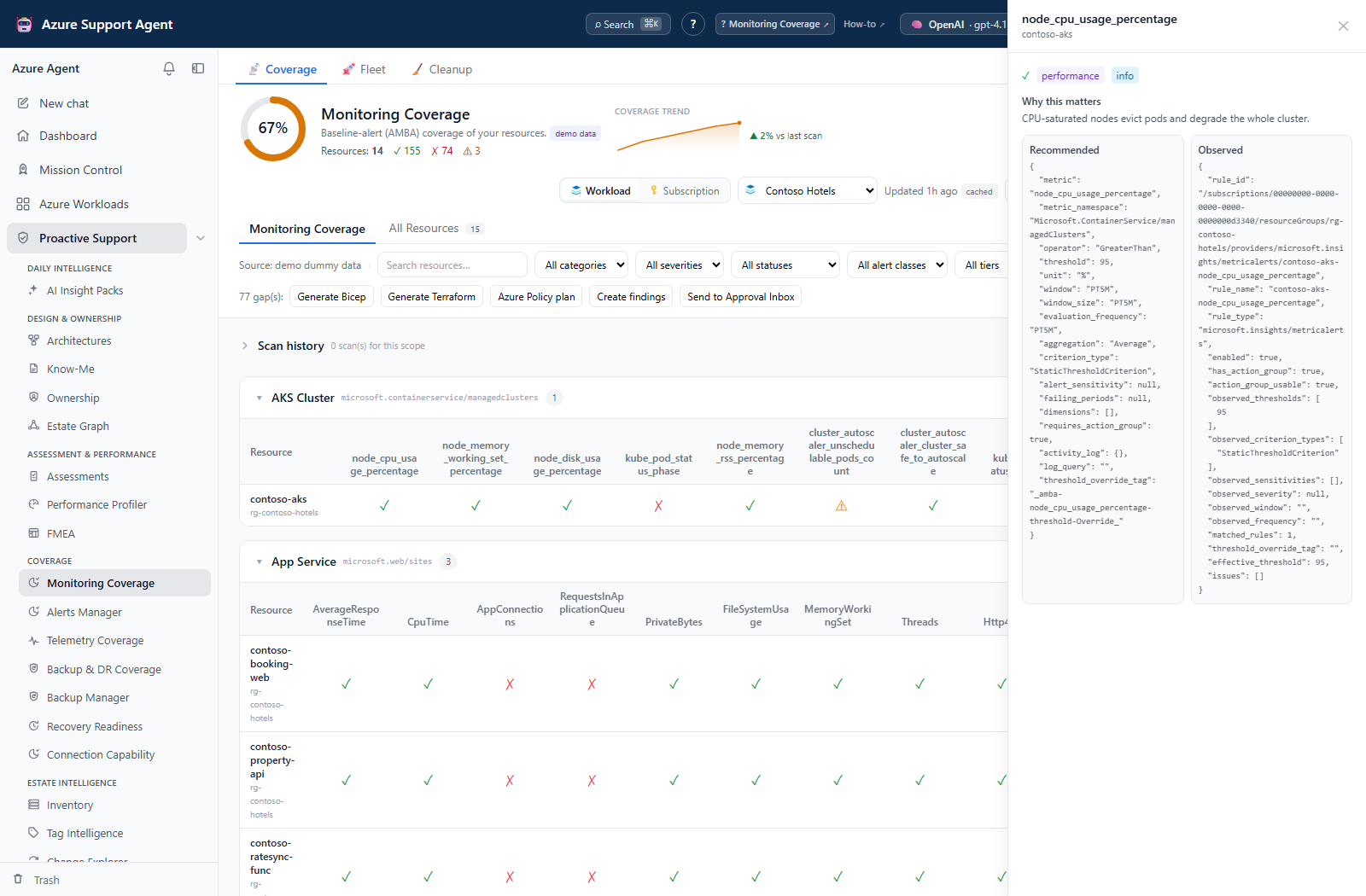
- Use Monitoring Coverage for AMBA metric/log/Activity Log expectations, suppression/routing evidence, and explicit Fleet batch scans.
- Use Alerts Manager for fired-alert triage, overlaps, rule and Action Group authoring, deployment plans, and approval-gated Azure changes.
- Use Telemetry Coverage for diagnostic-setting categories and destinations.
- Use Backup & DR Coverage for property-based protection checks, while verifying live jobs, restore tests and replication in the source service; that collector does not fetch those deep facts.
- Use Backup Manager to analyze a backup estate, sweep every workload, triage failed jobs, close gaps through approved changes, and reclaim stored analyses.
- Use Recovery Readiness to derive per-scenario RTO and RPO, find what has no recovery path at all, agree objectives and export an audit-ready report.
- Use Connection Capability to explain collection blind spots or disabled writes.
Expected result: You start from the feature whose collector and reference match the control being investigated.
Verification and safety: Confirm the route, selected connection, scope and result timestamp before acting on a score. Matrix Full, All Resources covered, and a high coverage percentage have different meanings; none proves recovery or end-to-end notification/log delivery.
How to separate collection, review and execution
- In Monitoring, Telemetry or Backup & DR Coverage, use Load coverage to read a saved scope, Refresh now for a new scan, or Fleet → Scan selected for a durable workload batch. A workload’s connection is authoritative.
- Read scan errors, raw evidence and the feature-specific caps before interpreting missing/partial rows. An old result can remain visible after a failed refresh.
- Use full JSON Export to retain the loaded result. PDF and Evidence Locker actions fetch the latest server-cached scope snapshot instead, so verify their actual timestamps rather than assuming they export a filtered table or historical selection.
- With
coverage.manage, submit and review coverage change requests in the corresponding Settings inbox. Withcoverage.read, finding/evidence/cleanup operations can write application records and ticket actions can write to an external connector; the permission name does not mean all actions are non-mutating. - Deploy approved coverage artifacts externally. Mark applied only after verification; reference restore, request deletion and scan restore do not roll back Azure.
- Review Nightly fleet refresh under
/admin/settingsif caches change without a manual scan. It is off by default and requiressettings.writeto change; it warms caches independently of coverage history/trend recording. A stale TTL is not a schedule.
Expected result: Collection evidence, reference edits, sign-off metadata and actual Azure execution are treated as separate events.
Verification and safety: Check terminal batch outcomes, saved reference versions, artifact timestamps and external deployment/recovery evidence. Cancel pending is not rollback; purge is irreversible. Follow the shared operating model for permission and retention details.
Safety and rollback
Coverage scans are read-only, but Alerts Manager and Backup Manager can apply approved Azure changes. Generated IaC and runbooks are artifacts, not deployments. Preserve evidence before purging runs, and use each feature’s verification procedure after an external or managed change.
Troubleshooting
| Symptom | Likely cause | Resolution |
|---|---|---|
| A page is empty | Scope is not loaded, no snapshot exists, or discovery/access failed. | Check scope/connection and use Load coverage or Run first scan; inspect errors rather than assuming no resources exist. |
| A score changed without an Azure change | Reference revisions, refreshed evidence, nightly cache collection or collection limits changed the inputs. | Compare generated times, reference versions, resource counts and raw error fields. |
| A write control is missing or returns 403 | Action-specific product permission or the feature’s write prerequisites are missing. | Check the documented action permission; do not broaden Azure roles to repair a product permission failure. |
| Mark applied did not change Azure | Coverage inboxes record human assertions, not executions. | Use the approved external deployment process and verify the actual resource state. |