Notifications
Application routes: /notifications for the feed; /automations/notifications for routing rules.
Product permissions: notifications.read for the in-app feed and read-state changes; notifications.manage for tenant-wide routing rules. Connector selection and management additionally use connectors.manage.
Purpose
The notification engine records event type, source, severity, title, body, facts, links, and tenant. Matching rules select the in-app center and/or connector destinations. With no enabled rules for the tenant, events are delivered in-app by default; disabled rules do not suppress this fallback.
Screenshot note: Routing rules, destinations and inbox events are browser fixtures. The editor is unsaved, connectors contain no credentials, and delivery/test operations were blocked during capture. No notification was marked read, no linked job was triggered, and no real message was sent.
Prerequisites and data sources
notifications.readis required to list tenant-scoped in-app deliveries, read the unread count, and mark one or all notifications read.notifications.manageis required to list, create, update, or delete routing rules. It does not grant feed access.- External delivery requires an enabled connector. Test is side-effect-free by design; Send test creates a real destination event and must follow the provider-specific guide.
- Producer features supply normalized event type, source, severity, title, body, facts, and links.
Tabs and actions
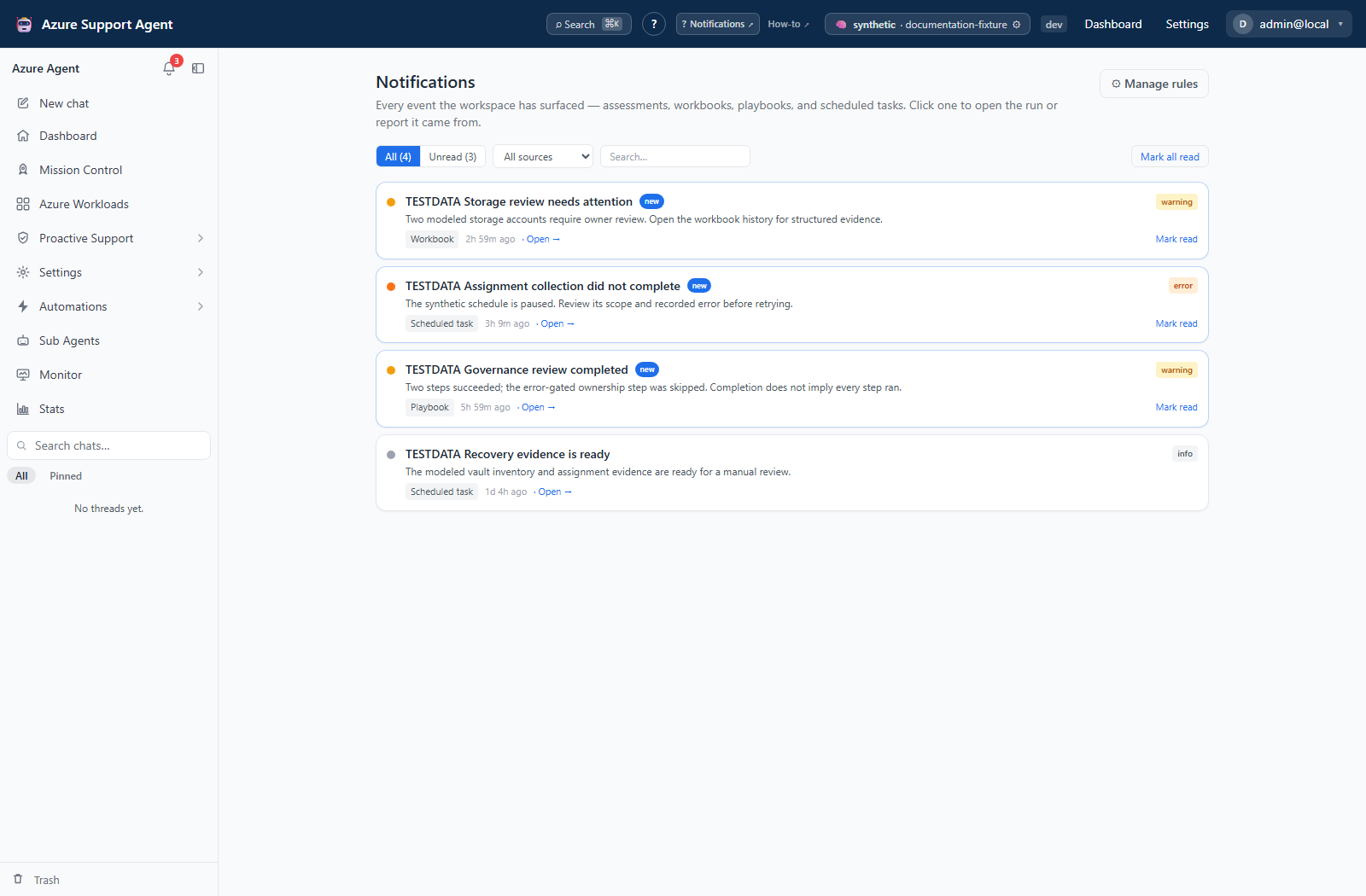
- Notifications switches between All and Unread, searches title/body, and offers a source filter when multiple sources are present. Clicking a linked item marks it read and opens its source; Mark read does not navigate. Mark all read changes all unread notifications in the tenant, not just the filtered page.
- The bell provides a compact feed and See all notifications. Source links open an assessment report, workbook/playbook library, Insight Packs runs, chat thread, or schedules list when the event supplies recognized link fields. Not every producer has a supported deep link.
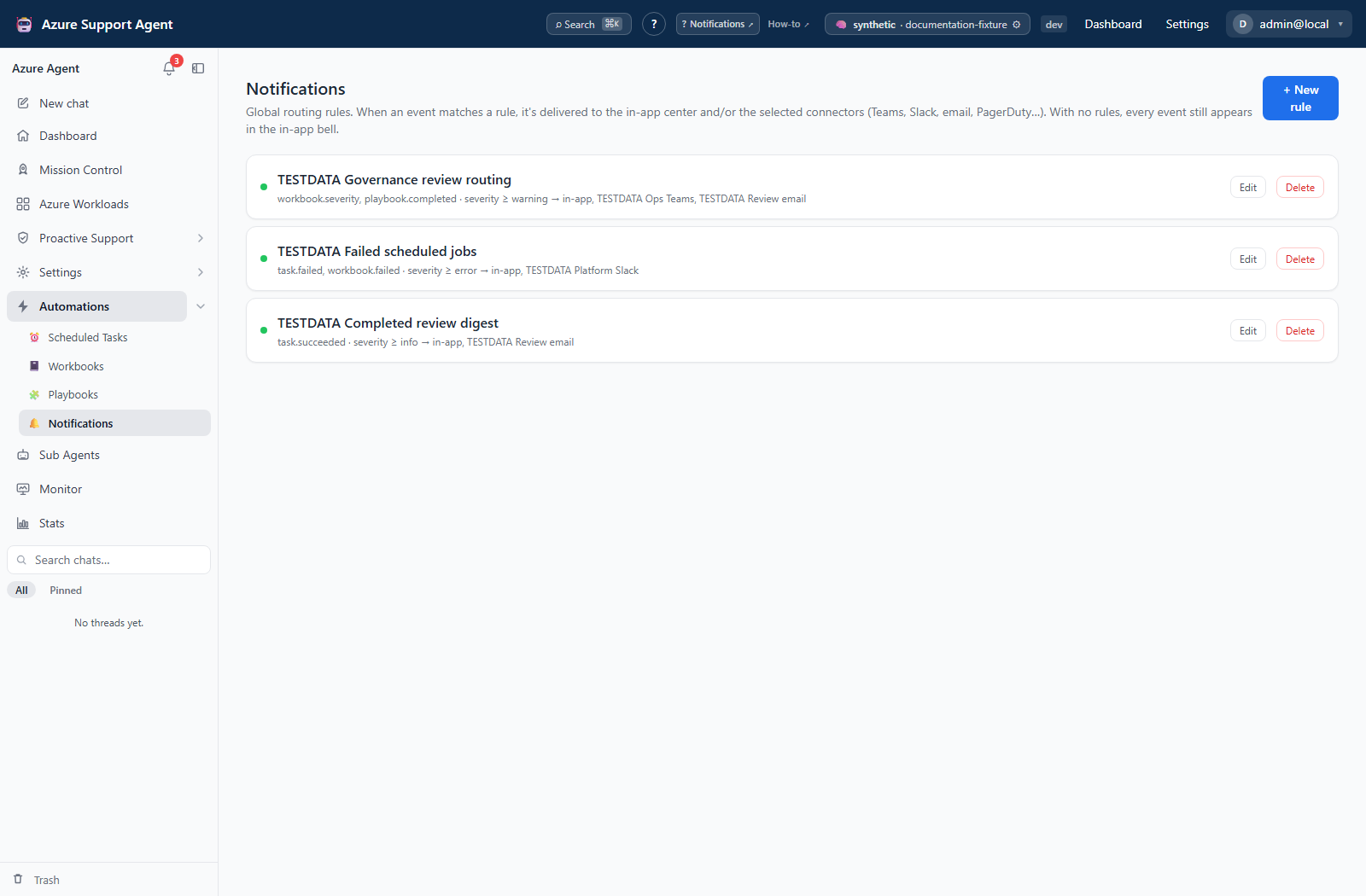
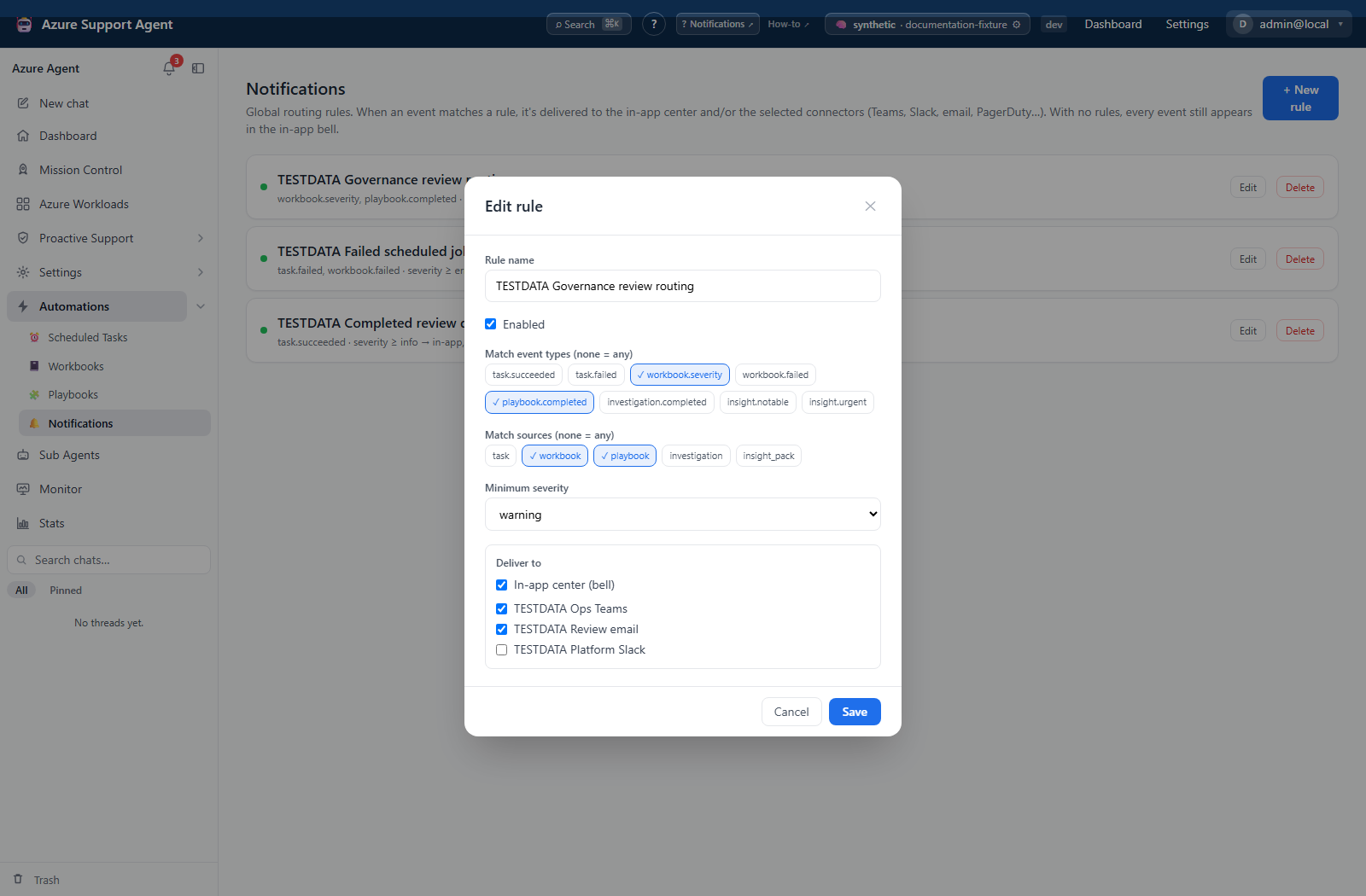
- Manage rules opens tenant-wide rules. New rule and Edit open a modal containing name, Enabled, event-type/source chips, minimum severity, In-app center, and enabled connectors. Delete immediately removes the rule; there is no confirmation, archive, or restore here.
- Marking an event read changes local application state only. Saving a rule changes application state only. A later connector delivery creates an external side effect.
Freshness and scope behavior
- Feed and rule queries are tenant-scoped. Read state is shared by the tenant, not stored per user. One operator marking an event read changes what other operators see.
- The UI requests the newest 50 events; the API caps custom limits at 200. Search, source filters, and the page’s Unread count apply to that loaded subset. The bell’s unread-count API counts all unread in-app notifications, so its count can exceed the page count. There is no pagination/load-more control.
- The full feed and bell unread count refresh every 60 seconds. The bell refetches its count when the browser tab becomes visible and fetches its list when opened. This is polling, not EventSource/live streaming.
- Feed membership depends on an in-app delivery record. A stored event routed only externally is not shown in the feed.
Event matching and channel catalog
Rules combine event-type membership, source membership, and the severity floor with AND. An empty type/source list matches any value in that dimension. Severities are ordered info, warning, error, critical. There is no title/body/facts filter or time schedule in the rule form.
The form offers task.succeeded, task.failed, workbook.severity, workbook.failed, playbook.completed, investigation.completed, insight.notable, and insight.urgent; source chips are task, workbook, playbook, investigation, and insight_pack. Other producers exist, including scheduled-assessment new-findings/low-confidence events and Radar digests. Their exact types/sources are not selectable chips; a wildcard rule can receive them. Do not select an unrelated chip as a substitute.
With at least one enabled rule, only matching rules’ selected channels are used. A nonmatching event—or a match with no destinations—can be recorded but delivered nowhere. Overlapping rules form a union: one event is delivered once per connector ID and once in-app. Separate events are not deduplicated by the stored fingerprint, and direct task-summary delivery is a separate path.
| Channel/type | Notification delivery effect |
|---|---|
| In-app center | Stores an application delivery record visible in the tenant feed. |
Teams (teams), Slack (slack) | Posts a message. |
Outlook (outlook), Email/SMTP (email) | Sends email. |
Jira (jira) | Creates an issue. |
ServiceNow (servicenow), PagerDuty (pagerduty), Cortex XSOAR (xsoar) | Creates or triggers an incident through the connector’s notify tool. |
Grafana (grafana) | Creates an annotation. |
Splunk (splunk), Sumo Logic (sumologic), CrowdStrike Next-Gen SIEM (crowdstrike_ngsiem) | Sends an event to the configured ingestion destination. |
AWS Security Hub (securityhub) | Imports a finding. |
Azure Service Bus (servicebus), Amazon SQS (sqs) | Sends a queue message. |
Amazon S3 (s3) | Writes an object containing the notification envelope. |
Azure Logic Apps (logicapp) | Invokes the configured workflow trigger; downstream effects depend on that workflow. |
Webhook (webhook) | Sends the configured HTTP request; downstream effects depend on the receiver. |
These are all 18 connector types in the notification dispatcher. Delivery invokes connector handlers directly, not a chat approval dialog; an Azure connection’s read-only setting is not a blanket block on external messages or workflow triggers. See Connectors for destination-specific permissions.
How to stage and verify a routing rule
- Select New rule and give it a purpose-specific name.
- Choose exact event/source chips where available and the intended minimum severity. Keep In-app center (bell) selected if matched events must remain visible.
- Choose only reviewed enabled connectors, clear Enabled, and select Save. The rule form itself has no Test or Send test action.
- Verify the connector separately using its provider-specific guide. Connector Test does not create a destination record; supported Send test actions perform real deliveries.
- Edit and enable the rule, then produce one controlled matching event through an authorized source workflow.
- Inspect the in-app result and each provider artifact, including any downstream workflow effect.
Expected result: A matching event reaches the union of intended channels without routing unrelated events through this rule.
Verification: Compare type, source, severity, and destination with the rule. Saving or testing a connector does not prove that a producer event matched this rule.
Interpretation of results
- The bell’s Unread count covers unread in-app notifications for the tenant; the page’s count covers its loaded rows.
- An empty feed means no matching in-app delivery is currently retained; it does not prove that the producer ran or that an external connector succeeded.
- Rule save success proves configuration persistence, not provider delivery. Verify the external artifact at the destination.
Exports, history, scheduling, and integrations
There is no notification export, mark-unread, delete/clear-feed, resend, retry-failed, or dedicated delivery-history screen/API in this surface. The engine stores one sent/failed delivery attempt per selected channel, but does not implement a durable retry queue. A process interruption can leave a stored event without completed delivery records. Verify the producer and provider before generating another event; it may duplicate a delivery that already happened.
Rules integrate with enabled connectors; provider-side messages, incidents, objects, or queue records remain in the destination after local rule deletion. Task history does not show the engine’s per-channel delivery records or task-level direct-delivery outcomes.
Safety and limitations
A successful test proves only the tested path at that time. Avoid routing sensitive telemetry broadly. Use minimum necessary severity and destination scope, but do not filter so aggressively that critical events disappear.
- Marking read does not delete or retract an event.
- Disabling or deleting a rule changes future matching only; it cannot cancel an already-started delivery or retract an external artifact. Removing the last enabled rule restores the default in-app path.
- Connector Test is configuration-only or a lightweight authentication/read probe and intentionally creates no destination record. Send test is the separate allowlisted action that performs a real delivery.
Troubleshooting
| Symptom | Cause and resolution |
|---|---|
| Notification bell or route is absent | Assign notifications.read to the active role; notifications.manage alone governs rules and does not replace the feed read capability. |
| No in-app events appear | Confirm the producer emitted an event, an in-app delivery record exists for the same tenant, and the unread-only filter is not hiding a read item. |
| A rule never matches | Compare exact type/source and the severity threshold. Empty lists mean any value. Types absent from the chip catalog need an intentionally broad wildcard rule, not an incorrect source selection. |
| An external delivery fails | Confirm the connector is enabled, its secret and endpoint remain valid, and the destination policy permits the operation. Use side-effect-free Test first; prepare the destination before another Send test. |
| A destination receives duplicates | Overlapping rules deduplicate connector IDs for one event. Check separate producer events, repeated runs, task-level connector destinations, or agent delivery tools, which are independent. |
Failed playbook did not match task.failed | Non-agent task notifications currently classify failure from an error string. A failed playbook target without error text can emit task.succeeded; inspect task/playbook history rather than relying only on this event filter. |
| Event vanished from Unread for another operator | Read state is shared tenant-wide. Switch to All and locate the source evidence; there is no mark-unread action. |
| Bell count exceeds page count | The page filters only its newest 50 rows; the bell count is unbounded by that page size. Mark all read affects the whole tenant, not just the displayed rows. |
| Enabling the first rule hides other events | Baseline in-app delivery applies only when no enabled rules exist. Add an explicit in-app wildcard rule if all events must remain visible. |
| Unread count changes later than the producer run | Wait for the periodic/visibility refresh, then confirm the producer and in-app delivery completed before treating it as a feed problem. |