Set security policy and revoke sessions
Prerequisites
- Product permission
users.manage. - At least one tested recovery sign-in path.
- Approved password, lockout, session, and SSO provisioning values.
- A user, IP, user-agent, or incident time window for investigation.
Route
- Open
/admin/audit. - Open
/admin/policies. - Open
/admin/sessions. - Open
/admin/users.
How to change Security Policy safely
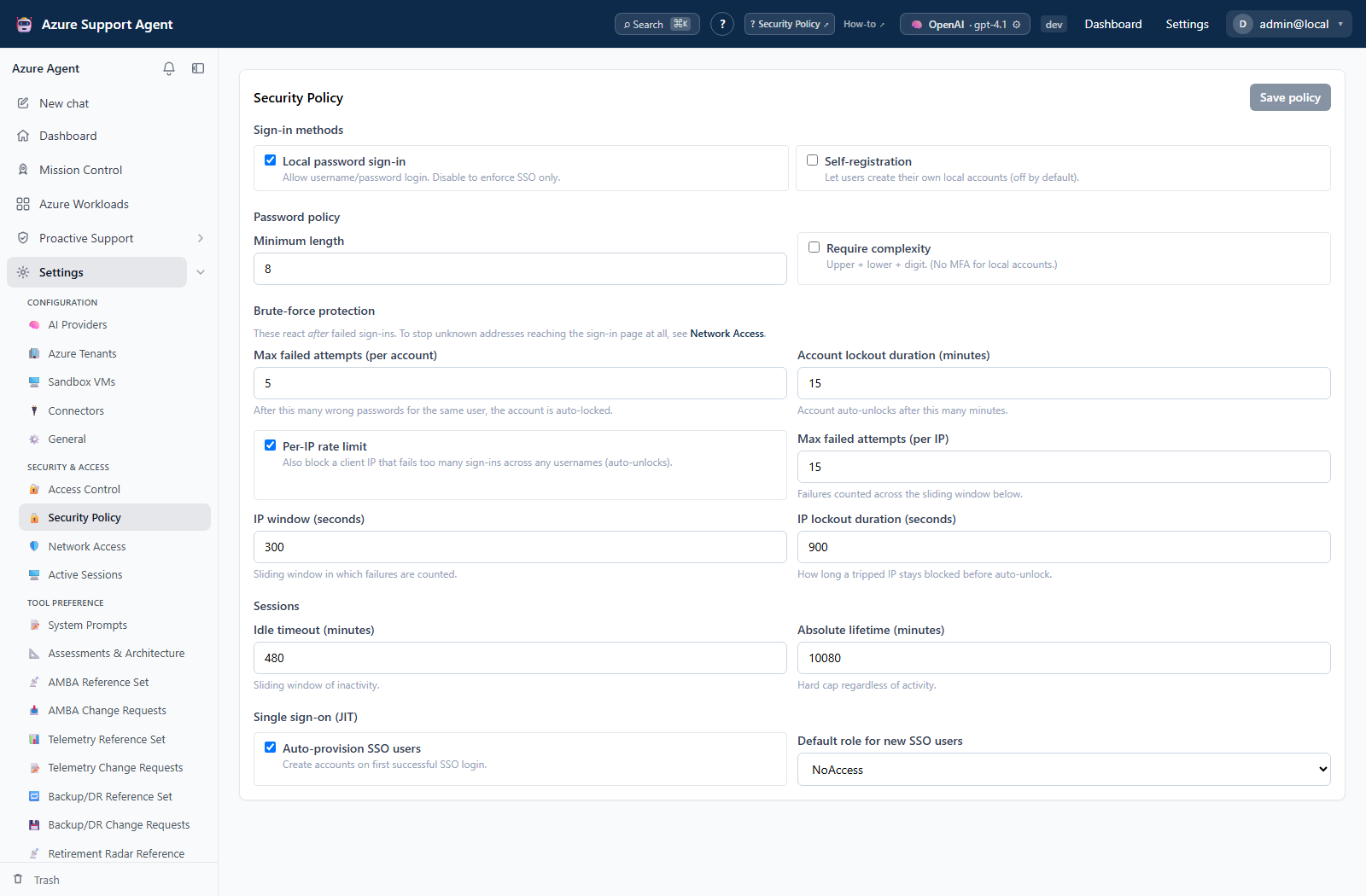
- Record current visible settings: local password sign-in, self-registration, minimum length and complexity, account lockout, IP protection, idle/absolute session lifetime, SSO auto-provisioning, and SSO default role.
- Keep SSO JIT’s default role at
noaccessor an explicitly reviewed least-privilege role. - Change one policy group at a time and save.
- Reload the page and confirm backend-validated values.
- Test local and SSO sign-in in a private browser while keeping the current administrator session open.
- Confirm new sessions and lockout behavior follow the approved policy.
Expected result: The saved policy is enforced for subsequent authentication and session-validity decisions without removing the recovery path.
Verification: Run bounded positive and negative sign-in tests, inspect a new session at /admin/sessions, and review Audit Log for the policy update.
How to review and revoke Active Sessions
- Refresh the table and review user, state, IP, user agent, last seen, and expiry.
- Enable Show expired sessions when investigating historical/stale records.
- Select Revoke on a suspicious or no-longer-needed session and confirm.
- Use Revoke expired sessions to bulk-mark expired sessions when cleanup is needed.
- For all sessions belonging to one user, open
/admin/usersand use that user’s Sign out action. - Investigate related sign-in and access events in
/admin/audit.
Expected result: The targeted session is revoked and its next authenticated request requires sign-in again.
Verification: From the affected browser session, request a new page and confirm redirection or unauthorized response. Check the session state and access.session_revoked or related Audit Log entry.
Safety and rollback
Revocation is immediate and cannot restore the old session. The user must authenticate again. Avoid revoking the only recovery administrator session until another recovery path is proven.
Do not disable local login until SSO and recovery are proven. Complexity is not MFA; enforce MFA at the IdP. Restore the recorded policy values to roll back. If a policy blocks access, use the retained recovery session/path rather than changing storage directly.
Troubleshooting
| Symptom | Resolution |
|---|---|
| User still sees a cached page | Trigger a new server request; cached UI alone does not prove the session remains valid. |
| Session cannot be identified | Correlate user, IP, user agent, last-seen time, and audit events before revoking. |
| User is repeatedly signed out | Review idle/absolute policy, clock, IdP session, cookie settings, and account status. |
| User remains locked after a reset | Confirm the user is active; password reset clears account lockout but not disabled status. |
| New SSO user cannot use features | Review auto-provisioning and default role, then assign approved access. |
| Existing session seems unaffected | Session changes are evaluated over lifecycle boundaries; test with a new/private session and current timestamps. |