Schedule and operate tasks
Prerequisites
tasks.readandtasks.write;tasks.runto run immediately.- A reviewed target and its catalog permission:
agents.read,workloads.read,workbooks.read, orplaybooks.read. An agent target can use the task prompt without a saved Sub Agent. connectors.manageand an enabled, reviewed connector only if the result must be delivered externally.- Access to the originating feature to inspect output, for example
chat.useorassessments.read. - A clear retention decision before permanent deletion.
Route
- Open
/automations/tasks.
Screenshot note: These schedules, previews and histories are synthetic browser fixtures, not executed jobs. Both editors are unsaved, and no schedule was created, enabled or run. The illustrated enabled switch must be cleared before saving a real paused staging definition.
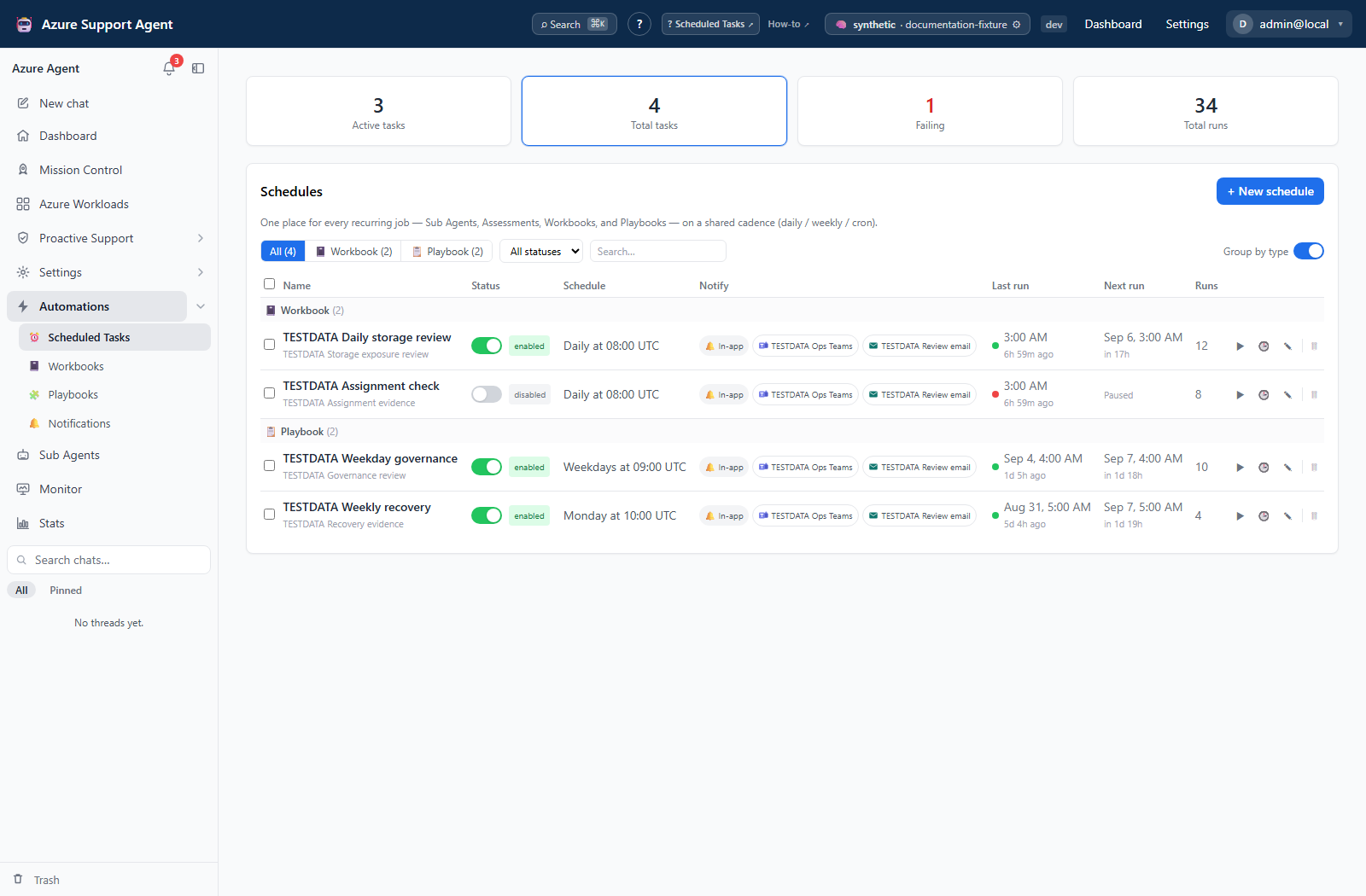
How to create and validate a scheduled task
- Select New schedule, name the task, and choose its target type and target.
- For Sub Agent, supply task details and optionally select an agent; choose Review and New thread per run or Same thread. Autonomous removes the interactive write gate and is not appropriate for an unreviewed task. These controls are agent-only.
- For Assessment, select workloads and WAF/WARA/WASA or custom pillars; review AI summary, new-findings, and low-confidence alert options. For Workbook, choose the workbook and parameter values. For Playbook, choose the previously validated playbook.
- Choose Daily, Weekly, Advanced (recurrence builder), or Custom (cron expression) and the intended IANA timezone. Review the live schedule label and next five occurrences.
- Set optional start/end dates and run limit. The live preview omits these fields; verify them again after saving. Keep complex existing cron expressions in Custom mode rather than relying on best-effort conversion to the visual builder.
- Select notification connectors only when the run summary should leave the app. Turn Schedule enabled off: the new form defaults to enabled.
- Select Create schedule. Reopen Edit to confirm the stored target, date window, run limit, and paused state.
- Select the row’s Run now once, inspect its automatically opened Run history, then follow the target link. Enable recurrence only after verifying output and destination effects.
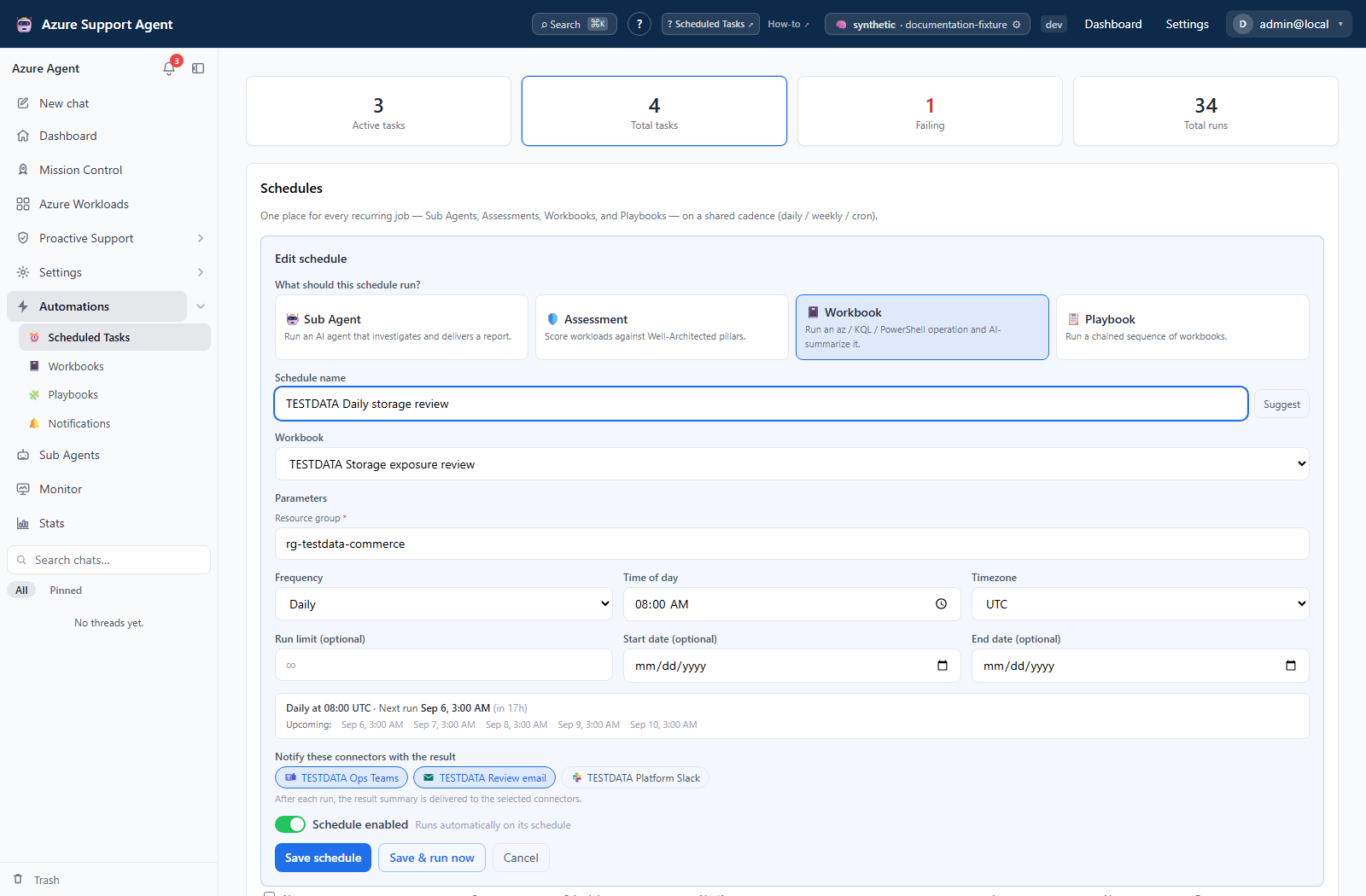
Expected result: A paused schedule is saved and manually validated before automatic execution is enabled. Manual runs work while paused and count toward the run limit.
Verification: Check status, start time, trigger, summary/error, and originating output. Workbook/playbook links open their library; find the matching run there. Task history does not expose per-connector outcomes. Recheck saved next-run times around daylight-saving transitions.
The unified list also displays Retirement Radar, Mission Control, and AI Insight Pack schedules created from their own feature screens. Here their target type is fixed; edit only the shared name, cadence, and notification settings. The target catalog explains all seven types.
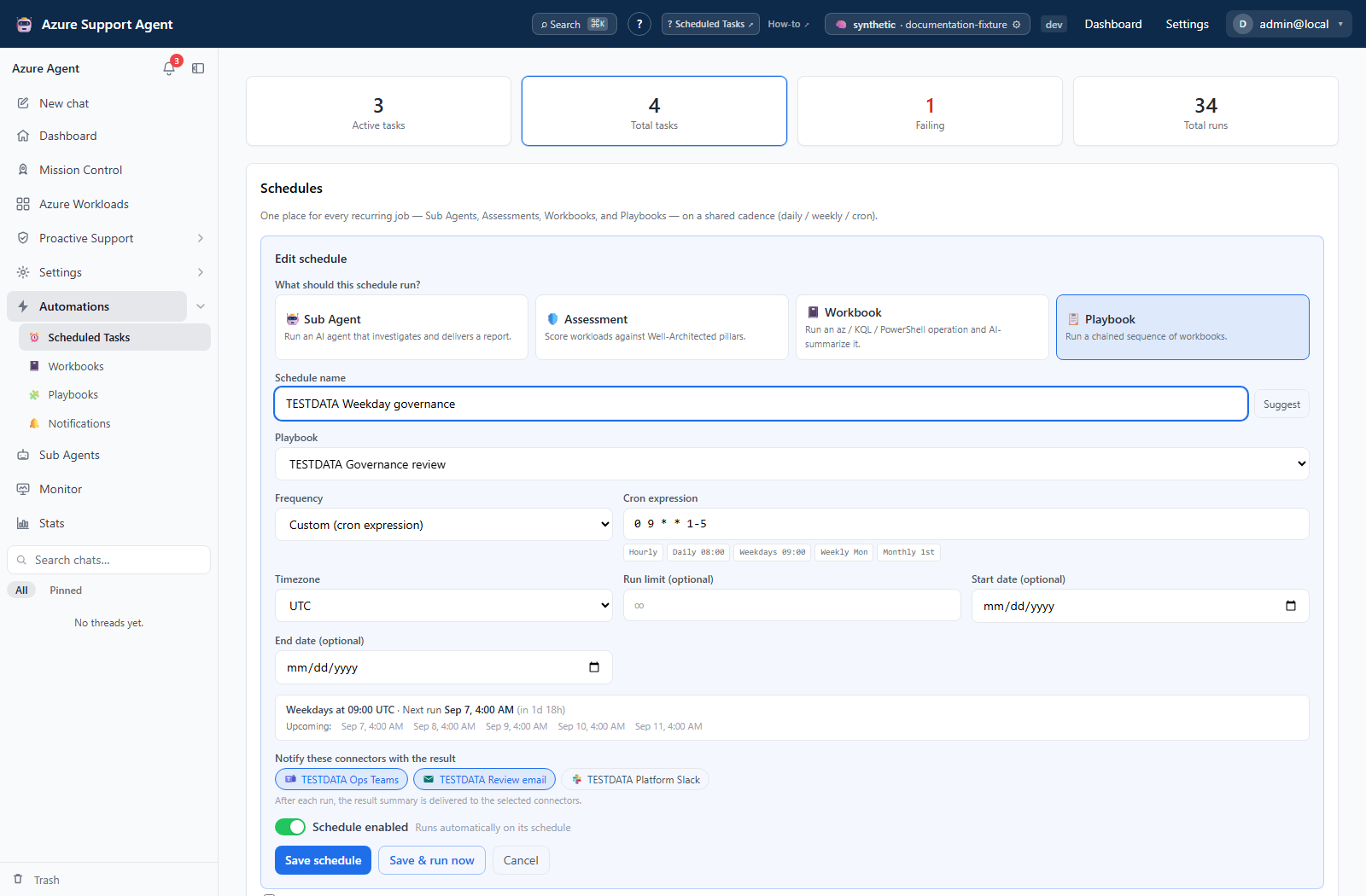
How to investigate an incomplete or failed scheduled run
- Disable recurrence while investigating if another run could duplicate work. Check whether an earlier run is still active before clicking Run now again.
- Open Run history (latest 50 records). Compare
manualandscheduletriggers and read the recorded error/summary. - Follow the output link. For agents, inspect thread activity for tool errors or
awaiting_approval; for assessments/missions, inspect every intended workload; for playbooks, inspect every step and underlying workbook history. - Verify external destinations separately. A completed task does not prove direct connector delivery or rule-based notification succeeded.
- Correct the definition or dependencies. Start one new complete manual run only after establishing whether previous external actions already occurred; there is no resume/retry-failed control here.
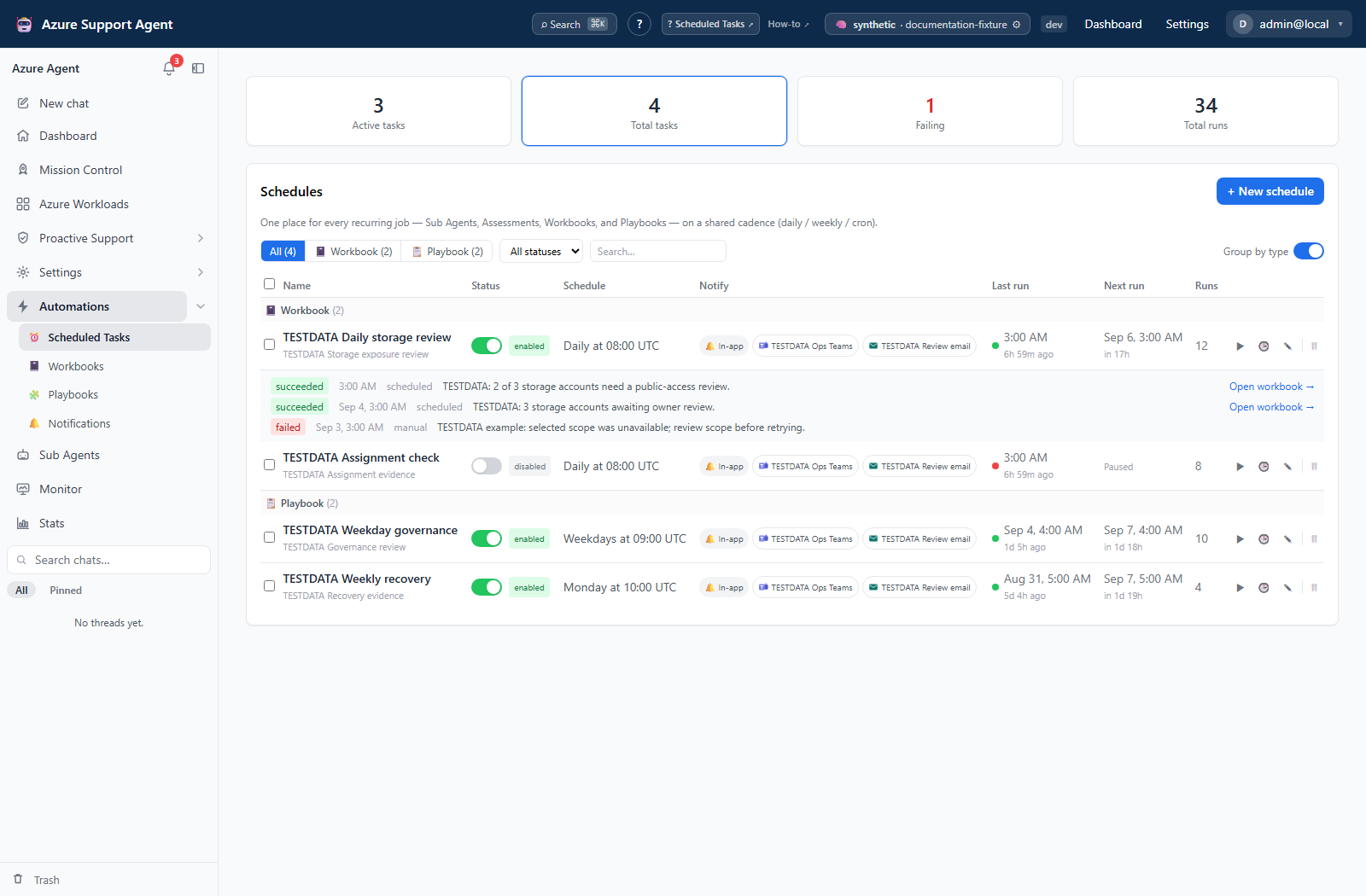
Expected result: The next action is based on actual partial evidence rather than an acknowledgement or success badge.
Verification: Confirm the corrected run’s output and that previously completed writes/messages were not unintentionally repeated. A scheduler lease can reclaim unfinished occurrences, but it does not resume a target from an internal checkpoint.
How to pause, archive, restore, or permanently delete a task
- Use the task’s status control to disable recurrence without changing its definition. This does not cancel work already dispatched.
- Select Delete and confirm to archive a schedule; archived schedules do not run.
- In Archived schedules, inspect History before taking further action.
- Select Restore to return the schedule as paused, then review and enable it if still valid.
- Select Delete permanently only when both the schedule and its task-run history may be removed, and confirm the irreversible deletion.
Expected result: Paused and archived tasks stop future automatic dispatch; restored tasks return paused; permanent deletion removes the schedule and its task-run history.
Verification: Confirm status and active/archived-list placement. Separate chat/report/workbook/playbook histories and provider-side artifacts are not deleted by task purge.
Safety and rollback
Disable/enable and archive/restore change application state. Execution can read/change Azure or send external results. There is no task-specific export or per-run purge, and permanent schedule deletion cannot be rolled back. Retain required evidence through the originating feature’s supported controls before deletion.
Scheduled runs use database claims/heartbeats, with four scheduled runs per application process and approximately 30-second checks. Manual runs use a separate path; repeated clicks can overlap. Completed failures usually leave recurrence enabled until its window or run limit ends. Review-mode agent schedules record gated activity but do not provide a resumable scheduled approval workflow. Disabling/deleting a Sub Agent is not a substitute for pausing its schedule.
Bulk Enable/Disable/Delete issue separate requests. After a bulk error, inspect every selected row rather than assuming all changes were rolled back.
Troubleshooting
| Symptom | Cause and resolution |
|---|---|
| Task still runs after pause | A dispatched run is not cancelled. Recheck saved status and inspect existing target work before any new manual launch. |
| Restored task does not run | Restore intentionally returns it paused. Review target, dates, and run limit, then enable. |
| History is absent or stuck running | Early failure/interruption can leave no completed record; purge removes task history. Inspect target output and ask an administrator to review execution errors before rerunning. |
Invalid/missing next run or ended | Check recurrence, timezone, date window, and completed-run limit. The preview does not validate the saved window. |
| Clearing a date/limit did not persist | Null fields are excluded during update. Reopen to check; a reviewed replacement schedule may be needed. |
| Manual run unavailable | tasks.run is separate; the current UI also disables the whole tasks panel without tasks.write. |
| Save & run now closed with no run | Save and run are separate requests, and run failure can be hidden by form closure. Check history, then use the row’s Run now for visible feedback. |
| Due run delayed | The scheduler may be at capacity or handling a claimed occurrence. Check other work/status instead of repeatedly launching manual runs. |
| Missing/duplicate delivery | Task-level delivery, target events, and rule routing are separate. Verify the provider artifact and use its connector guide; a task success badge is not a delivery receipt. |
| Failed playbook produced a success notification | Task event classification uses error text, which a failed playbook target can omit. Check task and playbook history; a task.failed rule alone does not catch this case. |