Diagnose Connection Capability
Screenshot note: These native views contain synthetic browser-only capability data and saved diagnostic results. Verify live was never selected; no token check, Azure read, DNS lookup, SSH/network probe, or AI call occurred. Neither a Full matrix cell nor a blocked result is live evidence in these examples.
Prerequisites
- Product permission
connections.read. - Access to the configured connection metadata.
connections.manageonly if a connection must be corrected under/admin/tenants.
Route
Open /capability. The page is a read-only matrix with 14 capability columns: ARM, Resource Graph, Recovery posture, raw Graph token, MCP-based Entra directory, Log Analytics, Key Vault, six Entra domain/license columns, and gated writes. It is not a new scoped authorization audit of all those surfaces.
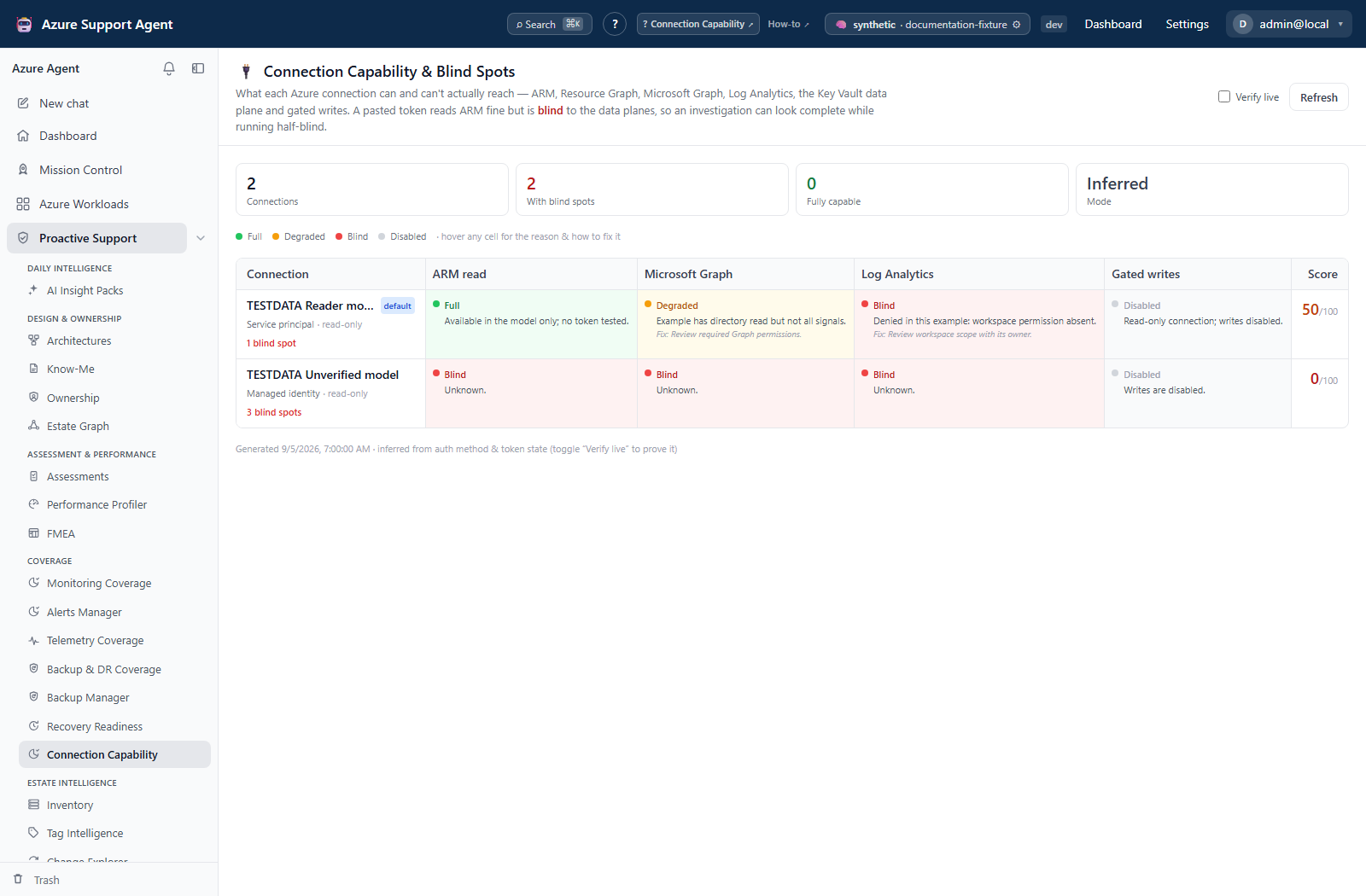
How to explain a missing or partial feature result
- Open
/capabilityand locate the connection used by the affected feature. - Find Degraded, Blind, or Disabled cells.
- Read the inline reason and suggested fix, or hover for the full text; cells do not open a detail drawer.
- Map the blind spot to the feature: ARM/Resource Graph affects estate and coverage collection; Graph affects identities and actor resolution; Log Analytics affects KQL; Key Vault affects data-plane secret/certificate checks; gated writes affect remediation.
- Distinguish raw Graph-token success from the separate MCP client-ID/secret-or-certificate requirement, and from cached Entra domain permissions/license evidence.
- Return to the feature and verify the actual operation at the required scope rather than treating a green matrix cell as sufficient proof.
Expected result: The matrix supplies an authentication, audience, configuration, cached-permission, license, timeout, or read-only explanation to investigate; some resource-specific failures remain outside its tests.
Verification and safety: Compare the feature’s selected connection with the row. Entra domain cells use the last tenant-level cached evidence, not a separate fresh probe for each row; a new matrix timestamp does not refresh that evidence. Do not broaden roles merely to raise the score.
The separate connectivity result below illustrates why application-path evidence and control-plane capability must be reviewed independently. It is not a matrix-cell detail view or output from Verify live.
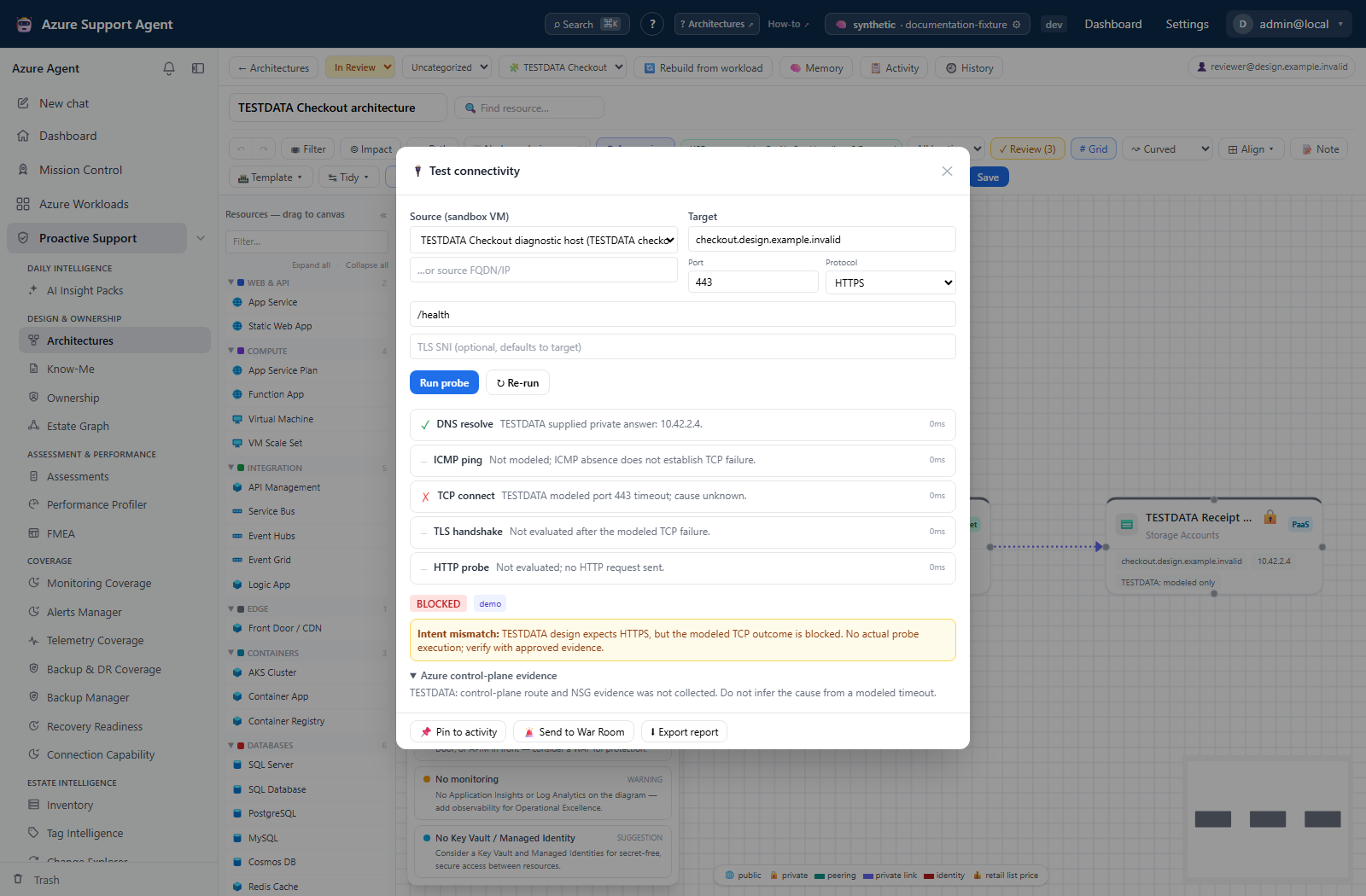
How to run live verification safely
- Start from the inferred matrix, which uses connection metadata and cached Entra evidence without new Azure calls. Browser freshness is 60 seconds in this mode.
- Enable Verify live when current proof is needed.
- Wait for ARM token retrieval, optional subscription enumeration, and Graph token retrieval. Each has its own 20-second bound, and connections are processed sequentially; the whole matrix can take longer.
- Review token failures and visible-subscription notes. Resource Graph and Recovery posture inherit ARM capability; they do not run their own live query/analysis.
- Treat workspace/vault cells as inference, and Entra domain cells as cached permission/license evidence. Refresh the relevant Entra domain separately when needed.
- After an approved correction, choose Refresh and retry the affected feature’s scoped operation. Switch off Verify live when done because the live query is immediately stale and normal refetches can repeat probes.
Expected result: ARM and Graph token-helper results update their cells; failures become Blind. Disabled connections are not probed.
Verification and safety: Graph token success is not a Graph directory API read, and a pasted token can be returned after only an expiry check. Subscription-list failure does not necessarily downgrade ARM. Verify the required feature itself; no workspace query, vault-by-vault probe, remediation, or approval is performed here.
How to correct a blind spot without over-privileging
- Identify the exact operation and Azure scope required by the feature.
- Prefer an appropriate managed identity or service principal over a short-lived pasted token for durable automation.
- Grant only the required audience, application permission, Azure role, and resource scope.
- Preserve
read_onlywhen the connection is intentionally audit-only. - Allow propagation time, then verify capability and rerun the smallest affected scan.
Expected result: The required feature works without turning unrelated capability cells green.
Verification and safety: Confirm both the capability test and the feature’s actual scoped operation. The writes column reflects connection configuration, not the current user’s product grants or every feature’s approval policy; auto-execution may be separately enabled.
How to interpret the score without weakening read-only access
- Inspect Full, Degraded, Blind and Disabled cells rather than only the score.
- Compare the 14-column score: Full contributes 1, Degraded 0.5, Blind/Disabled 0, then the mean is rounded to 0–100.
- Read With blind spots as connections with at least one Blind cell only. Degraded/Disabled cells do not increase that counter.
- Leave Gated writes Disabled on an intentional read-only connection, even though it prevents a score of 100.
Expected result: A connection can have no blind spots yet not be counted Fully capable; the summary is consistent with its cell states.
Verification and safety: Success means the needed read-only capability works at the intended scope, not that every column is green. Do not enable writes or grant unrelated Graph permissions to improve a summary card.
Safety and rollback
- The matrix never returns credentials or token values.
- Do not broaden permissions merely to improve the matrix.
- Roll back a permission change by removing the newly granted role/consent after confirming no dependent workflow requires it.
- Pasted ARM tokens do not provide Graph access and expire.
Troubleshooting
| Symptom | Likely cause | Resolution |
|---|---|---|
| Matrix will not load | Missing connections.read or backend unavailable. | Verify the product role and service, then Retry. |
| ARM Full, Graph Blind | Separate Graph token/audience is missing or expired. | Correct only the needed Graph credentials/consent; ARM and Graph tokens are not interchangeable. |
| Graph token Full, Entra directory Blind | Raw token success does not satisfy the MCP secret/certificate dependency. | Use a properly scoped service-principal connection for that feature. |
| Entra stays Degraded | Cached permissions were not probed, or a required P1/P2 license is absent. | Read the reason and refresh the relevant Entra domain or verify licensing. |
| Static Full, live Blind | Metadata inference was not current token proof. | Check expiry, tenant, egress, timeout and Azure health; retry before changing roles. |
| Key Vault/Log Analytics Full, actual feature fails | Data-plane RBAC and feature execution paths are not tested. | Verify the exact resource-level role and feature prerequisites. |
| Writes Disabled, no blind spots, score below 100 | Disabled cells reduce the score but do not count as blind. | Keep intentional read-only restrictions; no remediation is needed just for the score. |