Chat and Deep Investigation
Routes: /chat, /chat?deep=1, and /c/{chatId}
Product permission: chat.use
Purpose
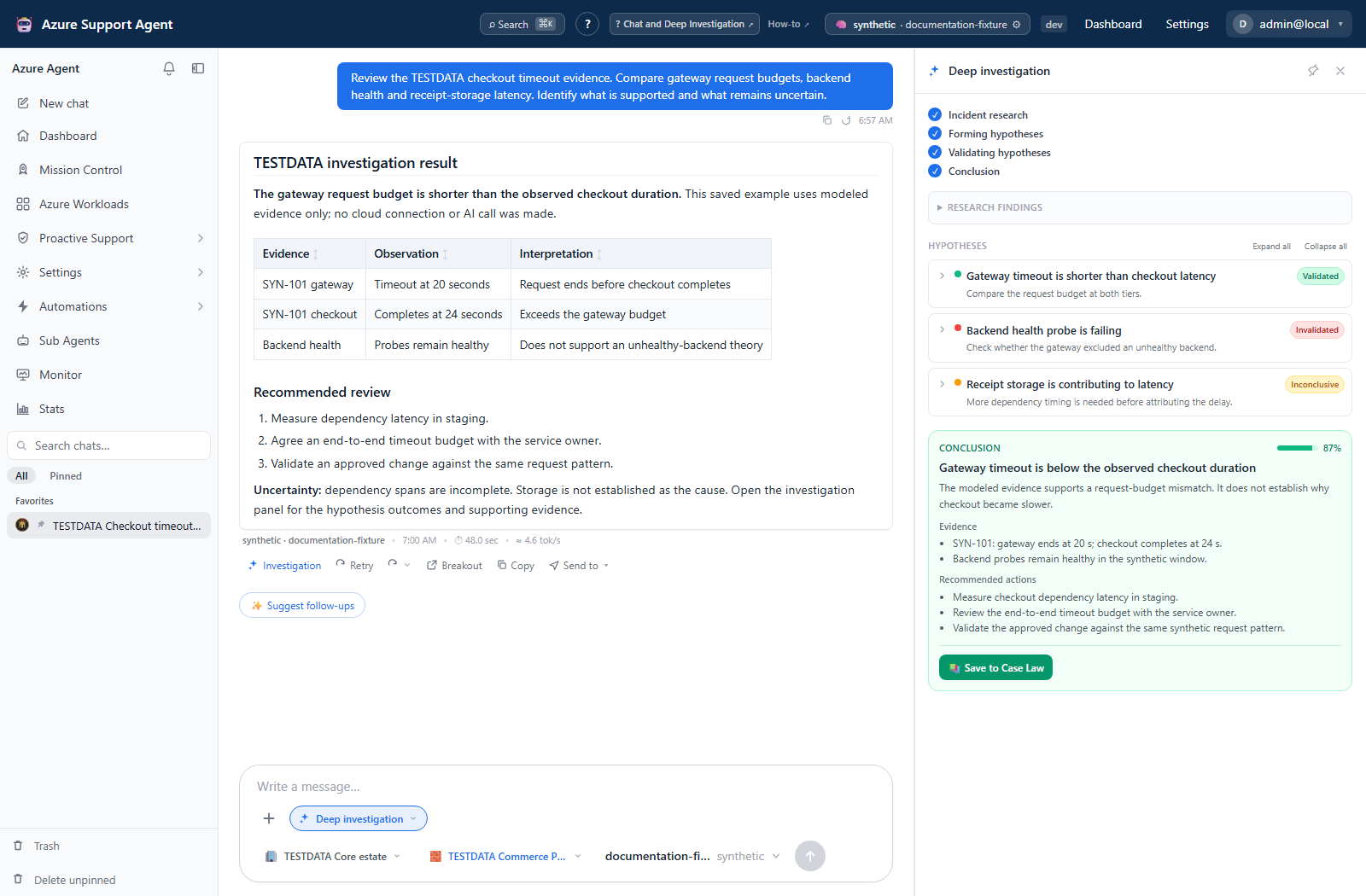
Chat is the conversational entry point for Azure investigation. A normal turn is best for a focused question. Deep Investigation convenes a War Room of specialist agents that researches, forms hypotheses, validates them against available evidence, and produces a structured conclusion.
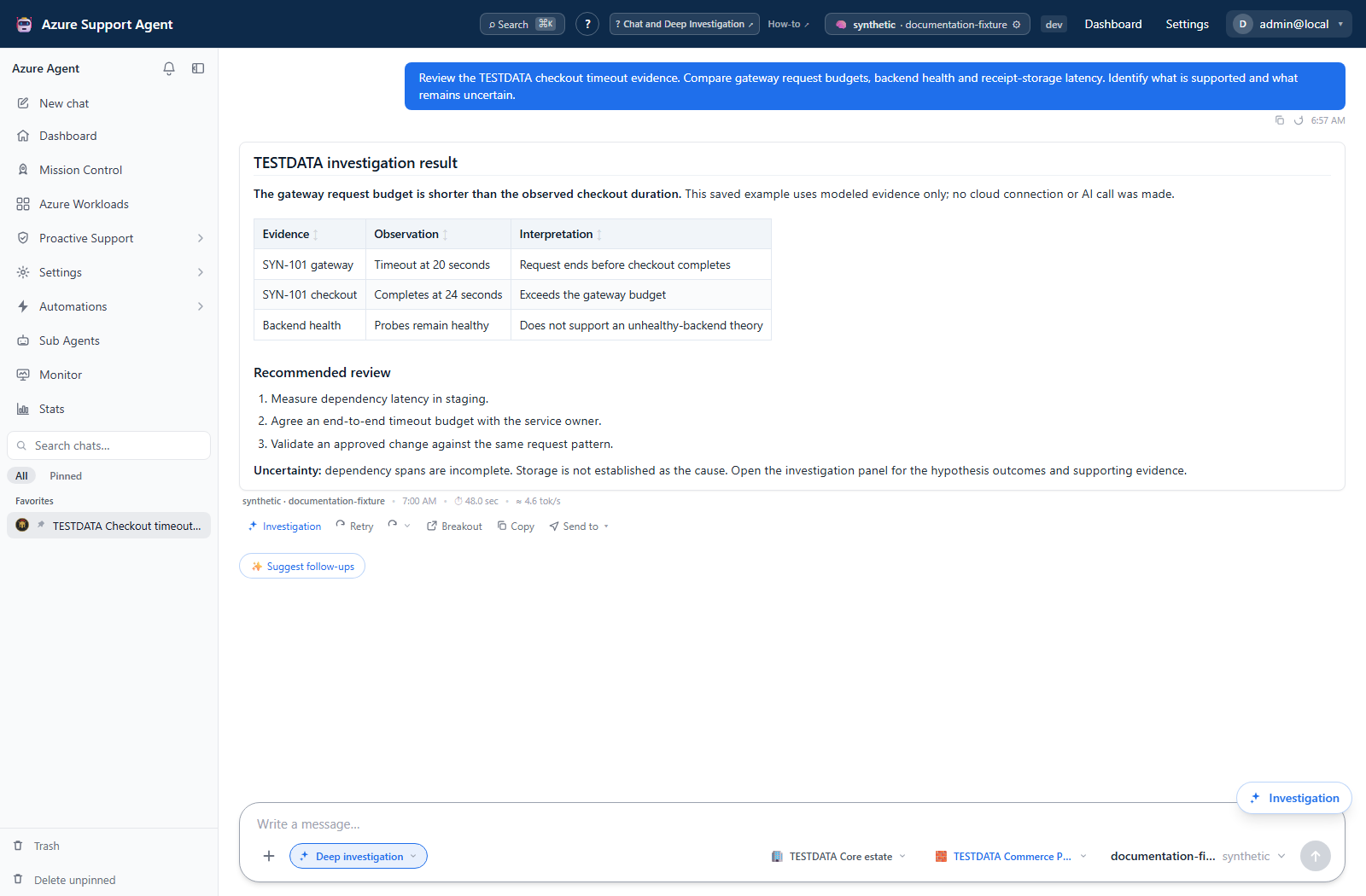
When to use each mode
| Mode | Use it for |
|---|---|
| Standard Chat | Inventory questions, explanations, targeted checks, and iterative follow-up |
| Deep Investigation | Intermittent outages, cross-domain symptoms, unclear root cause, or high-impact decisions requiring competing hypotheses |
Deep mode can involve networking, identity, compute, storage, security, reliability, cost, and monitoring specialists. Available evidence depends on the configured connection and tools.
Prerequisites and data sources
Prerequisites and permissions
- An authenticated session whose active role contains
chat.use. The chat router enforces it for history, lifecycle, turn, and SSE endpoints in addition to user/tenant ownership checks. - A configured and active AI provider/model.
- For live evidence, an Azure connection that can read the selected scope.
- Microsoft Graph permissions for Entra-specific evidence and Log Analytics access for relevant log queries.
- Optional: a workload to constrain investigation scope.
- Optional: an enabled Jira, ServiceNow, or XSOAR connector for ticket handoff.
Tabs and actions
Freshness and scope behavior
Workflow overview
Standard Chat workflow
- Open
/chatand select the intended provider/model and Azure connection if controls are shown. - Select a workload where possible.
- Ask a bounded question containing the symptom, time window, expected behavior, and affected service—without pasting secrets.
- Watch the streamed response and tool-call timeline. Tool success proves execution, not necessarily that the returned dataset is complete.
- Ask follow-up questions to resolve scope, freshness, or contradictory evidence.
- Use a breakout thread when a new line of inquiry should preserve context without changing the original discussion.
- Archive completed chats. Purge only when permanent deletion is intended.
Deep Investigation workflow
- Enable Deep investigation in the composer or open
/chat?deep=1. - Select one workload to reduce noise and cost.
- State the incident, start/end times, user impact, recent changes, and what has already been ruled out.
- Start the turn and monitor the research, validation, and conclusion phases.
- Expand the hypothesis tree. Each branch progresses from validating to validated, invalidated, or inconclusive.
- Review the conclusion’s root cause, supporting evidence, and prioritized actions.
- If the result is inconclusive, add missing access/time context or reduce the scope before retrying.
- Where available, save a conclusive RCA to a linked architecture’s Memory, create a ticket, or continue in a breakout thread.
Chat lifecycle and safety
- Chats and messages are stored for the signed-in user/tenant context. Archive is reversible; purge and empty-trash operations are permanent.
- Navigating away or losing the stream does not cancel the server-side turn. Stop explicitly requests cancellation and attempts to save partial output; neither action undoes tool work already performed. Reopen the chat to verify what was saved.
- Ticket handoff can include the conversation and a generated PDF. Review the transcript for sensitive content first.
- Never provide passwords, tokens, private keys, full connection strings, or unnecessary personal data.
- Treat any write proposal as a plan. Use feature-specific preview, approval, audit, and rollback controls.
- A model can be wrong even when its narrative is confident. Prefer direct Azure evidence and independent verification.
Interpretation of results
Interpret results
- Validated means the investigation found supporting evidence within the available data. It is not a guarantee that no other cause exists.
- Invalidated means observed evidence contradicted that hypothesis in the checked scope and time window.
- Inconclusive means evidence was unavailable, ambiguous, or insufficient.
- Confidence summarizes hypothesis outcomes. It should be read alongside data freshness, agent errors, and the evidence itself.
- Root cause and actions are model-generated synthesis. Verify resource IDs, timestamps, metrics, and commands before use.
A Deep Investigation limits hypothesis depth to keep completion bounded. If a case remains broad, split it into focused follow-up investigations.
Exports, history, scheduling, and integrations
Reopening /c/{chatId} loads persisted messages and reconnects to an active server turn when available. Live event replay is bounded and is separate from saved chat history; losing the browser stream is not a reason to submit the same question again. Ticket handoff can send the conversation and a generated PDF externally, so review the saved transcript before sending.
Safety and limitations
Troubleshooting
| Symptom | Resolution |
|---|---|
| Chat route shows Access not granted | Switch to an assigned role containing chat.use, or request that exact capability. |
| No model is available | Ask a user with settings.read and settings.write to configure, test, and activate a provider |
| Stream stops or appears stuck | Reopen the chat; cross-tab active-turn state can reconnect to server work. Check provider health and rate limits |
| Tools return unauthorized | Verify the selected Azure connection, Azure/Graph permissions, and application role |
| Investigation has no conclusion | Narrow to a workload/time window and ensure specialists can reach ARM, Graph, metrics, or logs needed for validation |
| RCA cannot be saved | Link an architecture to the workload; select one if several match. Inconclusive RCAs are not saved as case law |
| Chat is missing from recents | Check Trash; the recent list is bounded, while a known /c/{chatId} link can still open an older chat |
| Ticket creation fails | Verify that the connector is enabled and tested, and that its credentials and endpoint remain valid |