Triage lifecycle risk with Retirement Radar
Route
Open /radar.
Screenshot context: The native application example uses isolated synthetic demo data, not live Azure evidence. Demo Azure writes are disabled. Guidance links were displayed but not opened for this capture; dates, replacement guidance and impact still need independent verification for a real migration.
Prerequisites
- Product permission
radar.readto view. Addradar.manageto the same custom role to refresh, change state, curate the reference, generate runbooks, register findings, create tickets, or seed demo data through the read-gated UI. - An Azure connection that can read Service Health, Advisor, and inventory at the selected scope.
- Current workload ownership; AI for enhanced runbook drafting (a deterministic fallback is available); Jira/ServiceNow for ticketing.
workloads.readfor scope pickers,connectors.managefor the ticket picker, andchat.usefor War Room. These UI dependencies are additional to the Radar endpoint permission.
How to refresh and prioritize retirement events
-
Open
/radarand choose Workload or Subscription scope. A workload follows its own connection; for a subscription, select the intended connection. - Check generated time, cache age, and
never loadedstate. - Select Refresh when the decision requires live Service Health and Advisor signals.
- Filter retirement/breaking-change type, lifecycle status, text, or Unowned only.
- Open an event and confirm source, service/feature, deadline, severity, impacted resources, and mapped owner. Resolved resources counts distinct ARM IDs. Not provided means Service Health supplied only service/region/subscription scope, not a resource-level list; it does not mean zero resources.
- Validate the announcement and affected resource inventory in Azure.
Cached countdowns come from collection time. Selecting scope reads cache only; the default six-hour TTL marks staleness without automatically refreshing it.
Expected result: A prioritized list of lifecycle events mapped to known resources and owners.
Verification: Confirm tracking ID/source and deadline. Validate a representative impacted resource when IDs are supplied; otherwise validate the reported service/region/subscription scope rather than inventing a resource match. Public/reference-feed items may lag Azure notices.
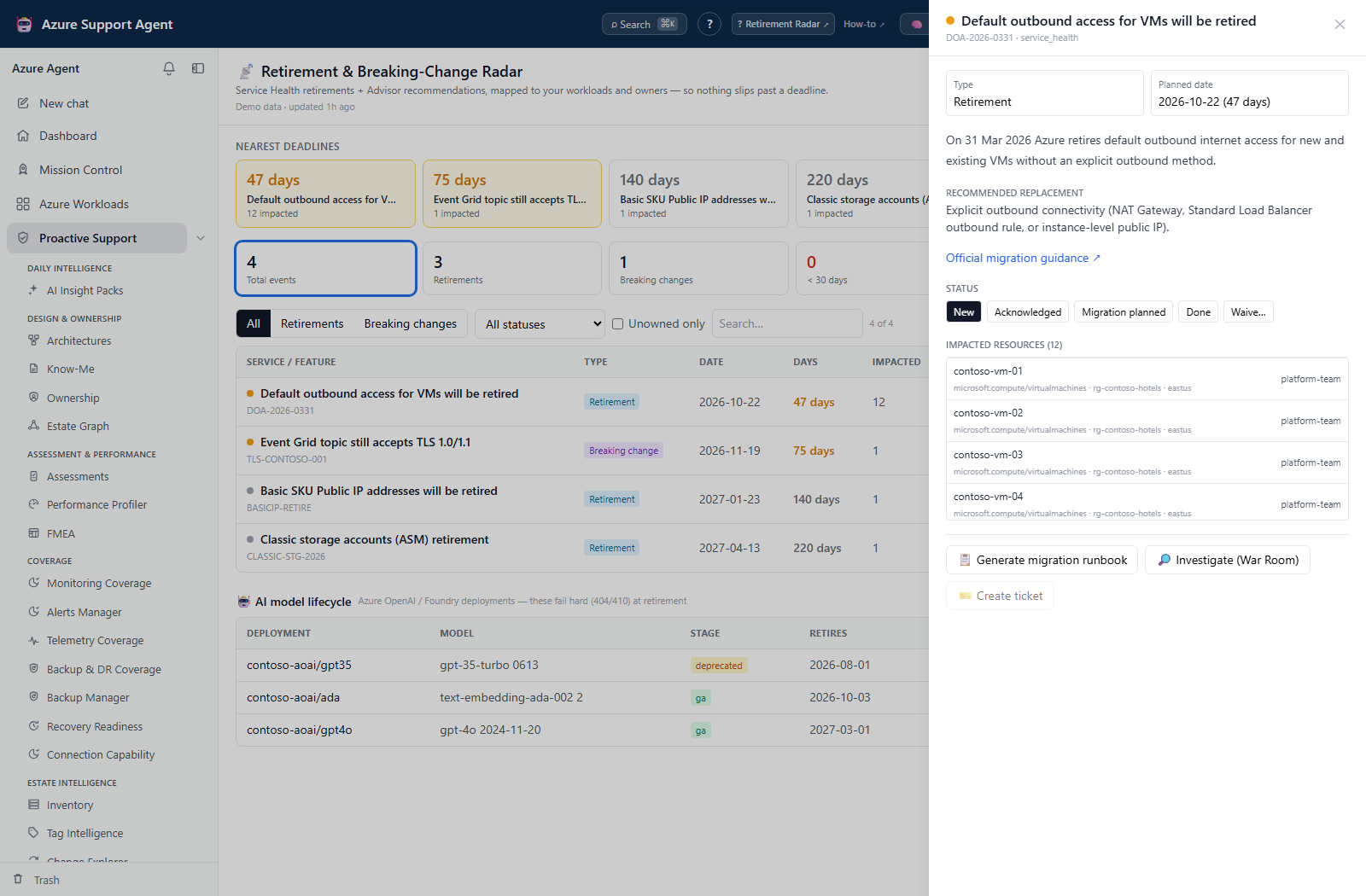
How to track migration work
-
Identify an accountable resource owner. If ownership is absent, update the Ownership mapping and refresh Radar; this drawer has no assignee editor. The API’s optional
assigneefield is distinct from the resource owner. - Move status from
newtoacknowledged, thenmigration_planned,done, orwaivedas evidence supports. - For a waiver, enter a defensible, non-sensitive reason and approval reference.
- Select Generate migration runbook; validate every step, dependency, date, and rollback. AI failure falls back to a deterministic template. Select Download to retain the draft; closing the dialog does not create a runbook archive.
- In workload scope, Register findings saves a new assessment run for the filtered events. Create ticket followed by connector selection sends a new Jira/ServiceNow ticket immediately; no separate approval dialog appears. Investigate (War Room) instead prefills the chat composer for review before launch.
- Refresh after migration and confirm affected resources no longer depend on the retiring feature.
Expected result: An auditable event state, owner, migration plan, and handoff.
Verification: Open the destination ticket/finding, reopen the Radar drawer to confirm disposition, and verify Azure resource state after remediation. Backend state history keeps the last 25 entries but is not displayed as a history panel. Check for duplicates before repeating an uncertain create/register request.
How to preview a lifecycle digest
-
Select the intended scope and inspect freshness. Table filters do not constrain digest preview.
- Select Preview digest and read the summary/lead days. Preview treats eligible events as new and excludes done/waived items; it does not preview recipient routing or allow editing individual rows.
- Validate deadlines and ownership in event drawers, and review data-handling requirements before scheduling external delivery.
- Inspect an existing Radar task in Scheduled Tasks with
tasks.read; editing needstasks.write, and Run now needstasks.run. The generic creation form does not offer Radar, although the backend tasks API supports it. Preview does not create a schedule.
Expected result: A reviewable summary; preview alone sends nothing.
Verification: Reconcile actual task source and recipients separately. A scheduled workload uses its own connection; subscription scheduling uses the default connection rather than honoring a separate connection ID. Already-known events inside a lead threshold can recur in later digests. Verify destination receipt, not just task success.
How to recover a failed refresh or reference change
- Inspect Partial Radar snapshot for failed sources and keep successful-source evidence separate. Last-good snapshot retained means all three required sources failed and an earlier manual-refresh snapshot was retained; its older data is not fresh.
- Correct the reported scope/source-access issue and Refresh again. There is no retry-failed-source action, and scope-resolution failures or scheduled runs do not guarantee last-good preservation.
- For an incorrect reference, use Administration’s Retirement Radar Reference → Version history → Restore with
radar.manage. Restore creates a new version from one of at most 50 retained revisions; Reset to built-in is a separate confirmed action. - Refresh the affected Radar scope after the reference change and confirm corrected classification/model dates.
- Do not confuse reference save with Save radar settings: the latter’s lead-day/feed fields are absent from the current settings-update schema. A success message alone does not prove they persisted; ask the administrator to verify effective settings.
Expected result: Corrected collection or a new reference version, without executing a migration or restoring an old Azure state.
Verification: Check the new snapshot time, source status, and reference content. Snapshot cleanup/restore and an unbounded event-history browser are not provided by Radar.
Safety and rollback
Refresh is Azure-read-only and replaces application cache. Assignment via API, status, waiver, ticket, and finding actions write application or external records but do not migrate Azure resources. Status can be corrected by another state transition; backend state history is bounded. A waiver does not cancel a retirement deadline. Correct or close an erroneous external ticket in its destination.
Freshness and partial results
Snapshots are cached and age visibly. Source feeds can be delayed, resource matching depends on current inventory, and missing ownership on resolved resources produces Unowned; missing resource IDs leave ownership unresolved. AI runbooks are proposals. An empty snapshot is not proof of no lifecycle risk when collectors failed or scope was incomplete.
Troubleshooting
| Symptom | Cause and resolution |
|---|---|
| View opens but Refresh or another change returns forbidden | radar.read is view-only; switch to an assigned role containing radar.manage. |
| No events and never loaded | Verify scope/connection and select Refresh. |
| Impacted resources says Not provided | Validate the displayed Service Health scope and open the event’s Impacted resources tab in Azure; the API did not provide concrete ARM IDs, so Radar intentionally does not claim zero. |
| Advisor event has no impacted resources | Refresh inventory and check workload/resource matching. |
| Owner is missing | Update ownership mapping, then refresh/reopen the event. |
| Runbook is generic or absent | AI failures normally produce a deterministic fallback; the UI also supplies no Architecture Memory ID. If no draft opens, check radar.manage and the request error rather than assuming Azure migration failed. |
| Ticket action is unavailable or fails | Check connectors.manage for picker loading, radar.manage for creation, then enabled connector state, destination access, and connector health. |