Resolve effective policy and governance risks
Prerequisites
- Product permission
policy.readand a current inventory; compliance is needed for compliance-based advice. - Exact target resource, resource group, subscription, or management-group scope.
policy.writefor exemption apply/remove; a connection whose API write gate allows the operation and Azure exemption rights for that connection identity. Preview usespolicy.read.- Change approval outside the app for any Azure remediation. The exemption API has no separate approval workflow.
Route
/policy/governance, /policy/exemptions, /policy/effective, and /policy/advisors.
Screenshot note: Resolution and advice below are modeled browser responses. No live Azure resolution, compliance scan, exemption mutation or remediation ran. The exemption procedures require separate authorization and verification; these images do not demonstrate an applied exemption.
How to resolve effective policy at a scope
-
Open
/policy/effective. - Enter or select the exact target scope.
- Resolve assignments and inspect the returned source scope, effect and enforcement mode. The resolver matches scope prefixes and removes matching
notScopes; inspect full parameters and exclusions in Azure. - Follow N exempt into Exemptions. These are records referencing the assignment, not a validated applicable-exemption set: check their scope, reference IDs, category and expiry independently.
- Repeat at a representative child resource when inheritance or exclusions may differ.
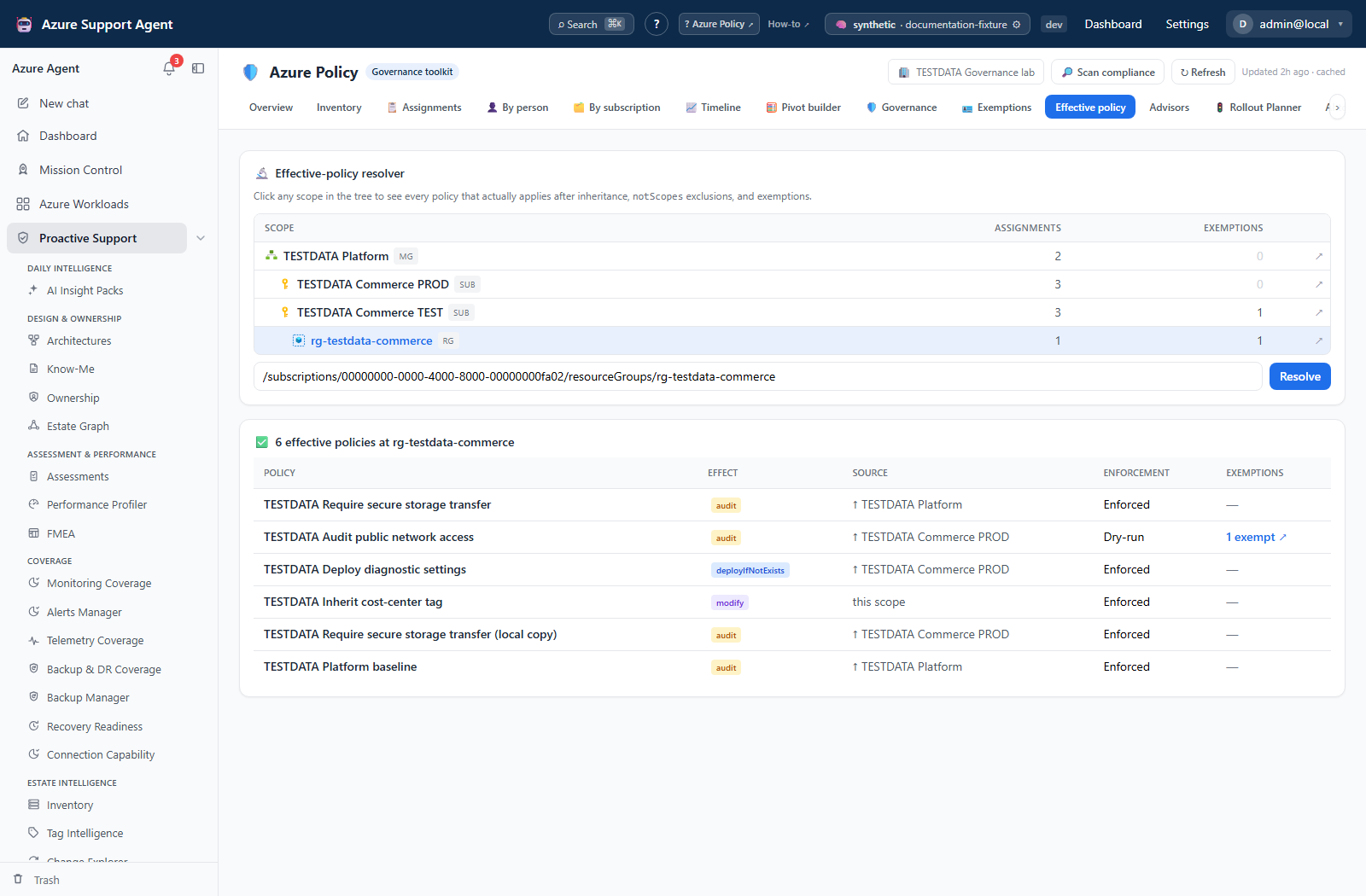
Expected result: A candidate assignment set with prefix inheritance, exclusions and linked exemption evidence. Management-group ancestry is not expanded for an arbitrary resource target, and exemptions are annotated rather than subtracted.
Verification: Compare selected rows with Azure Policy assignments and exemptions at every parent scope. This resolver is not an Azure authorization decision trace.
How to review exemption hygiene
-
Open
/policy/exemptions. - Filter expired, expiring, never-expiring, or weakly justified records.
- Open each candidate and confirm assignment, scope, category, expiry, references, and owner.
- Decide whether to renew, narrow, replace, or remove it through the approved change process.
- Refresh inventory and resolve effective policy again after the change.
Expected result: A verified exemption action list with owners and deadlines.
Verification: Confirm the exemption in Azure and test one affected resource. An expired exemption in cache may already have changed.
How to create or update an exemption safely
-
Open
/policy/exemptionsand select Add exemption, or select Edit on an existing row. - Choose the exact target assignment and scope, then enter category, expiry, and a non-sensitive justification.
- Respect configured guardrails such as required justification, maximum expiry, and blocked never-expiring records.
- Select Preview & validate and review the generated Azure CLI. This is payload validation, not a live before/after comparison. Changing a field clears the preview and requires validation again.
- On a read-only connection, copy the CLI into the approved external change process. On a write-enabled connection, select Create exemption or Apply update only after approval.
- Refresh inventory, reopen the exemption, and resolve effective policy at an affected resource.
Expected result: The approved exemption is created or updated in Azure, or a reviewed CLI plan is produced without applying it.
Verification: Confirm assignment, scope, category, expiry, and justification in Azure. Test that only the intended resources are exempt.
Default guardrails require justification, block never-expiring exemptions and limit expiry to 180 days. The dialog keeps scope and target assignment fixed when editing and has no initiative reference-ID editor. Do not use it to update a selective initiative exemption without separately preserving and checking those IDs. There is no ETag conflict check: reload current Azure values immediately before applying, retain the prior values, and verify after the write. A successful response can be ARM acceptance (202), not final-state verification.
How to remove an exemption safely
-
Open the exemption and confirm the assignment, scope, owner, expiry, and reason for removal.
- Select Remove and read the warning: the policy assignment will apply again to previously exempt resources.
- On a read-only connection, copy the generated delete CLI for approved external execution. On a write-enabled connection, confirm Remove exemption only after impact review.
- Refresh inventory and resolve effective policy at representative affected resources.
Expected result: The exemption is removed and the underlying assignment becomes applicable again, subject to other exclusions or exemptions.
Verification: Confirm deletion in Azure and test representative deployment/update paths before declaring success.
How to use Governance and Advisors
-
Open
/policy/governance, then/policy/advisors. - Use Governance for dry-run exposure, attribution, scope density and recent assignment creation; use Advisors for promotion, remediation gaps, conflicts, exemption hygiene and baseline coverage.
- For a promotion candidate, confirm fresh compliance, representative deployment tests, exclusions, and false positives.
- For Modify or DeployIfNotExists gaps, verify assignment identity, location, least-privilege role definitions, and remediation-task design.
- For conflicts, compare definition IDs, parameters, scopes, inheritance, and effects before labeling a duplicate.
- For a coverage proposal, select WAF (8 controls), MCSB (8) or CIS (7), then Analyze coverage. This keyword-based comparison automatically saves a local run under
policy.read; it is not a full benchmark implementation or proof of enforcement. - Record accepted work in a ticket or rollout plan; do not treat an advisor card as approval.
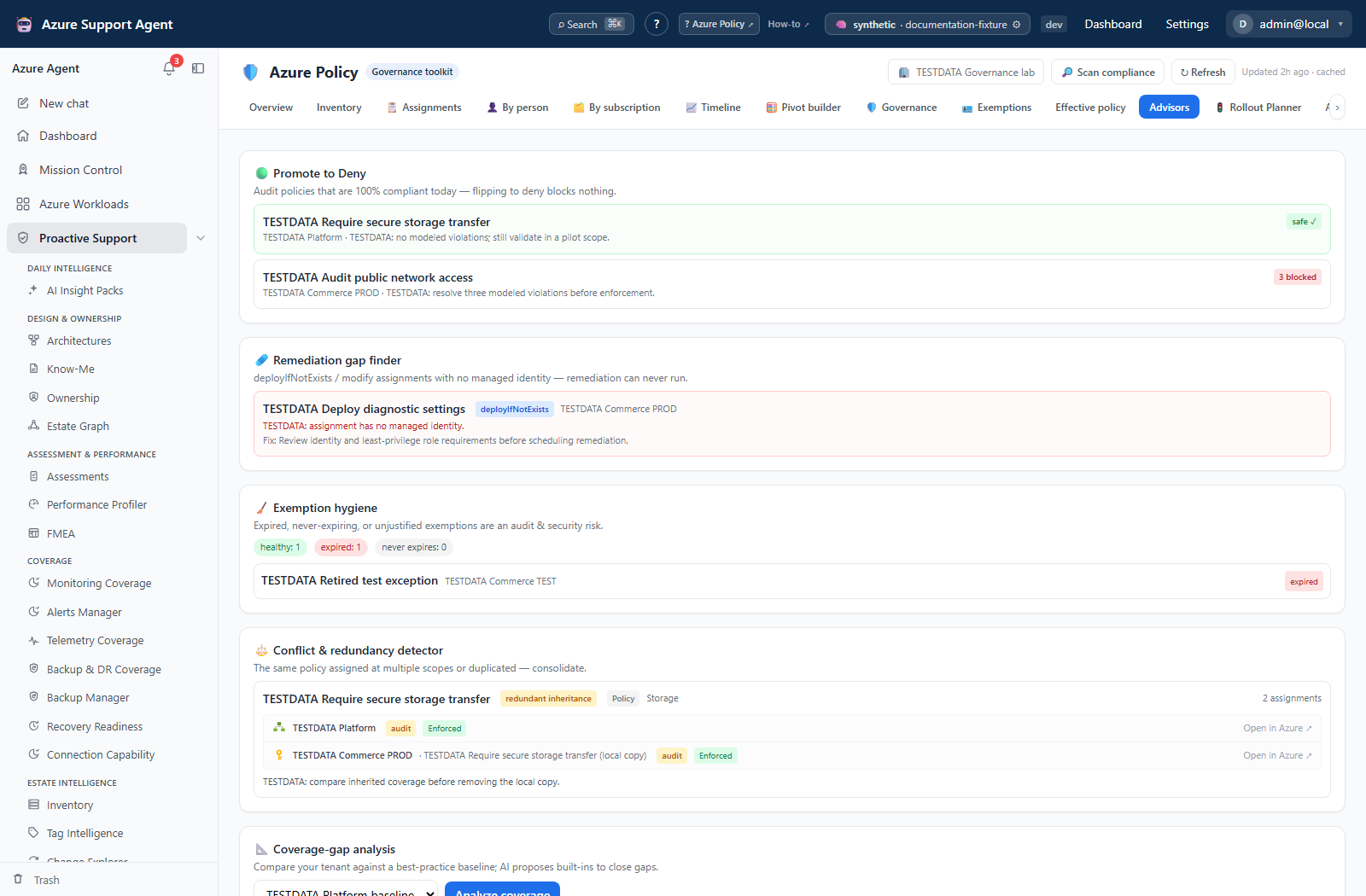
Expected result: Prioritized, source-checked governance work rather than automatic changes.
Verification: Re-run the relevant advisor after external remediation and confirm the underlying assignment, compliance, identity, or exemption state changed.
Safety and rollback
Governance, Effective policy, and Advisors are analytical. The Exemptions tab can create, update, or delete Azure exemptions when the selected connection is write-enabled; a read-only connection produces CLI for external review instead. Exemption removal can immediately restore policy enforcement, while a broad exemption can weaken governance. Use narrow scope, expiry, justification, owner, approval, and representative tests. Roll back a mistaken create by removing it; roll back an update or removal by recreating the previously approved exemption values. Deny promotion, role grants, and remediation tasks remain external changes and need their own Azure/IaC rollback.
Freshness and partial results
Promotion advice depends on available compliance and is unsafe when compliance is stale, absent, sampled, or scoped too narrowly. An assignment missing from a partially successful compliance summary can still receive a safe label; verify that assignment’s evidence, not just available=true. Conflicts compare shared definition IDs and can be intentional. Baseline coverage matches names/categories, not complete rules. Resource Graph caps and inaccessible subscriptions can hide assignments and exemptions.
Troubleshooting
| Symptom | Resolution |
|---|---|
| Effective assignment is unexpected | Trace parent scopes, notScopes, exemption scope, expiry, and workload filter. |
| Apply action is unavailable | The connection is read-only; use the generated CLI through the approved external process or have an administrator review connection write settings. |
| Apply fails but your own CLI succeeds | The API uses the connection identity. Verify its scope-specific Azure rights and policy.write; do not assume your personal administrator role authorizes the connection. |
| Exemption validation is blocked | Supply required justification/expiry and comply with configured maximum-expiry and never-expire guardrails. |
| Safe-to-promote looks wrong | Refresh compliance and test representative create/update paths in audit. |
| Remediation gap persists | Verify managed identity, assignment location, role-definition IDs, and scope. |
| Conflict is intentional | Document distinct parameters, effect, ownership, or scope; do not remove it blindly. |
| Coverage run is incomplete | Check baseline, workload scope, inventory truncation, and inaccessible subscriptions. |