Azure Policy
Product permissions: policy.read for inventory, analysis, previews and Excel export; policy.write for saved simulations, snapshots, drafts, enforcement links, IaC source changes, history deletions and Azure exemption mutations. Analyze coverage is an exception: it automatically saves its analysis under policy.read.
Purpose
App routes: /policy and /policy/:tab Azure Policy provides governance inventory and analysis. It can author proposals, resolve effective policy, estimate blast radius, and build staged rollout plans, but it does not assign or deploy policy definitions or assignments to Azure. The Exemptions tab is the exception to the otherwise analytical workflow: with policy.write and a write-enabled connection, it can create, update, or delete Azure policy exemptions.
Screenshot note: These views use browser-only example responses, not live Azure collections or compliance certification. No AI provider was called, policy deployed, or backend source/history saved during capture. Drafts and modeled results are not evidence of an applied change.
Prerequisites and data sources
- An ARM/Resource Graph-capable connection with Reader access to selected scopes.
- Policy Insights read access for compliance summaries.
- A workload definition when filtering policy inventory to workload scopes.
- A configured AI provider for AI author/explain/triage and AI-assisted simulation phases.
policy.writefor local persistence actions and exemption mutations. Local saves do not deploy Azure policy; exemption apply/remove uses ARM against Azure and also requires a write-enabled connection and Azure rights at the target scope.
Tabs and actions
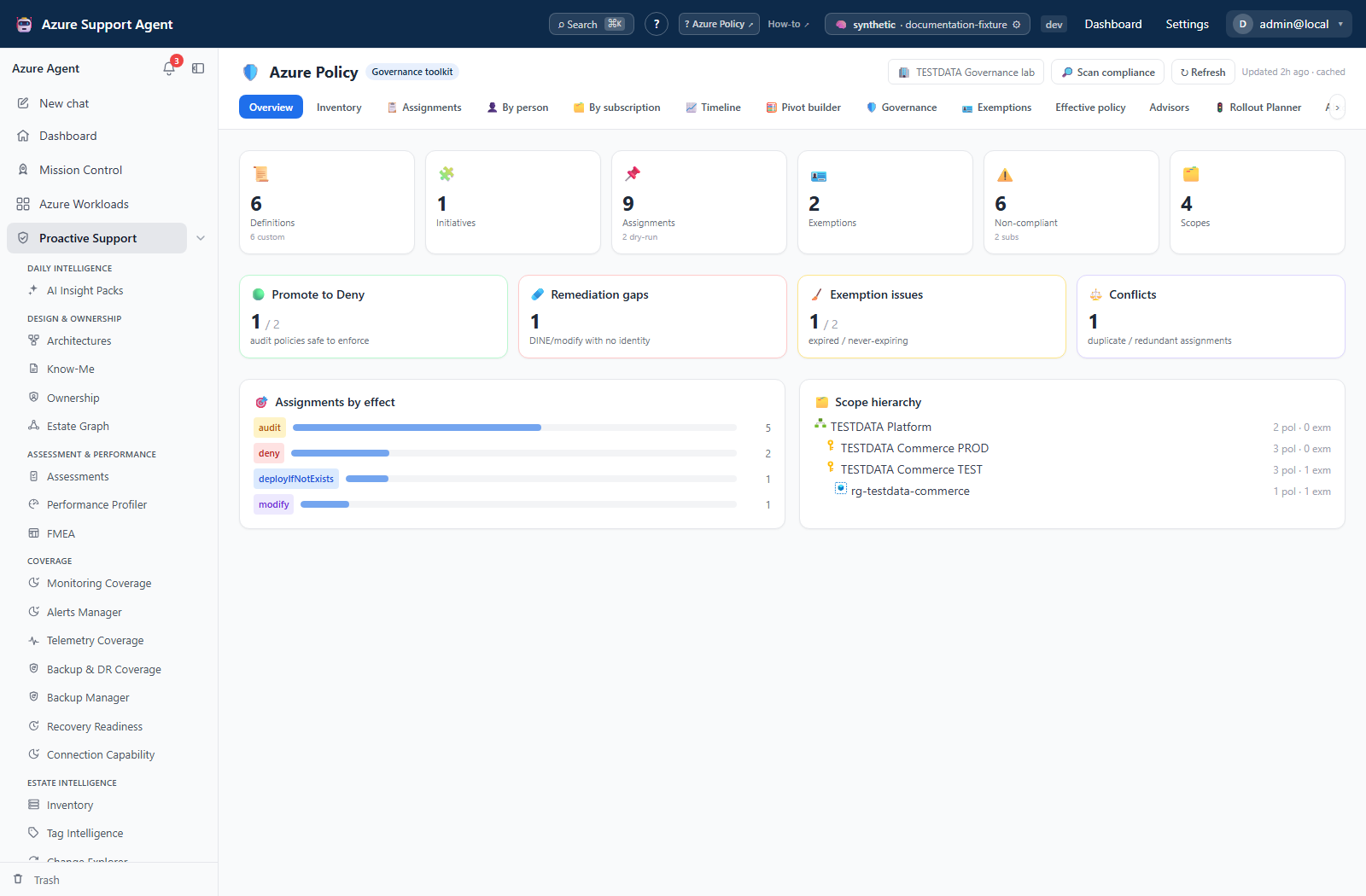
- Overview: governance KPIs and current inventory summary.
- Inventory: definitions, initiatives, assignments, exemptions, scope tree, and available compliance.
- Assignments: detailed register with scope, definition, effect, enforcement mode, exclusions, and identity.
- By person: author/identity-oriented pivot available from inventory metadata.
- By subscription: scope-oriented policy view.
- Timeline: assignment/compliance history from captured data.
- Pivot builder: custom analysis across policy dimensions.
- Governance: dry-run exposure, attribution, scope density, missing descriptions and recently created assignments.
- Exemptions: expiry/hygiene analysis plus create, edit, preview and remove dialogs.
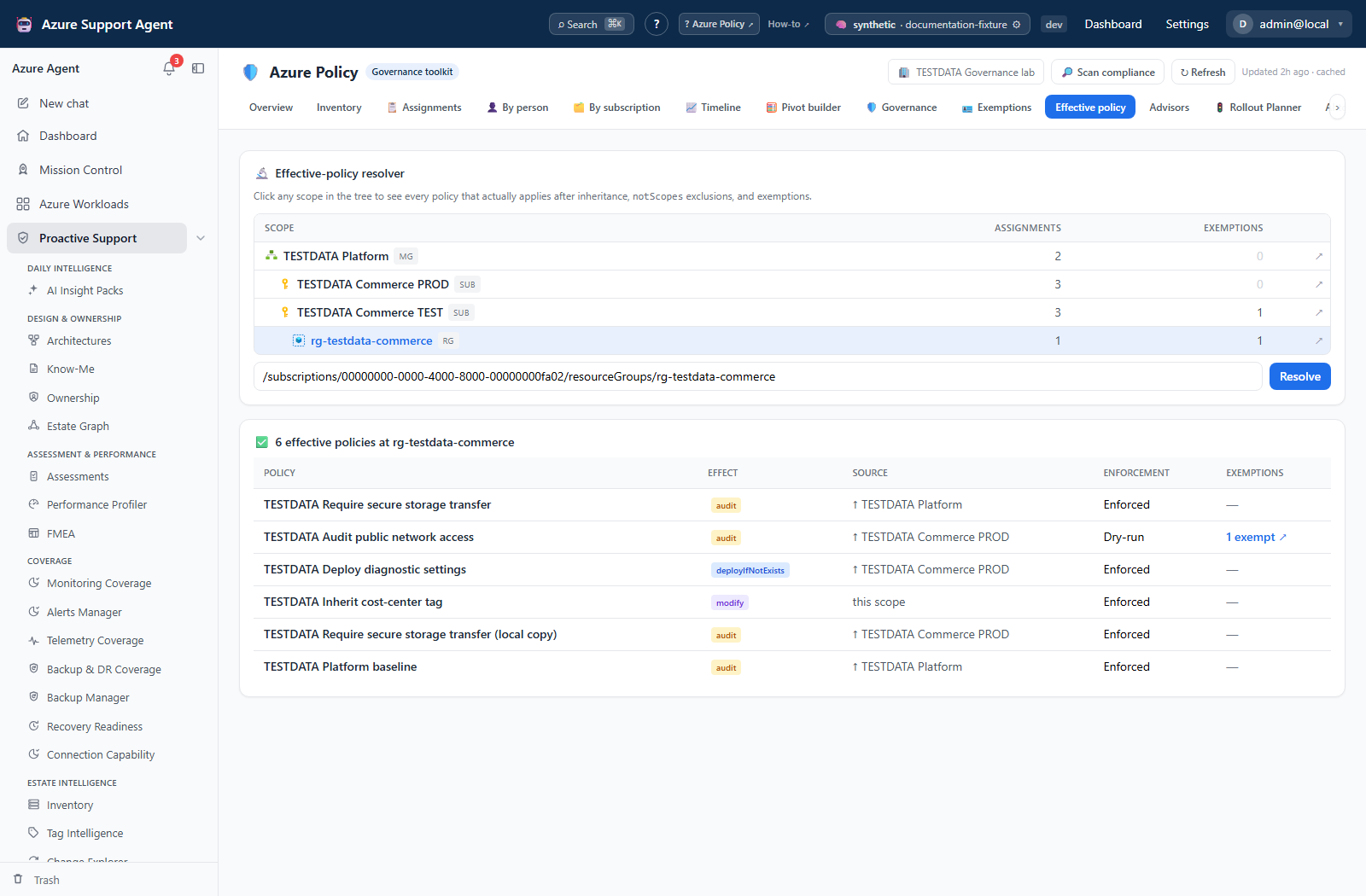
- Effective policy: matches assignment scope prefixes, removes matching
notScopes, and attaches exemption records for review. - Advisors: promote-to-deny candidates, remediation gaps, conflicts, exemption hygiene, and baseline coverage.
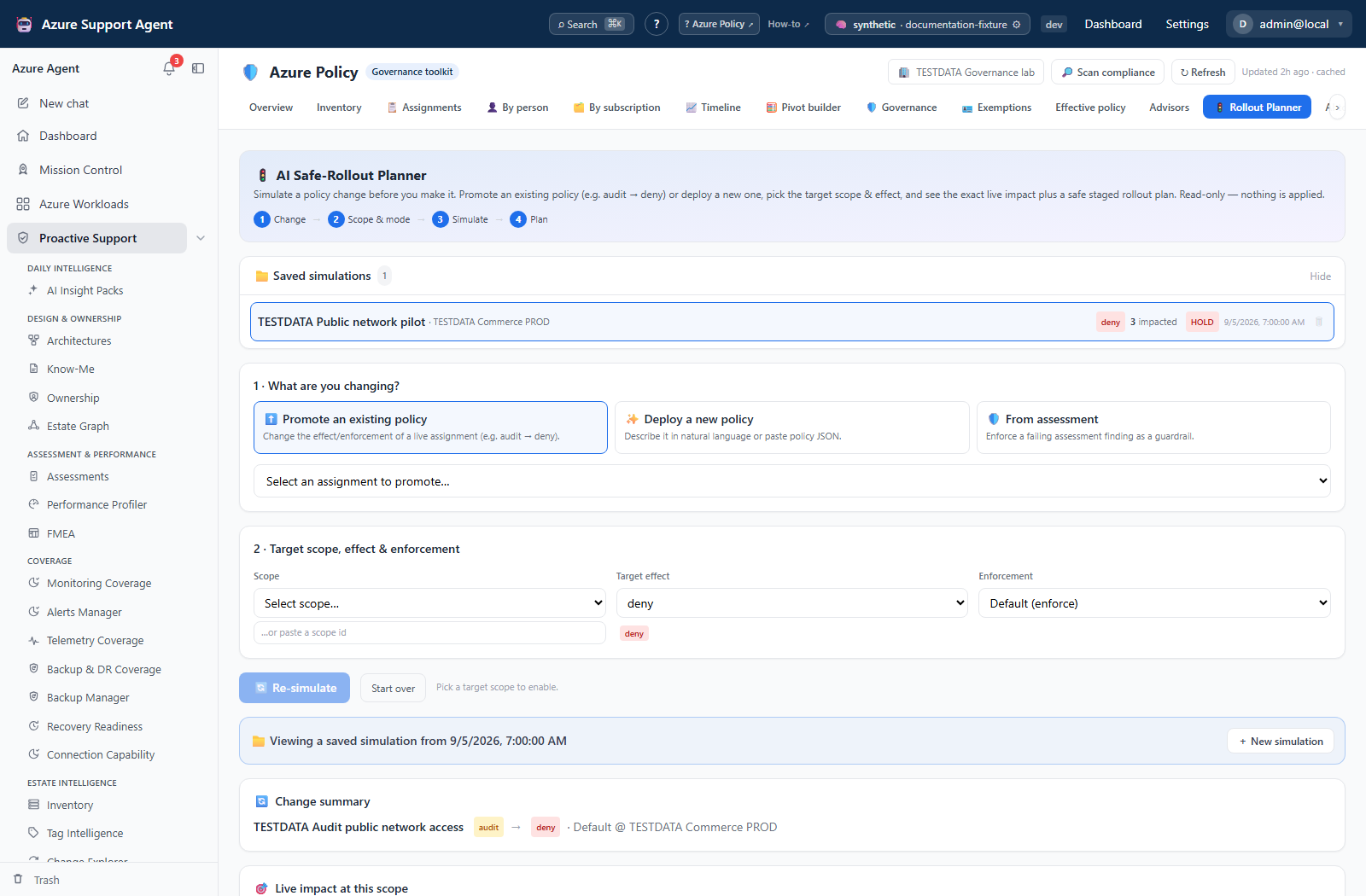
- Rollout Planner: streaming simulation for deploy, promote, or finding-driven scenarios.
- AI tools: author JSON, explain a rule, triage a deny, and propose tag governance.
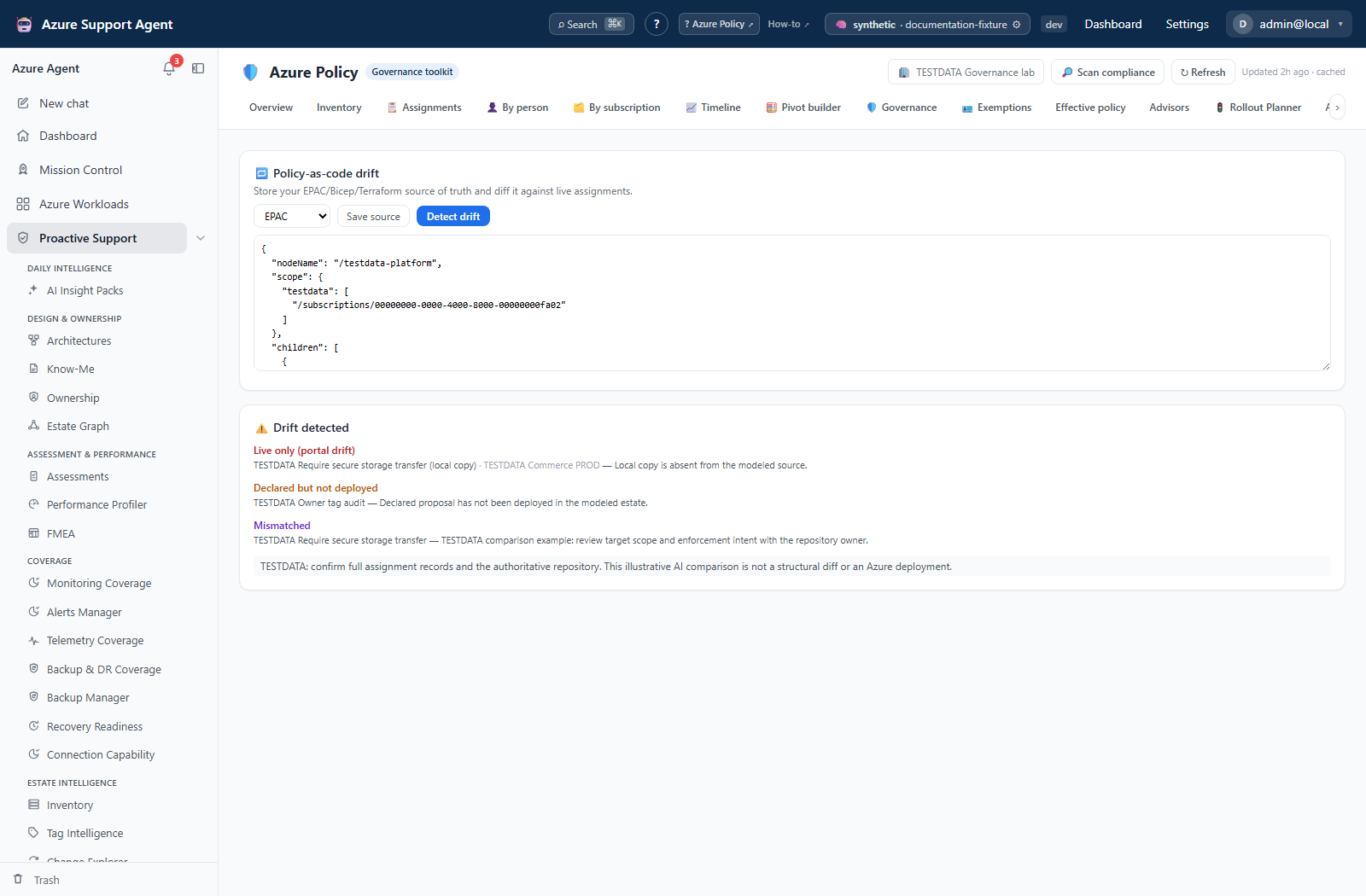
- Drift & IaC: compares stored source-of-truth material with observed policy and proposes reconciliation.
- History: Take snapshot, saved inventory/compliance summaries and count deltas. Saved simulations are on Rollout Planner; saved coverage analyses are on Advisors.
Within Exemptions, the Table and Pivot nested views support scope/group/column filters, saved perspectives, CSV/Excel export, and drill-down. Pivot builder also supports reorderable row dimensions, presets, saved local perspectives, date granularity, expand/collapse, CSV, and Excel.
Freshness and scope behavior
Policy inventory is cached persistently by application tenant, connection, workload, and whether compliance was requested. Opening a page reads only that cache, even on a miss. Refresh forces a live inventory collection; Scan compliance forces collection with Policy Insights summaries. Once compliance is selected in the current page session, subsequent Refresh calls retain that choice. Selecting a workload makes its configured connection authoritative.
Because the cache has no automatic expiry, always inspect fetched_at/age and errors. Collection is bounded before workload filtering: definitions and assignments at 2,000 each; initiatives and exemptions at 1,000 each. Subscription-name lookup is capped at 1,000 and management-group names at 2,000. Compliance discovery considers up to 200 subscriptions and summarizes at most 24, with six concurrent requests and $top=200 per summary. A successful subset makes compliance available; it does not establish complete subscription coverage. Some caps are not separately flagged in the UI, so a warning-free page is not proof of completeness.
Workflow overview
Implementation-grounded usage scenarios
- Explain an unexpected deny: open
/policy/effectiveat the failing resource scope, trace inherited assignments,notScopes, and exemptions, then use/policy/aiTriage only as a hypothesis and verify the blocking assignment in Azure. - Review an expiring waiver: open
/policy/exemptions, filter expiring records, inspect assignment and scope, run Preview & validate, and either copy the generated CLI on a read-only connection or apply the approved update withpolicy.writeon a write-enabled connection. - Plan audit-to-deny promotion: refresh compliance, open
/policy/rollout, choose Promote an existing policy, stream the bounded impact simulation, save the local plan if required, and deploy externally only after representative audit testing.
Simulate a rollout
- Open Rollout Planner and choose deploy, promote, or finding.
- Supply intent/policy JSON, target scope, and target effect as applicable.
- Start simulation. The stream reports authoring/resolution, what-if translation, blast-radius analysis, and staged-plan generation.
- Inspect whether what-if is supported, matching count, sample, exclusions, identity requirements, and exemption guidance.
- Begin externally with audit at a test scope, validate telemetry and false positives, then use staged expansion. A sample deny and full deny require separate organizational approval and external deployment.
A 100% compliant audit assignment is not automatically safe to deny: sample limitations, stale compliance, exemptions, and unobserved deployment paths still matter.
Interpretation of results
An effective-policy result is not a live Azure evaluation trace. The resolver tests string-prefix ancestry and notScopes; it does not expand management-group ancestry for an arbitrary subscription/resource target. It attaches all known exemptions referencing each assignment without checking exemption scope, expiry or initiative reference IDs, and does not subtract them from the count. Verify those separately in Azure.
Safe to promote is a lead, not a safety guarantee: once any compliance summary is available, an assignment absent from that summary can be treated as zero non-compliant. Missing assignment-level evidence is therefore unknown even if the card says safe. Baseline coverage is keyword matching over assignment names/categories, not proof that required effects, parameters and scopes are enforced. The three shipped baselines contain 8 WAF, 8 MCSB and 7 CIS controls.
Exports, history, scheduling, and integrations
Assignment and exemption tables/pivots provide CSV and Excel. Rollout results provide copy-only CLI and JSON artifacts. Pivot perspectives are browser-local layouts, not saved data or scheduled scans.
Rollout Planner attempts to save each completed simulation automatically; verify it appears under Saved simulations, since a missing policy.write grant can leave a displayed result unsaved. Advisors automatically saves coverage runs. History displays up to 30 snapshot summaries; storage retains at most 60 snapshots, 100 simulations and 100 coverage runs across their respective registries, not a guaranteed quota per connection. Confirm each record’s scope before comparing.
AI output is proposal text/JSON; validate aliases, modes, effects, parameters, and resource-provider behavior. Detect drift first saves the editor content, then asks AI to compare it with up to 120 summarized assignments and the first 20,000 source characters. Saved source is application-tenant-wide, not per selected Azure connection/workload. Neither drift nor rollout deploys definitions or assignments. There is no dedicated scheduling control in these Policy tabs.
DeployIfNotExists and Modify remediation require assignment identity, location where applicable, suitable role-definition IDs, and Azure remediation tasks. The view highlights gaps but does not execute remediation.
Safety and limitations
Review governance posture
- Select connection and workload/scope.
- Run an explicit scan if the cache is absent or old.
- Review Inventory and Assignments for scope,
notScopes, enforcement mode, definition/initiative, parameters, and identity. - Review Exemptions for expired, expiring, never-expiring, or weakly justified records.
- Resolve Effective policy at a representative resource scope; confirm inherited assignments and exclusions.
- Use Advisors as leads:
- promotion candidates are audit assignments whose observed compliance suggests further evaluation;
- remediation gaps identify modify/DeployIfNotExists designs missing required identity/RBAC;
- conflicts identify duplicate/redundant patterns;
- baseline coverage identifies missing governance areas.
- Capture a snapshot or save analysis only when the record is needed.
- Policy analysis, simulation, and local saves are read-only with respect to Azure. Exemption apply/remove is not: it performs audited ARM create, update, or delete operations after preview and connection/write checks.
- The exemption API allows writes when
read_only=falseorauto_execute_writes=true; the dialog shows direct apply based onread_only. It revalidates guardrails, but has no separate approval record, ETag/stale-version check or automatic rollback. Organizational approval is external; this is not a statement about Chat autonomy. - The exemption dialog previews generated CLI, not a live before/after diff. It does not expose initiative reference-ID editing; preserve and verify those values separately before modifying a selective initiative exemption.
- Resource counting narrows by subscription/resource group only. A management-group target does not expand its descendants, and a resource ID narrows to its resource group rather than that single resource. The sample is at most 25 resources. Treat broader estimates and provider errors as unknown impact, not zero breakage.
- Removing an exemption can immediately restore enforcement. Recreate the previously approved values to recover an accidental update or removal; remove an accidentally created exemption only after checking impact.
- What-if translates only supported policy-rule patterns into Resource Graph predicates; unsupported results require external testing.
- Match samples are limited and Resource Graph itself is eventually consistent.
- Compliance can be absent due to permission/API failure.
- Deny can break deployments; Append/Modify can alter resources; DINE can create resources and cost.
- Exemptions and
notScopescan make top-level compliance percentages misleading. - Saved drafts/simulations are local records, not Azure definitions or assignments.
Troubleshooting
| Symptom | Check |
|---|---|
| Inventory says never loaded | Page visits do not collect. Select Refresh for inventory or Scan compliance for inventory plus compliance. |
| Compliance is unavailable | Verify Policy Insights access, subscription coverage, and connection token/scope. |
| Assignments appear missing | Check workload filtering, Resource Graph truncation, scope visibility, and cache age. |
| What-if is unsupported | The rule cannot be translated safely; validate through an external test assignment in audit. |
| Remediation gap is reported | Add an assignment identity and least-privilege role at the correct scope before external deployment. |
| Drift does not update Azure | Expected: Drift is analysis only; reconcile through reviewed IaC. |
| Exemption apply fails although your own CLI succeeds | Apply uses the connection identity, not the signed-in operator. Verify that identity’s exemption rights at the target scope; use approved external execution if it should remain read-only. |
| Saved rollout is absent | Displaying a result does not prove autosave succeeded. Check policy.write and reopen Saved simulations before treating it as retained evidence. |