Playbooks
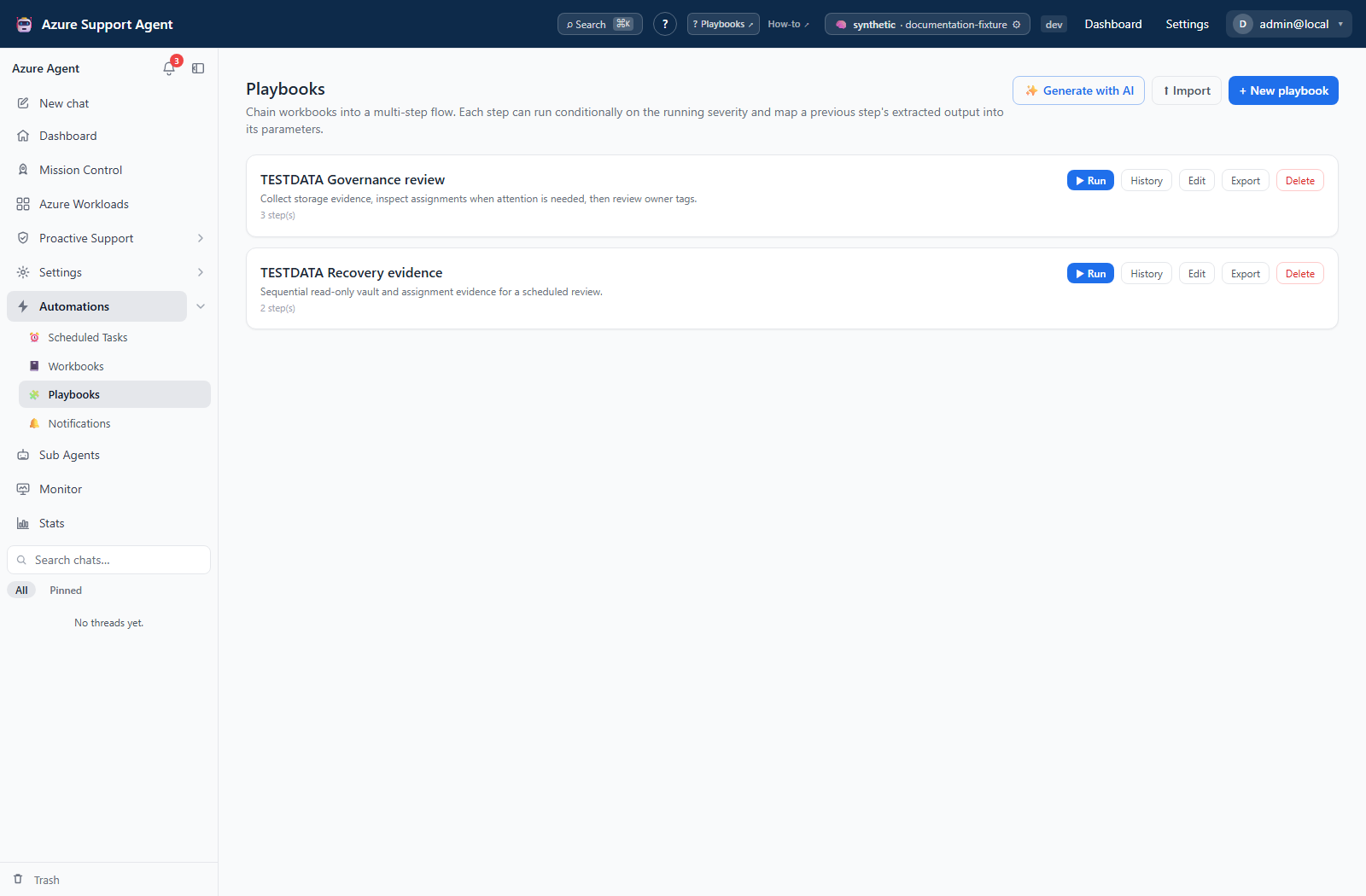
App route: /automations/playbooks
A playbook runs an ordered list of saved workbooks. It is a sequential form-based workflow, not a canvas, dependency graph, or transaction. Each step can use the highest severity reached so far as a condition.
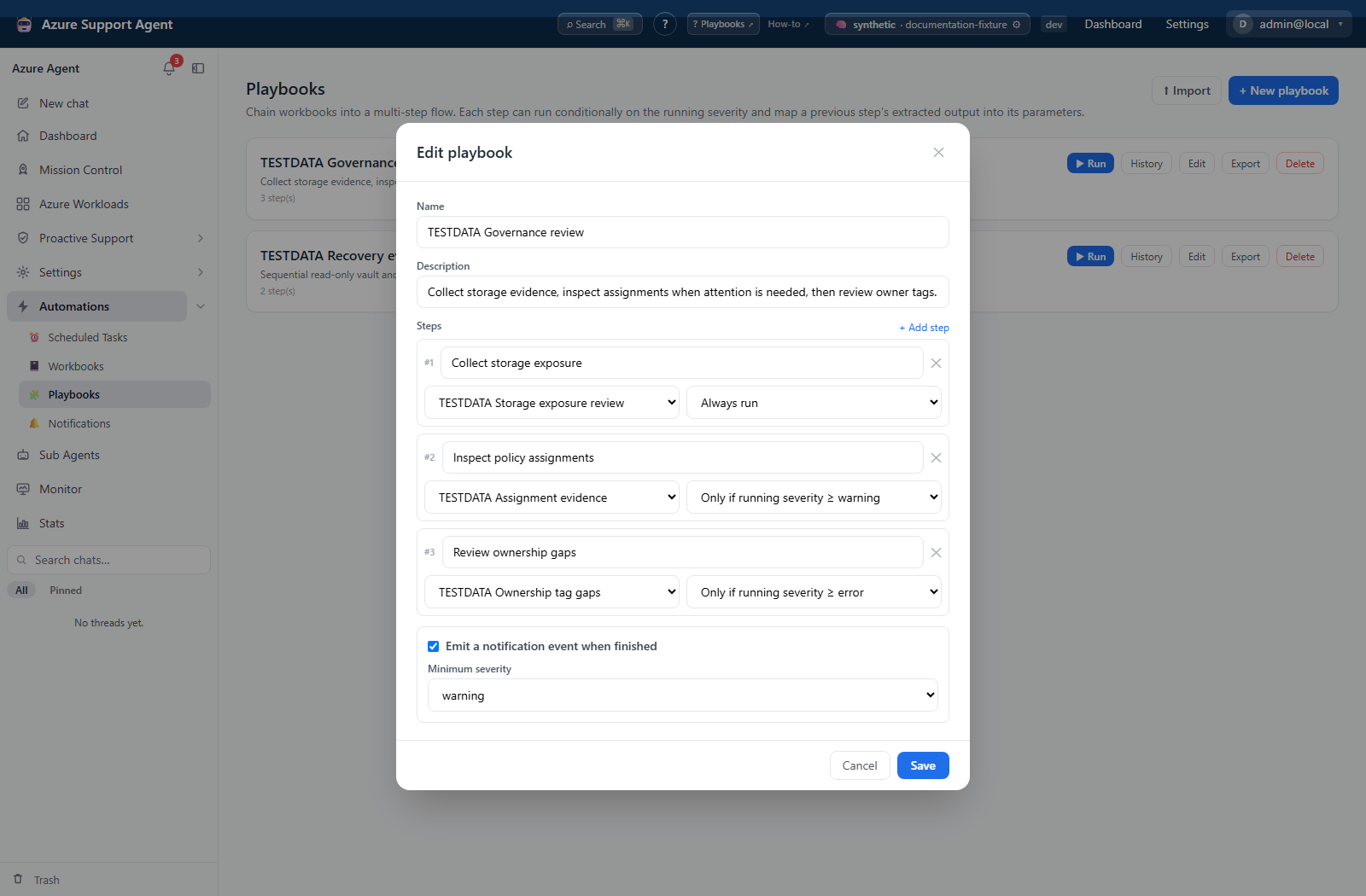
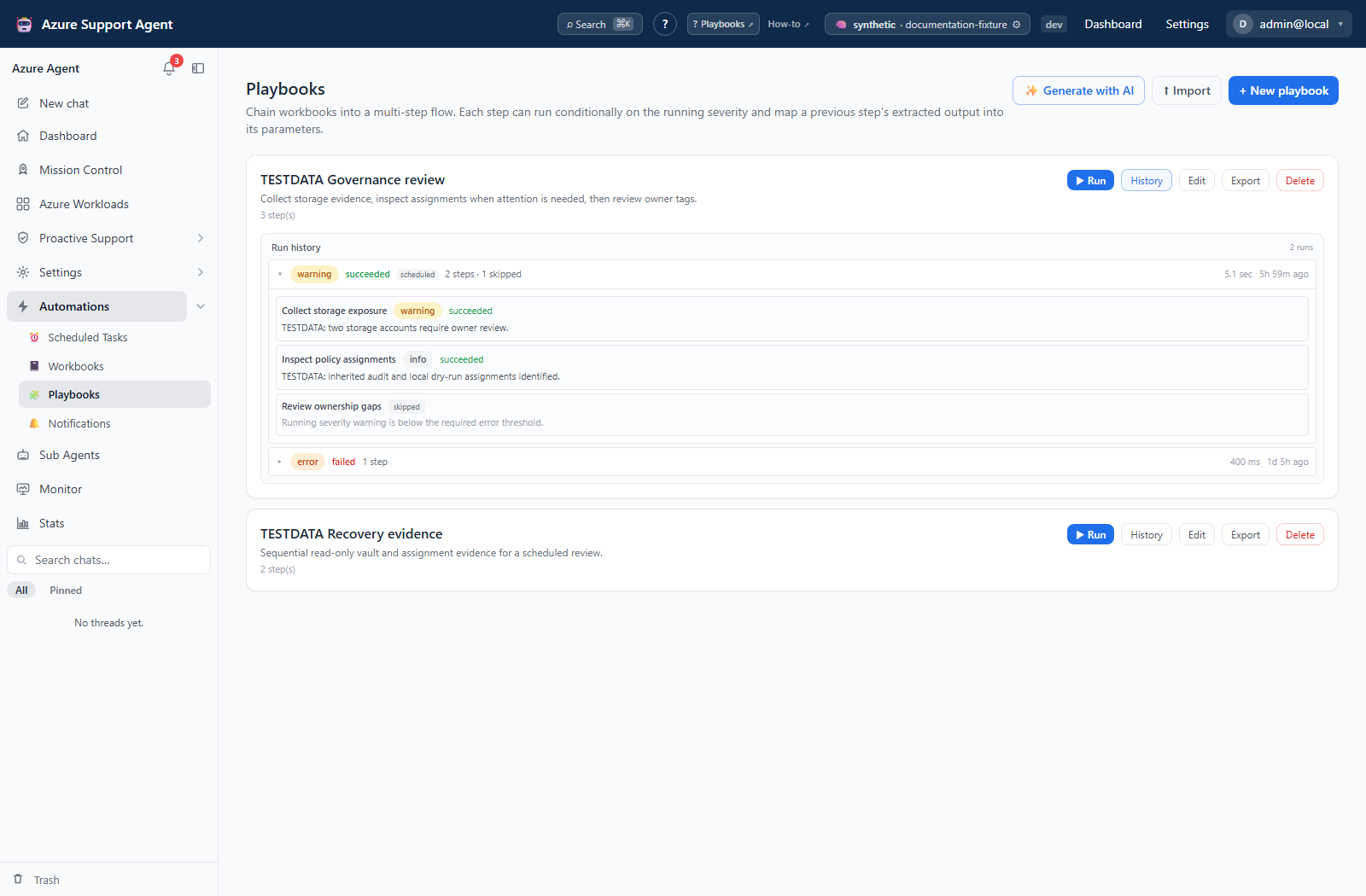
Screenshot note: The playbooks and histories below are browser fixtures, and the editor is unsaved. The step result was opened from synthetic saved history; Run was never clicked, no workbook executed and no completion notification was delivered.
Permissions and prerequisites
playbooks.read: list, export definitions, and read tenant-scoped history.playbooks.write: create/edit/delete, import, AI interview/generation, and run. There is no separateplaybooks.runpermission.workbooks.read: populate the editor’s workbook picker and inspect workbook evidence;workbooks.write: create or correct those workbook definitions.- A valid connection and executable/AI configuration for each workbook. The manual playbook form has no connection picker; a connection already stored in the playbook overrides each workbook default, otherwise workbook defaults apply.
The current shell disables the whole playbook panel without playbooks.write, including History/Export controls. These application permissions do not grant Azure access. A playbook import can create referenced workbook definitions under the playbook import permission; review the whole bundle, not only the playbook name.
Builder and target catalog
Every step targets a workbook from the saved workbook catalog. The supported workbook runtimes are Resource Graph (KQL), Azure CLI, and PowerShell; see the complete workbook starter catalog. There are no built-in playbook templates or non-workbook step types.
New playbook opens name, description, an ordered Steps list, and optional Emit a notification event when finished with minimum severity. Add step offers step name, workbook selector, and Always run or running severity ≥ warning/error/critical. The editor adds/removes steps but has no drag/reorder control, parameter-map editor, input form, cycle validator, or per-step enable switch. Plan the order before adding steps.
Saved/AI-generated/imported definitions can contain static params and param_map. A mapping has the form s1.count: step ID plus a top-level key in that earlier workbook’s structured result. It is not a nested JSON path. A resolved mapping overrides the static value. Missing/invalid mappings are ignored, leaving a static/default value or empty interpolation; they do not fail closed. Review mappings in the exported definition rather than looking for a mapping control in the current UI.
Generate with AI interviews against the workbook catalog and opens a draft for review; it does not save a playbook or create proposed workbooks. Unknown generated workbook references are omitted. The proposed-workbooks notice tells you to create those workbooks separately, then add the steps yourself.
Execution and result interpretation
| Outcome | What happens next |
|---|---|
| Running severity is below a step’s threshold | Step is skipped with a reason. Initial severity is info, so the first warning-gated step will skip. |
| Step has no workbook selected | Step is skipped as no workbook. An all-skipped/empty flow can still finish with status succeeded and severity info. |
Workbook returns status failed | Playbook status becomes failed, but execution continues to later steps. Severity gates still use the returned severity, not the status flag. |
| Workbook call raises an exception, such as a deleted workbook ID | The playbook records an error and stops the loop. Later steps are not executed and may be absent from the outcomes list. |
| All executed workbook calls succeed | Overall status is succeeded; severity is the highest returned workbook severity, which may still be warning/error/critical. |
There is no automatic undo, transactional rollback, retry-failed step, or resume-from-step action. A gate is orchestration logic, not authorization or proof of successful prior execution. Use read-only investigation steps first; separately review any remediation and its verification.
How to build and inspect a conditional run
- Validate each workbook independently, including defaults and any structured fields it must produce.
- Select New playbook, name it, and add workbooks in execution order. Start with an Always run evidence-gathering step.
- Choose severity thresholds for later steps. Review any existing mappings through Export; do not assume the form exposes them.
- Enable the completion event only if its intended threshold and destinations have been reviewed, then select Save.
- Select Run only when execution is authorized. It starts immediately without a confirmation dialog.
- Read the result modal, then open History and expand the run. Inspect workbook histories separately for raw output, structured results, and rendered commands.
Expected result: Workbooks execute sequentially, conditional skips are recorded, and the result carries overall severity and per-step outcomes.
Verification: Check both status and severity, count the intended versus returned steps, and confirm why each step ran, skipped, or stopped. A successful badge alone does not establish useful work was performed.
History, scheduling, and notifications
The library has Run, History, Edit, Export, and Delete on each card. History shows up to 25 runs from the default 50-row response (API maximum 200), newest first. Expanded steps show name, status/severity, narrative, skip reason, and recorded errors—not full workbook raw output or parameter inputs.
Runs execute within the request; history is written after the sequence completes, and playbook history persistence is best-effort. Closing the modal is not cancellation. Polling exists for returned running rows, but there is no playbook SSE stream or durable step checkpoint. After a lost request, check per-workbook history and external effects before a new full run.
A completion event is playbook.completed, source playbook, only when configured and the accumulated severity meets the threshold. It does not mean all steps succeeded. Workbooks may also emit their own events. Schedule a validated playbook from Scheduled Tasks; the playbook page itself has no cadence controls.
Import, export, and deletion effects
Export includes the definition and each resolvable referenced workbook, with reference tags used during import. It excludes run history, not necessarily environment values, body text, connection/tenant fields, or sensitive defaults.
Import creates a uniquely named playbook and remaps workbook references. It reuses workbooks with the same name, runtime, body, and parameters; connection, AI, alert, and tile settings are not part of that reuse signature. Inspect reused workbooks as well as newly imported ones. Unresolved referenced steps are dropped and reported as step(s) dropped (unresolved). The workbook count in import feedback includes resolved/reused references, not just newly created records.
Delete immediately removes only the playbook definition; there is no delete confirmation, trash, or restore action on this page. Workbook definitions and stored runs remain separate. Pause referencing schedules first. Reimport creates a new playbook ID; it is not a restoration of history or scheduled references. External changes need provider-specific recovery, not a definition import.
Troubleshooting
| Symptom | Cause and resolution |
|---|---|
| Unexpected skip | Check accumulated severity before that step, not just the immediately preceding result. A missing workbook selection is also skipped. |
| Parameters use an unexpected default | Missing structured keys leave static/default values in place. Enable workbook extraction, inspect the exact top-level key, and review the exported mapping. |
| Failed flow still ran later workbooks | A returned failed result does not stop the loop; only a raised exception does. Review later effects before rerunning and redesign unsafe dependent steps. |
| Fewer steps after import/generation | Unresolved workbook references can be omitted. Compare the step count and recreate missing workbooks before scheduling. |
| Imported workbook has unexpected connection/alerts | Content-based reuse ignores those settings. Open the reused workbook and verify its environment configuration. |
| Recognized write command is rejected | Playbook calls do not pass workbook confirmation. There is no approval continuation here; use an approved workflow rather than treating a severity gate as consent. |
| Result appeared but history is absent | History persistence is best-effort after execution. Inspect workbook histories and destination state; do not assume the flow never ran. |