Concepts and glossary
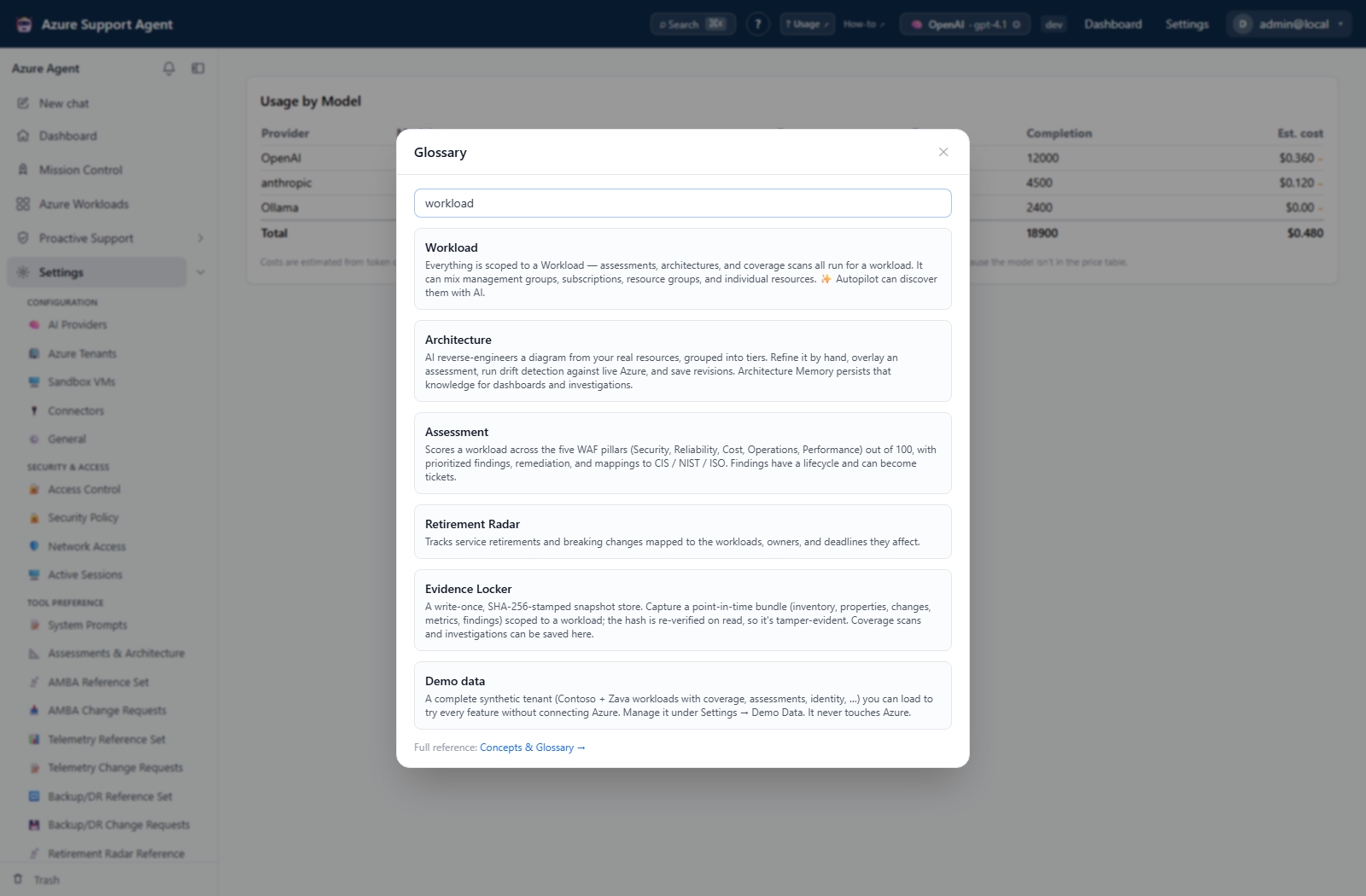
A plain-English reference for the concepts and vocabulary used throughout Azure Support Agent. The same definitions are available in-app from Help (?) → Glossary and as tooltips next to the terms themselves.
When writing cases or procedures, use these definitions consistently and record the scoped workload and connection plus the evidence timestamp, rather than relying on an ambiguous resource nickname.
Core concepts
Workload
A Workload is a named group of Azure resources that together make up one application or solution. It can mix management groups, subscriptions, resource groups, and individual resources. Workloads are the unit everything else is scoped to: assessments, architecture diagrams, and coverage scans all run for a workload. Use Autopilot to let AI discover and propose workloads from your estate.
Architecture and Architecture Memory
An Architecture is a living diagram of a workload. AI reverse-engineers it from real resources, groups it into tiers, and draws the connections. You can refine it by hand, overlay an assessment onto it, run drift detection against live Azure, and save revisions. Architecture Memory is the persistent, versioned knowledge captured from those diagrams that powers dashboards and investigations.
Know-Me
A Know-Me document turns an architecture’s Memory into a support-facing reference: an AI-drafted triage runbook with known issues, SLA thresholds, incident-response checklists, and diagrams. Read it inline, guided-fill the remaining gaps against a human-completion checklist, or edit per section; each section can be regenerated on its own. Documents move through draft → in review → published and export to Markdown or PDF.
Assessment (Well-Architected)
An Assessment scores a workload against the five Azure Well-Architected Framework pillars — Security, Reliability, Cost, Operational Excellence, and Performance Efficiency — producing an overall score out of 100, prioritized findings with remediation, and mappings to control frameworks such as CIS, NIST 800-53, and ISO 27001. Findings have a lifecycle (open → waived or resolved) and can be turned into tickets.
FMEA (Failure Mode and Effects Analysis)
An FMEA turns an architecture’s Memory into scored risk tables. Each potential failure mode is scored for Severity × Occurrence × Detection (each 1–10); their product is the Risk Priority Number (RPN), color-coded by risk band. RPN is always computed server-side and never trusted from the model. Edit cells live, regenerate a single table, track recommended actions, owners and due dates, move a document through draft → in review → published, and export to CSV or Excel.
Deep Investigation (War Room)
Switch a chat to Deep mode and the agent forms multiple hypotheses and dispatches specialist sub-agents (Networking, Identity, Compute, Storage, Security, Reliability, Cost, Monitoring) that research in parallel against live Azure data, validate each hypothesis with evidence, and converge on a root-cause conclusion with remediation. The result is a navigable hypothesis tree saved with the chat.
Proactive Support
The umbrella for the posture and forensic dashboards that surface risk before you ask. The sidebar organizes them into Daily intelligence (AI Insight Packs), Design & ownership (Architectures, Know-Me, Ownership, Estate Graph), Assessment & performance (Assessments, Performance Profiler, FMEA), Coverage (Monitoring Coverage, Alerts Manager, Telemetry Coverage, Backup & DR Coverage, Backup Manager, Connection Capability), Estate intelligence (Inventory, Tag Intelligence, Change Explorer), Governance & identity (Azure Policy, Entra ID, IAM), and Lifecycle & investigation (Retirement Radar, Reservations Monitor, Quota Monitor, Telemetry Intelligence, Evidence Locker, Case Files). Mission Control runs the whole sweep for a workload at once.
The coverage detectors
All three audit each in-scope resource against an editable, versioned reference baseline, roll gaps up to a Well-Architected pillar, and export ready-to-apply remediation. A scan is cached: opening a scope shows the last saved scan, and Refresh runs a new one live against Azure. Each scan is saved to history and can be exported as a branded PDF or captured into the Evidence Locker.
Monitoring Coverage (AMBA)
AMBA is Azure Monitor Baseline Alerts, Microsoft’s recommended set of metric alerts per resource type. This detector audits which recommended baseline alerts are present, missing, or misconfigured, and generates Bicep or Terraform to close the gaps. Rolls up to Operational Excellence.
Telemetry Coverage
Audits each resource’s Azure Monitor diagnostic settings against a reference of recommended log and metric categories: are settings present, are the recommended categories enabled, and do logs ship to an administrator-approved Log Analytics workspace rather than drifting to an unknown destination? Exports Bicep or an Azure Policy assignment. Rolls up to Operational Excellence. Alerts without telemetry are useless and telemetry without alerts is silent, so the two detectors are designed to pair.
Backup & DR Coverage
Audits each resource’s backup and disaster-recovery posture: is backup enabled, is there a policy with adequate retention, did the last job succeed recently, is there an offsite or geo-redundant copy, is a DR pair configured and recently drilled, and is the resource encrypted and soft-delete protected. Exports Bicep plus a runbook. Rolls up to Reliability.
Other Proactive Support tools
AI Insight Packs
Scheduled AI watchers. Each pack gathers change and telemetry data over a time window, reasons over it, and notifies you only when something material happens. Author one with the AI wizard or by hand, run it on demand against a tenant, subscription, or workload to test, then put it on a schedule. Each run produces a digest with a change table and a verdict (nothing notable, notable, or urgent) plus any security flags.
Alerts Manager
Operational triage for alerting itself: fired-alert history, overlapping or duplicate alert rules, action-group routing problems, noisy signals, and AMBA baseline gaps. Rule and action-group changes are proposed and approval-gated rather than applied silently.
Backup Manager
Day-to-day backup operations rather than coverage scoring: protection inventory, backup job triage, policy and vault administration, DR drills, backup cost, and approval-gated backup changes. Can sweep every workload from Fleet and reclaim stored analyses from Cleanup.
Entra ID
Tenant-wide identity posture: a posture score, Conditional Access coverage and conflicts, privileged access, application-registration and credential-expiry hygiene, guest access, blast-radius analysis, and a findings inbox — read through the Microsoft Graph MCP server.
IAM
Azure access review, collapsing a full RBAC scanner into task-oriented tabs: effective access, access paths, privileged exposure, PIM, scopes, reviews, change simulation, and diagnostics — to answer who can do what, where, and why.
Azure Policy
Policy inventory, compliance, assignments, exemptions, effective policy, rollout planning, and drift against infrastructure as code.
Retirement Radar
Tracks Azure service retirements and breaking changes, mapped to the workloads, owners, and deadlines they affect.
Telemetry Intelligence
Analyzes the content of telemetry rather than only its presence, correlating Application Insights signals, translating questions to KQL, and surfacing noise, gaps, and cost-saving opportunities.
Performance Profiler
A resource-by-metric heatmap built on the monitoring baseline that ranks which resources are running hottest against their thresholds.
Reservations Monitor
Tracks reservation and savings-plan coverage and upcoming expirations, with a renewal digest.
Quota Monitor
Tracks subscription and region quota usage, limits, headroom, and risk, so deployments do not fail because a limit was silently reached.
Inventory
A unified resource grid with overview, location, cost, and optimization lenses.
Change Explorer
Analyzes what changed in a workload over a time window, grouped by risk, actor, and dependency, so a regression or drift can be traced back to the change that caused it.
Tag Intelligence
A tag census, hygiene, and coverage lens: cost allocation by tag, drift detection, and generated Azure Policy to enforce a tagging standard.
Estate Graph
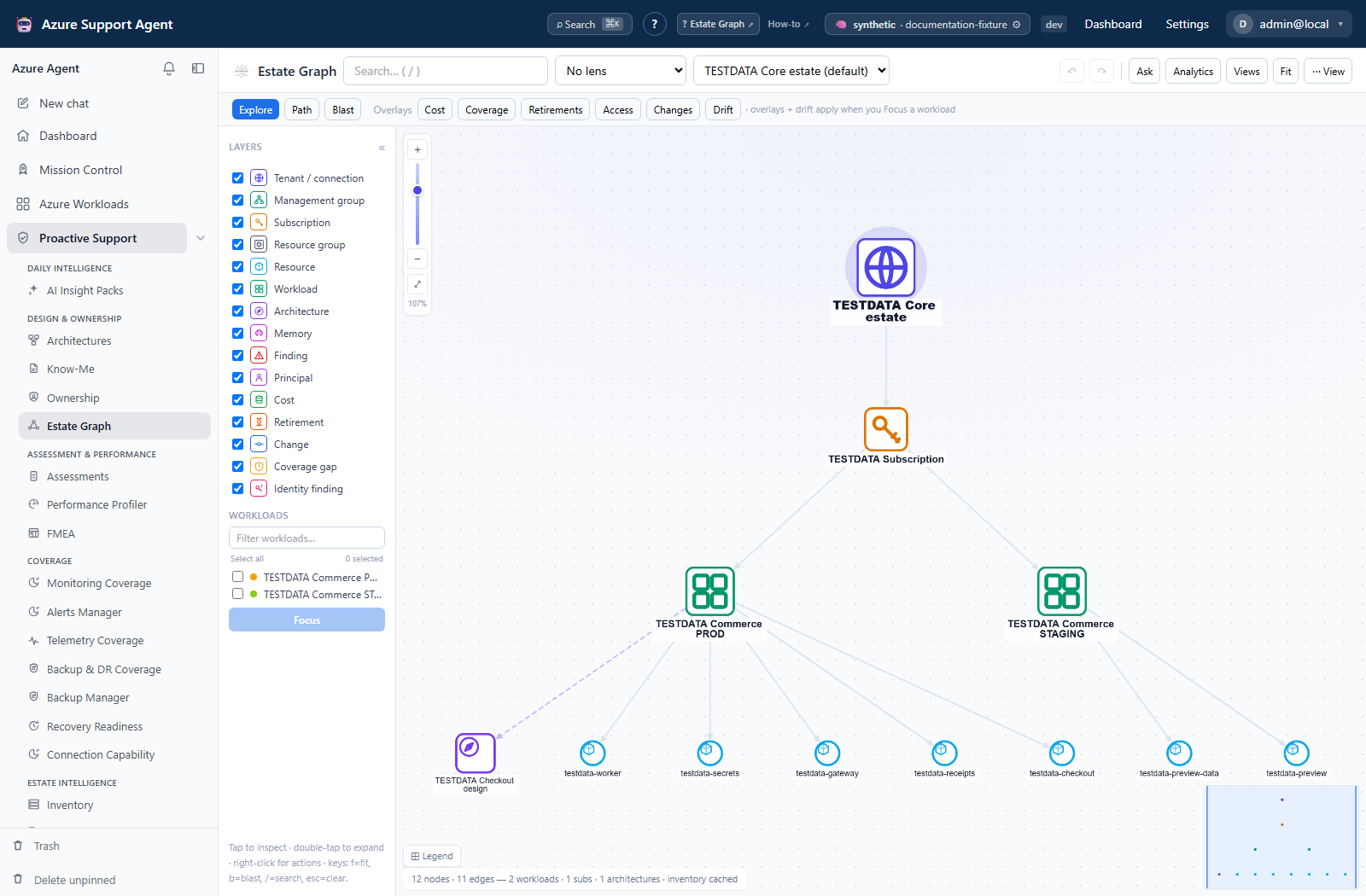
A workload-aware knowledge graph of the whole tenant, with cost, retirement, and RBAC overlays, for exploring how resources connect.
Ownership
Assigns accountable owners and teams across subscriptions, workloads, and resources, so every finding has someone to route to.
Connection Capability
Shows what each Azure connection can actually reach — ARM, Microsoft Graph, Log Analytics, Key Vault, and gated writes — surfacing the blind spots that would otherwise make an answer half-blind.
Case Files
Durable incident case files on a single append-only timeline: findings → investigation → evidence → remediation → verification, surviving refresh and reassignment.
Mission Control
Runs every analysis for a workload in one coordinated sweep — architecture, assessment, performance, the coverage detectors, FMEA, and Retirement Radar — streaming live progress you can watch, re-run per system, and revisit from history.
Evidence Locker
A write-once, hash-stamped snapshot store for forensic investigation and audit. Capture a point-in-time bundle (inventory, properties, recent changes, metrics, findings) scoped to a workload; each snapshot’s SHA-256 is recorded and re-verified on read, so it is tamper-evident. Coverage scans and investigations can be saved here as evidence.
Automations and integrations
Sub Agents
Custom, specialized agents defined with a scoped tool set and persona, built through an AI-guided wizard. They can be dispatched in deep investigations or run on a schedule.
Workbooks and Playbooks
A Workbook is a saved az, Resource Graph, or PowerShell operation with AI-summarized output. A Playbook chains workbooks into a multi-step, conditional flow.
Scheduled Tasks
Recurring agent workflows that run on a schedule. An advanced recurrence builder compiles a cron expression from an interval, weekdays, day of month, months, and one or more times of day, with a live preview of the next runs. The same scheduler powers AI Insight Packs.
Connectors
Outbound integrations that route findings and notifications to where the team already works: messaging, email, ITSM and on-call, SIEM and security, dashboards, cloud and eventing services, and generic webhooks. See Connectors for the implemented list.
Notifications
The in-app notification center. Events can also fan out to connectors.
Platform and safety
MCP (Model Context Protocol)
The standard the agent uses to talk to tools. Azure Support Agent ships two MCP surfaces: the official Azure MCP server and a Microsoft Graph (Entra ID) MCP server. Tools are classified read or write. See MCP tools for the current catalog.
Read-only by default, approval-gated writes, audit
Azure access is read-only out of the box. Any tool that would change Azure is write-classified and requires explicit opt-in and per-action approval; every action is recorded in the Audit Log. AI providers are disabled until you configure them, so no data reaches any model until you opt in.
Connection (Azure tenant connection)
A stored, encrypted credential — service-principal secret or certificate, managed identity, or Azure CLI sign-in — that lets the agent read a tenant. Multiple tenants can be connected, each isolated, with one default.
Demo data
A complete synthetic tenant with sample workloads, coverage, assessments, and identity data that you can load to explore every feature without connecting Azure. Load or remove it from Settings → Demo Data or the first-run Welcome screen. Demo data never touches Azure.
Security and access model
| Control | What it means |
|---|---|
| Read-only by default | The agent reads your estate; writes are opt-in. |
| Approval-gated writes | Every write-classified tool call needs explicit approval. |
| Full audit log | Every privileged action is recorded with actor, target, and time. |
| RBAC | Users, roles, and groups; least privilege by default. |
| SSO | OIDC and SAML sign-in. |
| Encrypted credentials | Azure connection secrets are encrypted at rest. |
| Data residency | Everything runs in your own subscription. |
Related pages
- User guide — how to use each feature
- Permissions reference
- Security overview
The in-app Help → Trust & Security page reflects the running build and is authoritative when it differs from this page.