Scan and investigate quota risk
Route
Open /quota.
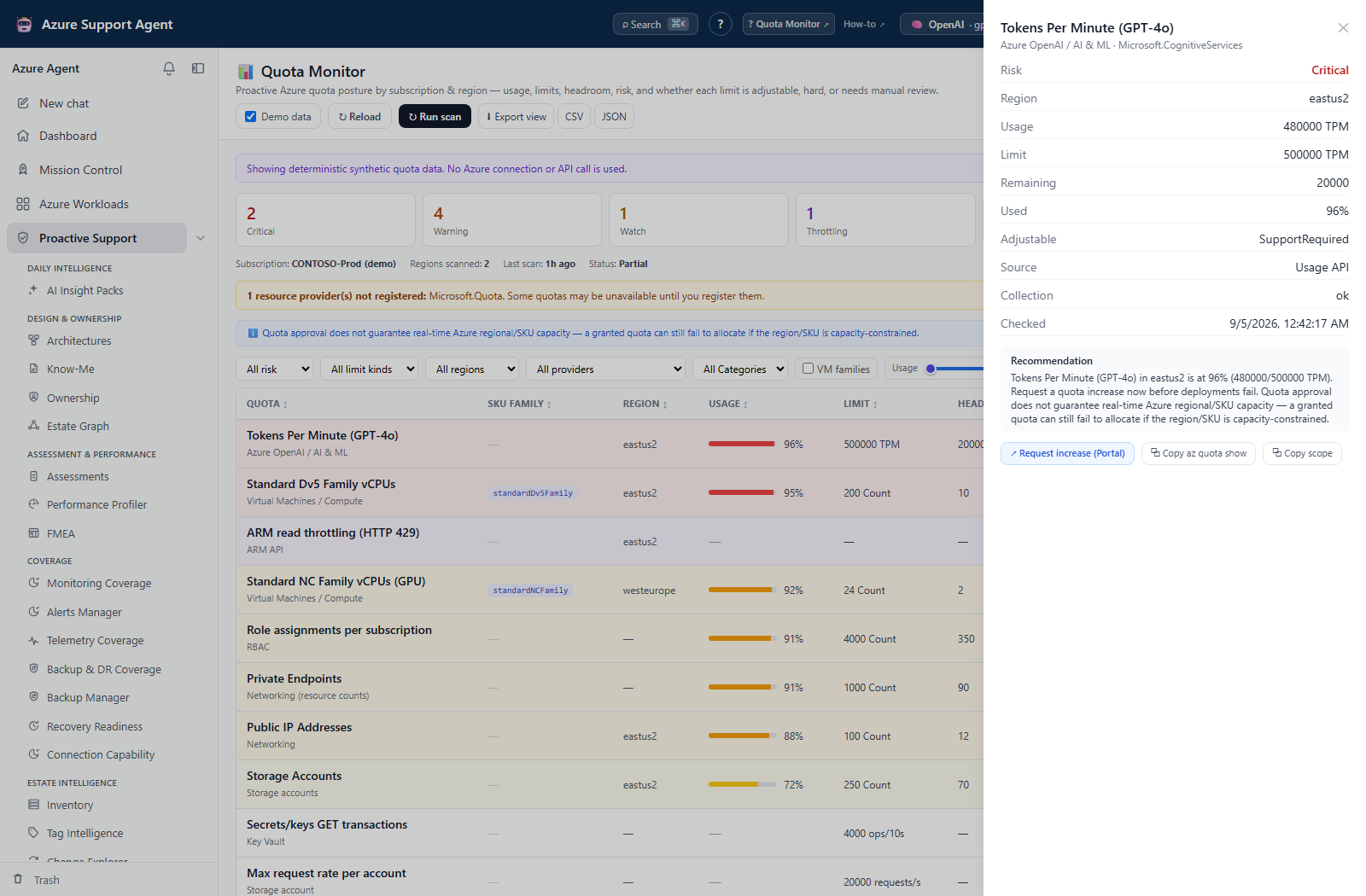
Screenshot context: The native application example uses built-in Demo data, not a live subscription scan or Azure capacity evidence. Demo Azure writes are disabled. Portal escalation and command-copy actions were not invoked for the capture; displayed quota headroom is not guaranteed regional capacity.
Prerequisites
- Product permissions
quota.readandquota.runfor a new scan. workloads.readfor the UI subscription tree, which uses workload discovery rather than Quota’s subscription-list endpoint.- An Azure connection and subscription with access to relevant quota, usage, Resource Graph, and Monitor APIs.
- Required provider namespaces registered through an approved Azure process.
How to run a bounded quota scan
-
Open
/quota, select the connection and subscription, then select Load to inspect the saved quota snapshot and its age. For a safe offline quota walkthrough, enable Demo data instead; synthetic quota collection does not call Azure. - Choose only required regions and collector categories.
- Set Show unused if zero-usage quota families matter, then select Run scan and follow streamed region/provider/collector progress.
- Do not start overlapping scans. Minimise keeps collection running across in-app navigation, but a browser reload is not a resumable job handoff.
- When complete, review collector errors, provider registration, throttling events, and generated time.
Expected result: A cached subscription snapshot with successful rows and explicit partial failures.
Verification: Confirm selected regions/categories ran and compare representative quota usage/limit with Azure. Check snapshot Status and row Collection, not only the completion message. A failed collector does not invalidate successful collectors but does create a blind spot.
How to prioritize capacity risk
-
Filter by region, provider, category, risk, limit kind, VM families, text, or usage range. Adjustability and source are row/detail fields, not separate filter selectors.
- Select the Usage or Headroom column heading to sort; select it again to reverse direction.
- Open a row and inspect raw response, quota family, region, usage, limit, risk, adjustability, and recommendation.
- Treat
Unknownas unresolved unless the recommendation explains a by-design singleton/remaining-allowance counter. TreatThrottlingObservedas API-pressure evidence, not a capacity percentage. - Confirm business growth and deployment demand before requesting an increase.
Expected result: A source-checked list of capacity or throttling actions.
Verification: Recalculate percentage from usage/limit when both exist and verify the exact regional quota family in Azure. The displayed percentage is capped at 100%; headroom is never shown below zero. An approved quota still does not guarantee available regional/SKU capacity.
How to export and verify quota work
-
Apply the intended filters.
- Choose Export view for filtered/sorted CSV, or CSV/JSON for the full cached snapshot. Record scan time, subscription alias, regions, categories, and the JSON snapshot’s thresholds; the full export ignores table filters.
- Create an approved capacity ticket in the appropriate external system without secrets or unnecessary subscription identifiers. The row drawer’s Request increase (Portal) only opens the Quotas blade; copied commands/scopes are not executed by this app.
- After an externally approved quota increase or workload change, run a bounded scan again.
- Confirm new limit, headroom, and risk state.
Expected result: A reproducible planning artifact and verified follow-up.
Verification: The refreshed source row reflects the expected limit/usage; provider and collector errors are resolved or documented.
How to recover after a partial scan or lost stream
- Open the affected row’s Collection, error, and recommendation. Resolve unauthorized, unregistered, or unsupported-provider conditions through the relevant Azure administrator; allow backoff after throttling.
- If the progress stream disconnects or you selected Cancel, reopen the page and Load. Compare generated time and selected subscription before deciding that no result was saved.
- Run a new bounded scan only after correcting the cause. There is no retry-failed-collectors button or durable resume control.
- Review the latest 20 compact history points in At-risk trend when available. Compare equal scan scopes before interpreting “recovered”; changing categories/regions can remove an at-risk key without changing Azure.
- Export important full snapshots before overwriting them. The cache is shared per application tenant/subscription across connections and scan subsets, and may be replaced by a completed error result. There is no restore/purge control for quota history on this page.
Expected result: Successful rows remain usable with explicit gaps, and a follow-up scan is initiated deliberately.
Verification: Confirm the new persisted time, source statuses, and representative raw values. A stopped browser stream or a green completion banner is not proof of complete collection or server-side cancellation.
Safety and rollback
Scans are read-only but can issue many Azure calls and trigger throttling. Narrow region/category scope and allow backoff. The app does not register providers or submit quota increases. Those writes occur externally; provider registration can have governance effects and quota increases may affect spend capacity, so use approvals. No scan rollback is required.
Freshness and partial results
Results are cached, with a default six-hour freshness interval rather than automatic expiry. Read snapshot threshold metadata rather than assuming defaults; quota tuning keys are not currently accepted by the General settings update schema. APIs expose different quota families and update times. Unknown, absent, or failed rows must not be interpreted as healthy.
Troubleshooting
| Symptom | Cause and resolution |
|---|---|
| Run scan is disabled or forbidden | Select a subscription and check active progress. A forbidden API response requires quota.run; read/view/export access separately requires quota.read. |
| Provider not registered | Use approved Azure registration, wait for propagation, and rescan. |
| Throttling appears | Stop repeated scans, allow recovery, and narrow scope. |
| Category has no rows | Check collector support, provider state, permission, region, and errors. |
| Portal differs | Match subscription, region, SKU/quota family, and refresh times. |