Groups and overlaps
Routes: /workloads/groups, /workloads/groups/{id}, and /workloads/overlaps
Purpose
Groups organize workloads into non-destructive application families. Overlap analysis identifies resources represented by more than one workload, either explicitly or through a broader scope. Use both when production, staging, development, and shared-platform boundaries need to remain visible without losing their individual workload identities.
When to use groups
- Model an application family across production and non-production environments.
- Roll up resource count, health, criticality, environment mix, and risk.
- Compare members to find environment drift, such as a production-only service or missing control.
- Attach ownership and descriptive metadata at the family level.
When to use overlap analysis
- After Autopilot or manual scope changes.
- Before ownership, cost, or coverage reporting where double attribution matters.
- When a shared platform legitimately belongs to several applications.
- When a resource appears explicitly in one workload but is implied by another workload’s resource-group or subscription scope.
Prerequisites and data sources
Prerequisites and permissions
workloads.readfor groups, comparisons, and overlap scans.workloads.writeto create/edit/delete groups, assign members, or change workload membership.- A valid Azure connection for deep overlap expansion.
Tabs and actions
Freshness and scope behavior
Workflow overview
Group workflow
- Open
/workloads/groups. - Create a group with a clear name, description, owner, color, and tags, or review suggested families based on workload naming.
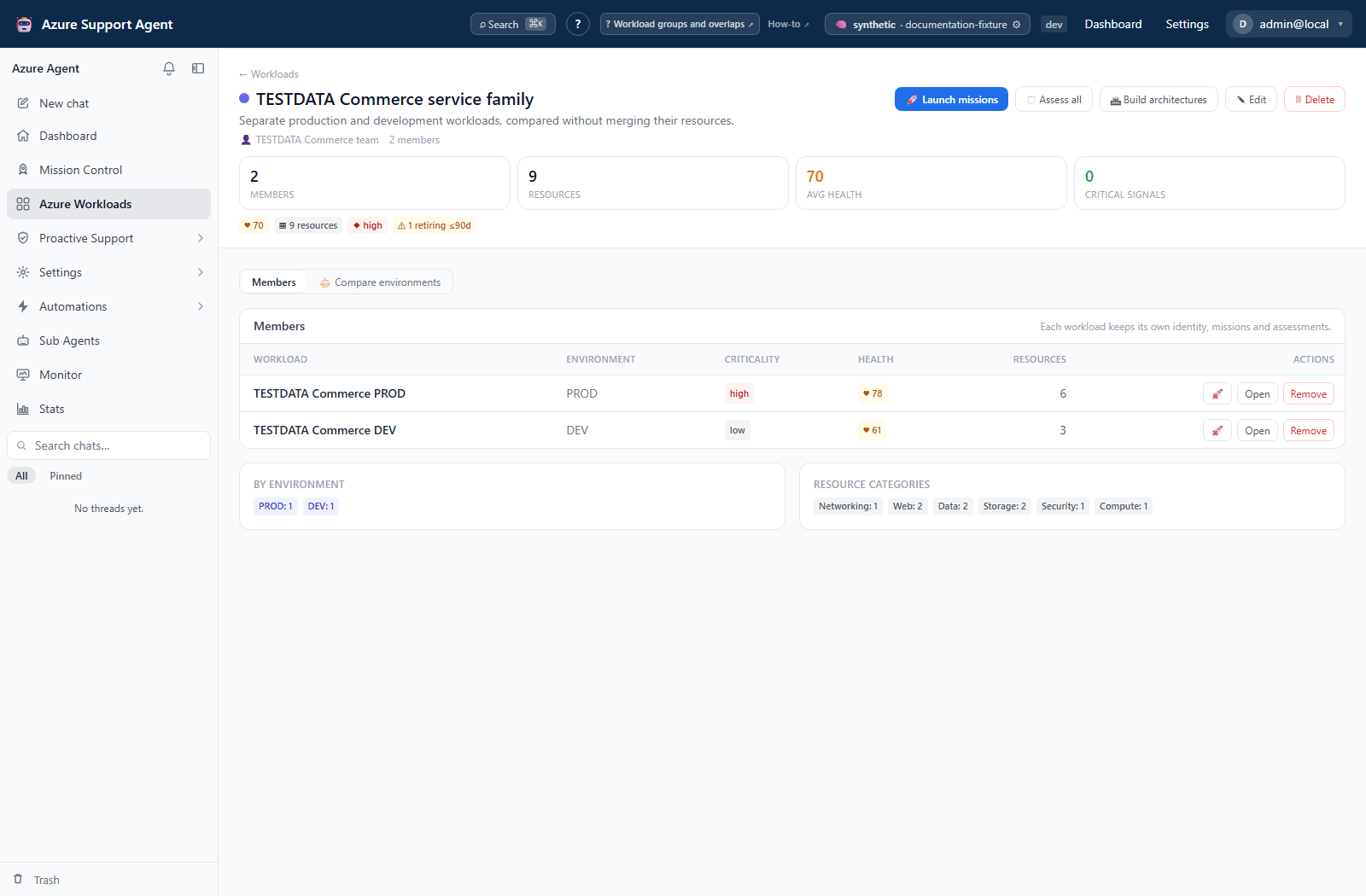
- Add workloads. Assignment stores a group reference on each workload and does not merge resources.
- Open group detail to review the rollup and member profiles.
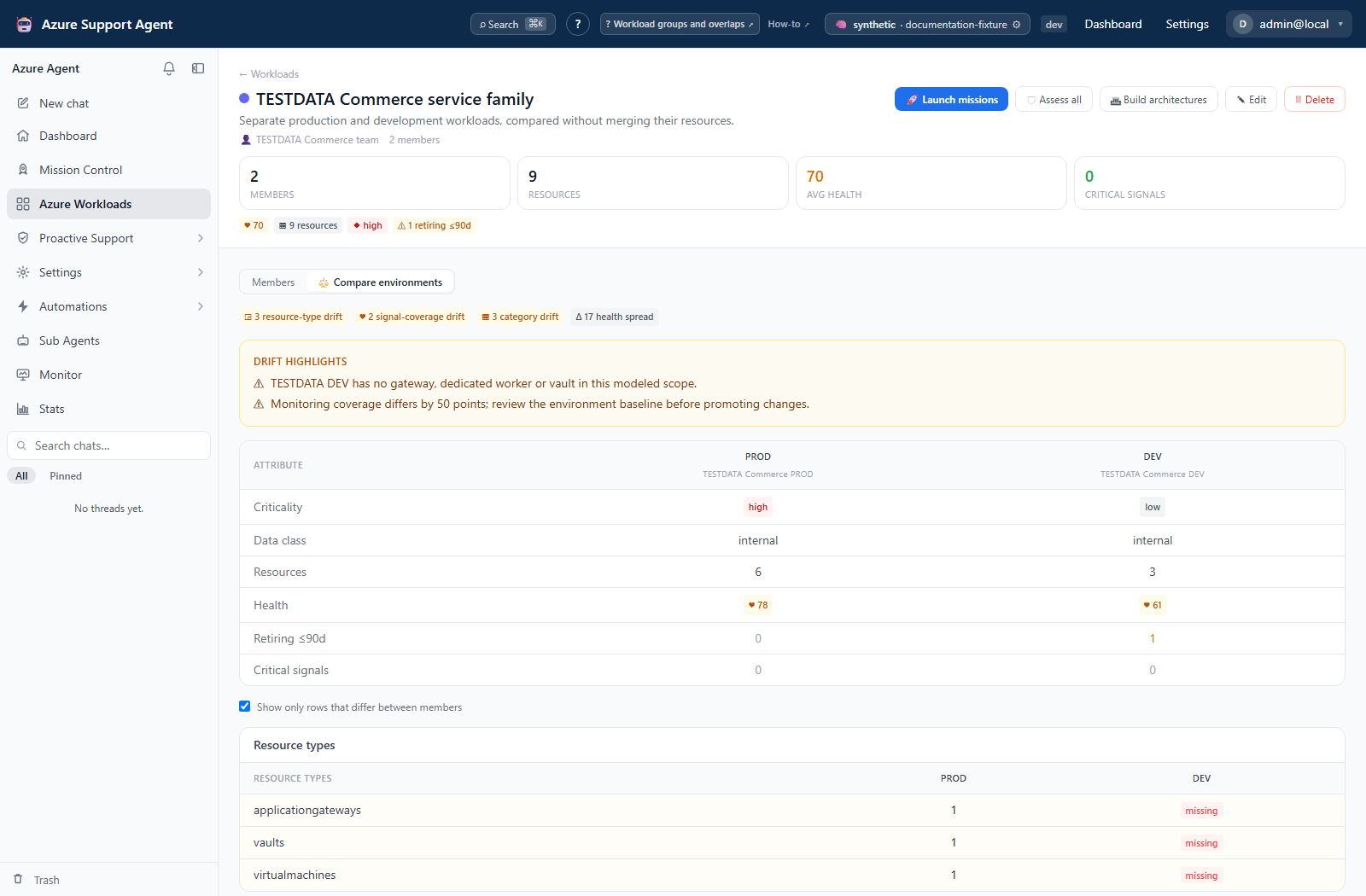
- Use Compare to inspect resource-type, category, and health-signal coverage across members.
- Enable drift-only display to focus on divergent signals.
- Investigate highlighted differences before deciding whether they are defects or intentional environment design.
A health spread greater than 30 points is highlighted as significant, but it still requires component-level review because members may have different available signals.
Overlap workflow
- Open
/workloads/overlaps. - Start with the instant explicit scan.
- Run Deep scan when scope-implied membership must be expanded through Azure; this requires a usable connection and can take longer.
- Group results by resource, workload pair, or resource type.
- Export CSV if a review requires offline ownership decisions.
- Decide whether each overlap is intentional.
- For unintended overlap, edit the workload node/exclusion or use the available remove-from-others action after confirming the authoritative owner.
- Rerun the scan to verify the result.
Interpretation of results
Interpret results
- Explicit overlap: the same resource is directly selected in multiple workloads.
- Scope-implied overlap: a resource is covered by a broad scope in one workload and another matching scope or explicit node elsewhere.
- Group rollup: aggregates active members’ cached profiles; it is not a new live scan.
- Compare highlight: a notable difference, not automatically a defect.
- Suggested group: name-token clustering, not an AI-confirmed application relationship.
Exports, history, scheduling, and integrations
No dedicated export, history, scheduling, or integration controls are documented for this feature page.
Safety and limitations
Safety
- Shared resources can be intentional. Do not deduplicate automatically without service-owner review.
- Removing a resource from a workload changes every downstream analysis that uses that scope.
- Deleting a group detaches its members but does not delete workloads.
- Grouping does not confer Azure ownership or access control.
- Exported overlap data can contain resource identifiers; handle it as infrastructure metadata.
Troubleshooting
| Symptom | Resolution |
|---|---|
| Expected overlap is absent | Run Deep scan; instant mode detects explicit overlap only |
| Deep scan fails | Verify connection access and Resource Graph availability |
| Group rollup is unknown | Analyze member workloads so profiles contain usable signals |
| Member is missing | Check whether it is trashed; active membership is derived from workload group_id |
| Compare looks inconsistent | Review member signal freshness and missing components |
| Suggested groups are incorrect | Ignore them and create explicit groups; suggestions rely on environment/name tokens |
Screenshot walkthrough
These group views use synthetic browser fixtures to illustrate member review and comparison. They are not live drift verification or an overlap-scan result.
1. Review the family without merging its members
2. Investigate differences between environments