Retirement Radar
Permissions: radar.read to view cached snapshots, event detail, reference history, and digest preview; radar.manage to refresh, change state, curate/restore/reset the reference, generate a runbook, register findings, create a ticket, or seed demo data
Purpose
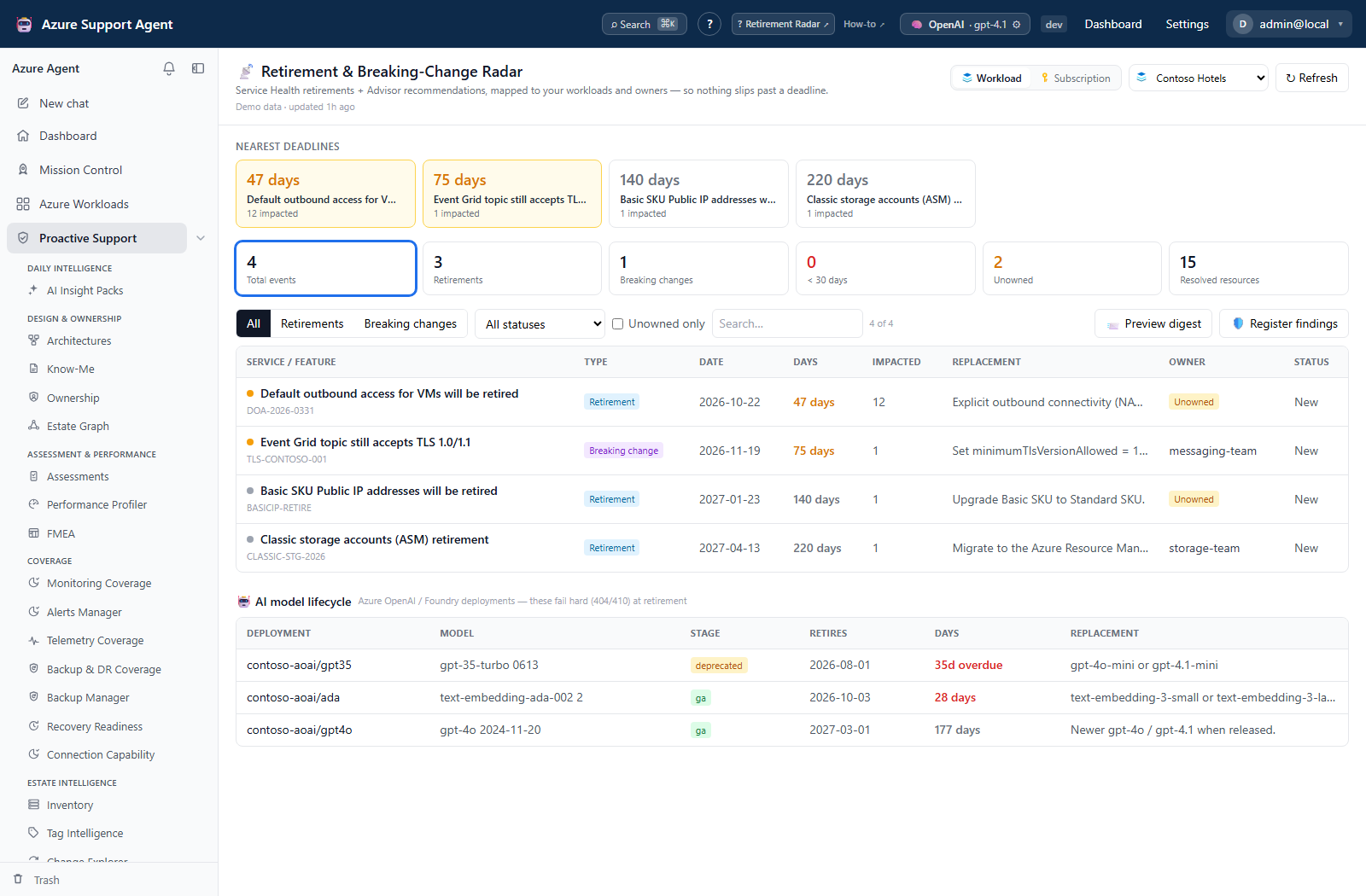
App route: /radar Retirement Radar combines cached Service Health and Advisor signals with a radar.manage-maintained classification and model-lifecycle reference. It maps announcements to workload resources, deadlines, owners, and action state.
Screenshot context: This native application view uses isolated synthetic demo data, not live Azure evidence or an authoritative retirement announcement. Demo Azure writes are disabled. Example deadlines and impacted resources must not be used to plan a real migration without checking current official guidance.
Prerequisites and data sources
- An enabled Azure connection able to read the selected scope’s Service Health, Advisor, and inventory data.
- Current workload inventory and ownership assignments for useful impact mapping.
- An AI provider for AI-authored migration guidance; runbook generation falls back to a deterministic template when the provider is unavailable.
- A configured Jira or ServiceNow connector only when creating an external ticket.
workloads.readfor workload/subscription-tree pickers andconnectors.manageto populate the ticket picker. The Radar ticket endpoint itself still requiresradar.manage; opening War Room needschat.use.
How to load and prioritize lifecycle risk
- Choose Workload or Subscription scope. A workload’s configured connection is authoritative and the connection picker is locked; select the intended connection for subscription scope.
- Inspect cache age; use Refresh to collect live signals when needed.
- Filter by retirement or breaking change, lifecycle status, text, or Unowned only.
- Open an event to review service, feature, deadline, impacted resources, owner, source, and migration context.
- Inspect the separate AI model lifecycle lane for deployment/model/version matches and unknown dates. Model-family fallback can supply a reference date even without an exact version match; validate current official guidance.
Expected result: A cached list of Azure lifecycle notices with deadline, source, known impact, and ownership context.
Verification: Match source/tracking ID and resource scope before acting. The default cache freshness interval is six hours; cached countdowns are computed during collection, not continuously from the browser clock. The cache is keyed by application tenant and workload/subscription, not separately by selected connection. Refresh after a connection change when identity-specific evidence matters.
How to record disposition and create a migration handoff
- Open a row or Nearest deadlines card. Use Acknowledged, Migration planned, Done, or New in the drawer to change disposition, or Waive…, enter a reason, and select Waive.
- Resolve missing resource ownership through the Ownership feature, then refresh Radar. The drawer has no assignee editor: an API
assigneeis a separate tracking field, not the mapped resource Owner. - Select Generate migration runbook, review the Markdown, and use Download before closing the dialog if it must be retained. This produces guidance, not an executable change plan or saved runbook history. The UI sends event context only; Architecture Memory enrichment requires an explicit architecture ID through the API.
- In workload scope, select Register findings for the currently filtered events. Each request creates a new Reliability assessment run; it does not update an existing finding run or prove a migration completed.
- Select Create ticket and an enabled Jira/ServiceNow connector to create a new external ticket immediately, or Investigate (War Room) to open a prefilled deep-investigation composer. Review the prompt before launching; the handoff may also best-effort create/update a workload case.
Expected result: A recorded application disposition, downloadable draft, assessment finding, or external ticket without migrating Azure resources. Ticket creation is an external write and has no separate approval dialog here.
Verification: Reopen the event to verify status/reason, and verify each requested finding or ticket in its destination. Correct status with another transition; correct or close an erroneous ticket in its own system. Do not repeat an uncertain ticket request before checking for duplicates.
Statuses are new, acknowledged, migration_planned, done, and waived. A waiver records disposition; it does not remove the underlying Azure deadline.
Countdown and red/amber/grey indicators prioritize time, but source quality and resource matching still matter. Resolved resources is a distinct count of concrete ARM resource IDs, so one resource affected by multiple notices is counted once. Advisor normally supplies those IDs. Service Health can supply affected service, region, and subscription scope without supplying a resource-level list; those events show Not provided instead of a false zero and are not classified as Unowned. Unowned means at least one resolved resource has no mapped owner. The backend’s models-at-risk count comes from the model-lifecycle reference rather than a direct Azure resource retirement match; the page presents these deployments in the AI model lifecycle lane.
How to preview a digest without assuming it schedules delivery
- Select Preview digest after checking scope and snapshot freshness. Preview uses the full cached scope, not table filters, and displays a summary plus lead days. It neither sends nor creates a schedule.
- Interpret preview counts as a first-run view: the API supplies an empty known-ID set, so eligible events are treated as new. Done/waived events are excluded. This is not a faithful replay of the next scheduled run’s prior-seen state.
- For existing Radar schedules, use Scheduled Tasks to inspect cadence, run history, and notifications with
tasks.read; changing a schedule needstasks.write, and an on-demand run needstasks.run. The generic New schedule form cannot create Radar targets; the backend accepts them through the tasks API. - Verify scheduled destination receipts separately. The scheduled collector uses the workload connection, or the default connection for subscription scope; it does not honor a separate configured connection ID in the same way as manual refresh. Items already within a lead threshold can recur on later runs rather than sending only once when crossing it.
Expected result: A no-send preview and an explicit boundary between Radar collection permissions and automation permissions.
Verification: Check actual scheduled source/destination and run output before enabling or relying on delivery. Scheduled collection does not use the manual refresh’s last-good preservation branch; a succeeded task summary is not proof that every source or notification channel succeeded.
How to review reference changes and retained history
- Open Retirement Radar Reference in Administration with
radar.read; useradar.managefor Edit JSON and Save new version. This reference is application-wide, not an Azure configuration change. - Review classification rules and model/version dates before saving. In Version history, Restore saves that retained revision as a new version; Reset to built-in asks for confirmation and also creates a new version. Up to 50 revisions are retained.
- Refresh Radar after a reference correction; existing snapshots are not automatically reclassified by saving the reference.
- Distinguish reference versions from event history. Event disposition retains only the last 25 state entries in backend storage; the Radar drawer does not display a history browser. State changes, refreshes, reference updates, finding registration, and successful ticket creation have audit records. Runbook generation and reference restore/reset do not each have a dedicated audit-log write in these endpoints.
- Treat the Save radar settings lead-days/feed controls separately from reference save. They submit settings keys not accepted by the current settings-update schema, so a success message does not establish persistence. Ask the administrator to verify effective configuration rather than assuming a feed or cadence changed.
Expected result: A versioned local classification/reference update with a documented recovery path, not an Azure migration or unbounded event archive.
Verification: Reopen the reference and compare version/content, then refresh the intended scope. The optional public feed is supplementary and can be delayed; empty feed results do not prove there are no announcements. Reference editing is also described in Reference sets and change requests.
How to recover from a failed or partial refresh
- Read the Partial Radar snapshot or Last-good snapshot retained banner before interpreting event counts.
- With a partial snapshot, use successful sources but document failed Advisor, Service Health, or model-deployment collection. If all three required sources fail and an earlier snapshot exists, manual refresh retains it with failure metadata rather than claiming fresh evidence.
- Correct source access or scope and select Refresh again. Scope-resolution failures and scheduled runs do not share that all-sources-failed preservation guarantee; there is no retry-failed-source control.
- Preserve required case notes/runbook downloads before subsequent collection. Radar retains a latest cache and bounded state/reference histories; it has no snapshot Trash, import, or restore control.
Expected result: Available evidence remains usable with its age and blind spots visible.
Verification: Confirm the generated time advanced and failure indicators cleared, then validate representative events externally. Service Health is collected at the workload’s subscription scope; it need not identify an exact workload resource. Large source queries are capped and the collector does not surface every underlying completeness flag, so counts are not a completeness certificate.
Troubleshooting
| Symptom | Cause and resolution |
|---|---|
| Page is visible but a change returns forbidden | radar.read permits inspection only. Switch to an assigned role containing radar.manage before refresh, state, runbook, finding, ticket, demo, or reference actions. |
| No events and never loaded | Confirm the connection and scope, then select Refresh. |
| Snapshot is stale | Compare cache age with configured TTL and refresh. |
| Event shows Not provided for impacted resources | Service Health did not provide concrete ARM resource IDs. Use its displayed service/region/subscription scope and validate the event’s Impacted resources tab in Azure; do not interpret this as zero. |
| Advisor event has no impacted resources | Refresh inventory and verify workload scope/resource matching. |
| Runbook lacks AI-specific detail | Provider failure/short output falls back to a deterministic template. Validate the guidance; the UI does not send an architecture ID for Memory enrichment. Check permission/request errors if no draft opens. |
| Ticket action is unavailable | The picker needs connectors.manage and an enabled Jira/ServiceNow connector; creation separately needs radar.manage and destination access. Verify connector health. |