Build and maintain FMEA
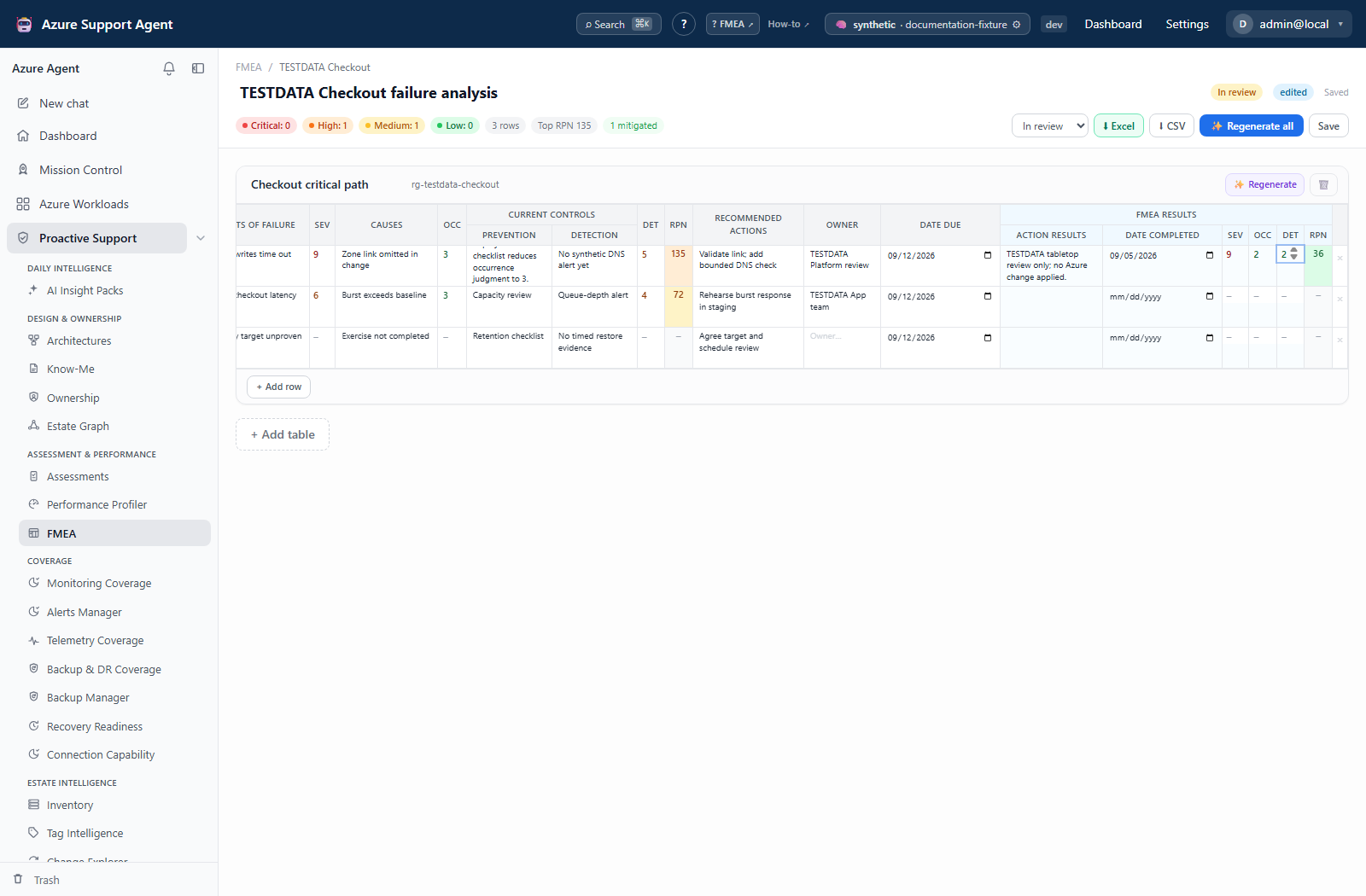
Screenshot note: These native views contain synthetic support context and FMEA results. Saves, ownership entries, and post-action scores update browser-only examples; no AI generation, DNS/SSH probe, or real mitigation occurred. The source-document menu shown below belongs to Know-Me, not the FMEA editor.
Prerequisites
architectures.read;architectures.writefor create, generate, edit, lifecycle, restore, and delete.- A reviewed architecture and current Memory for grounded AI generation; an active provider for generation.
Route
Open /fmea or /fmea/{fmeaId}.
If a review starts from Know-Me, use its Source menu to open the linked Architecture Memory and diagram before drafting the FMEA. The support reference and source Memory are separate documents; a completed Know-Me field does not verify Memory or a risk control.
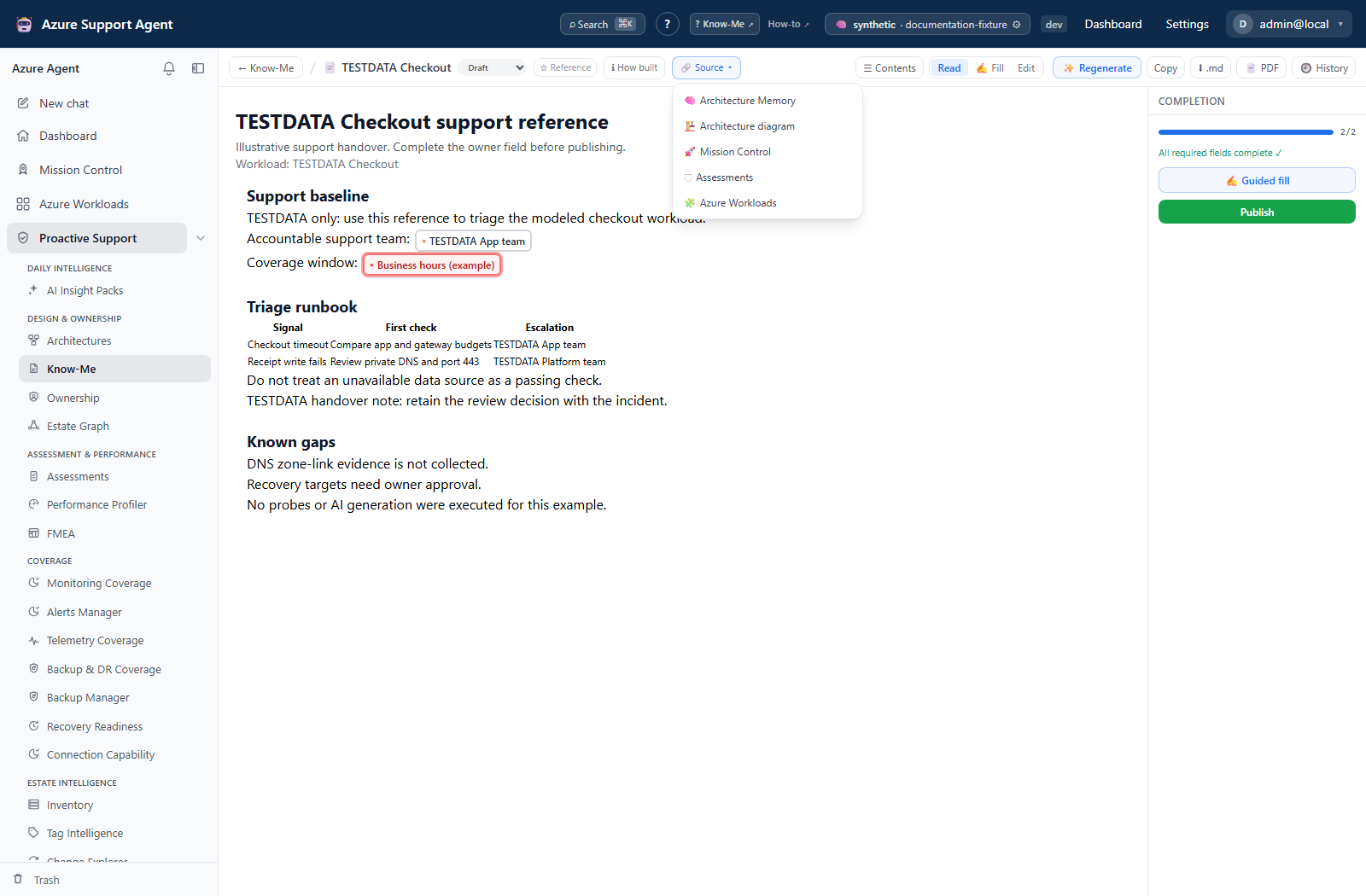
How to create or generate an FMEA
- Review the workload architecture and refresh stale Memory.
- Open
/fmeaand choose a buildable architecture/workload suggestion, create a blank document, or select Generate from Memory. - Monitor draft, verify/refine, and save phases; a parse failure in the refinement pass can fall back to the first draft.
- Open the document and validate every table, scope reference, failure mode, effect, cause, current control, and recommendation.
- Add/remove tables or rows as needed; use per-table regeneration only when that table can be safely replaced.
Expected result: A saved draft contains one or more reviewable failure-mode tables grounded in architecture Memory.
Verification: Trace each modeled component/failure to the architecture, Memory, evidence, or explicit workshop input.
How to edit factors and interpret RPN
- In a cross-functional workshop, define consistent 1–10 criteria for Severity, Occurrence, and Detection.
- Edit factor cells; the UI updates RPN immediately and the server recomputes authoritatively on save.
- Use $\mathrm{RPN}=S\times O\times D$; a zero/blank factor leaves RPN blank.
- Interpret bands: Critical $\ge 200$, High $120$–$199$, Medium $40$–$119$, Low $<40$.
- Sort/review high RPN, but separately review catastrophic low-occurrence and common-cause failures.
- Wait for the short auto-save before navigating or exporting.
Expected result: Every complete row has normalized factors, derived RPN, and risk band.
Verification: Reopen the document and spot-check multiplication and band; out-of-range values are normalized server-side.
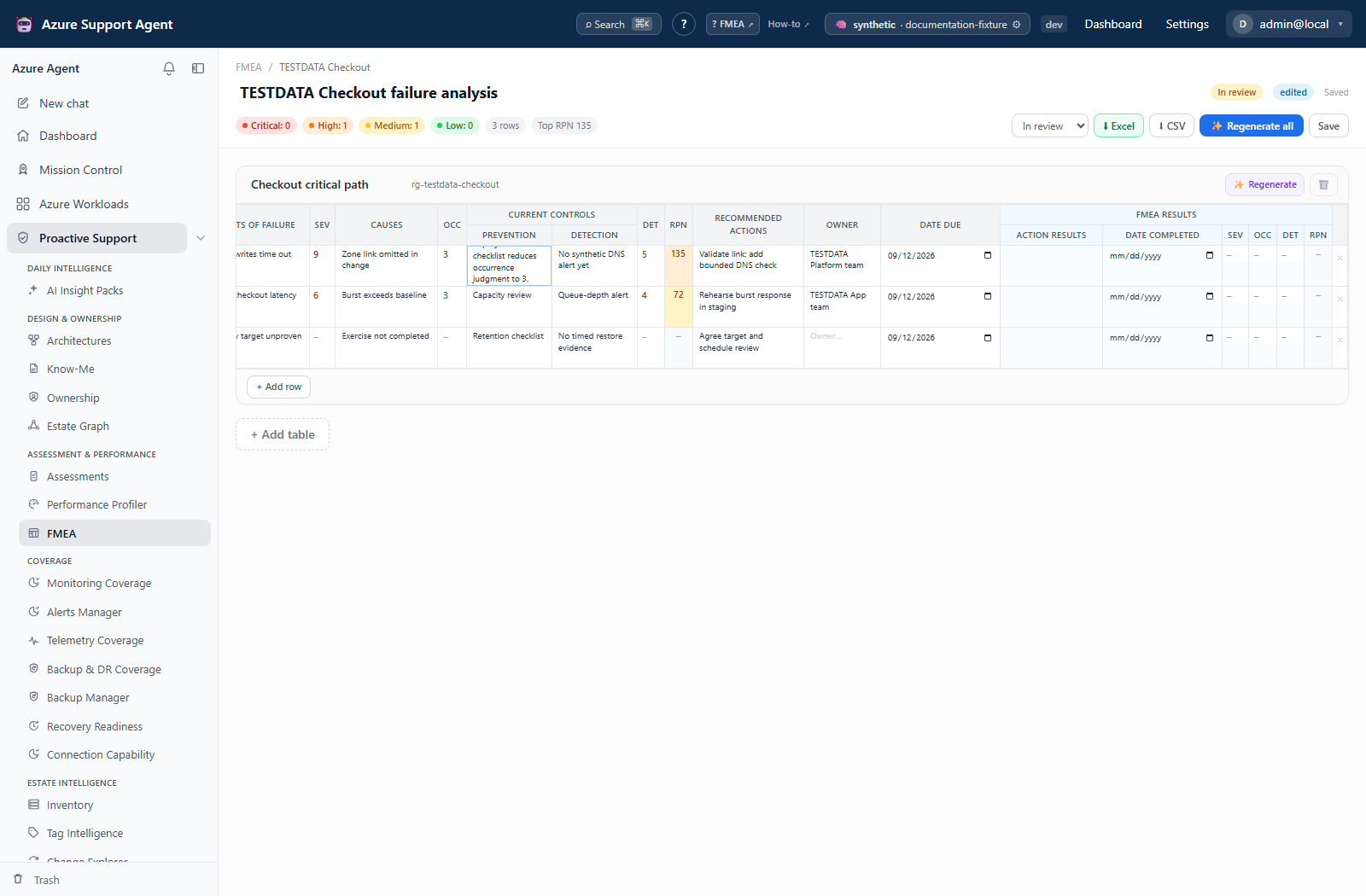
How to assign ownership, actions, status, and lifecycle
Current worksheet limits: Use Action results, Date completed, and post-action factors to record follow-up. There is no separate per-row status selector or open/in-progress/completed summary; the status steps below are review guidance, not additional UI controls. Document lifecycle remains separate from row completion.
- Replace blank/generated owner and due-date placeholders with human-approved values.
- Enter recommended action and row status; record post-mitigation factors only after controls are implemented and verified.
- Review open/in-progress/completed summaries.
- Move the document from Draft to In review and Published only after approval; use Archived for retained inactive records.
- Do not treat lifecycle status as validation by itself.
Expected result: Risks have accountable action, due date/status, and reviewed document lifecycle.
Verification: Confirm owners accepted responsibility and completed controls have evidence before lowering post-mitigation scores.
How to use revisions and exports
Current FMEA history limit: The editor has no History button, revision drawer, or revision-preview control. Revision listing and restore are API operations with no dedicated preview endpoint; the history steps below are not a clickable worksheet workflow. Architecture Memory has its own native preview/diff, but that history does not restore an FMEA. Wait for Saved before using the worksheet’s CSV or Excel controls.
- Open revision history and preview the desired snapshot.
- Restore only after comparing it with current content; restore creates a new current revision.
- Select ⬇ CSV for flat tabular data or ⬇ Excel for Summary plus per-table sheets, conditional formatting, dates, and live RPN formulas.
- Open the workbook and recalculate formulas in the target spreadsheet application.
Expected result: History remains intact and the export reflects current saved tables without unresolved token syntax.
Verification: Compare table/row counts, factors, RPN, status, owner, and dates between UI and export.
How to handle a deleted workload
- On
/fmea, identify the amber workload deleted badge. - Open the retained FMEA and decide whether it must be exported, archived, relinked through a supported workflow, or deleted.
- Do not expect new buildable suggestions for deleted workloads.
- Move obsolete documents to Trash; restore if needed, or purge after retention review.
Expected result: Orphaned risk records remain visible for deliberate disposition rather than silent loss.
Verification: The deleted workload does not reappear as buildable and the FMEA’s chosen lifecycle/export/delete outcome is recorded.
Safety and rollback
- AI can omit modes, invent controls, or score inconsistently; human facilitation is mandatory.
- Regeneration can replace manual content. Preserve a revision/export first and prefer per-table regeneration.
- RPN can under-rank catastrophic or systemic failures.
- Owner/due date must never be inferred as fact.
- Soft deletion is recoverable; purge/empty Trash is permanent. Deleted workloads do not cascade-delete FMEA.
Troubleshooting
| Symptom | Resolution |
|---|---|
| No buildable suggestion | Confirm active workload, linked architecture, Memory, and permission. |
| Generation is partial | Check provider and Memory; review the first-pass fallback rather than assuming completeness. |
| RPN is blank | Enter non-zero S, O, and D values from 1 through 10. |
| Score changes after save | Inspect out-of-range/non-numeric values; server normalization is authoritative. |
| Edits are missing | Wait for auto-save, avoid concurrent tabs, and inspect revisions. |
| Excel differs | Recalculate formulas and verify spreadsheet support for formatting/formulas. |