Alerts Manager
Product permissions: alerts_manager.read; mutations and privileged previews use alerts_manager.alert_state_write, alerts_manager.action_group_write, alerts_manager.rule_write, alerts_manager.advanced_rule_write, alerts_manager.bulk_write, alerts_manager.amba_blueprint_write, alerts_manager.query_preview, alerts_manager.test_notifications, alerts_manager.delete, and alerts_manager.approve according to the action.
The embedded analysis additionally requires alert_analysis.read for reports, refresh, trend, exports, and analysis Evidence. Accept overlap, Keep, and Exempt require alert_analysis.manage. Those decisions annotate application findings; they do not approve or modify Azure rules.
Purpose
App routes: /alerts-manager and /alerts-manager/:tab Alerts Manager combines current alert operations with rule authoring and governed changes. Unlike the read-only coverage score, some actions can mutate Azure. Availability depends on both the user’s permission and the connection’s read-only/write policy.
Screenshot context: These native application views use isolated synthetic demo data, not live Azure evidence. Demo Azure writes are disabled. No notification test or managed Azure apply is demonstrated; displayed costs are reference estimates, not actual billing.
Prerequisites and data sources
- An Azure connection with access to Alert Management, Azure Monitor rules, and action groups in the selected scope.
alerts_manager.alert_state_writeto acknowledge or close alert instances.alerts_manager.rule_write,alerts_manager.action_group_write, or the corresponding advanced/bulk permission to propose or execute those changes.alerts_manager.approveto approve pending requests; notification tests require their dedicated permission.- Azure access sufficient to read subscriptions, Resource Graph inventories, Activity Log alert rules, Action Groups, and destination resource groups. The selected connection also needs the target-specific ARM write access used at apply time.
- Configured connectors where a workflow sends to an external ticketing or notification system.
Tabs and actions
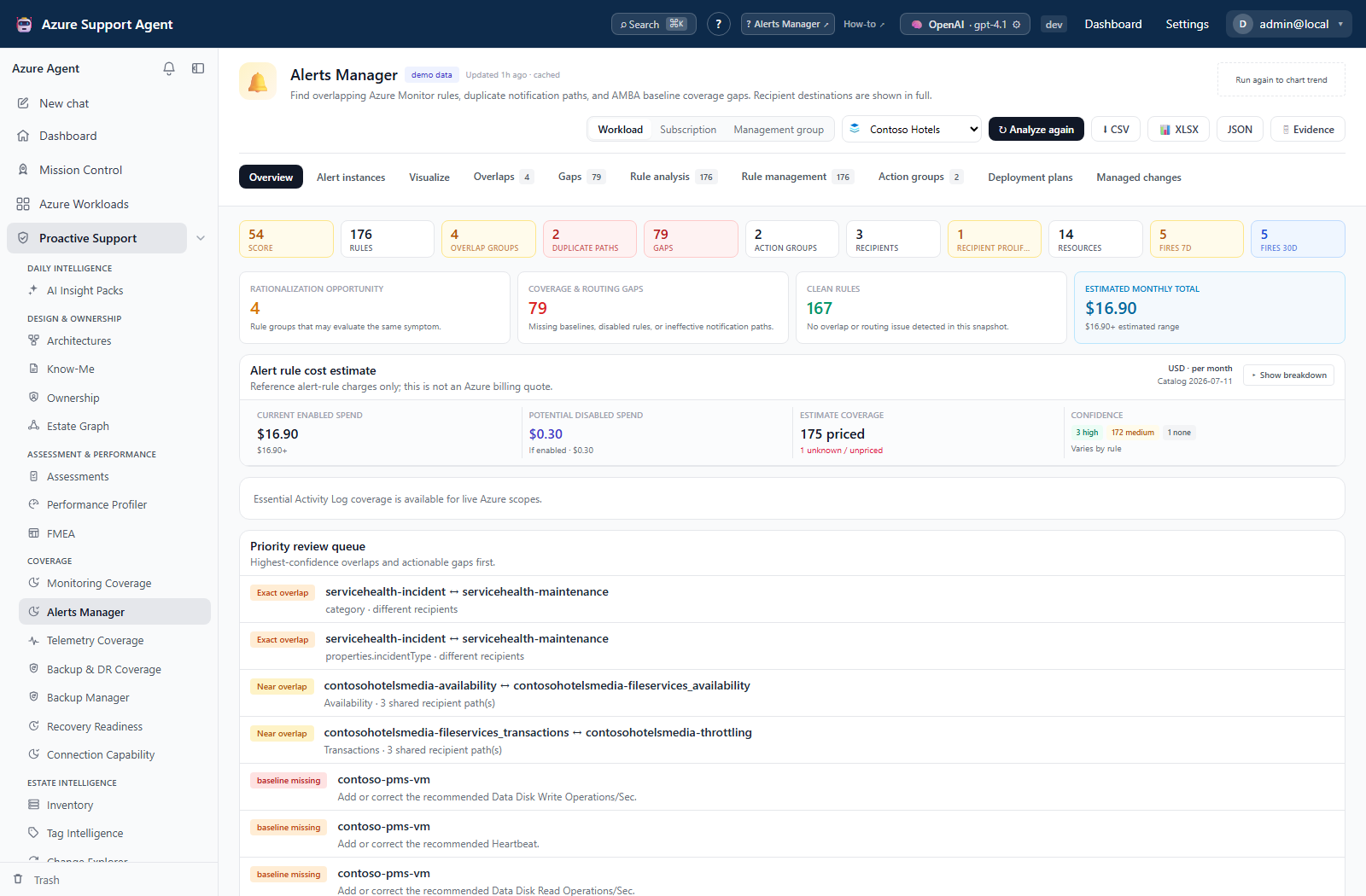
- Overview summarizes gaps, overlaps, ineffective/clean rules, activity-log coverage, and reference cost estimates.
- Overview also hosts Essential Activity Log coverage and its five-step setup wizard: Categories, Subscriptions, Conditions & naming, Routing, and Review.
- Alert instances lists fired alerts; permitted users can acknowledge, close, or reopen an instance. The current table has no instance-detail/history drawer; history is available through the dedicated API or Azure.
- Visualize runs the notification-path simulator and renders resources/rules through action groups to receivers so duplicate and missing routes can be inspected. Activity rules can be narrowed by category; Service Health rules can also be narrowed by Azure event type.
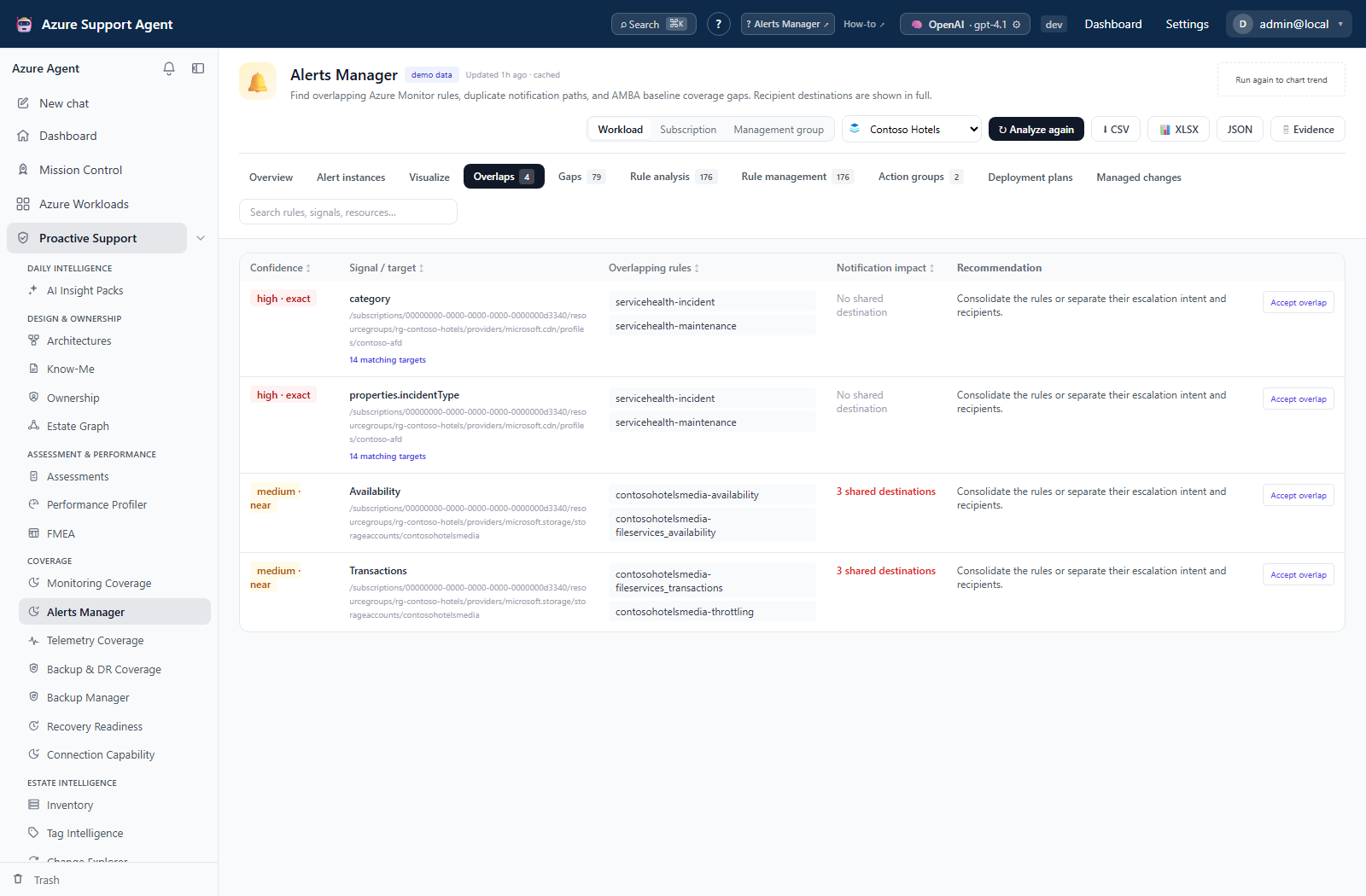
- Overlaps shows rules monitoring the same signal/target and their notification impact.
- Gaps shows missing, disabled, or ineffective baseline coverage and can create reviewed rules or deployment plans for supported gaps.
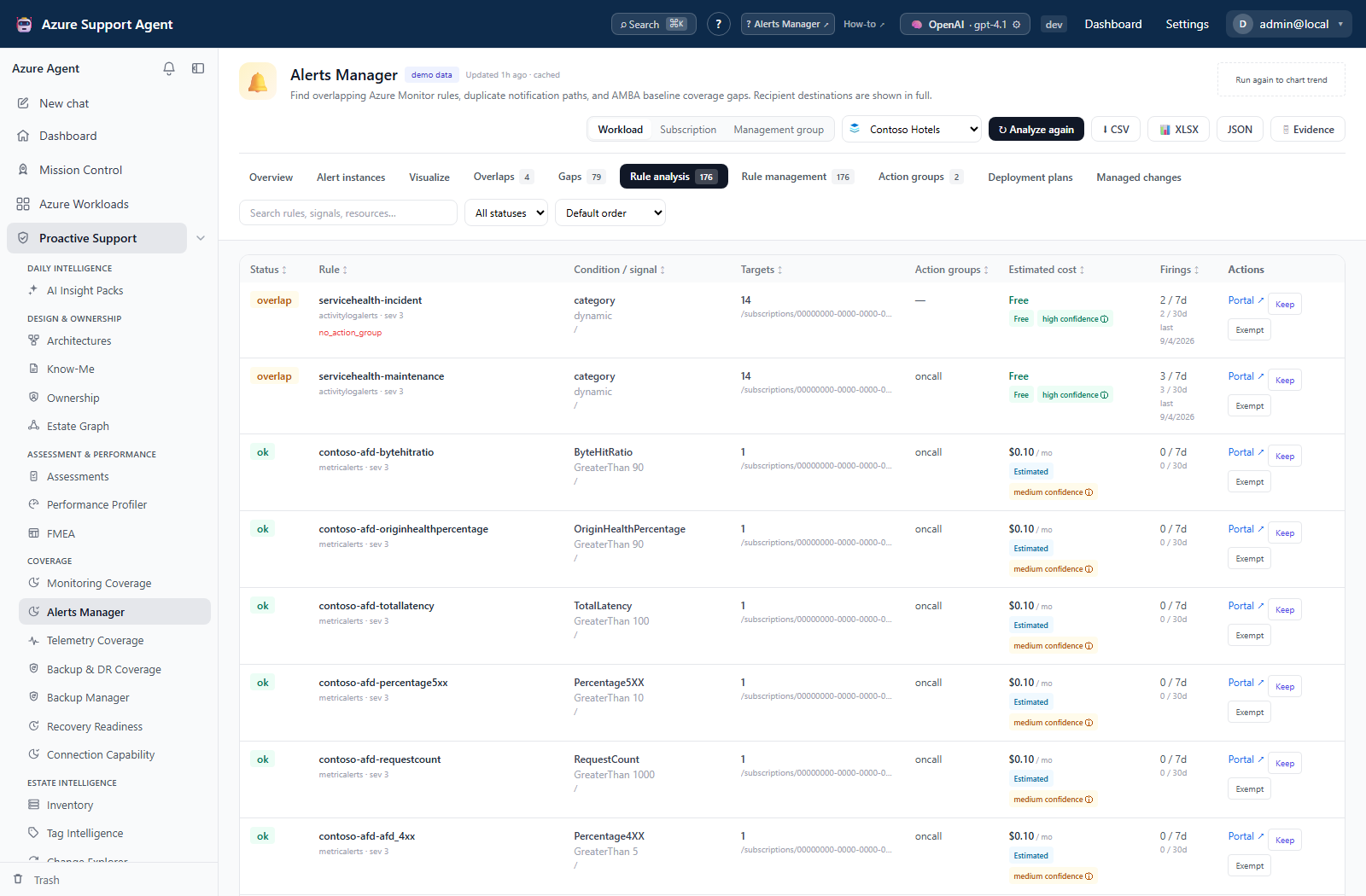
- Rule analysis evaluates observed conditions, targets, action groups, firings, status, recommendations, and estimated cost.
- Rule management is the live Azure inventory/editor for supported metric, log, activity, smart-detection, and Prometheus rule families.
- Action groups inventories and manages receivers, dependencies, enablement, clone/test, and reviewed deletion where capabilities permit.
- Deployment plans groups selected supported gaps into previewable remediation plans.
- Managed changes shows pending, approved, rejected, failed, applied, and rollback-capable requests with before/after detail.
Tab visibility can be permission- or capability-dependent. A read-only connection disables write controls even when the signed-in user has a write permission.
Reading overlaps and rule analysis
Read structural overlap separately from firing frequency. A shared signal or receiver can be intentional escalation rather than a rule to delete. Use the rule’s targets, conditions and destinations to establish what would change before proposing consolidation.
Approval and connection policy
Managed requests are approval-gated independently of autonomous chat. They are stored with auto_apply=false; approval and explicit apply remain separate even when the connection permits chat to auto-execute writes. The current apply helpers enforce read_only=false, but do not check that auto_execute_writes is false. Use an approval-gated connection as an operational safeguard, not as a claim that the API enforces that setting.
Alerts Manager’s decision endpoints do not enforce a different requester and approver or a second approver for high/critical risk. Arrange independent review through your operating procedure; do not infer Backup Manager’s dual-approval behavior from an Alerts Manager risk label. Alert-state transitions and confirmed notification tests are immediate Azure actions with their own permissions, not pending managed changes.
Permissions also differ between UI and endpoint: Delete buttons use alerts_manager.delete, but direct Action Group deletion proposals require alerts_manager.action_group_write, rule deletion proposals require alerts_manager.rule_write (plus advanced permission for advanced families), and bulk rule deletion requires alerts_manager.bulk_write. Preparing a rollback uses alerts_manager.delete. An unavailable UI button is not a complete statement of API authorization.
Freshness and scope behavior
The Inbox, rules, and action groups use live-inventory reads with caching. Managed mutations invalidate affected server inventories; use the available Refresh control or reload the view to reconcile out-of-band Portal or IaC changes. Activity-log coverage runs separately from the stored analysis.
The live Alerts Manager inventory cache lasts 120 seconds, is bounded to 128 entries, and is keyed by application tenant, Azure tenant, connection, scope, and query dimensions. Browser queries also retain Inbox results for two minutes and rule/Action Group results for five minutes. Action Group and rule collectors cap Resource Graph results at 10,000 rows; fired-alert collection caps them at 5,000. Incomplete collection reports partial and truncated. The setup wizard does not select metadata-only or unlisted subscriptions automatically.
The separate analysis becomes stale after its configured TTL (six hours by default) but does not automatically recollect live scopes. Its current firing collector reads seven days even though Rule analysis displays both 7d and 30d columns; that 30d value is not a complete 30-day history. The live Inbox and notification fidelity simulator request a separate 30-day inventory, still subject to source retention and row caps.
- An overlap means multiple rules monitor similar signals/targets or duplicate a notification path; it is a review signal, not automatically an error.
- An AMBA gap means the configured baseline expects a rule that was not matched.
- Pending is not deployed; approved may still await apply; applied should be verified against Azure; failed requires error review.
- A successful test notification proves the tested path at that moment, not complete end-to-end incident delivery.
Workflow overview
Implementation-grounded usage scenarios
- Close selected AMBA gaps: open
/alerts-manager/gaps, select supported actionable rows, preview and validate a deployment plan against a live Action Group, submit child changes, then approve and apply them from/alerts-manager/changes. - Remove duplicate receiver delivery: open
/alerts-manager/visualize, trace duplicated rule-to-Action-Group-to-receiver paths, confirm the overlap in/alerts-manager/overlaps, and submit the smallest rule or routing change through the managed ledger. - Recover from an out-of-band conflict: open
/alerts-manager/changes, inspect a Stale row whose concurrency hash no longer matches Azure, refresh live inventory, create a new request instead of forcing the old payload, and run Analyze again after apply. - Establish management-group Activity Log coverage: select a management group, map every selected subscription to its own existing monitoring resource group or an explicitly approved resource-group prerequisite, choose a healthy visible central Action Group with recommended same-subscription overrides or approved local clones, review server-classified operations, validate, submit pending changes, and apply prerequisites before dependent rules.
Activity Log filters in Visualize
Activity category is always visible. Choosing a category selects the Activity family locally and reveals category-specific filters. Rule family, severity, enabled state, Activity category, and all category dimensions filter the already-loaded routing universe in the browser; they do not rerun Azure inventory. Scope, event state, and explicit simulation refreshes can rerun the backend.
Choosing Service Health adds Azure’s four event types. The simulator maps them to Activity Log properties.incidentType values as follows:
| Visualize event type | Activity Log value |
|---|---|
| Service issue | Incident |
| Planned maintenance | Maintenance |
| Health advisories | Informational or ActionRequired |
| Security advisories | Security |
Choosing Resource Health adds Event status (status: Active, InProgress, Resolved, Updated), Current resource status (properties.currentHealthStatus: Available, Degraded, Unavailable), Previous resource status (properties.previousHealthStatus: Available, Degraded, Unavailable, Unknown), and Reason type (properties.cause: PlatformInitiated, Unknown, UserInitiated).
Facet counts are computed from the conditions currently stored on each live ARM rule. They do not assume the portal defaults. New guided rules and Essential Activity Log plans now default to all four event statuses, all three current statuses, all four previous statuses, and all three reason types. Existing rules are not silently rewritten; a zero beside Available means the live rule does not currently include that value.
Choosing Recommendation adds Recommendation category (properties.recommendationCategory: Cost, Performance, HighAvailability, OperationalExcellence, Security) and Impact level (properties.recommendationImpact: High, Medium, Low). Display labels use spaces while condition matching accepts both spaced and compact Azure values.
Multiple values within one dropdown use OR semantics; separate dimensions use AND semantics. Conditions within an Azure rule retain their ARM allOf/anyOf semantics. A rule without a condition for one dimension is unrestricted for that dimension. Unknown future values are not silently assigned to a known option: Visualize reports an unmapped-condition warning and routing diagnostic. The graph, KPIs, routes, diagnostics, and exports all use the same client-filtered rule set.
This is a configured-routing prediction, not a replay of historical Service Health notifications. It does not fire an alert or send a notification. Use Alert instances or Azure Service Health history to investigate events that actually occurred.
Alert-rule and Action Group nodes support a context menu through right-click, Shift+F10, or the keyboard Context Menu key. The menu always offers Edit rule and Edit Action Group. If the clicked entity has several connected counterparts, the chosen action expands to an inline list so the operator selects the exact ARM resource. Selecting an action opens the corresponding management tab and loads the existing editor with that resource’s current configuration. Visualize filter and highlight context is retained for the return journey.
On a read-only connection or without the relevant management permission, both context actions remain visible as red locked items with the reason. Missing or unreadable connected entities are disabled separately. Opening an editor performs reads only; saving still creates an approval-gated managed change and never applies directly to Azure.
Guided Activity Log rule authoring
Creating or editing an Activity Log rule in Rule management dynamically changes the condition controls for the selected category. Service Health provides event-type selection plus optional impacted services and regions. Resource Health provides Event status, Current resource status, Previous resource status, and Reason type. Recommendation provides Recommendation category and Impact level and fixes the Advisor operation to Microsoft.Advisor/recommendations/available/action. Administrative and Security retain operation, level, status, resource-type, and resource-group controls.
Changing category resets incompatible conditions to safe category defaults. Multi-select values become ARM containsAny clauses; singular free-text values become equals clauses. Existing unknown values for a supported field remain visible as preserved custom values until that field or category is changed. Saving still creates an approval-gated managed change and never writes immediately to Azure.
Essential Activity Log destination model
The setup wizard manages four subscription-level categories: Service Health, Resource Health, Security, and Recommendation. It creates or repairs Activity Log alert rules; it does not silently configure SIEM ingestion. Security event export requires the separate diagnostic-settings workflow.
For a read-only tenant connection, Set up missing alerts remains visible as a red locked action and a persistent notice explains that a writable connection is required. Missing rule-management permission is reported separately from tenant read-only state.
For a management-group scope, destination mapping is per subscription:
- A common resource-group name is optional. Each selected subscription can map to a different resource group.
- Existing rule updates and enables retain the existing rule’s resource group.
- New rules require a mapped resource group. The wizard verifies each target with ARM before it permits submission.
- Preferred resource-group name is a real editable value, prefilled as
rg-monitoringwhen no connection policy is saved. Use where available applies it only where a matching group exists. With Create missing resource groups enabled, Copy name to missing fills unmatched subscriptions; the prefilledeastusdefault location can be changed before planning. - If exactly one resource group is visible for a subscription, it is the fallback after saved and preferred mappings. Ambiguous subscriptions remain unresolved rather than receiving an arbitrary destination.
- Save as connection default writes tenant-and-connection-scoped application configuration containing the preferred name, default location, and resolved subscription-to-resource-group mappings. It can save reusable naming and location defaults before every current mapping is complete; unresolved empty rows are omitted. It requires
alerts_manager.rule_write, is audited, and does not write Azure.
Only enabled Action Groups with at least one active receiver are selectable. One common Action Group can be a healthy group visible through the selected connection in another subscription; preview labels each rule relationship local or cross_subscription. Hybrid central + local routing is the recommended multi-subscription model: a same-subscription healthy override wins, otherwise the healthy central Action Group is the fallback. Saved preferred and per-subscription Action Group mappings are tenant-and-connection scoped application configuration, are re-matched only to healthy visible groups, and require alerts_manager.rule_write to read or update.
For subscriptions that need a local route but have no healthy override, an operator can explicitly enable local Action Group creation, select the subscriptions, choose a healthy visible clone source, and provide an Azure-safe prefix. The generated clone name appends the first eight subscription-ID characters and is bounded to the Azure name limit. Preview classifies each route as local, cross_subscription, or planned_clone; it shows source/target resource IDs and receiver counts, but never receiver endpoints or secrets. Clone creation is a separate high-risk, approval-gated Action Group prerequisite. Its encrypted payload preserves source receiver configuration for apply and retry. Ownership suggestions rank routes, but the displayed SIEM capability is heuristic and must be verified.
The server preview classifies each rule operation as create, update, enable, equivalent, blocked, or invalid. A pending or approved change for the same target blocks a second proposal. The preview also lists existing rules, duplicate/overlap evidence, full reviewed routing, mandatory and optional conditions, and a direct rule-cost classification of free. That classification excludes downstream ingestion, notification, and operational costs.
Missing resource groups are represented as separate resource_group create requests. Planned local clones follow as action_group create requests, and dependent activity_rule requests follow those in the same batch. Submission sets every row to pending with auto_apply disabled and performs no Azure write. Apply checks tenant, connection, expected prerequisite type, and applied status: a clone cannot bypass its resource-group prerequisite, and a rule cannot bypass either its resource-group or planned-clone prerequisite.
Managed-change selection is dependency-aware across server-side pages. Selecting one or more pending or approved rows calls POST /api/alerts-manager/changes/resolve-dependencies; the backend, not the browser, follows every prerequisite transitively, rejects missing, cross-tenant, cross-connection, type-mismatched, or cyclic references, and returns the topological order. The selection bar distinguishes requested rows from automatically added prerequisites. Select all retrieves all actionable pages before asking the backend to expand the closure. Applied rows are not selectable as actionable rows.
Bulk approval and rejection use POST /api/alerts-manager/changes/bulk-decision and require alerts_manager.approve. Approving with prerequisites included changes every pending row in the resolved closure and retains prerequisites already approved or applied. Rejection can cancel pending or approved-but-unapplied rows, walks the dependency closure in reverse topological order, and does not reject a prerequisite that is shared by an unselected active dependent. The row-level Reject control uses POST /api/alerts-manager/changes/{change_id}/decision and can likewise reject one pending or approved-but-unapplied row. Decisions are application-state and audit writes only; they do not call Azure.
Bulk apply uses POST /api/alerts-manager/changes/bulk-apply. The server recomputes the transitive closure and executes its topological order, with resource groups ordered before Action Groups and dependent rules (for the wizard path, RG → Action Group → rule). A failed prerequisite skips only its descendants; independent branches continue. Results report applied, already_applied, skipped, and failed counts plus grouped prerequisite errors and affected descendant IDs. Skipped descendants retain their approved state. After an eligible individual clone retry has applied the original prerequisite, selecting an approved descendant recomputes the closure and treats already-applied ancestors as satisfied. Bulk apply does not itself retry a failed root, and a replacement proposal does not automatically repair old dependency links.
Approval and apply remain separate. alerts_manager.rule_write builds, previews, validates, submits, and saves destination defaults; alerts_manager.approve approves, rejects/cancels pending or approved-but-unapplied changes, applies, and retries an eligible failed clone; alerts_manager.delete prepares supported rollbacks. Rejection is not a rollback and is unavailable after application. Apply creates evidence and invalidates affected inventories. Optimistic concurrency marks an out-of-date rule update stale. Resource-group prerequisite creation has no automatic rollback because deleting a group could delete unrelated resources. A wizard-created clone can produce a rollback request only while it has no rule dependencies; dependency discovery blocks deletion both when requested and again at apply time.
Subscription Activity Log diagnostic settings
From the setup wizard’s Conditions & naming step, Configure diagnostic settings opens a separate three-step workflow: Inventory, Destination, Preview & submit. It enables Administrative, Alert, Policy, and Security exports to one Log Analytics workspace, Storage account, or Event Hub namespace authorization rule plus hub name. This is log ingestion, not Action Group notification routing, and downstream storage/ingestion charges may apply.
Only inspectable subscriptions can be selected. Preview classifies each operation as create, update, equivalent, or blocked; validation and submission rebuild the plan and compare its token, including prior-setting hashes. A named setting is preferred, then one matching the destination. An update preserves other properties/categories but replaces that setting’s destination fields with the selected destination: review any existing additional destinations before submitting. Submission requires alerts_manager.rule_write and a writable connection; apply requires alerts_manager.approve and checks live concurrency again.
The diagnostic-setting executor supports create and update, not delete. A generic Prepare rollback control can therefore prepare an inverse for a create that cannot be applied by this executor. Review an update’s supported inverse separately; removal of a created setting needs an independently reviewed Azure operation.
Triage an alert
- Select the intended connection and scope, then load the Inbox.
- Page through the current 30-day request and inspect severity and state. The API additionally accepts a state filter and a 1–90-day window; these are not current table controls.
- Inspect fired time, monitor condition, and target; use Azure or the history API for the instance’s transition history.
- Acknowledge only when ownership is clear; close only after resolution or accepted disposition.
- Use Rule analysis and firing history for recurrence; use Visualize separately to trace its notification route and detect duplicate deliveries.
State changes affect the Azure alert instance; they do not fix the monitored condition or modify the rule.
Propose a rule or routing change
- Open Gaps, Rule management, Action groups, or Deployment plans.
- Select an existing object or start a supported authoring flow.
- Validate metric names, dimensions, query syntax, scopes, thresholds, receivers, and estimated behavior.
- Preview the before/after deployment plan.
- Submit the change. It remains pending regardless of chat auto-execution settings.
- An approver reviews the diff and approves or rejects it.
- Confirm applied/failed status and re-query Azure. A failed request retains error details for correction.
Alerts Manager requests in this workflow always enter the managed ledger with automatic apply disabled. Submission and approval do not mutate Azure; only Apply to Azure does.
Reduce noise safely
Start with notification-path visualization, overlap evidence, and firing history. Prefer a narrowly scoped threshold, dimension, window, or evaluation-frequency proposal over disabling a rule. Current Alerts Manager does not implement Alert Processing Rule suppression windows. Test notification routing where supported, document the reason, and monitor incident detection after the change.
Interpretation of results
Treat overlap, gap, cost, and simulator output as decision support. An overlap may be intentional layered escalation; a gap is relative to the selected AMBA baseline; cost is a reference estimate rather than a bill; and simulated notification edges show configured paths, not guaranteed downstream processing. Applied means the request completed, but only refreshed Azure inventory and a new analysis verify convergence.
Exports, history, scheduling, and integrations
Gap and deployment-plan flows produce reviewable change plans for supported rules; rule/action-group editors submit managed changes rather than silently editing Azure. Generated payloads and previews must be checked for scopes, receiver secrets, region support, naming, and cost. Sensitive receiver values must be supplied through the organization’s secret-management process, never embedded in documentation or source control.
Analysis exports support CSV, XLSX, and JSON. Essential Activity Log coverage exports support CSV, JSON, and XLSX at the API; the current wizard exposes CSV and JSON controls. Export is read-only and audited. Managed apply creates an Evidence Locker snapshot; the destination-default record is local application configuration rather than an Azure artifact.
Analysis exports can contain full email and phone destinations. They are not anonymous or guaranteed free of operational identifiers. Visualize’s client-side CSV/JSON exports use the local rule filters; graph-only display filters and the routes-table search are not an export scope filter.
Refresh records full analysis runs and compact trend points. Run-history and decision APIs remain available without dedicated history/decision tabs. Run/trend history is keyed by tenant and scope; decisions and the current snapshot also include connection. Legacy /api/alert-analysis/plans are non-executing review artifacts and are distinct from the executable managed-change ledger. AMBA blueprint/version/assignment APIs also exist, but the current Deployment plans tab renders plan review, not the standalone blueprint editor. Mission Control can refresh alert analysis; there is no schedule editor on these tabs.
Current limits include 50 targets per bulk rule proposal, 5,000 requested change IDs for dependency operations, 100 rows per managed-change page, and 200 rows per analysis-section API page. Rules accept at most five Action Groups. KQL/PromQL are limited to 8,000 characters; metric previews return up to 200 points and log previews up to 100 rows. Pricing uses the versioned public-USD reference catalog, not actual spend: unknown prices and unbounded maxima must not be read as zero.
Safety and limitations
- Alert-state, rule, and action-group operations are distinct permissions.
- Query validation is best-effort and cannot predict every runtime data pattern or billing impact.
- Closing an alert does not suppress future firings.
- Suppression and dynamic tuning can hide real incidents; keep narrow scope, expiry, ownership, and an audit rationale.
- Portal/IaC changes made outside the app may remain invisible until refresh.
- Inventory collectors can return
partialortruncatedmetadata; do not treat absent rules, action groups, or paths as proof of absence when either flag is set. - A management-group plan changes only explicitly selected subscriptions returned inside the resolved scope. Unlisted subscriptions are not inferred or changed.
- Management-group discovery supports a healthy visible central Action Group across subscriptions, preferred and per-subscription saved mappings, same-subscription local overrides, and explicitly selected approval-gated local clones. A local override must belong to the rule subscription; central fallback is the supported cross-subscription relationship.
- Clone target availability and source health are rechecked during preview. A planned clone also requires an explicitly enabled creation option, a destination resource group, and a valid safe prefix.
- A saved destination policy is a convenience default, not proof that a resource group still exists or that the connection can write it; preview rechecks ARM.
- Automatic resource-group rollback is intentionally unsupported. Clone rollback is also blocked while the clone has dependencies. Remove an unused prerequisite manually only after proving that it contains no unrelated resources or references.
- Dependency resolution is authoritative at decision and apply time. A browser selection is not proof that its closure is complete, and a structural dependency error disables bulk apply until the source records are corrected.
- Never include webhook URLs, tokens, email addresses, tenant IDs, or other live identifiers in exported examples.
Troubleshooting
| Symptom | Cause and resolution |
|---|---|
| Analysis fails with a permission error although manager inventory is allowed | The analysis uses alert_analysis.read, not alerts_manager.read. Grant the missing read capability; alert_analysis.manage is separately needed for acceptance decisions. |
| A wizard optional condition is refused by name | The guided wizard and server allowlist differ for some fields: impacted Service Health services/regions and the wizard resource-group filter are not accepted in that planner contract. Clear the named optional field and rebuild the preview, or use the separately reviewed Rule management editor; do not bypass validation. |
| Retry clone leaves a failed row unchanged | The current UI routes Retry clone through bulk apply, which accepts approved/applied rows and rejects failed rows. The individual apply API supports eligible failed-clone retry. Have an authorized operator review that path or create a corrected proposal; do not repeatedly click the bulk retry. |
| A created diagnostic setting cannot complete rollback | Its inverse is delete, but the diagnostic executor only accepts create/update. Use a separately reviewed Azure removal after checking ingestion dependencies. |
| Write button is disabled | Check the specific product permission, connection read_only state, and capability matrix. |
| Rule validation fails | Verify signal family, target resource type/region, metric namespace, dimensions, query, and evaluation settings. |
| Change remains pending | A user with alerts_manager.approve must decide it; inspect the Changes tab. |
| An approved change should no longer be applied | Before apply, use that row’s Reject control, or select the approved rows and use bulk Reject, provide a reason, and verify they move to archived/rejected. If the row is already applied, rejection is unavailable; prepare a supported rollback instead. |
| Applied change is absent | Refresh rules, inspect request error/audit fields, and confirm Azure RBAC at the target scope. |
| Duplicate notifications persist | Trace every rule-to-action-group path, including activity-log and externally managed rules. |
| A management-group subscription remains unresolved | Select an existing resource group for that subscription, or enable explicit resource-group creation and provide a valid location. A preferred name is not used when it does not exist unless creation is enabled. |
| A local override is outside the rule subscription | Select a healthy Action Group from that subscription, clear the override to use the healthy central fallback, or explicitly plan a local clone. Cross-subscription routing is supported only for the common/central relationship. |
| A subscription is unresolved in hybrid routing | Select a healthy central Action Group, choose a healthy same-subscription override, or explicitly enable clone creation and select that subscription with a healthy source and valid prefix. |
| Planned clone preview is invalid | Confirm the source is visible, enabled, and has an active receiver; enable local Action Group creation; provide an Azure-safe prefix; and resolve the destination resource group and location. |
| Activity Log rule or clone apply is blocked after approval | Select the approved row and apply it; the current row-level apply uses the dependency-aware bulk endpoint for that one requested row, expands prerequisites, and enforces resource group → Action Group → rule order. Resolve any non-approved prerequisite or structural error first. |
| Selecting one change adds rows from another page | This is the backend-resolved transitive prerequisite closure. Review the requested/prerequisite counts and dependency status before deciding or applying. |
| Bulk apply reports one failed branch and several skipped rows | Resolve the named prerequisite first: eligible failed clones use individual apply, not bulk retry. Independent branches have continued and skipped descendants remain approved. Once the original prerequisite is applied, select an approved descendant to resume; rebuild the dependent plan if a replacement prerequisite is needed. |
| Bulk decision reports a shared prerequisite | Another unselected pending or approved change depends on that prerequisite. Review that dependent before rejection; the server intentionally retains the shared prerequisite. |
| Clone receiver endpoints appear absent from preview | This is intentional. Preview and audit summaries expose only source/target IDs and receiver counts; encrypted source configuration is restored only for apply or an eligible retry. |
| Resource-group prerequisite cannot be rolled back | This is an intentional safety boundary. Verify whether the group is empty and remove it through an independently reviewed Azure process if appropriate. |
| Wizard-created clone rollback is blocked | Detach every dependent Azure alert rule and refresh inventory. The service checks dependencies before preparing deletion and again before apply. |