Usage and Audit Log
Permissions: monitor.view for Usage; audit.read for Audit Log and stored SIEM destination details; settings.write to change, test, flush, or reset SIEM destinations
Purpose
App routes: /admin/usage, /admin/audit
Prerequisites and data sources
- Usage reads stored request/token/cost estimates and requires
monitor.view. - Audit reads tenant-scoped application audit rows and requires
audit.read. - SIEM destination mutation is a separate
settings.writeoperation. The/admin/auditUI is read-gated, so a custom role that manages SIEM from this page needs bothaudit.readandsettings.write. Either key alone is insufficient for the complete UI workflow.
Tabs and actions
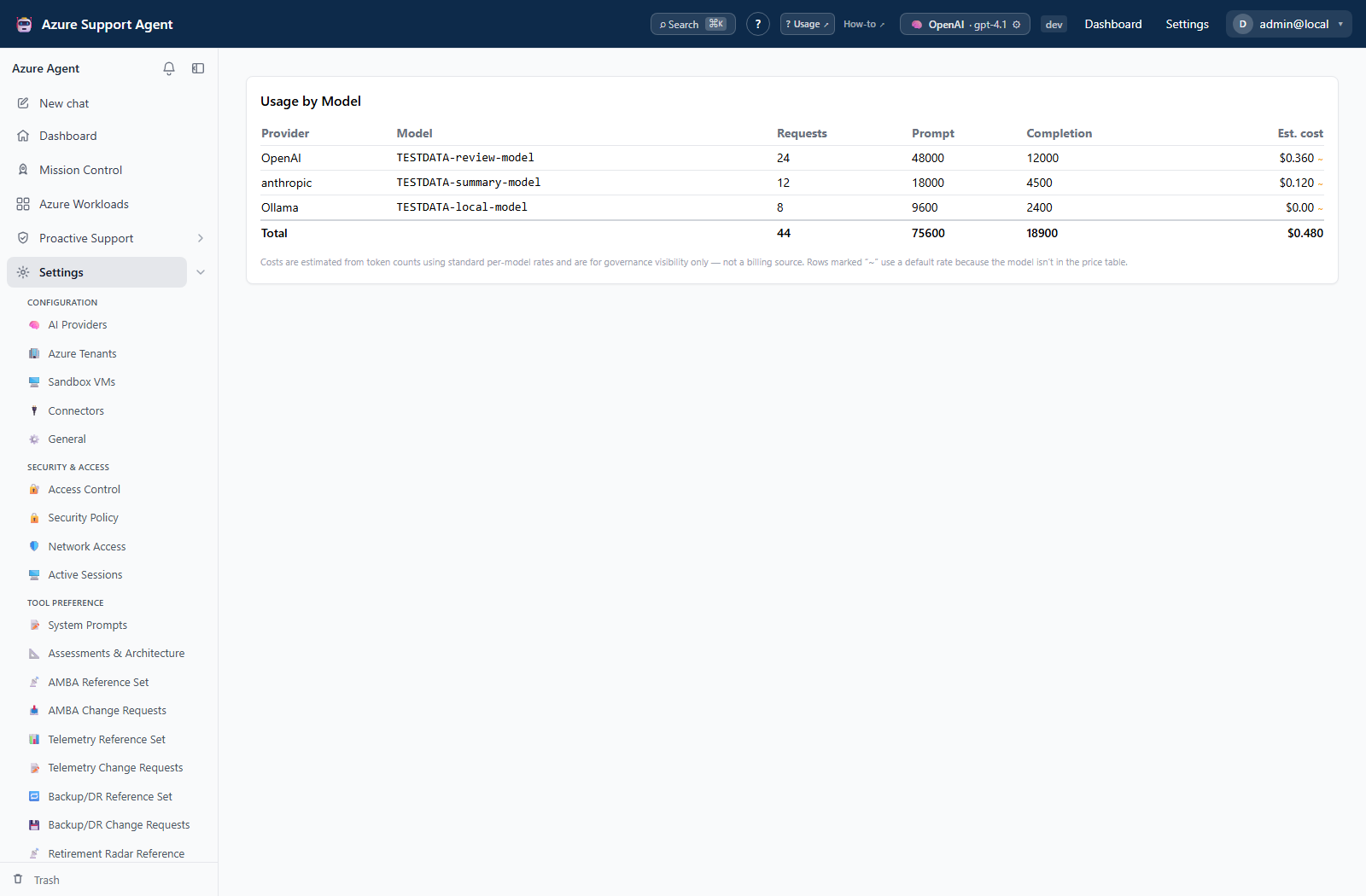
- Usage is read-only and groups request count, prompt/completion tokens, and estimated cost by provider/model.
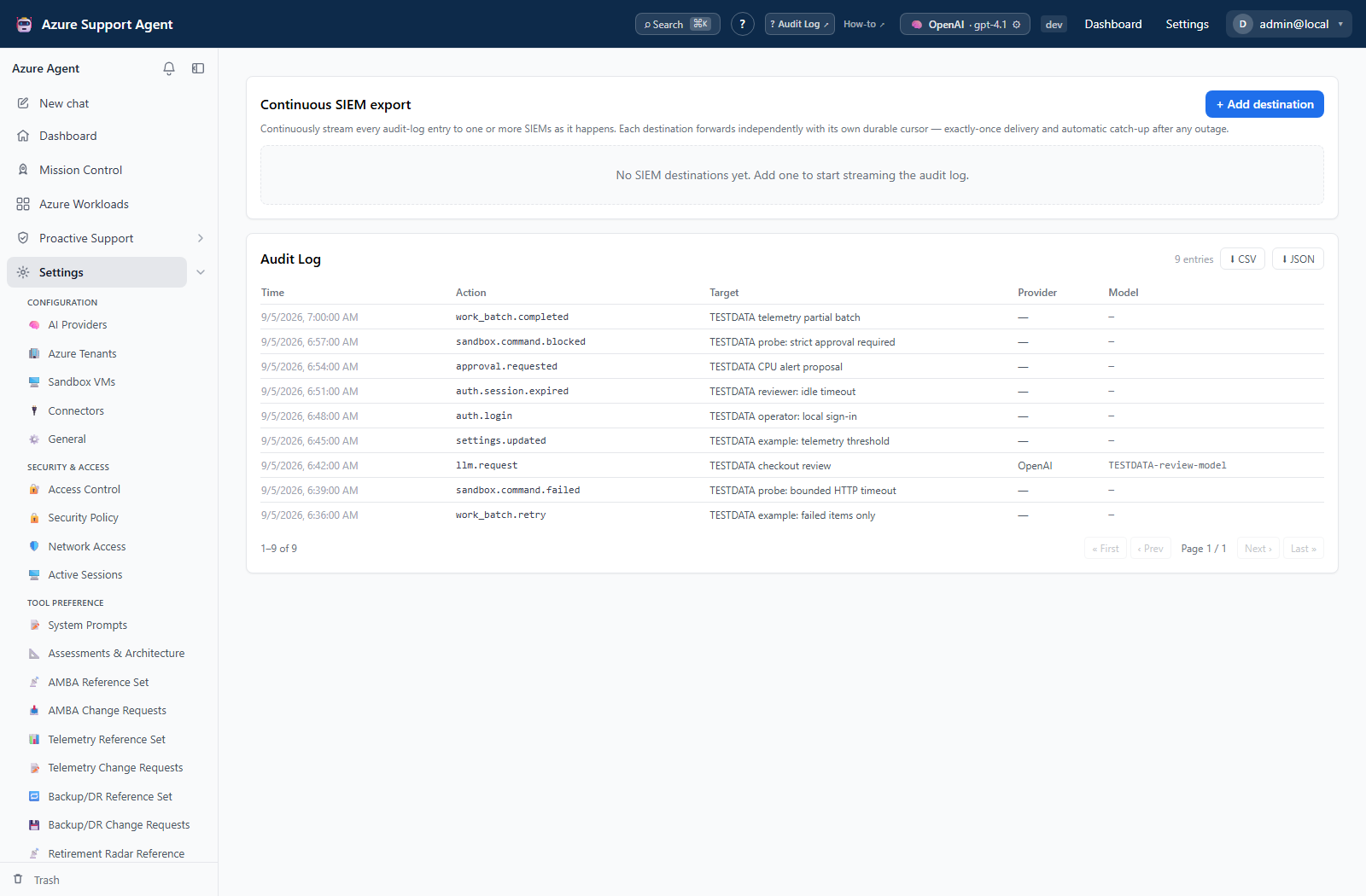
- Audit Log pages through entries and can create local CSV/JSON artifacts from readable rows.
- SIEM destinations can be inspected with
audit.read; create/update/delete, enable/disable, test delivery, flush, and cursor reset requiresettings.writeand can produce external effects. Supported destination configurations are Splunk HEC and generic HTTP/webhook.
Freshness and scope behavior
- Usage and Audit Log reads are tenant scoped. Audit pages use a maximum page size of 200; CSV/JSON export pages through the readable rows in batches.
- Each SIEM destination maintains its own cursor, forwarded count, last success, and last error. Flush now requests immediate delivery of pending rows. Reset cursor starts replay from the earliest audit row and can create duplicates at the destination.
Workflow overview
Investigation workflow
- Define a UTC window and actor/target.
- Find the initiating action and associated approval or configuration change.
- Correlate IDs and timestamps with feature, Azure, and connector records.
- Export only through an approved process and redact sensitive metadata.
- Preserve decision-grade records in Evidence Locker or the organization’s SIEM.
Interpretation of results
Exports, history, scheduling, and integrations
Usage
Usage is grouped by provider and model with request count, prompt tokens, completion tokens, and estimated USD cost plus totals. A tilde marks a fallback rate for a model absent from the price table. These numbers support governance only; provider invoices, Azure agreements, caching, and delayed billing remain authoritative.
Audit Log
Audit entries include timestamp, actor, action, target, optional provider/model, and action-specific metadata. Use pagination and available filters/search to investigate configuration, provider OAuth, approvals, connections, connectors, users, sessions, backups, demo data, and feature writes.
An audit event proves the application recorded an action; it does not alone prove an external Azure or connector operation completed. Correlate with managed-change status, destination delivery logs, Azure Activity Log, or external system records.
SIEM Send test event performs a real outbound delivery. A successful test verifies the configured endpoint at that moment, not continuous delivery. Flush now can forward pending records, and Reset cursor deliberately replays previously forwarded records.
Safety and limitations
Usage estimates are not invoices. Audit export can contain sensitive actor, target, provider, model, and metadata fields. SIEM endpoint tokens are masked after save; leaving a saved token blank preserves it. Keep TLS verification enabled unless an approved private trust design requires otherwise. SIEM test/flush/reset actions can deliver or replay external events; use settings.write only under an approved destination procedure.
Troubleshooting
| Symptom | Cause and resolution |
|---|---|
| Usage is absent or returns forbidden | Assign monitor.view to the active role. |
| Audit Log is absent or returns forbidden | Assign audit.read; monitor.view does not grant audit access. |
| SIEM mutation controls are read-only | The active role lacks settings.write. Use a separately approved configuration role. |
A custom SIEM role has settings.write but cannot open Audit Log | Add audit.read; the page route is independently read-gated. |
| Reset cursor caused duplicate events | Reset intentionally replays from the earliest audit row. Deduplicate at the SIEM by event identity/time and do not reset again until the replay is reconciled. |
| Estimated cost differs from an invoice | Reconcile against provider billing; fallback rates, caching, and billing delay can differ. |
| Audit success does not match Azure or a destination | Correlate the application row with managed-change state, Azure Activity Log, or destination records. |