Manual deployment
Use manual deployment when you need to control the image build, registry, Container Apps sizing, storage, networking, or release process. The product ships as one image: FastAPI serves both /api and the built SPA, while MCP servers run in-process. No separate frontend, database, or Redis container is required.
Prefer a guided path? Use one-click installation.
How it fits in one container
- SPA — built by the repository’s multi-stage Dockerfile (
VITE_API_BASE=/api) and copied intoapp/static. FastAPI serves/assets/*and falls back toindex.htmlfor any non-/apipath, so deep links and refresh work. - Database — PostgreSQL for a shared deployment, or SQLite (
DATABASE_URL=sqlite+aiosqlite:///./.data/app.db) with./.dataon an Azure Files volume so it survives revisions. - Redis — not on the request path; omit it.
- MCP servers — spawned in-process over stdio. The production image runs its pinned, build-time Azure MCP installation through
azmcp; the EntraID FastMCP server uses its isolated image virtual environment. The image includes Node 22 and Azure CLI. - Azure Resource Graph extension — production bakes
resource-graphinto/opt/az-extensionsand setsAZURE_EXTENSION_DIRto that stable path, so temporary service-principal CLI sessions do not download an extension into each throwawayAZURE_CONFIG_DIR. - Dependencies — pinned in the backend requirements file and installed before
pip install --no-deps .so every runtime import resolves.
API prefix
Every backend endpoint is served under /api (for example /api/me, /api/chats, /api/admin/...). Only /healthz and /readyz live at the root. The frontend reads its base from VITE_API_BASE, defaulting to http://localhost:35001/api for local development. This keeps API routes from colliding with the SPA’s client-side routes such as /inventory, /admin, and /policy.
Azure access modes
| Mode | How |
|---|---|
Your az login (default, local) | ~/.azure is mounted into the backend and your own RBAC applies |
| Service principal | set AZURE_TENANT_ID, AZURE_CLIENT_ID, and AZURE_CLIENT_SECRET |
| Managed identity (Container Apps) | assign an identity to the Container App; no secret is needed |
The Azure MCP server starts with --read-only (MCP_READ_ONLY=true). Write-capable tools are classified, approval-gated, and audited.
Match runtime identity to the application connection
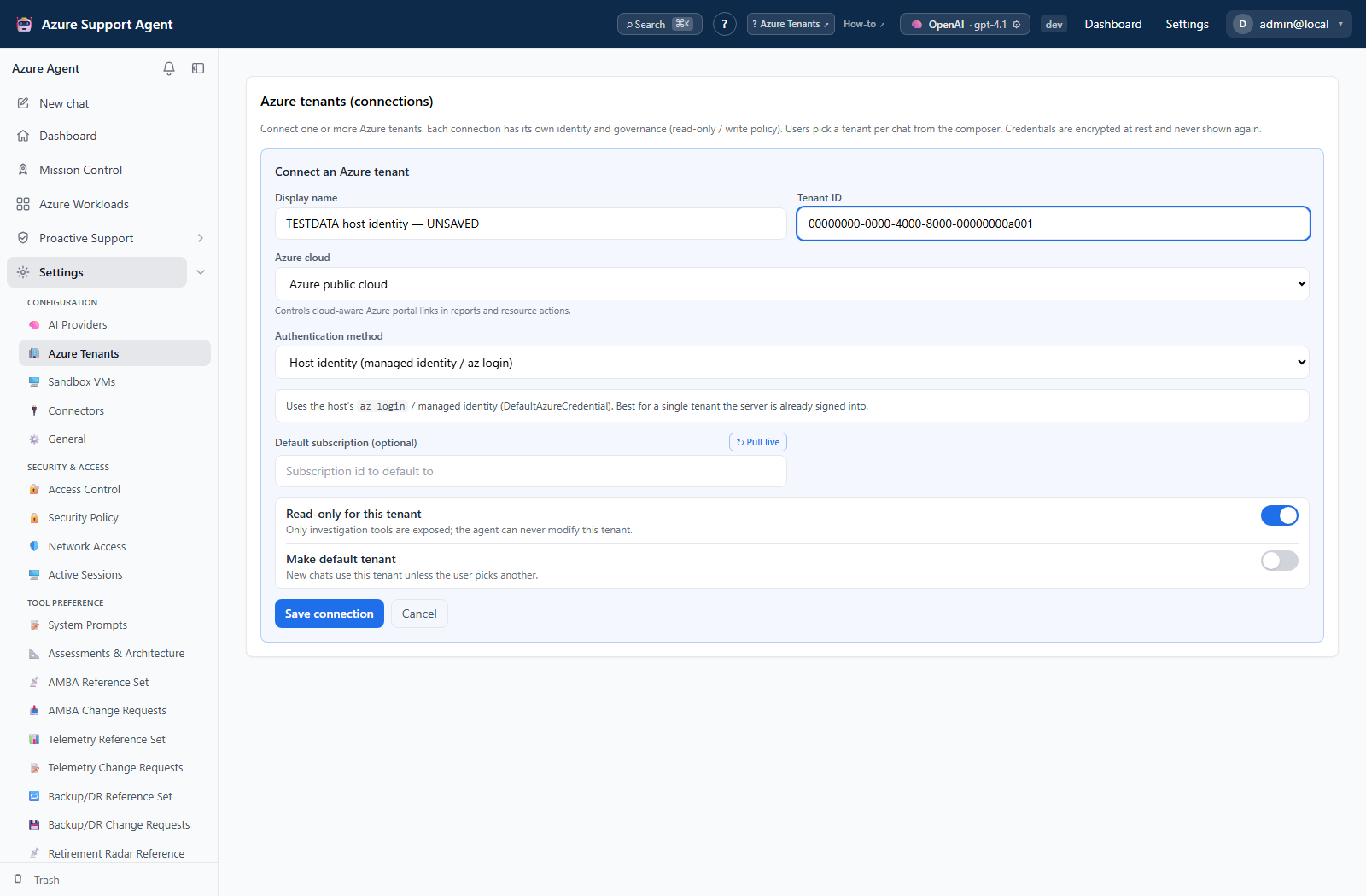
After deployment, configure the corresponding connection under Settings → Azure Tenants. The Host identity option covers a managed identity in Azure or the host credential chain in a suitable local environment; the form itself does not provision either identity.
Prerequisites
- Azure CLI authenticated to the intended subscription.
- Permission to create a resource group, Azure Container Registry, Container Apps resources, identities, role assignments, storage, and the chosen database.
- Dockerfile build context from a trusted release or reviewed source checkout.
- A production secret-management plan.
Deployment workflow
- Choose persistence. Use PostgreSQL for a shared production database, or place SQLite’s
.datadirectory on Azure Files. Never rely on an ephemeral container filesystem. - Choose the identity. Prefer a Container App managed identity. If using a service principal, store its secret or certificate as a Container App secret.
- Build, scan, and publish the image. Build from the repository root so the frontend and backend are included, scan it before publication, and update the registry’s
latesttag. - Create the Container Apps environment and application. Expose port 8000 through HTTPS ingress.
- Set production configuration. Important settings include the database URL, secure-cookie behavior, bootstrap administrator values, public URL, connection identity, and optional model configuration.
- Attach persistent storage before allowing production traffic when SQLite is selected.
- Verify health. Check
/healthzfor process-only liveness and/readyzfor a bounded database plus recent event-loop readiness check, then load the SPA through the public URL. - Grant Reader to the application identity at the intended Azure scope.
- Complete First-run setup.
Key production environment variables
| Variable | Purpose |
|---|---|
SEED_ADMIN_USERNAME / SEED_ADMIN_PASSWORD | Bootstrap administrator created on first run. Store the password as a Container App secret; the user is forced to change it at first sign-in. |
DATABASE_URL | sqlite+aiosqlite:///./.data/app.db on Azure Files, or a PostgreSQL URL (?ssl=require for Azure Database for PostgreSQL). |
COOKIE_SECURE | true behind HTTPS ingress. |
AZURE_TENANT_ID / AZURE_CLIENT_ID / AZURE_CLIENT_SECRET | Service-principal identity for MCP, or use a managed identity. There is no ~/.azure mount in Container Apps. |
AZURE_EXTENSION_DIR | Stable Azure CLI extension location. The production image and Bicep deployment use /opt/az-extensions, which already contains resource-graph. |
LLM_API_KEY | Optional. A model provider key can be configured in Settings instead. |
Keep every secret in a Container App secret or an approved secret store. Never bake one into the image or a template parameter file.
Deploy the supplied template
The production preset keeps secrets out of source control by reading them from the process environment. It enables more expensive resilience controls deliberately; inspect and adjust it before deployment.
$env:AZSUP_ADMIN_PASSWORD = '<strong-temporary-bootstrap-password>'
$env:AZSUP_POSTGRES_PASSWORD = '<strong-database-password>'
$env:AZSUP_ALERT_EMAIL = '<optional-operations-email>'

az deployment group create -g <resource-group> `
  --template-file deploy/main.bicep `
  --parameters deploy/production.bicepparam
Use the default template instead for the lower-cost 1-2 replica/Burstable/LRS profile. Keep containerImage on registry/repository:latest. The template’s timestamp-backed containerRevisionSuffix creates a fresh revision on every deployment so Azure pulls the current image.
Production knobs
- PostgreSQL: tier/SKU, 32-32,767 GiB storage, autogrow, 7-35 day retention, geo-backup, HA mode/zones, and custom maintenance window.
- Container Apps: environment zone redundancy, CPU/memory, minimum/maximum replicas, HTTP concurrency, and startup/liveness/readiness probes.
- Storage: redundancy, Azure Files quota, and share soft-delete retention.
- Operations: shared tags, Log Analytics retention, data-service diagnostics, optional metric/log alerts and email receiver, and optional
CanNotDeletelocks. - Secrets and supply chain: pre-publication image scanning, a mutable
latestapplication tag, system-assigned runtime identity, optional existing user-assigned identity for ACR/Key Vault, and optional Key Vault URIs for database/admin/encryption secrets.
appMaxReplicas must be at least appMinReplicas. PostgreSQL HA requires a supported General Purpose or Memory Optimized SKU. A private ACR configuration requires an existing user-assigned identity with AcrPull before the initial deployment. Scheduled-query alerts should be enabled on a later deployment, after the Container Apps log tables have received data; platform metric alerts can be enabled initially.
When publishing a new image, scan it first and then move latest to that reviewed build. Re-running the supplied template uses a new revision suffix automatically; a direct az containerapp update must likewise provide a unique suffix. See upgrades and uninstall.
Cost and scaling
- Lowest-cost posture: Basic ACR plus a Consumption Container App with
--min-replicas 0(no compute charge while idle) at 0.5 vCPU / 1 GiB. The first request after idle pays a cold start, but the Azure MCP package and Resource Graph extension are already in the image and are not fetched at runtime. - Use a single replica with SQLite. PostgreSQL plus the current shared leases/state supports multiple replicas; the template defaults to 1-2 for bounded cost and the production preset uses 2-4 for replica resilience.
Production guardrails
- Set
COOKIE_SECURE=truebehind HTTPS. - Keep the bootstrap password in a platform secret and change it at first sign-in.
- Protect database credentials and the application’s secrets-encryption key.
- Keep one uvicorn worker per replica. Database leases coordinate process-owned schedulers and durable jobs across replicas; extra workers inside one replica only create hidden pools and schedulers.
- Keep Azure MCP read-only unless a reviewed workflow requires writes; product write paths remain permission- and approval-gated.
- Keep the root image’s
AZURE_EXTENSION_DIR=/opt/az-extensionssetting. The image bakes theresource-graphAzure CLI extension there so temporary service-principal sessions do not install it dynamically. - Restrict ingress and outbound traffic deliberately if private networking is required.
- The Azure Files mount uses the Container Apps account-key contract; managed identity does not replace that key. Private mode disables storage public access and uses a private endpoint.
- Defender for Cloud plans are subscription-level and can add cost. Review them separately; the resource-group template intentionally does not change subscription security plans.
Validate the result
- The Container App revision is healthy, serving the expected
latestbuild, and reports the expected build identity from/version. /healthzsucceeds without touching dependencies;/readyzsucceeds only when the bounded database probe and recent event-loop criterion are healthy.- Refreshing a client-side route such as
/workloadsreturns the SPA, not a 404. - Database data survives a revision restart.
- The managed identity or service principal can list only the intended Azure scopes.
- No credentials appear in revision logs or environment-variable exports.
Troubleshooting
| Symptom | What to check |
|---|---|
| Container exits at startup | Application logs, dependency installation, database URL, and mounted paths |
| SPA loads but API calls fail | /api routing, frontend build-time API base, ingress, and CORS/public URL settings |
| Data disappears after a revision | Azure Files mount or PostgreSQL connection; SQLite must not live only in the image filesystem |
| Deep links return 404 | Requests must reach FastAPI’s SPA fallback, not a static host without rewrite rules |
| Azure tools cannot authenticate | Managed-identity assignment or service-principal variables and RBAC scope |
az graph is missing intermittently | Confirm the current image contains /opt/az-extensions and the revision sets AZURE_EXTENSION_DIR to it; rebuild rather than dynamically installing into each temporary CLI profile |
| First request is slow | Scale-to-zero cold start and initial MCP process startup; production packages are already image-baked |
Build-time gotchas
az acr build’s log streamer can crash locally on Windows withUnicodeEncodeError: '\u2713'(colorama on cp1252). The build still runs server-side; pollaz acr task list-runs -r <acr> --top 1 -o table, or stream logs to a UTF-8 console without piping or redirecting.az containerapp up --source .can fail with'NoneType' object has no attribute 'linux'. Use the explicitacr create→acr build→containerapp createsequence above instead.- The Dockerfile copies
backend/beforepip installbecausesetuptools packages=["app"]validates the package directory at build time. - The container imports the whole API at startup, so a missing dependency crashes uvicorn immediately. Keep
backend/requirements.txtcomplete. - If
az graphis reported missing in a service-principal session, verify the revision was built from the root Dockerfile and still setsAZURE_EXTENSION_DIR=/opt/az-extensions. Rebuild the image rather than working around it with repeated dynamic installs into temporary config directories.