Discovery and Autopilot
Route: /workloads → Autopilot
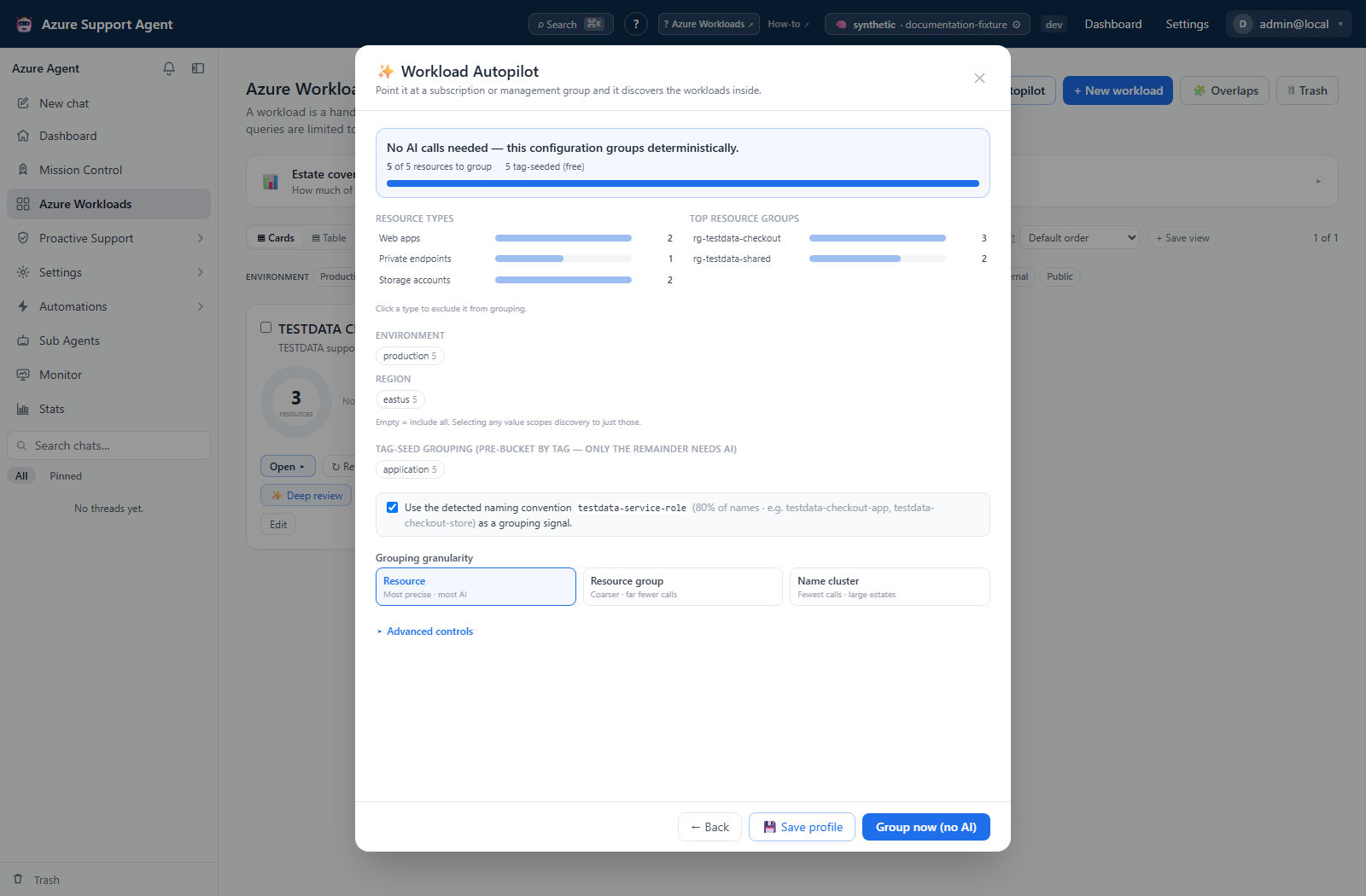
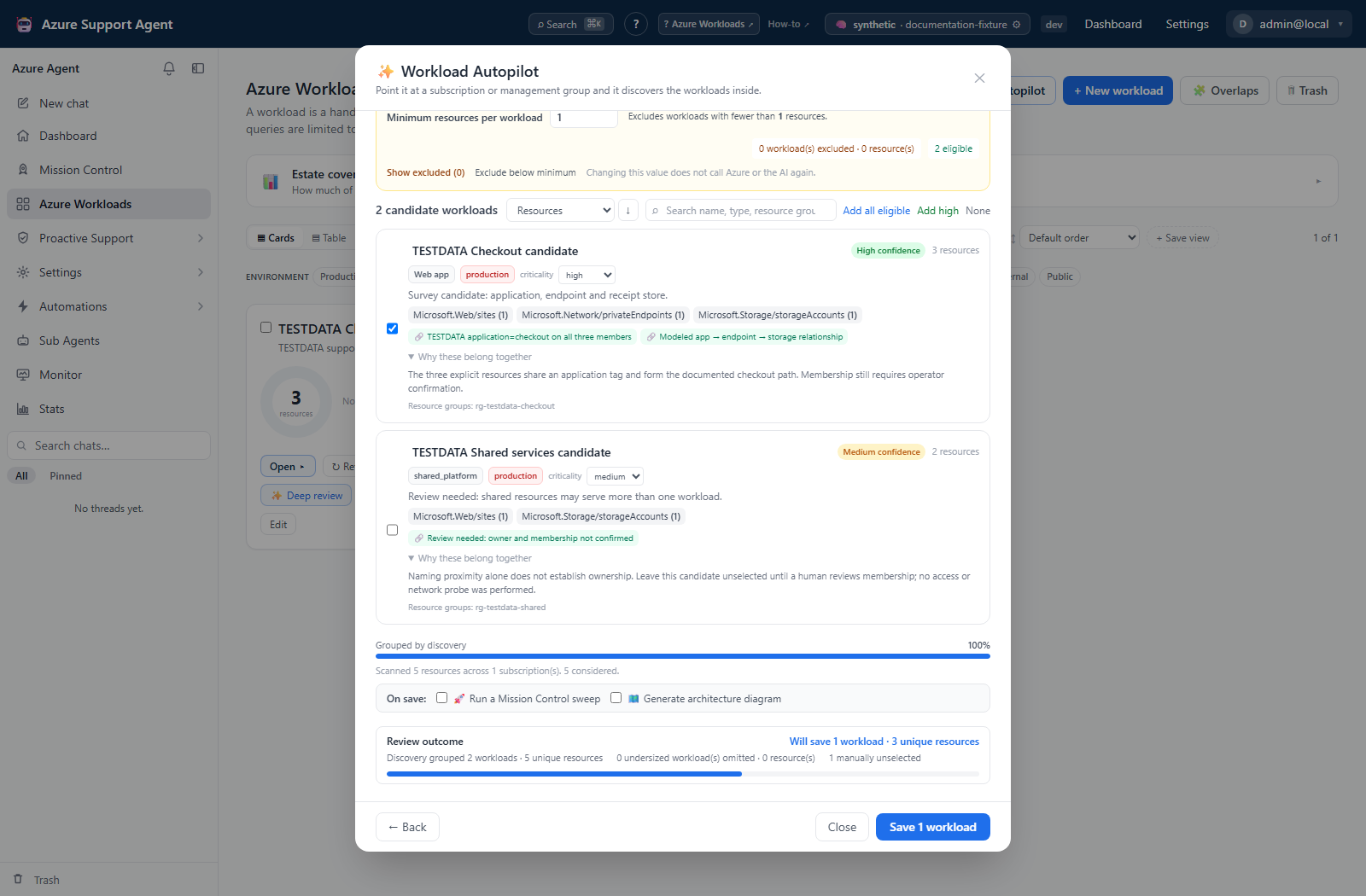
Screenshot note: Survey and candidate results are synthetic browser-only responses rendered by the native Autopilot UI. No Resource Graph collection, AI inference, or network probe occurred. Save was not clicked, so no workload was saved and no follow-on Mission Control or architecture job was created.
Purpose
Autopilot discovers candidate application boundaries from an Azure estate. It separates inexpensive Resource Graph survey from AI grouping, allowing you to filter, estimate, and control the operation before model calls begin.
When to use it
- First onboarding of a subscription or management group.
- After major estate reorganization.
- When fleet coverage shows many orphaned resources.
- To replace manual resource-by-resource selection with reviewable candidates.
Use manual workload creation when the intended boundary is already known and small.
Prerequisites and data sources
Prerequisites and permissions
workloads.readto survey and run discovery.workloads.writeto save candidates.- A valid Azure connection with Reader over the selected scope.
- An AI provider for the AI grouping strategy. Deterministic strategies can reduce or avoid model calls.
Tabs and actions
Autopilot is a modal workflow rather than a URL tab. Its stages and material controls are:
| Stage | Controls and actions |
|---|---|
| Setup | Connection; subscription, management-group, or seed-resource scope; full/delta mode; saved profile; Survey estate or Trace dependencies |
| Survey and sculpt | Fast/Balanced/Thorough preset; resource/resource-group/sample granularity; type, environment, region, subscription, name, noise and system-RG filters; tag seeding; confidence floor; AI-call cap; minimum candidate resources; save profile; start discovery |
| Seed trace | Hop and link-strength controls, relationship-kind toggles, shared-platform inclusion, member selection, dependency map, optional one-call AI naming |
| Discovery | Streamed status and candidate messages; Stop early keeps candidates already received and opens Review |
| Review | Search and sort candidates; select eligible candidates; rename; change criticality; inspect evidence/reasoning; adjust minimum size; inspect/override excluded candidates; optionally launch Mission Control or architecture generation after save |
The minimum candidate control accepts 1–5,000. It is present in Advanced setup and again in Review, where changing it re-evaluates the retained candidate list immediately.
Freshness and scope behavior
Survey enumerations are cached for 10 minutes and held for the eight most-recent scopes in the running process. Estimate recalculation uses that cache and makes no Azure or model call; when the cache expires, the UI asks for another survey. Discovery reuses a warm survey for the same tenant, connection and scope.
Estate enumeration stops at 5,000 resources and marks the result truncated. The review minimum does not change that scan cap and does not suppress candidate events on the server: every grouped candidate streams, along with counts below the selected minimum, so the browser can restore it when the threshold is lowered or Include anyway is selected.
Workflow overview
Three-phase workflow
1. Survey
- Select a connection and management-group or subscription scope.
- Run Survey. It enumerates resources through Azure Resource Graph without calling the LLM.
- Review counts and facets by type, resource group, region, subscription, environment, and tags.
- Check the estimated model calls, time, and effective resource count.
The survey is cached for a limited period. Re-run it if controls report that a survey is needed.
2. Sculpt
- Choose Fast, Balanced, or Thorough based on desired granularity and cost.
- Apply hard filters only to resources that must be excluded from candidate workloads.
- Use soft/noise filters for resources that may be reattached after grouping.
- Select resource, resource-group, or sampled granularity.
- Optionally seed grouping from a reliable tag key or detected naming pattern.
- Set a confidence floor and maximum AI-call budget.
- Optionally set Minimum resources per proposed workload. The strict rule is “fewer than”: a value of
5excludes candidates containing 1–4 resources, not candidates containing five. - Review the updated estimate after every significant control change and save the controls as a profile when they should be reused. Minimum size defaults to
1and is profile-persisted.
Hard-filtered resources are not reattached. Tag and naming conventions should be inspected for drift before they are used as authoritative grouping signals.
3. Group and review
- Select AI, resource-group, subscription, or tag grouping.
- Start discovery and follow streamed progress.
- Review each candidate’s name, type, environment, criticality, members, confidence, evidence, and reasoning.
- Adjust the minimum live during Review. The candidate stream is retained, so lowering the value restores prior selections without a second Azure enumeration or AI run.
- Use Show excluded to inspect undersized candidates and Include anyway to recover a legitimate small workload. Automatic size exclusions are not recorded as model rejections.
- Correct membership and classification where the UI permits; discard weak candidates.
- Compare Grouped by discovery with Will be saved. The save view reports selected workloads and unique resource IDs after minimum-size exclusions and overrides.
- Save only accepted candidates. Saving creates active workload records; discovery itself is non-destructive.
Interpretation of results
Interpret output
- Confidence measures the grouping strategy’s certainty, not operational health.
- Evidence can include co-location, network, dependency, RBAC, tags, names, and provenance. Correlated evidence is stronger than one naming token.
- Filtered is the count excluded by sculpt controls.
- Tag-seeded groups are deterministic starting points and still require review.
- Reattached resources were initially treated as noise but found a plausible group.
- Below floor candidates were omitted because confidence did not meet the selected threshold.
- Below minimum candidates were grouped successfully but excluded from the save review because their post-reattachment resource count is lower than the configured minimum.
- Capped means the AI-call budget was exhausted and fallback grouping handled remaining resources.
Cost and token values are estimates, not provider invoices or execution guarantees.
Exports, history, scheduling, and integrations
No dedicated export, history, scheduling, or integration controls are documented for this feature page.
Safety and limitations
Safety
- Survey and discovery do not modify Azure resources.
- Saving modifies only the application’s workload registry; candidates can later be edited or soft-deleted.
- Minimum-size exclusion happens after grouping, so it saves review effort but does not reduce model calls. Seed mode ignores it because one explicit seed intentionally produces one workload.
- Broad scopes can expose extensive resource metadata to the selected model during AI grouping. Use filtering and a provider approved for that data.
- Do not encode secrets or personal data in naming hints.
- Review shared services and overlaps after saving; an application boundary is not necessarily exclusive.
Troubleshooting
| Symptom | Resolution |
|---|---|
| Survey returns zero resources | Check connection, selected scope, Reader assignment, and Resource Graph access |
| Estimate says a survey is needed | Survey cache expired or controls target another scope; run Survey again |
| Discovery is expensive | Use RG granularity, tag seeding, filters, a lower AI-call cap, or deterministic grouping |
| Candidates are too broad | Use resource granularity, stronger filters, or split the input scope |
| Candidates are too fragmented | Use RG/tag seeding, lower the confidence floor carefully, or merge manually after review |
| Valid shared resources are missing | Inspect hard filters; hard-filtered resources are not reattached |
| Stream fails midway | Check provider availability/rate limits; rerun the survey before retrying discovery |
| Expected small candidates are missing from Review | Select Show excluded, lower Minimum resources per workload, or use Include anyway for a legitimate exception. Changing the minimum does not rerun discovery. |
| Lowering the minimum does not restore a candidate | Clear the candidate search and inspect manual selection. Automatic size exclusion preserves selection, but a candidate manually unselected remains unselected. |
| Save is disabled after candidates were found | No eligible candidate is selected. Lower the minimum, include an undersized candidate explicitly, or select an eligible candidate. |