Documentation regeneration
Azure Support Agent changes frequently, so its documentation is maintained by a workspace custom agent that starts from the implementation rather than from an old page list.
Invoke the agent
In VS Code Chat, choose Documentation Regenerator from the agent picker and ask it to regenerate the documentation. An optional prompt can highlight a recent feature, but the agent always performs a complete scan.
The agent definition is stored at .github/agents/documentation-regenerator.agent.md. It is committed with the repository so every contributor uses the same workflow and page formats.
What every run scans
The run uses the following authorities, in order:
RELEASEandfrontend/src/version.tsfor the current release.frontend/src/App.tsxfor application routes.frontend/src/components/navConfig.tsfor sidebar groups, items, URL-driven tabs, Admin areas, security areas, and Automations.- The relevant components under
frontend/src/components/for actual buttons, dialogs, filters, bulk actions, failure states, and handoffs. - Every FastAPI router under
backend/app/api/plus its feature modules for endpoints, request schemas, limits, caching, exports, history, streaming, and write behavior. backend/app/auth/permissions.pyfor exact product permission keys.- Connector, provider, MCP-tool, reference-set, assessment, mission, notification, workbook, and playbook registries for currently supported catalogs.
- Existing reference pages, how-to recipes, indexes, links, and public screenshot assets.
A label is never treated as proof that an operation exists. The run confirms the frontend action, backend endpoint, permission guard, and approval/apply behavior before documenting it.
Discovery output
During regeneration, the agent writes temporary files under .docs-work/:
current-inventory.json— sorted routes, navigation, tabs, features, actions, endpoints, permissions, connectors, safety classification, and mapped pages.coverage-report.md— missing, stale, removed, ambiguous, and documented features.
The directory is ignored by Git because it is a reproducible local audit artifact. The public Markdown pages remain tracked.
Documentation layers
The site has two complementary layers:
- Feature reference under
docs/user-guide/,docs/admin/,docs/connectors/,docs/security/, anddocs/reference/explains purpose, concepts, tabs, permissions, outputs, and limitations. - How-to guides under
docs/how-to/provide numbered procedures with expected results, verification, safety/rollback, troubleshooting, and related links.
Every visible application area must have both. Every material action must be represented by a How to recipe.
Deterministic update rules
- New routes, navigation items, tabs, permissions, connectors, or actions produce new or expanded documentation.
- Changed workflows update the reference, recipe, indexes, permission references, troubleshooting, and related links together.
- Removed behavior is removed from active pages and navigation; obsolete procedures are not left appearing current.
- Existing explanations are preserved when accurate.
- Titles, category placement, and permalinks remain stable unless the feature was renamed.
- Public examples never contain live identities, IDs, endpoints, or secrets.
Worked example: select and explain a screenshot
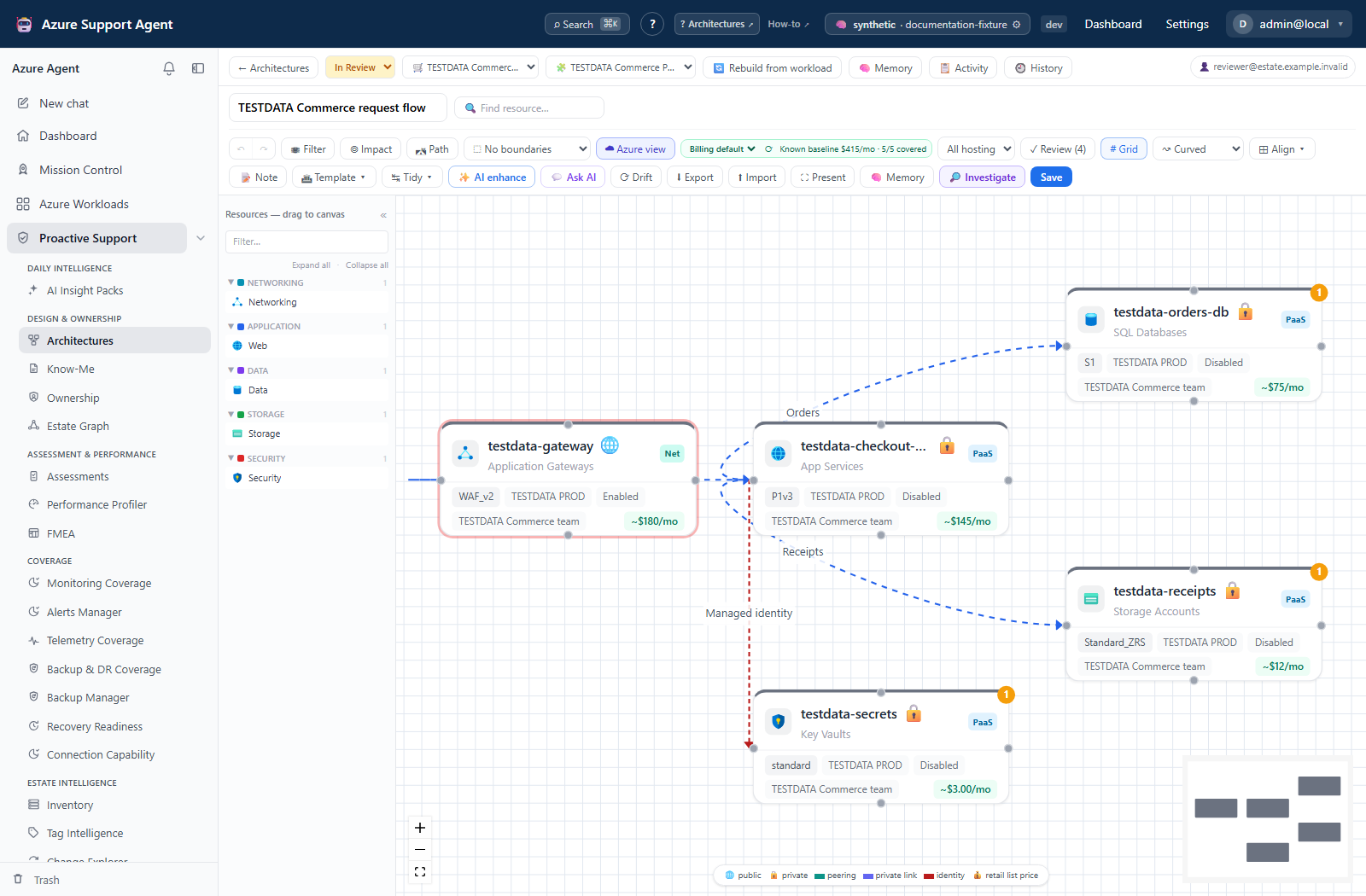
The figure below is an actual use of the shared screenshot include, not a capture of the documentation agent or of the visual-tour page. It demonstrates the same selection process a maintainer can apply when updating a guide:
- Read the guide’s workflow, then choose the architecture-canvas entry in the screenshot manifest. Its route, source note, dimensions, and hash describe the approved asset.
- Inspect the image itself: this example shows a checkout topology, a resource palette, and review controls. It does not show a successful discovery run, a generated Know-Me document, or the documentation-regeneration interface.
- Use the exact manifest filename in the include’s
fileparameter, identify the visible workflow intitle, and explain scope and limitations incaption. Preserve the shared synthetic-data notice and full-size link. A page must not claim an operation completed merely because its button appears.
Required validation
A run is complete only when all checks pass:
git diff --checkreports no whitespace errors.- Frontmatter, parent hierarchy, titles, and permalinks are valid and unique.
- Every current route, navigation item, permission area, and connector maps to documentation.
- Every internal link and image resolves.
- The full Just the Docs Jekyll site builds locally.
- A generated HTML crawl reports zero broken
/AzureSupportAgent/links or assets. - Generated
docs/_site/output is removed. - Application source files remain untouched by the documentation run.
The agent does not commit, push, publish, deploy, or modify Azure unless a user explicitly requests a separate operation.
How check 3 is enforced
Check 3 used to be a promise the repository could not keep, because nothing compared page metadata against the implementation. Pages could — and did — claim feature ids for registries that no longer existed. Two committed scripts now close that loop, and both run in CI.
docs/_feature_inventory.py
Reads application source only and emits docs/_feature_inventory.json: a sorted list of stable NAMESPACE:id values covering routes, every navigation and tab registry, the permission catalog, and the connector registry. Each registry names the exact file and symbol it is extracted from.
If a registry is renamed or moved, extraction fails rather than returning fewer ids. That choice is deliberate: a silently smaller inventory would mark undocumented features as covered, which is the precise failure this script exists to prevent.
docs/_validate_public_docs.py
Compares the inventory against the feature_ids: frontmatter on every published page and fails on three conditions:
- a page claims an id that does not exist in application source;
- an id exists in the application but appears on no page;
- an id appears in only one documentation layer.
The layer rule is the site’s own two-layer contract made executable: every visible area needs a feature reference and a how-to recipe. PERMISSION is the single exception — the permission catalog is explained in one reference table, because a numbered procedure per permission key would produce dozens of pages that teach nothing.
Running the checks
cd docs
python _feature_inventory.py    # refresh the inventory from source
python _validate_public_docs.py # structure, hierarchy, and source coverage
python _check_links.py          # every internal link resolves
Commit the regenerated _feature_inventory.json with the documentation change. CI regenerates it and fails if the committed copy is stale, so the inventory can never drift behind the application it describes.