Review usage and audit history
Prerequisites
- Product permission
monitor.viewfor the Usage area. - The provider invoice or Azure billing view when cost reconciliation is required.
- Product permission
audit.read. - Both
audit.readandsettings.writeto add, edit, enable, test, flush, reset, or delete a SIEM destination from/admin/audit. The route requires the read key and SIEM mutations independently require the write key. - A UTC time window and, when available, actor, action, or target identifiers.
Route
- Open
/admin/usage. - Open
/admin/audit.
How to review AI model usage
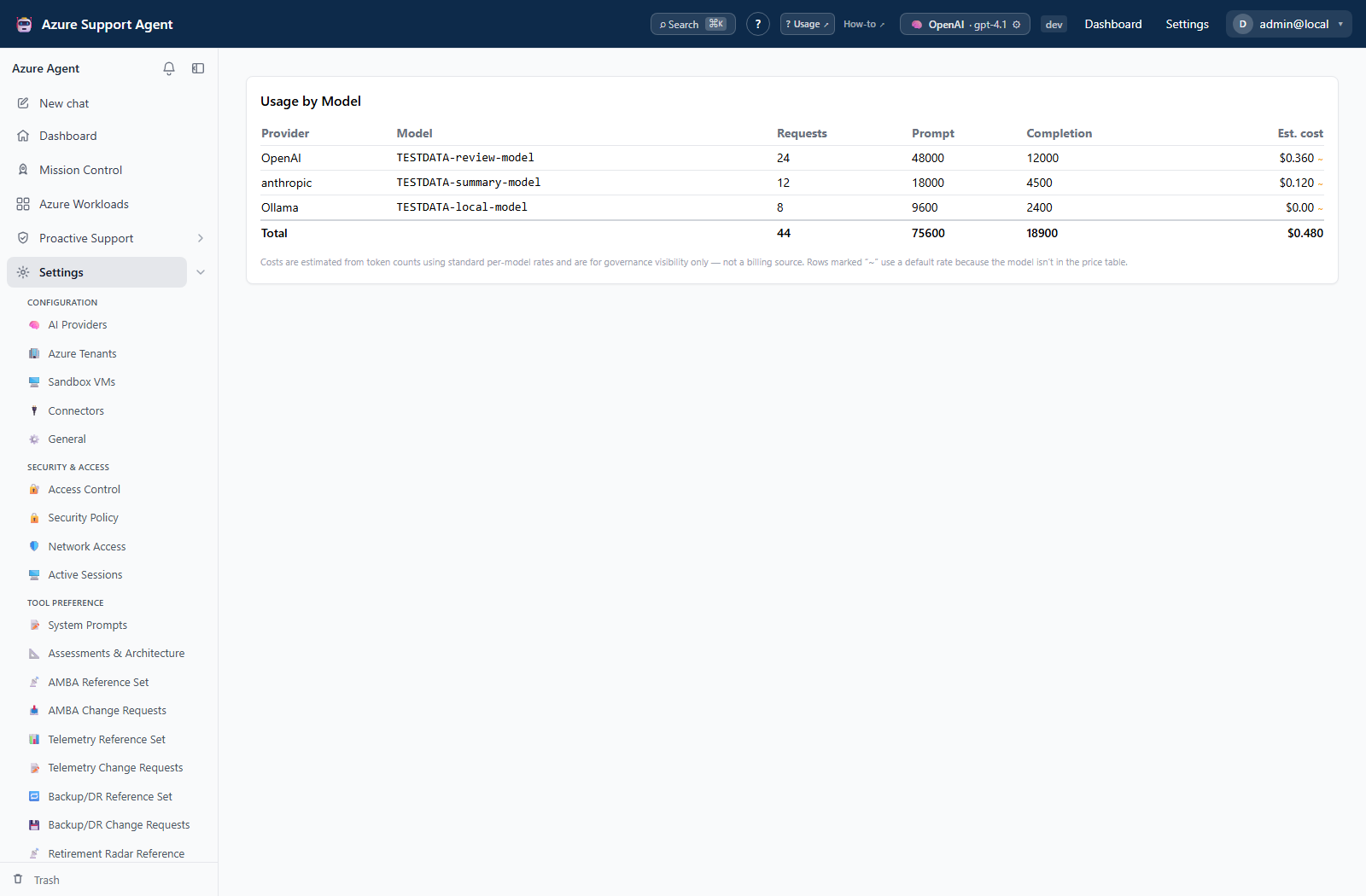
- Review totals and rows grouped by provider and model.
- Compare request count, prompt tokens, completion tokens, and estimated USD cost.
- Treat a tilde-marked cost as a fallback estimate for a model absent from the current price table.
- Compare unusual growth with provider/model changes, scheduled tasks, assessment runs, or investigations in the same period.
- Reconcile financial decisions against the provider’s authoritative invoice.
Expected result: The operator identifies which provider/model combinations account for recorded requests and token estimates.
Verification: Generate one bounded, non-sensitive request and confirm its usage appears after refresh; do not expect exact invoice parity because pricing, caching, and billing timing can differ.
How to investigate an administrative action
- Set the narrowest available time window, filter, search, or page range.
- Locate the initiating entry and record timestamp, actor, action, target, provider/model, and non-secret metadata.
- Follow related identifiers through approval, settings, connection, connector, access-control, backup, demo, or feature records.
- Correlate external writes with Azure Activity Log or destination records.
- Preserve decision-grade evidence through an approved Evidence Locker or SIEM process.
Expected result: A defensible timeline distinguishes an application-recorded action from external execution and delivery evidence.
Verification: Cross-check timestamps and identifiers in at least one independent system for external operations. Audit metadata should not contain plaintext credentials.
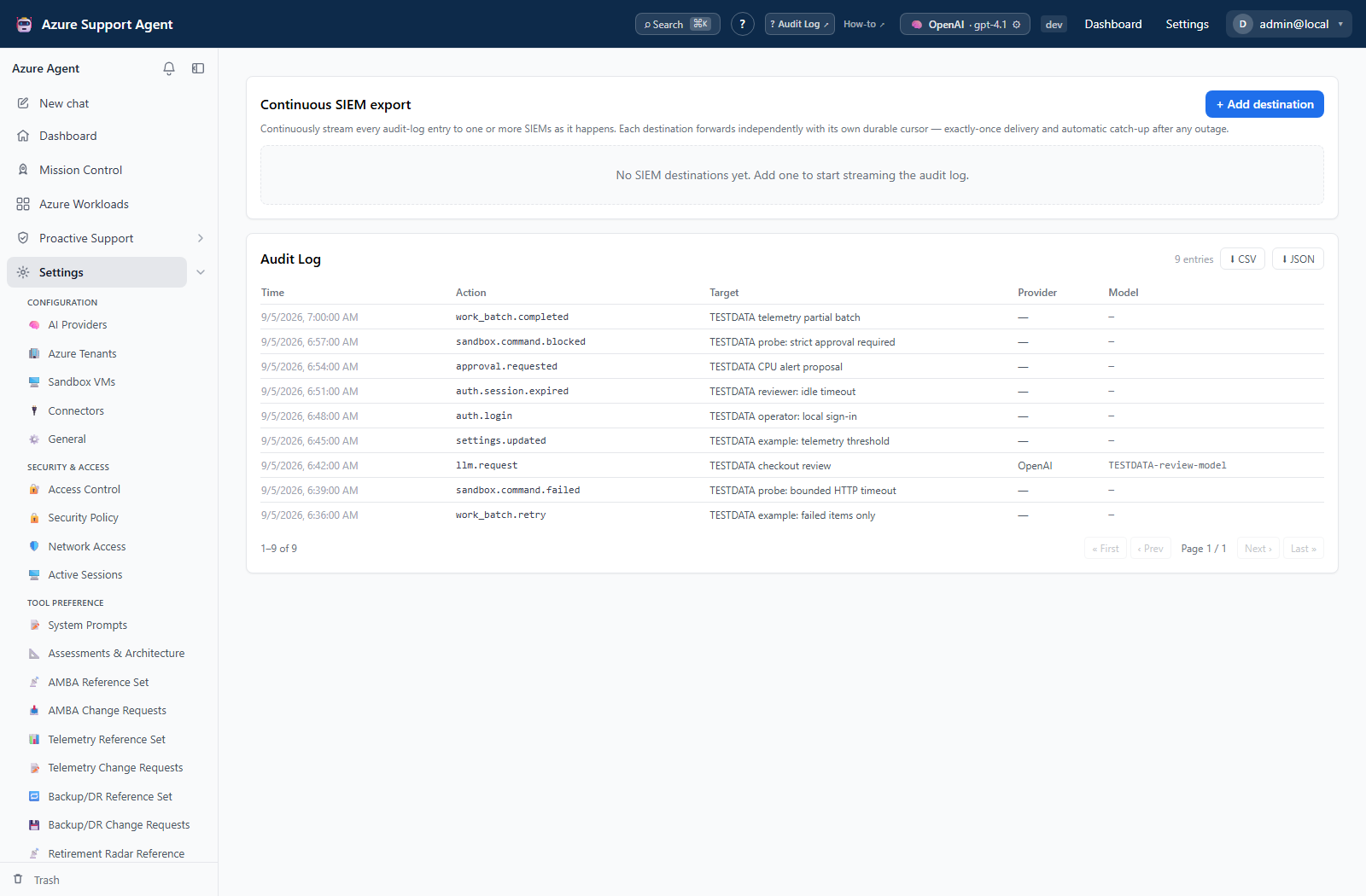
How to configure and verify continuous SIEM export
- Open
/admin/auditwith an active role containing bothaudit.readandsettings.write. - Select Add destination. Keep the new destination disabled while configuring it.
- Choose Splunk (HTTP Event Collector) or Generic HTTP / webhook, enter the approved endpoint and masked token/API key, and configure index/sourcetype or auth header/scheme as appropriate.
- Set a bounded batch size and keep Verify TLS enabled unless an approved private certificate design requires otherwise. Save the destination.
- Select Send test event. This performs a real outbound delivery; locate that event at the destination and confirm its source, timestamp, and non-sensitive payload.
- Enable the destination and save. Select Flush now only when pending audit rows should be delivered immediately.
- Produce one bounded auditable application change, then confirm the destination’s delivered count, cursor, last success, and health advance and the external record arrives once.
- Use Reset cursor only under an approved replay procedure. It restarts from the earliest audit row and can duplicate previously delivered records.
Expected result: New tenant audit rows are forwarded through the configured destination while the Audit Log remains readable to audit.read-only roles and SIEM controls remain disabled for them.
Verification: Correlate one application Audit Log row with the SIEM record and destination status. Test again with an audit.read-only role and confirm export remains available but SIEM configuration displays read-only.
Safety and rollback
Audit entries are evidence, not an undo mechanism. Redact sensitive metadata before sharing. Roll back the underlying change through its owning admin page and verify the compensating action is also audited.
Usage, audit rows, and local exports are read-only. SIEM destination controls are separate application-configuration writes. Reduce future model use through approved provider, schedule, or runtime-setting changes; there is no rollback for tokens already consumed.
To stop future SIEM delivery, disable the destination and verify the status is Off. Deleting the destination removes local forwarding configuration but cannot retract external events. Rotate the destination token externally if it may have been exposed. A cursor reset is a replay, not a rollback; reconcile duplicates using destination-side event identity and timestamp.
Troubleshooting
| Symptom | Resolution |
|---|---|
| Usage page is unavailable | Confirm monitor.view in the active role. |
| Audit page is unavailable | Confirm audit.read in the effective role. |
| SIEM controls are read-only | Add settings.write to an approved role that also has audit.read. |
| SIEM authoring role cannot open Audit Log | Add audit.read; settings.write alone does not satisfy the route requirement. |
| Test succeeds but new rows stop | Inspect destination enabled state, cursor, last error, endpoint policy, TLS, token, and then use Flush now only after the cause is corrected. |
| Reset cursor creates duplicate rows | This is expected replay behavior. Stop repeated resets and deduplicate/reconcile at the destination. |
| No matching entry appears | Broaden pagination/time assumptions and verify the action actually completed. |
| Entry says success but Azure differs | Correlate managed-change status and Azure Activity Log; app audit alone does not prove Azure completion. |
| Cost differs from invoice | Use provider billing as authoritative and check price-table coverage, caching, and delayed records. |
| Expected request is absent | Confirm the active provider/model and refresh after the operation completes. |