Permissions
Permissions are explicit strings in the canonical backend catalog. API dependencies enforce them independently of client navigation. Chat history and turns require chat.use; the personal notification feed requires notifications.read; global notification rules require notifications.manage. Custom roles select catalog capabilities in Settings → Access Control → Roles. The live implementation is authoritative.
| Area | Capabilities |
|---|---|
| Agent | chat.use |
| Automation | agents.read, agents.write, tasks.read, tasks.write, tasks.run, workbooks.read, workbooks.write, playbooks.read, playbooks.write, insights.read, insights.write, insights.run, notifications.read, notifications.manage |
| Workloads & design | workloads.read, workloads.write, architectures.read, architectures.write, missions.read, missions.run |
| Ownership | ownership.read, ownership.write |
| Estate insight | inventory.read, graph.read, changeexplorer.read, reservations.read, perfprofile.read, radar.read, radar.manage, quota.read, quota.run |
| Tagging | tagintel.read, tagintel.write |
| Governance & compliance | assessments.read, assessments.run, policy.read, policy.write, iam.read, iam.write, iam.review, iam.simulate, identity.read, entra.read, entra.admin, evidence.read, evidence.write |
| Incident response | cases.read, cases.write, investigate.read, investigate.activity |
| Observability | monitor.view, coverage.read, coverage.manage, alert_analysis.read, alert_analysis.manage, alerts_manager.read, alerts_manager.alert_state_write, alerts_manager.action_group_write, alerts_manager.rule_write, alerts_manager.advanced_rule_write, alerts_manager.bulk_write, alerts_manager.amba_blueprint_write, alerts_manager.query_preview, alerts_manager.test_notifications, alerts_manager.delete, alerts_manager.approve, backup_manager.read, backup_manager.protect_write, backup_manager.policy_write, backup_manager.vault_write, backup_manager.ondemand, backup_manager.drill_write, backup_manager.reference_write, backup_manager.approve, teleintel.read |
| Live diagnostics | sandbox.exec, netdiag.run |
| Integrations | connections.read, connections.manage, connectors.manage |
| Administration | settings.read, settings.write, users.manage, audit.read, firewall.read, firewall.manage, backup.manage, demo.manage |
Route and mutation splits
Navigation is based on the capability required to open a route. A mutation endpoint then checks its own write/manage capability. Custom roles that must use an editor through the UI therefore need both keys shown in a split row; possessing only the mutation key does not expose the read-gated route.
| Surface and route | Open/read | Mutate or author | Effect boundary |
|---|---|---|---|
Chat (/chat, /c/{chatId}) | chat.use | chat.use for chat lifecycle and turns | Application chat state and AI/tool execution; each downstream tool keeps its own approval and Azure authorization boundary. |
Workloads (/workloads, /workloads/{id}) | workloads.read | workloads.write for membership Refresh and definition changes | Refresh reads Azure, then reconciles the application definition only after complete enumeration. Failed or incomplete enumeration leaves membership unchanged; it does not mutate Azure. |
Personal notifications (/notifications) | notifications.read | notifications.read to mark one/all read | Tenant-scoped application read state only. |
Notification rules (/automations/notifications) | notifications.manage | notifications.manage | Application routing configuration; later matched events can produce external connector deliveries. |
AI Providers, General, Prompts, Scoring (/admin/...) | settings.read | settings.write | Application configuration only, except provider tests/OAuth operations can contact external providers. |
MCP tool catalogs (/admin/tools, /admin/entratools) | settings.read | settings.write for built-in/Entra exposure settings | Application tool exposure; the catalogs do not themselves execute a listed tool. |
Usage (/admin/usage) | monitor.view | None | Tenant-scoped stored usage estimates. |
Audit and SIEM (/admin/audit) | audit.read | settings.write for SIEM destination add/edit/delete/test/flush/reset | Audit reads and local exports versus external SIEM delivery/replay. The UI workflow requires both keys. |
Monitor (/monitor) | monitor.view | settings.write for create/customize/save/save-as/delete/default/AI/restore | Monitor reads and widget data runs versus local dashboard configuration. The UI workflow requires both keys. |
Stats (/stats) | monitor.view | None | Read-only summary; the current Stats toolbar has no export control. |
Network Access (/admin/firewall) | firewall.read | firewall.manage | Application ingress policy, enforcement confirmation, and block-history maintenance. The UI workflow requires both keys. |
Retirement Radar (/radar, /admin/radar) | radar.read | radar.manage | Cached/reference reads versus collection, local state/reference changes, generated runbooks/findings, and external ticket delivery. The UI workflow requires both keys. |
Alerts Manager deliberately separates read, alert-state write, action-group write, rule write, advanced/bulk/AMBA changes, query preview, notification test, delete/rollback, and approval.
Backup Manager separates by target as well as by verb: protecting an item, editing a policy, hardening a vault, running an on-demand backup, recording a drill, and curating the reference are distinct capabilities. backup_manager.read covers every read, including the Fleet grid and starting an analysis — an analysis is a read-only sweep. backup_manager.approve decides and applies managed changes, and is also required to permanently purge stored analyses or analysis history in Cleanup.
Built-in and custom role behavior
admincontains all catalog permissions.operatorcontains all catalog permissions exceptsettings.write,users.manage,audit.read,firewall.manage,backup.manage, anddemo.manage.auditorcontains every.readcapability pluschat.use,monitor.view,audit.read, andinvestigate.activity.usercontainschat.use,ownership.read,workloads.read, andarchitectures.read.noaccesscontains no permissions.- Custom roles contain exactly the selected catalog keys.
users.manageis special: it makes the holder an effective administrator and therefore satisfies every product-permission guard.
Direct and group roles normally contribute to one union. Selecting an active role restricts that session to one already-assigned role. The rbac.read legacy key is accepted and migrated to iam.read so existing custom roles do not lose IAM access after the route rename.
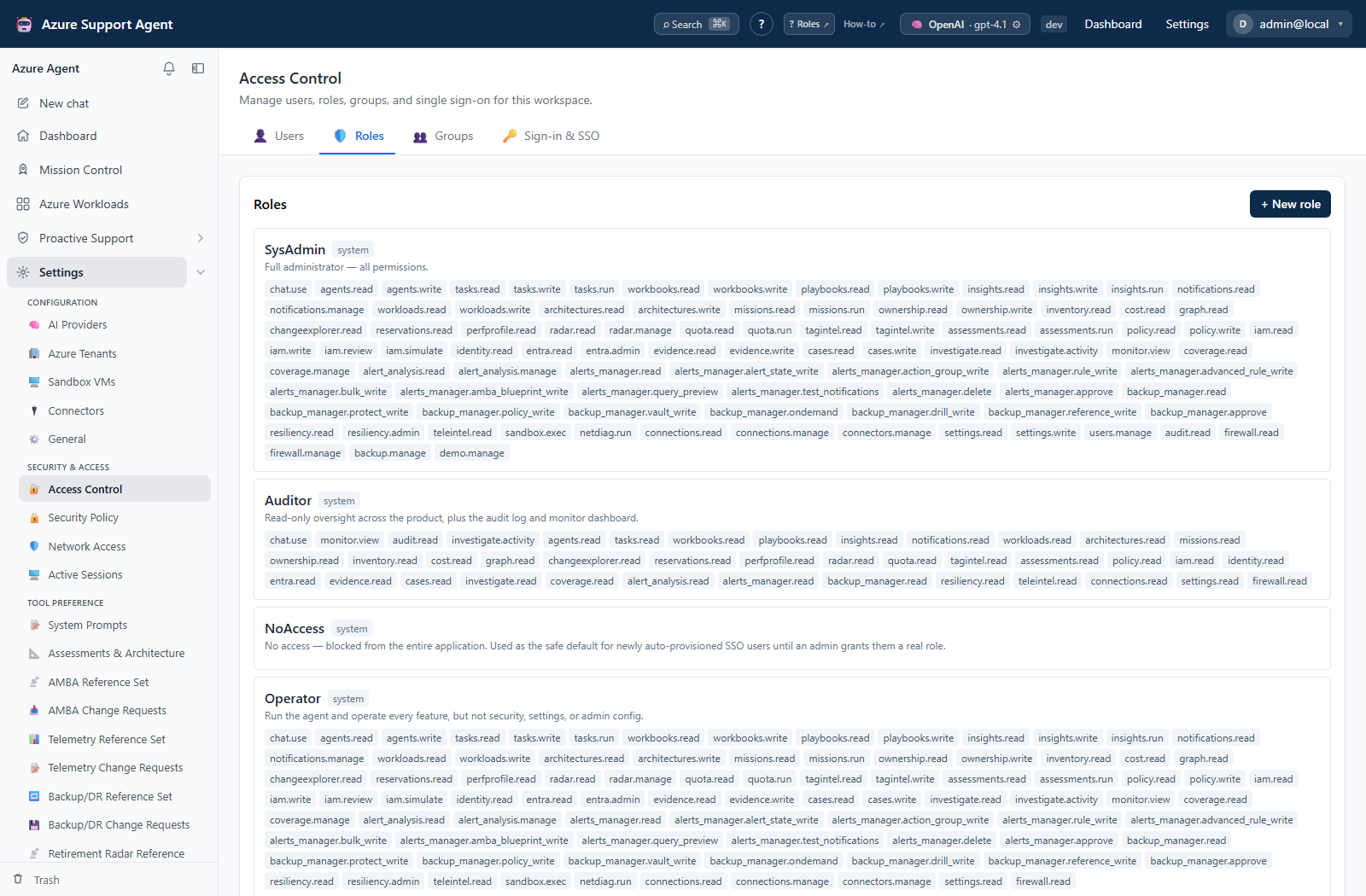
See Manage Access Control to compare user assignments with this catalog and verify a least-privilege role.
Most feature endpoints have an exact product-permission dependency. Intentional exceptions are limited to authentication/bootstrap callbacks, signed-in identity/profile/active-role operations, non-secret application/provider/connection metadata, expiring chart artifacts, and the generic work-batch router. Work batches resolve their permission from the selected feature and remain tenant scoped; a Deep Review batch is the authenticated chat-owned exception. Public health/version endpoints expose no tenant data.
Built-in role intent is documented in Access control. Product permission does not replace Azure RBAC, Microsoft Graph consent, connection read-only policy, or write approval.