Backup & DR Coverage
Product permission: coverage.read for scans, artifacts, findings, tickets, evidence, and run cleanup; coverage.manage for reference edits and submitting, deciding, or deleting change requests.
Purpose
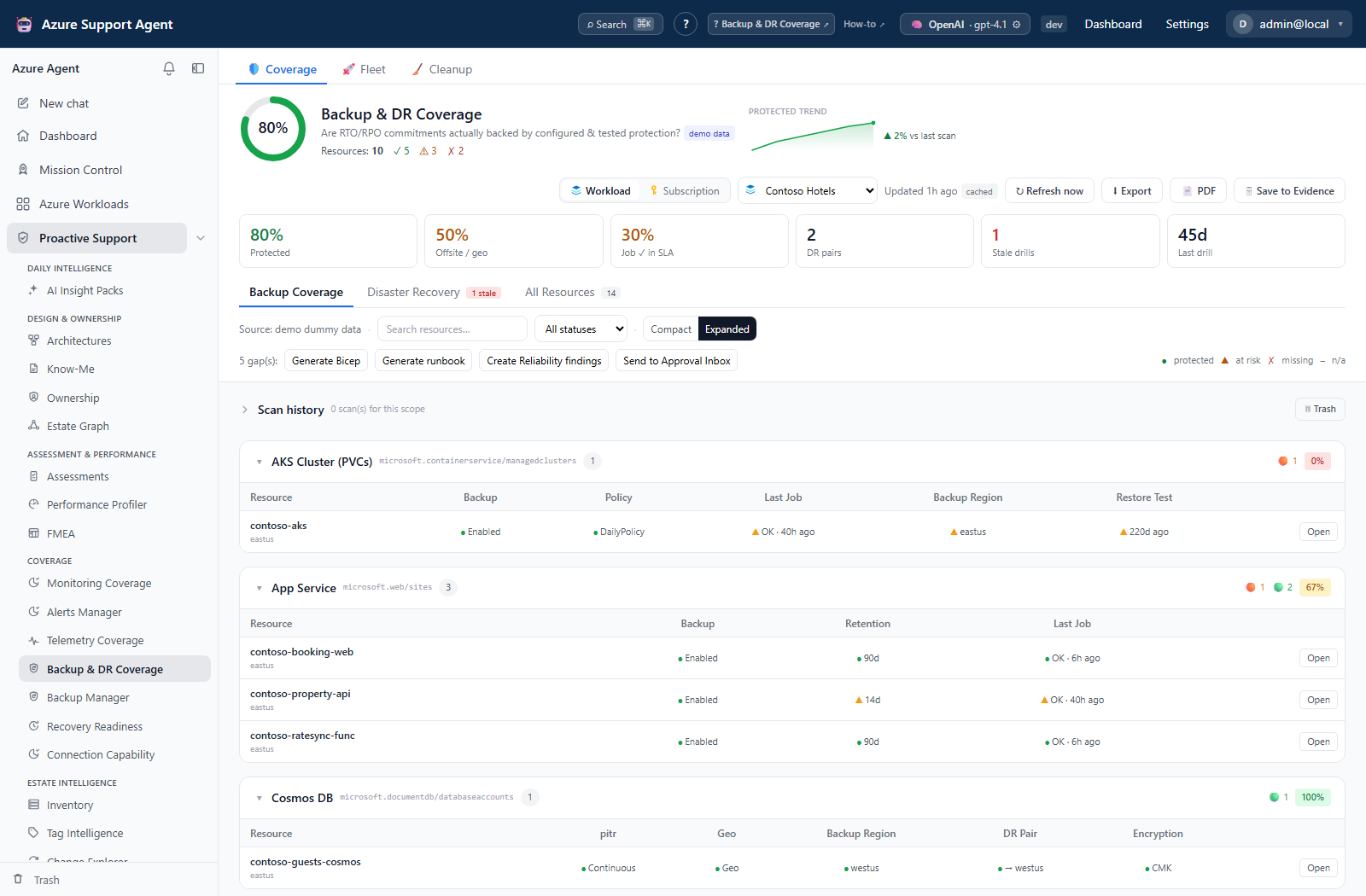
App route: /backupdr Backup & DR Coverage assesses resources against the configured protection reference. Its matrix can represent backup, policy, recency, redundancy, encryption, soft-delete, restore-test, PITR, persistence, and DR-pair checks. The current live collector supplies only best-effort Resource Graph property evidence; it does not collect protected-item/job/restore-test or Site Recovery pair evidence. Missing evidence must not be presented as proof of missing protection.
Screenshot context: This native application view uses isolated synthetic demo data, not live Azure evidence. Demo Azure writes are disabled. Populated demo jobs, protection checks and DR pairs illustrate the UI; they do not extend the live collector or prove recoverability.
Prerequisites and data sources
- An ARM-capable connection with Reader access to the selected resources and vault metadata through Resource Graph.
- A workload or subscription scope.
- A workload uses its configured connection; subscription mode lets you choose a connection. A SQL server or managed instance can expand to its child databases;
masteris excluded. - Access to the source backup/DR service for independent verification of jobs, recovery points, retention, and recovery exercises. Granting more access does not add the missing deep collector to this view.
Tabs and actions
- Coverage contains Backup Coverage, Disaster Recovery, and All Resources. Backup Coverage has search/status filters and compact/expanded groups. All Resources filters by type, resource group, and reference membership; covered means membership, not a passing check.
- Disaster Recovery displays supplied pair health, regions, protected-item count, and last-drill age. Unhealthy, stale, or never-drilled pairs get DR SLA at risk. An empty live list is expected with the current collector and is not evidence that no DR exists.
- Fleet compares cached protected/offsite/recent-job and DR-pair results. It reads without scanning on entry; Scan selected starts a durable batch with Cancel pending and Retry failed.
- Cleanup manages saved scan runs with recoverable trash and irreversible purge.
- A resource drawer has Details (checks and raw state) and Fix (Bicep, runbook, ticket). Investigate in War Room opens
/chatwith a workload/resource/gap prompt; it does not execute remediation. - Bulk generation, finding creation, and approval use all gaps, not the currently filtered rows. Drawer actions target one resource.
Freshness and scope behavior
Load coverage reads the saved result for a newly selected scope; revisiting the last loaded scope can restore it automatically. This read does not scan Azure. The independent backupdr_cache_ttl_s default is 21,600 seconds (six hours); stale_cache flags old results without erasing them. Demo scopes can regenerate synthetic evidence locally.
Refresh now explicitly collects Resource Graph properties. Navigation does not cancel the browser background refresh, and collection/cache writing is shielded from request cancellation. Successful refreshes save history and trend data; failures preserve any prior good result without a new healthy history point. Check generated time and exported scan_error/error. Saved checks are not continuously re-evaluated as the page ages.
State extraction is capped at 200 reference resources by default (configurable 1–2,000), although the matrix still includes reference resources beyond that cap with empty state. Resource queries page up to 10,000 rows per scope predicate, SQL child expansion requests up to 1,000 databases, and vault lookup up to 500 rows. Narrow a large scope before treating empty-state failures as verified gaps.
Workflow overview
- Select the connection and workload/subscription.
- Check generated time and refresh if needed.
- Start with critical red gaps, then amber degraded evidence.
- Open Details and distinguish observed failures from absent state and N/A checks. Validate backup-job and restore-test claims in Azure independently.
- Generate Bicep or the PowerShell-oriented remediation runbook.
- Review ownership, recovery objective, data criticality, target region, vault policy, cost, and change window.
- Optionally create Reliability findings, create a connector-backed ticket, save the latest snapshot to Evidence Locker, download a PDF, or—with
coverage.manage—send Bicep to the Approval Inbox. - Execute approved steps through the organization’s Azure/IaC process.
- Test recovery or failover where required, capture evidence, and refresh the scan.
Generated material includes Bicep and a downloadable PowerShell-oriented runbook. It is never applied by this coverage view. The Bicep generator emits a generic Recovery Services vault/VM-policy skeleton per gap with a protected-item TODO, even for non-VM gaps. Runbooks have selected service-specific examples and TODOs for other types. They are starting points, not complete service-correct deployment plans. Review every scope, dependency, placeholder, destructive implication, and service-specific command before external execution because backup enrollment, retention, replication, and failover can have cost and data-protection consequences.
Interpretation of results
- Backup enabled: the supplied state says backup is enabled; SQL and PostgreSQL/MySQL automated backup can be inferred from resource type, not an observed vault association.
- Policy/retention: policy name and retention are evaluated from supplied state. The retention check uses a fixed 30-day minimum; unknown retention is amber.
- Last job: supplied success/completed/succeeded state is green unless its numeric age exceeds the SLA (default 24 hours, configurable 1–8,760). A missing age does not itself fail a successful status; current live collection does not fetch these jobs.
- Geo redundancy/off-site region: supplied flags or differing resource/backup regions suggest offsite protection; confirm the actual failure boundaries independently.
- DR pair/geo-DR pair: a configuration flag or namespace alias was found in supplied state; this is not a replication-health test. For example, database HA and Premium ACR SKU are used as heuristics, not proof of cross-region recovery.
- Encryption/soft delete: supplied key and deletion-control flags are compared with the baseline; some values are type-derived defaults rather than deep service reads.
- Restore test: the resource check uses a fixed 180-day cutoff. The separate DR-pair stale-drill setting defaults to 180 days (configurable 1–3,650); it does not change that resource-check cutoff.
- PITR/persistence: supplied state distinguishes continuous from periodic backup and enabled from disabled Redis persistence; unknown values are amber.
- N/A: a check could not be evaluated, including an unknown backup region; it is not always a deliberate reference exclusion. Checks omitted from a type’s reference do not become columns.
Rows take the worst non-N/A check: Critical (red), At risk (amber), or Protected (green). The headline Protected percentage instead counts backup_enabled resources plus soft-delete-enabled Key Vaults, so it need not equal the proportion of green rows. PMK encryption is amber and CMK green in the current baseline. A green configuration check does not prove recoverability. Successful restore evidence and exercised procedures remain essential.
Reference set and change requests
The built-in seed (version 2) has 86 type/check assignments across 17 resource types, using 13 distinct check keys. Settings → Backup/DR Reference Set (/admin/backupdr) lets managers add/remove types, toggle applicable checks, edit guidance/category labels, or use Advanced: JSON. Unknown check keys are discarded on save; adding a type does not implement new collection logic.
Save new version, Reset to built-in, and History → Restore write a new reference version; history retains 50 revisions. Unsaved changes can be discarded. Changing the reference changes later scoring, not Azure protection or already-saved snapshots.
Settings → Backup/DR Change Requests (/admin/backupdrchanges) offers View, Approve/Reject, Mark applied, and Delete. The coverage UI submits Bicep; the API also accepts runbooks. Sign-off and Mark applied only change request metadata, and Delete removes the request without a trash workflow. No Azure apply or rollback occurs. Up to 200 gap-detail records are retained per request alongside the full submitted count and generated text.
Exports and saved runs
Export downloads full loaded JSON, not filtered rows. PDF and Save to Evidence fetch the latest server-cached scope snapshot, not a selected historical run. Verify the resulting artifact’s generated time. Create Reliability findings creates a workload assessment run; drawer ticket creation immediately calls the configured enabled Jira/ServiceNow connector, independently of coverage approval.
Run history supports View/Delete and Trash restore/delete-forever/empty. Saving keeps up to 30 active runs per scope; trends retain 90 points, merging identical scores within five minutes. Cleanup supports older-than-30/90-day, demo, empty, and retain-last-N presets (0–30; default 2). These select records rather than scheduling retention. Deletion does not clear the separate latest cache or trend. See the shared operating model for optional nightly cache refresh.
Safety and limitations
- Scans and artifact generation do not enable backup, trigger failover, delete recovery points, or change retention. Findings, evidence, references, requests, and cleanup write application records; tickets also write to an external connector.
- Azure job and replication states may lag. Confirm critical findings in the source service.
- Some services expose incomplete protection evidence or use service-specific recovery models.
- Missing live job/restore/ASR collection cannot be fixed by refreshing repeatedly. Use Backup Manager or the source service for the missing evidence; demo rows are not live recovery proof.
- Cross-region protection must satisfy residency, sovereignty, and cost requirements.
- Never run a production failover merely to clear a dashboard finding; use an approved test plan.
- Finding registration requires workload scope in the UI; ticketing requires a configured supported connector. Keep recovery evidence independent of the summary score.
Troubleshooting
| Symptom | Likely cause | Resolution |
|---|---|---|
| Protected resource appears unprotected | Deep protection data is not collected, or the resource lies beyond the state-extraction cap. | Inspect raw state and scope size; confirm actual protection in Backup Manager/Azure before changing it. |
| Job/restore evidence is missing | Current live coverage does not fetch job or exercise records. | Check the source service’s schedule, status and exercise evidence; do not treat repeated scans as a repair. |
| Disaster Recovery is empty | Live collection currently supplies no ASR pair list. | Verify replication and drills separately; an empty list is not a no-DR verdict. |
| Supplied DR pair is unhealthy | Replication health is not Healthy/Normal or its drill is absent/stale. | Inspect replication errors and test evidence in the source service before acting. |
| Check should not apply | Type mapping or a built-in heuristic differs from the recovery design. | Review the reference with coverage.manage; removing a check only changes scoring, not protection. |
| Runbook is too generic | Generator has only a skeleton or no implementation for that type. | Add service-specific RPO/RTO, owners, validated steps, rollback and approvals before execution. |