Tag Intelligence
Product permissions: tagintel.read authorizes analysis, AI proposals, policy/script generation, previews, exports, and history reads. tagintel.write authorizes catalog changes, tag snapshots, saved-change/group mutations and imports, apply, and revert. These are capability checks, not admin-only routes; administrators pass either guard. The Cost tab’s Load cost data also calls Inventory and needs inventory.read.
Purpose
App routes: /tagintel and /tagintel/:tab Tag Intelligence analyzes tags already present in Inventory, turns conventions into a catalog and policy proposal, and provides the scope’s most consequential write workflow: previewed, explicitly approved tag remediation with a revision for recovery.
Prerequisites and data sources
- A recently collected cache for the intended scope. The current UI selects Workload or Subscription; the API also accepts tenant/subscription/management-group scope strings. Workload collection uses the workload’s bound connection, not a conflicting picker value.
- Resource Graph/Reader access for analysis.
- Cost Management Reader for Cost allocation.
- For apply:
tagintel.write, explicit approval, a non-read-only connection, enabled command execution with an allowed/available Azure CLI, and Azure tag-write rights at every target. Revert has different gates; read the safety section before using it. - An approved change and rollback process for bulk metadata updates.
Tabs and actions
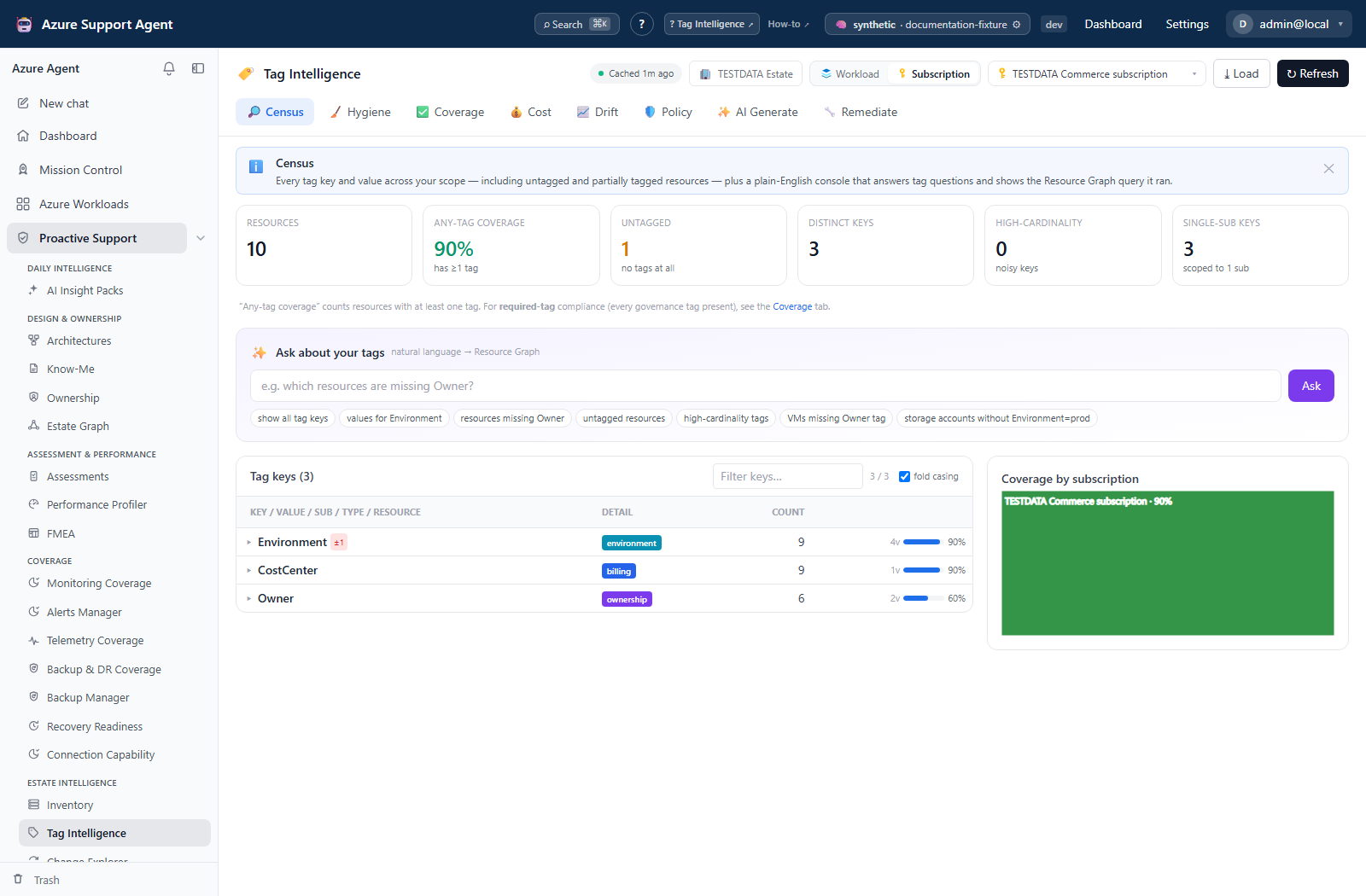
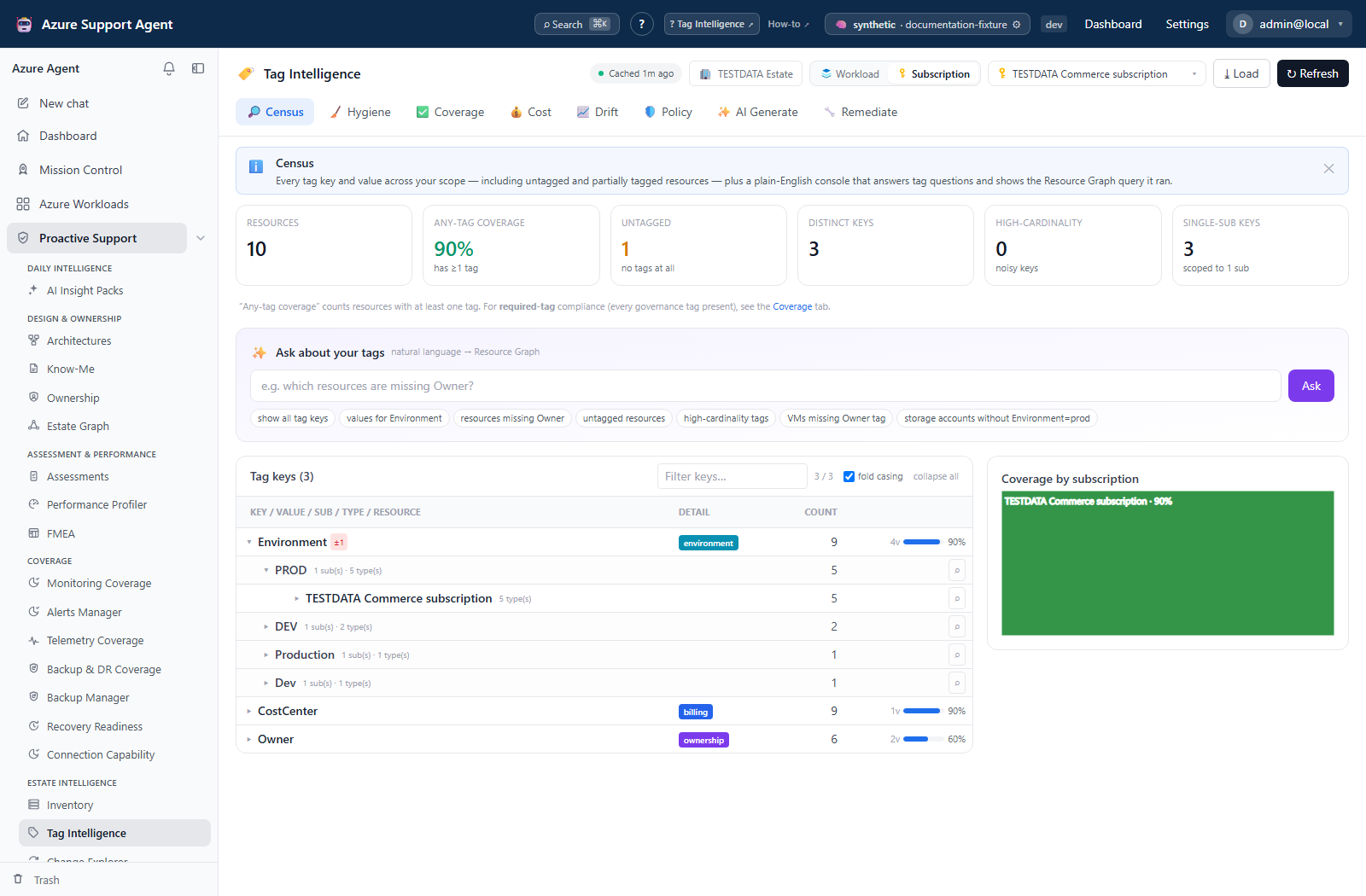
- Census inventories keys/values and supports drill-down and plain-English questions.
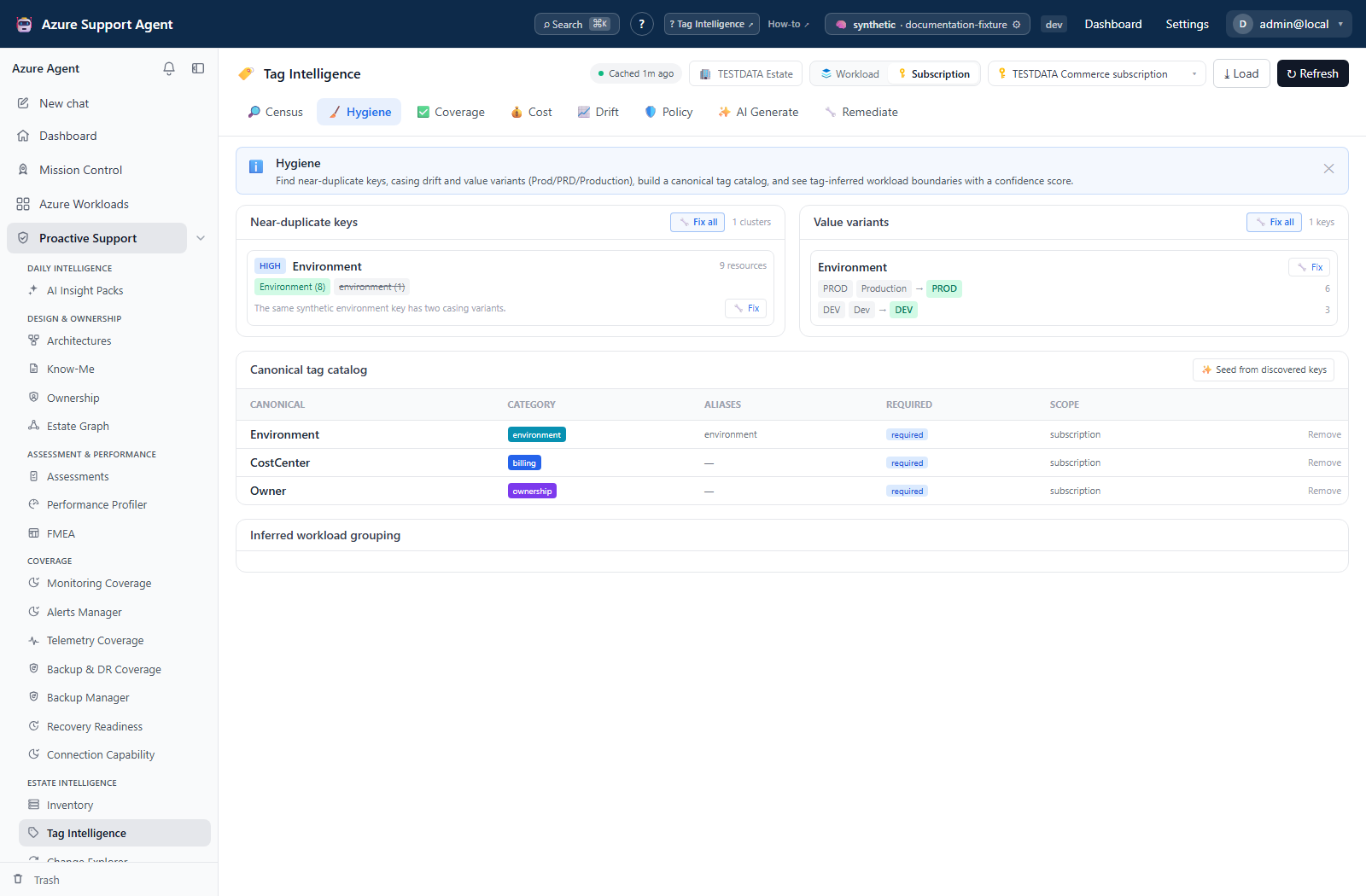
- Hygiene finds near-duplicate keys, casing drift, value variants, and workload-inference opportunities; findings can be queued for remediation.
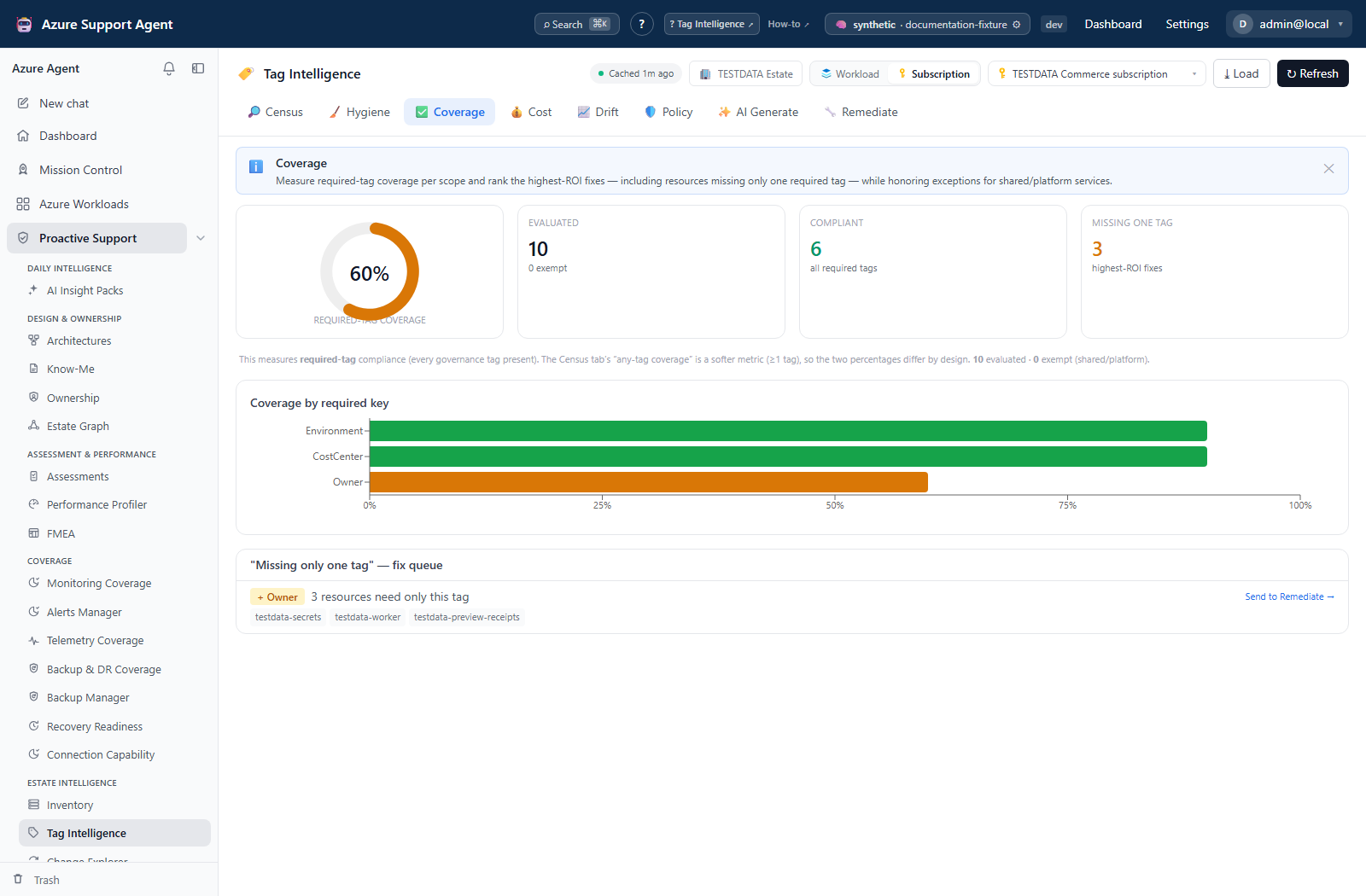
- Coverage evaluates required tags from the catalog or a quick-check override and highlights resources missing one tag. Send to Remediate only navigates; it does not stage a key, value, or selected resource list.
- Cost allocates available spend by workload, owner, or billing code.
- Drift captures cached tag snapshots and compares key/value/coverage changes. Applied-change recovery revisions are under Remediate → Tag change history, not Drift.
- Policy generates policy definitions/initiative material and presents a staged rollout ladder.
- AI Generate turns a plain-English intent into a concrete proposed change set for real resources.
- Remediate previews diffs, generates PowerShell/Azure CLI/ARG/rollback text, manages the change-set library, applies approved writes, and exposes revisions for revert. Its script tabs do not include Bicep.
Hygiene’s catalog UI can Seed from discovered keys and Remove entries; it has no full catalog editor. Seeding considers the first 12 discovered keys and can mark billing/ownership/environment keys required immediately. The catalog API supports canonical name, aliases, purpose/category, required/inherited flags, scope, allowed/example values, owner and description. These metadata fields are not all enforced by Coverage: required-key checks normalize casing/separators and require a nonblank value, but do not validate allowed values or catalog scope. The fixed default exemptions cover resource types containing microsoft.insights/, microsoft.alertsmanagement/, or microsoft.security/.
Freshness and scope behavior
Census and dependent analyses read the shared Inventory cache for their exact key. Load is cache-only; Refresh itself collects fresh Resource Graph data for that scope. Refreshing whole-connection Inventory does not automatically populate a separate subscription or workload cache. The stale nudge appears after 24 hours. The browser’s background refresh registry survives in-app navigation, but is not a durable job that promises recovery after closing/reloading the page.
Preview reads cached tags. Apply rebuilds the plan from cache, then reads current tags through Resource Graph in batches of 200 and rebases the operations before writing. A reported read error blocks apply, but missing IDs are treated as empty tag sets, and Resource Graph is eventually consistent. No version/ETag comparison binds execution to the preview that was approved. Keep the approval window short and verify the actual target list and current Azure state independently.
Cost cache mismatch: the Cost tab’s load button refreshes whole-connection Inventory cost, while subscription-mode Tag Cost reads a sub:-scoped cost key. Loading whole-connection cost can therefore leave subscription allocation empty. An approved API workflow must populate the exact cost scope; repeated clicking does not fix the mismatch. Allocation uses current cached tags joined to resource actuals, not historical billing-time tags. Its workload grouping assigns a resource’s cost to its first workload; Inventory instead divides cost evenly between overlapping workloads. Workload tag collection also normalizes attribution to an empty workload list, so its Workload dimension can show unassigned resources.
Drift retains 30 snapshots per tenant/connection/raw-scope bucket. The workload ID is used for collection but is not included in this drift storage key: workloads sharing the same connection and empty scope can share history. Compare only captures you can identify as the same resource scope. Recovery revisions retain at most 100 per tenant/connection; generated/applied plan history retains 100 per tenant.
Workflow overview
Implementation-grounded usage scenarios
- Normalize a casing variant: open
/tagintel/hygiene, confirm that two discovered keys are semantically equivalent, review the canonical catalog entry (seed it or use the catalog API if needed), queue arename_keyoperation, and inspect the exact per-resource diff in/tagintel/remediatebefore approval. - Close a required-tag gap: open
/tagintel/coverage, record the missing key and affected resources, then navigate to Remediate and explicitly build an Add tag (if missing) operation. The link does not fill the builder. Confirm that the entire selected scope is approved before running it. - Recover a partially successful campaign: open
/tagintel/remediateafter an apply, review Tag change history, and reconcile per-resource results with current Azure tags. Re-preview unresolved work or use a separately reviewed recovery plan; do not assume a partial revert can safely be repeated from its status badge.
Analyze tags
- Open Census, select scope, and refresh.
- Drill from key to value, subscription, resource type, and resource.
- Use Hygiene to choose canonical keys/values; do not normalize values until consumers and owners confirm semantics.
- Review seeded catalog requirements; use the catalog API for edits the UI does not expose.
- Use Coverage to prioritize missing requirements.
- Load Cost only when the required billing data/permissions exist; unallocated spend can indicate missing or unmapped billing tags.
- Capture a Drift snapshot before and after a tagging campaign.
Interpretation of results
Policy behavior
Policy generation produces definitions/initiative JSON and does not assign policy in Azure. The append and inherit choices generate the Azure Policy Modify effect, not an Append effect; inherit reads the containing resource group’s tag. Replace generated subscription placeholders and the append value’s REPLACE_ME default. Review the generated Contributor role requirement and assignment identity for Modify remediation. The UI selects required catalog keys, or falls back to CostCenter/Environment/Owner, and does not offer an allowed-value editor. Open Rollout Planner transfers definitions to /policy/rollout; it does not deploy them. Start with the Discover → Report → Audit → Append / Inherit → Deny ladder, progressing only through reviewed stages. Deny can block deployments.
Read the evidence at its actual granularity
- Near-duplicate keys/values are lexical signals; two values can look similar and have different business meaning.
- Required-tag coverage reflects the active catalog/override, not a universal Azure standard.
- Allocatable cost means the current cached resource has a nonempty BillingCode, CostCenter, CostCentre, or Billing tag (case-insensitive lookup). Changing the chart dimension does not change that definition; a catalog alias alone does not add a billing key.
- Drift compares captured states; it does not prove who made a change.
- Applied/failed counts are per resource. A partially applied batch must not be described as successful without reconciliation.
Exports, history, scheduling, and integrations
- Queue fixes from Hygiene, explicitly build the missing-tag fix identified in Coverage, or use AI Generate. Treat AI output as an untrusted proposal.
- In Remediate, inspect every operation, target count, and before/after diff.
- Generate validation, PowerShell, Azure CLI, and rollback text as needed. Generation does not apply anything. The ARG validation text includes only the first 50 plan IDs and queries
resources, so it is not a complete check of resource-group tag updates. - Review least-privilege advice, ownership, locks, policy interactions, inherited tags, and downstream billing/automation dependencies.
- Re-preview after every operation/scope edit, obtain organizational approval, check I approve applying these tag changes, then use Run on Azure → Yes, apply to Azure. The endpoint requires
approved=true; it does not verify an external change ticket or independent approver. - Monitor the streaming per-resource results. Partial success is possible; investigate each skipped/failed item.
- Verify that a recovery revision actually appears, preserve it, and refresh the scope before checking Census/Drift and downstream systems. Refresh while Remediate is mounted clears its working draft; save reviewed operations first.
- If rollback is approved, inspect the revision before invoking revert. Revert performs another Azure write and can overwrite legitimate changes made after the original run.
Saved change sets can be grouped, labeled, duplicated, imported, and exported as JSON. Deleting a group moves its sets to Ungrouped rather than deleting them. Export includes the whole library unless a group filter is set; a search alone does not restrict it. Bundles omit run/actor/timestamp audit fields, and import creates new sets, matching groups by name without overwriting existing sets.
Targeting and round-trip limitations: AI Generate can return per-operation resource_ids, but the multi-operation planner does not enforce those lists. Only a request-level resource_ids list (or the legacy single-op equivalent) restricts its resource set; the current builder does not send that request-level restriction. Without it, all applicable resources in the selected cached scope are candidates. Saved/imported operations also drop per-operation target IDs, and the current save/import cleaner drops remove_key operations. Reopen and compare the saved/imported definition, and never treat an AI match count or a successful save as proof of target isolation.
Load current tags prefills one overwrite operation per sampled key/value, not a safe per-resource copy. A key with several values produces repeated operations; later operations win. Census only includes the top eight values per key. Review duplicate badges and operation order before previewing.
Additional read-tier APIs are not separate UI tabs: POST /tagintel/cmdb-reconcile compares supplied CMDB billing codes with discovered codes after normalizing casing/separators (no CMDB connection or write); GET /tagintel/rbac-advice returns static least-privilege guidance (no role assignment); GET /tagintel/remediate/plans returns retained plan/result metadata; and GET /tagintel/summary returns a capped census/required-coverage headline. Plan metadata is not a complete per-resource backup. There is no recurring schedule control on the Tag Intelligence page.
Safety and limitations
- Analysis and generated artifacts do not write to Azure. Local catalogs, snapshots, plans, and saved sets are persistent application changes even though they do not change Azure.
- Apply rejects missing approval at the route, then blocks missing/read-only connections and reported pre-write tag-read errors. Writes use the command runner, which checks command execution, command validation/allowlist, CLI availability and confirmation. A service-principal CLI session is authenticated separately; do not assume a working pasted ARM token is also a valid CLI write session.
- Revert requires
tagintel.writeandapproved=true, rejects missing/already-reverted revisions and missing connections, and uses ARM Replace through the tag helper. It does not check the connection read-only flag or command-execution setting, does not stop on a failed pre-revert snapshot read, and does not compare current tags with the recorded after-state. Enforce organizational approval and least-privilege Azure RBAC independently; do not use a read-only badge as a revert barrier. - Revert marks the original revision reverted even when some writes fail; its inverse record includes all requested resources and can have incomplete pre-revert state. Inspect returned outcomes and Azure tags before planning recovery. Do not blindly revert the inverse or retry the original.
- Tag updates can trigger policy, automation, chargeback, access, or lifecycle behavior.
- Azure tag limits, reserved prefixes, unsupported resource types, locks, policy denies, and inheritance can block updates.
- Add/update-only diffs use Merge; removal or key recasing uses full Replace (clearing every tag uses CLI tag deletion). Apply and revert each use up to eight workers and have no batch-wide transaction or automatic rollback.
- Apply’s recovery revision is saved best-effort after terminal results, not durably committed before the first write. The streaming path cancels unfinished workers when interrupted. Neither apply nor revert is a durable resumable job: a disconnected page can leave changed resources without a complete recovery record. Keep the page open and preserve independent before-state evidence.
- Generated scripts can contain resource identifiers; store exports as operational data and never add credentials.
- Analysis is capped at 5,000 resources (
estate_cap); whentruncatedis true, narrow the scope before drawing coverage conclusions or building bulk remediation. - The plan reports the full changed-resource count but carries only its first 1,000 items; scripts/apply use those items, and the UI preview shows only 100. Split large plans and inspect the full plan separately before approval. Drift detail is capped at 300 value changes, 100 billing changes and 300 changed resources. Census drill nodes return at most 200 children; Ask resource results return at most 200 rows, even when the answer count is larger. CSV exports only the returned, locally filtered Ask rows.
- Source-collection errors/partial workload data are not consistently propagated to tag-analysis responses.
truncated=falseonly says the 5,000-resource analysis cap was not exceeded, not that Azure collection was complete.
Troubleshooting
| Symptom | Cause | Resolution |
|---|---|---|
| Census misses recent tags | Load reads cache; another Inventory scope may have been refreshed. | Use Refresh on the selected Tag scope and verify resource counts and timestamps. |
| Coverage has no requirements | No required catalog keys or quick-check override exist. | Enter reviewed keys in Quick required-tag check, or maintain the catalog through its API. Review newly seeded requirements before using their score. |
| Send to Remediate opens an empty or old draft | The Coverage link only navigates. | Explicitly build the missing-key operation and clear unrelated draft operations; preview the actual scope. |
| Subscription Cost stays empty after Load cost data | The button populated whole-connection cost, not the subscription cache key. | Have an authorized API consumer populate the same sub: scope; verify currency and resource mapping. |
| A proposal affects more resources than its AI count | Per-operation target IDs are not honored by the multi-op planner. | Stop. Use an entirely approved narrow scope or an independently reviewed request-level target list; compare all plan items. |
| Saved/imported set loses a deletion | The cleaner currently drops remove_key. | Compare round-tripped operations and do not apply the altered set as if it preserved the original intent. |
| Apply returns command execution disabled / CLI missing | Apply goes through the command runner, unlike revert. | Ask an administrator to review the host execution prerequisites; do not change safety controls merely to bypass a denial. |
| Some resources failed or the stream ended | Writes are concurrent and not a transaction; terminal history may be incomplete. | Check Azure tags and retained results first, then build a reduced, freshly previewed recovery plan. |
| Revert reports failures but the original is marked reverted | Status is marked after the attempt, including partial failures. | Reconcile per-resource outcomes manually; neither the badge nor the inverse revision proves a complete restore. |
| Drift compares unrelated workloads | Workload IDs are absent from the drift bucket key. | Match capture context and resource IDs before comparing; prefer clearly isolated subscription captures. |
Screenshot walkthrough
These synthetic browser fixtures illustrate tag analysis and review priorities, not live compliance verification. No tag changes were applied to produce these examples.
1. Distinguish tag presence from required coverage
2. Trace a key into its values
3. Review hygiene candidates before queuing changes
4. Identify the precise required-tag gap