Run an investigation with Case Files
Screenshot note: The queue and timeline use synthetic browser-only fixtures, not live backend case records or a real incident. No case was created or updated for these screenshots; displayed statuses and artifact references are not proof of remediation or verification.
Prerequisites
- Product permissions
cases.readandcases.writefor case changes. - Independently verified, appropriate finding, change, evidence, architecture, workload, or investigation references; the case API stores reference strings without checking each source object’s existence or tenant.
- A named owner and measurable verification criteria.
Route
/cases and /cases/:id.
How to open and scope a case
- Open
/cases, select + New case, enter a concise, non-sensitive Title, choose Severity, and select Open case. The form has no summary or assignee field. - Record the summary and owner in a note. Workload, architecture, investigation chat, and assignee can be populated by an authorized API integration, but cannot be edited in this detail view.
- Review Details at
/cases/:id. Confirm statusopenand any populated scope/risk/confidence metadata; blank values are not automatic discoveries. - Add an initial note stating impact, known facts, unknowns, and next step.
- Select Add to save the note, then select Investigating under Move to.
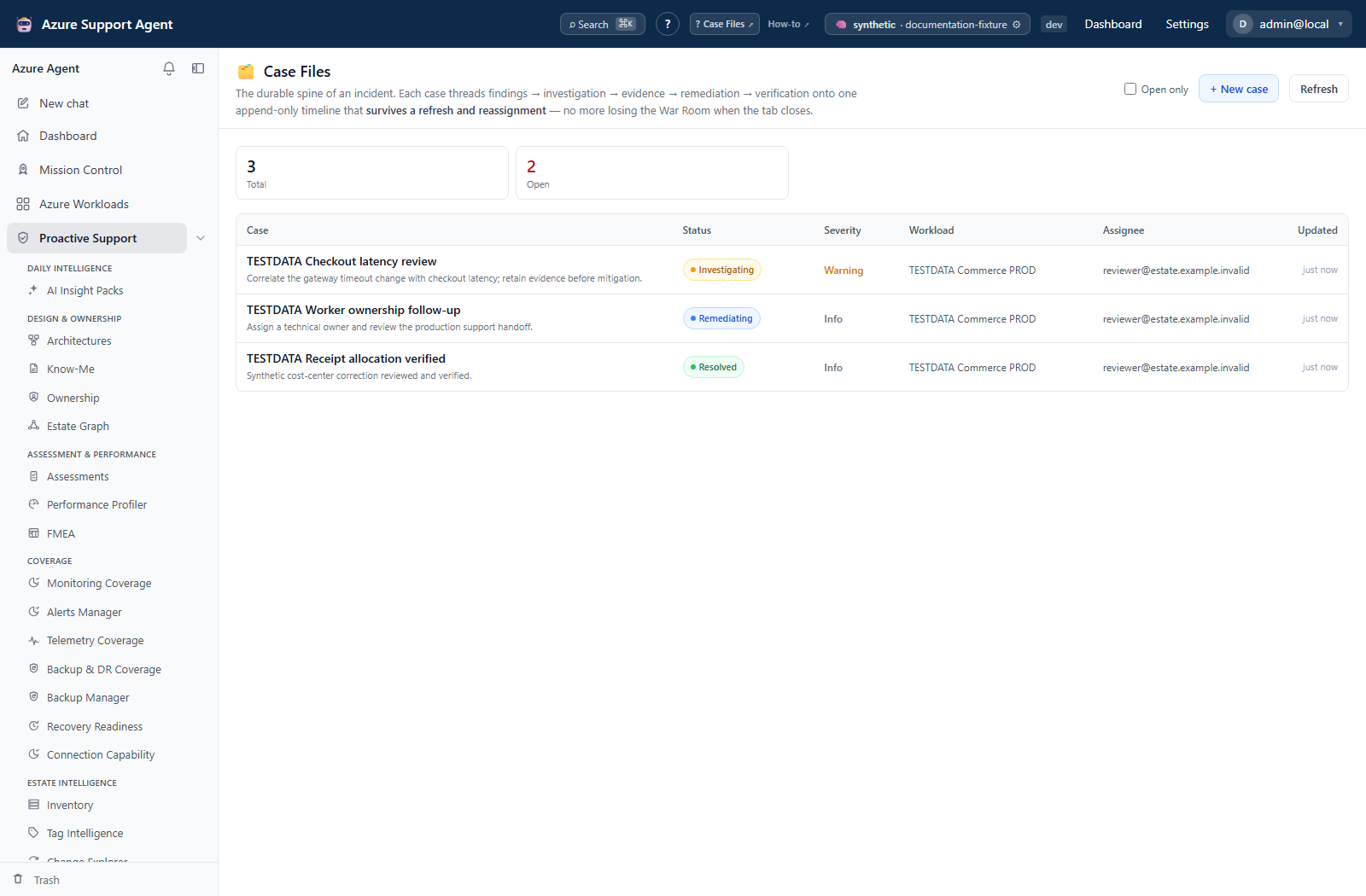
Expected result: A durable case with an append-only opening timeline.
Verification: Reload the page and confirm the opening event, note, and status event persist. An assignment event is created only when an API update changes the assignee, not merely because a note names an owner.
How to build an investigation timeline
- Record validated finding UIDs, change-event IDs, and Evidence Locker snapshot IDs in a note. For structured attachments, an authorized integration uses
POST /api/cases/{case_id}/attachwith fieldfinding_uids,change_event_ids, orevidence_snapshot_idsand avalueslist. There is no attachment picker in Case Files. - Keep the investigation chat reference rather than copying sensitive transcripts. Open investigation is available when the stored case has a chat ID; linking or replacing that ID is an API metadata update.
- Add timestamped notes for hypotheses, tests, decisions, and rejected explanations.
- Correct mistakes with a new note; timeline events and notes are not edited in place.
- Have the case integration update severity, risk, confidence, summary, or assignee when evidence changes, or record the correction in a note. These are not inline UI editors.
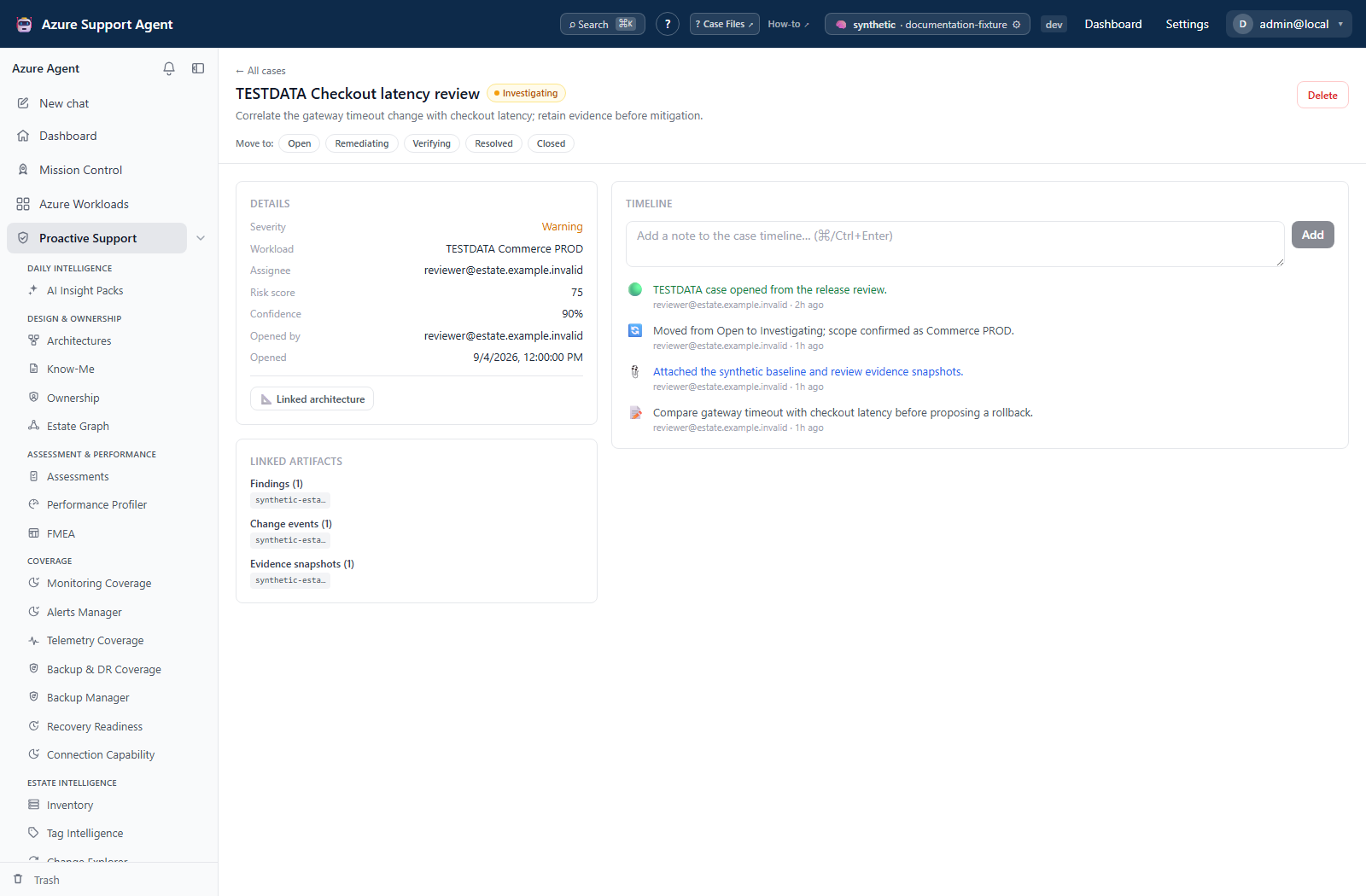
Expected result: A chronological record connecting evidence, decisions, ownership, and handoffs.
Verification: Open referenced source records in their own feature and confirm scope, relevance, and integrity. Linked artifacts shows IDs, not clickable source links; acceptance by the case API alone is insufficient validation.
How to remediate and verify a case
-
Record the approved remediation and rollback reference.
- Move to
remediatingonly when execution ownership is clear. - Apply the change through the approved external system.
- Capture fresh telemetry, inventory, quota, policy, identity, RBAC, or evidence as appropriate.
- Move to
verifyingand record measurable expected versus observed results. - Resolve when success criteria are met; close after operational follow-up.
The status buttons do not execute Azure changes or check verification evidence. Approved remediation and rollback remain responsibilities of the external execution system.
Expected result: A case whose resolution is supported by fresh verification evidence.
Verification: Confirm source symptoms are absent or controlled, no unacceptable regression exists, and attachments/timestamps postdate remediation.
How to reopen or hide an erroneous case safely
-
Reopen or move status backward when new evidence invalidates resolution; status transitions are allowed in either direction and remain logged.
- For an erroneous case, review references and external tickets before deletion.
- Preserve required evidence before selecting Delete and reviewing its confirmation. The warning says permanent deletion, but the backend currently soft-deletes the case: it retains the case/timeline and excludes the case from list and detail reads.
- Do not treat that retention as a usable undo. There is no case Trash, restore, or permanent-purge API/UI. Deleting a case does not delete external tickets or linked source records.
Expected result: Reopened work remains auditable; deleted cases are hidden from the application views while storage retains the record.
Verification: A reopened status appears in the timeline; add its reason as a separate note. A deleted case is absent even with Open only cleared and cannot be restored through the UI. Absence does not prove permanent erasure.
How to preserve a handoff without duplicating an incident
- For a workload-scoped Radar or Telemetry Intelligence War Room handoff, review the prefilled deep-investigation composer before launching an investigation.
- Open Case Files and check whether a case was created or an existing open workload case received a
handoffnote. This mirroring is best-effort; a failed case write does not prevent the chat handoff, and subscription-only handoffs do not supply a workload case. - If no case exists, create one manually. If a request outcome was uncertain, refresh/check existing cases before submitting another creation.
- Use
GET /api/cases/{case_id}through an authorized integration for structured metadata/timeline handoff. Use Evidence Locker for its own JSON export; there is no case-file download button.
Expected result: One durable incident record complements, rather than duplicates, the investigation chat.
Verification: Confirm the workload and latest note in the intended case. Do not assume a handoff automatically links the eventual chat/message ID or synchronizes future investigation results.
Safety and rollback
Case writes affect application records, not Azure resources. Notes are append-only and should contain no secrets, access tokens, share tokens, raw customer payloads, or unnecessary personal data. Status and metadata can be changed again; timeline history remains. Case deletion has no self-service restore despite retaining storage records. External remediation uses its own approved rollback.
Freshness and partial results
Case metadata and timeline are database-backed and current when loaded, but attached evidence is point-in-time and linked source objects can age, be removed, or remain partial. A case summary is not automatically synchronized with external tickets or Azure state.
Troubleshooting
| Symptom | Cause and resolution |
|---|---|
| Case is absent | Clear Open only for resolved/closed cases. Lists are capped at 200 and soft-deleted cases are always excluded; check the known detail URL before recreating anything. |
| Attachment fails | Correct the attachment field and confirm cases.write plus case access; independently verify source IDs and intended tenant. |
| Assignee is unavailable | No picker exists in this view. Record ownership in a note or use an authorized API metadata update. |
| Resolution lacks confidence | Return to investigating/verifying and collect fresh evidence. |
| Timeline appears out of order | Compare absolute creation timestamps and client time zone. |