Route and review notifications
Prerequisites
notifications.readfor in-app review and read-state changes;notifications.managefor routing-rule operations.connectors.manageto populate/manage connector destinations, plus an enabled, provider-verified connector for external delivery.- A known producer event type and source.
- An authenticated user in the intended tenant.
Route
- Open
/notificationsfor the tenant’s shared in-app center. - Open
/automations/notificationsfor tenant-wide routing rules.
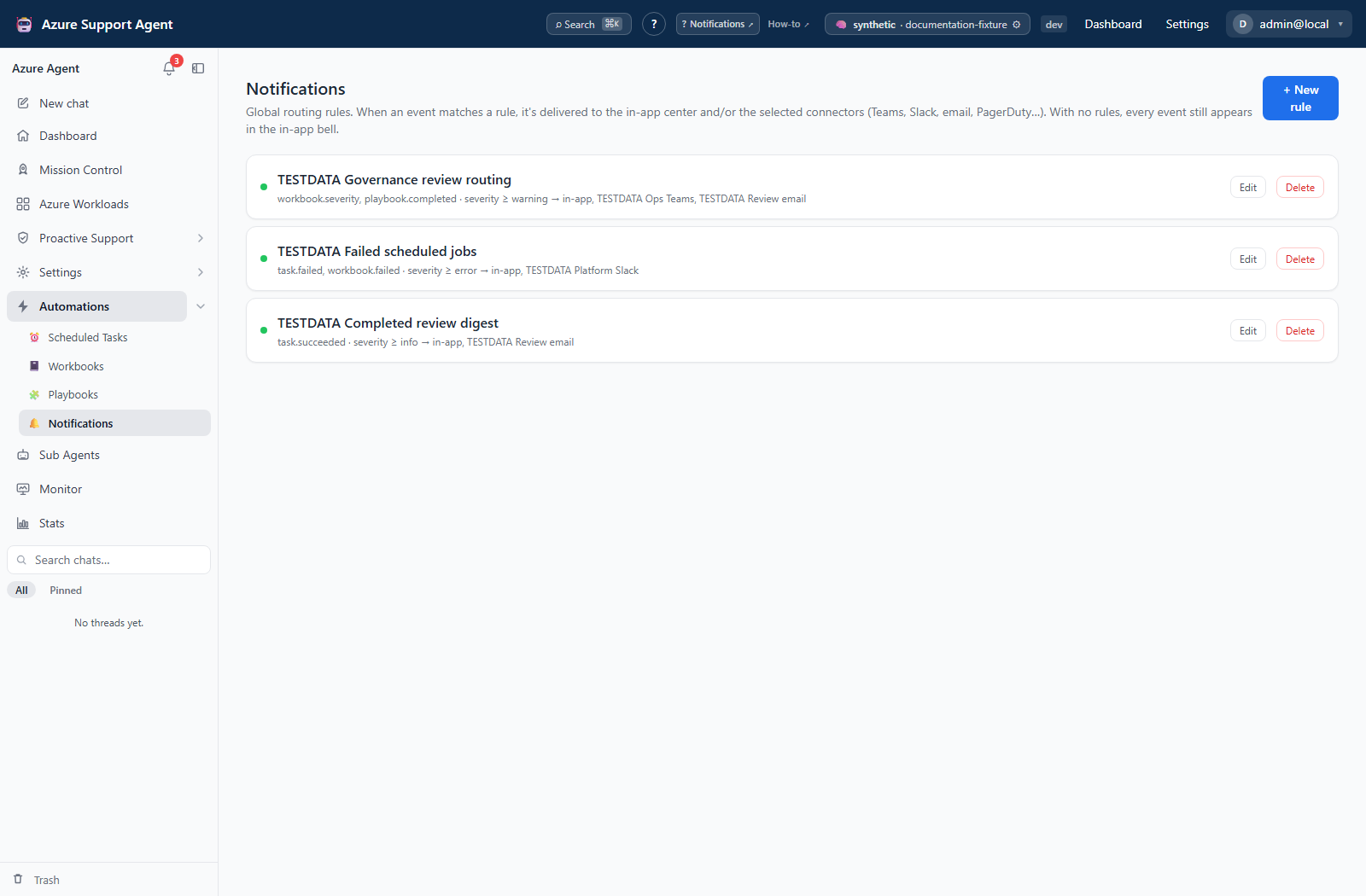
Screenshot note: The rule editor is unsaved, and routing/inbox data are synthetic browser responses. Connectors have no credentials and delivery/test endpoints were blocked. No real event was sent, no notification was marked read, and no linked job was launched.
How to create and verify a notification rule
- Select New rule and give the rule a purpose-specific name.
- Leave event types or sources empty only when the rule should match any value; otherwise select exact chips. Type, source, and severity conditions are combined. There is no free-text title/body/facts filter.
- Choose minimum severity: info, warning, error, or critical.
- Keep In-app center selected unless the workflow intentionally excludes it.
- Select enabled external connectors, clear Enabled, and select Save to stage the rule. Disabling all rules leaves default in-app delivery active.
- Verify the connector independently through its configuration page: use Test, and use Send test only when supported and real delivery is authorized. The notification rule itself has no test/send-test action.
- Enable the rule and produce a controlled event from a workbook, playbook, or scheduled task.
- Confirm the event in-app and at each intended external destination.
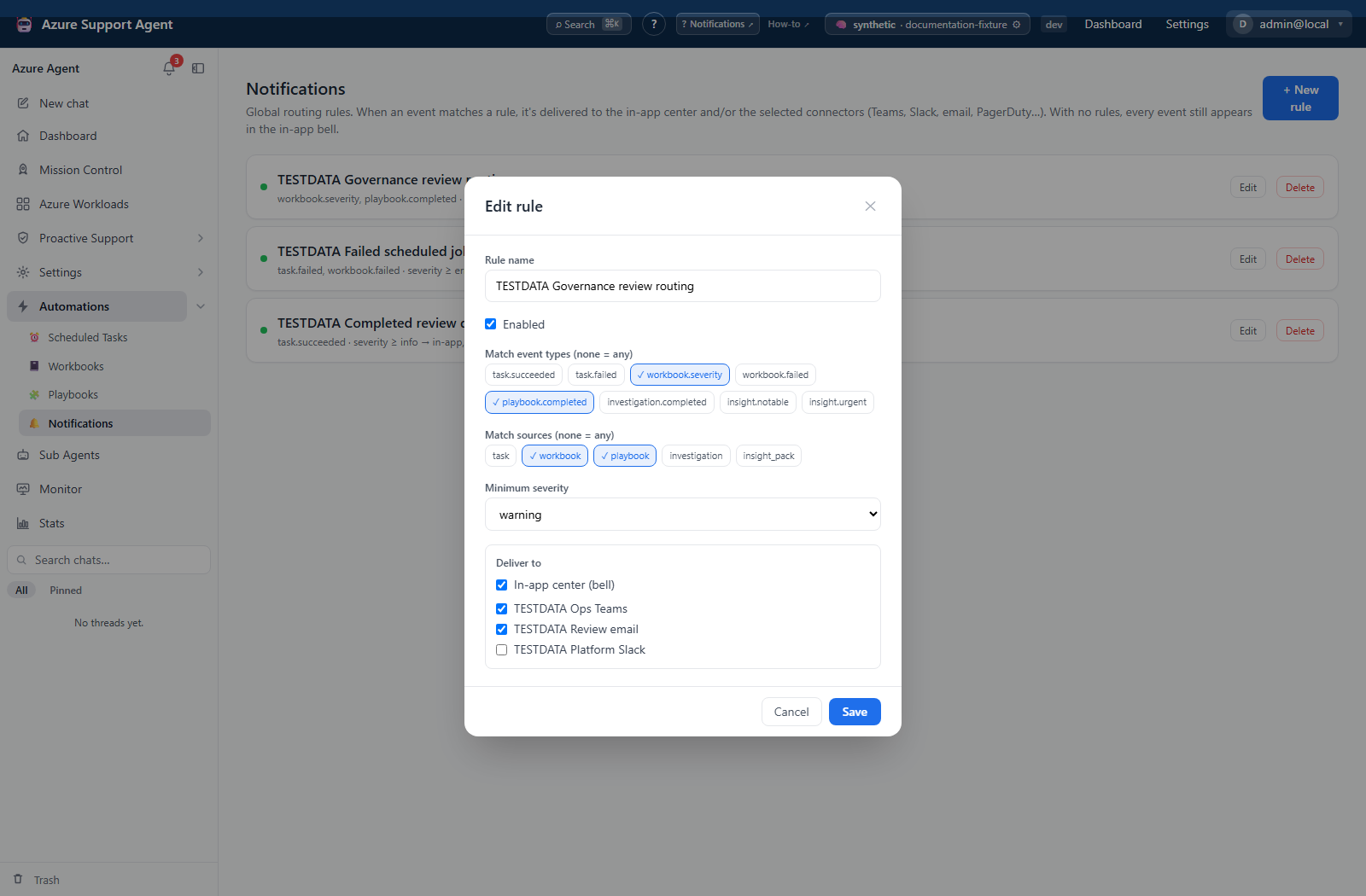
Expected result: Matching events are delivered to the union of selected in-app and connector targets, once per connector ID for that event. With no enabled rules, events appear in-app by default.
Verification: Compare the emitted event’s exact type, source, and severity with the rule. Confirm the provider artifact rather than relying on saved rule/connector status. Once an enabled rule exists, unmatched events no longer receive the default in-app delivery.
How to preserve all in-app events while filtering external delivery
- Create a rule such as All events in-app with no event/source chips, minimum severity info, In-app center (bell) selected, and no connector destinations.
- Save it enabled. This explicitly preserves the baseline when other enabled rules filter events.
- Add a separate external-delivery rule with narrow type/source/severity choices and reviewed connector targets.
- Verify one ordinary event appears only in-app and one qualifying event reaches both in-app and its destination.
Expected result: All producer events remain visible in-app, while only selected events leave the app.
Verification: Test the rules’ matching logic through authorized producer workflows. Events such as assessment alerts and Radar digests are not selectable chips in the current form; wildcard matching covers them without choosing an incorrect source.
How to review and mark in-app notifications read
- Open Notifications from the navigation or the bell.
- Switch between All and Unread, filter by source when multiple sources are available, or search title/body text. These controls search only the newest 50 loaded items.
- Select a notification to mark it read and open its source when a deep link is available.
- Use Mark read to change one item without navigation. Use Mark all read only after coordinating review: it marks all unread notifications in the tenant, including items outside the loaded/filter-selected page.
- Select Manage rules only when the active role also has
notifications.manage.
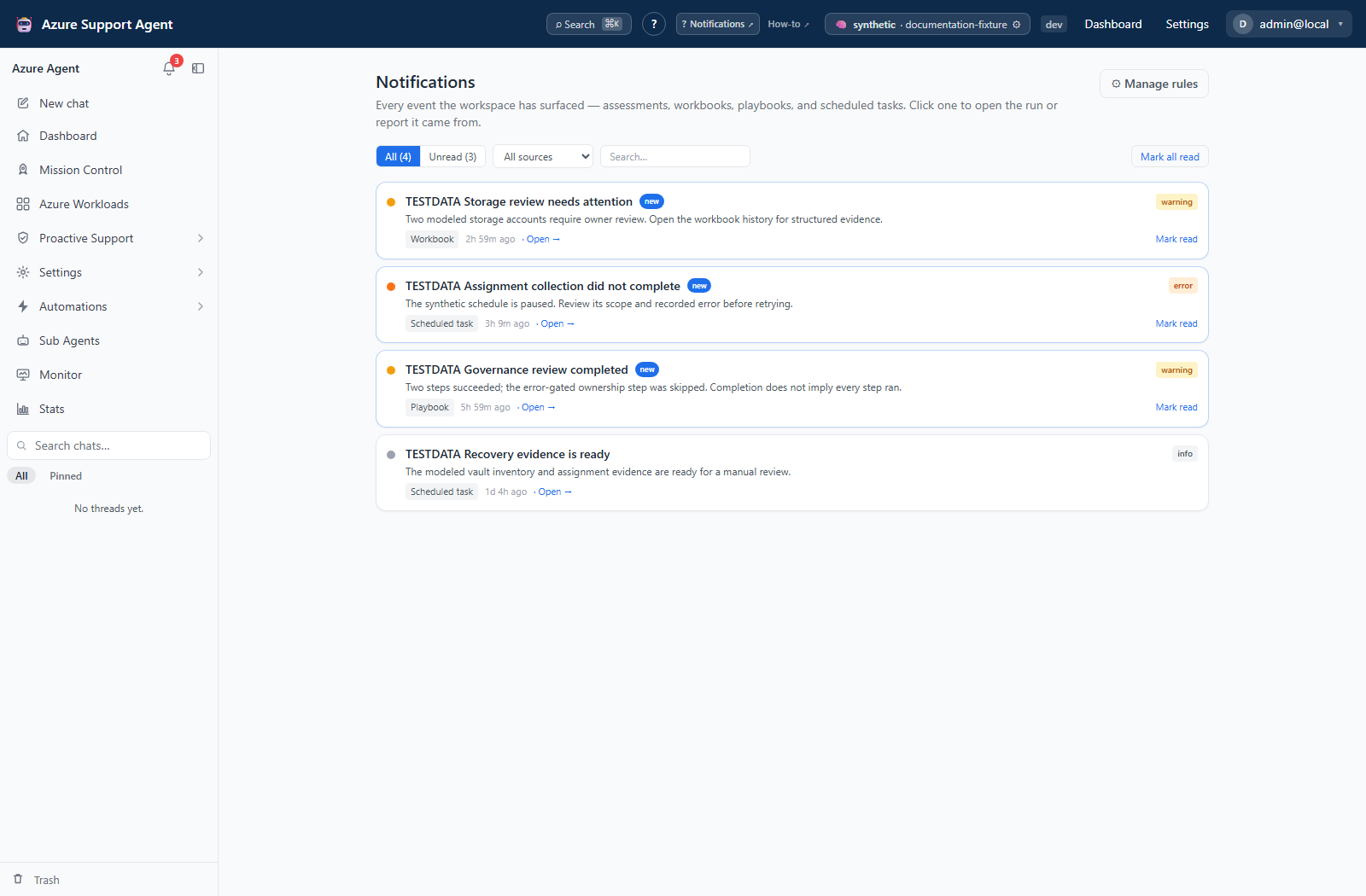
Expected result: Shared tenant read state updates for all operators, and supported items open their source. Workbook/playbook links open their libraries rather than a selected historical result.
Verification: Return to All or wait for the 60-second refresh. The bell’s count includes all unread in-app events and can exceed the page count. There is no mark-unread or delete/clear-feed action.
How to stop or troubleshoot a delivery route
- In Manage rules, select Edit, clear Enabled, and Save to stop future matches while retaining the definition. Alternatively, Delete removes the rule immediately without a confirmation/trash step.
- Check whether other enabled rules or task-level connector destinations still select the same receiver. Removing the last enabled rule restores in-app fallback, not silence.
- Inspect the source run and external artifact for an already-started delivery; changing a rule cannot cancel or retract it.
- For a failed destination, correct connector configuration/authorization through its provider guide and verify the destination before generating another controlled event.
Expected result: Future routing reflects the reviewed rule set; previously delivered messages/incidents/objects remain at the provider.
Verification: Confirm the rule state and later producer outcome. There is no delivery-history/resend/retry screen here and no durable notification retry queue; a new event can repeat an earlier partial delivery.
Safety and rollback
Marking read does not delete the event or reverse external delivery, and there is no unread-state restoration action. Use source history as the evidence record instead of recreating an event solely to make it unread.
Start with narrow event and severity filters and a non-production destination. Disable or delete the rule to stop future routing; provider-side messages, incidents, or records already created must be handled at the provider.
Saving a rule changes application state; matching delivery invokes connector handlers directly, without a chat approval prompt. Depending on channel, that can send mail/messages, create tickets/incidents/annotations/findings, write objects/messages, or trigger a workflow. Read the full channel catalog before choosing destinations. The engine records one attempt per selected channel but does not provide automatic durable retry or event export in this surface.
Troubleshooting
| Symptom | Cause and resolution |
|---|---|
| Bell or in-app route is absent | assign notifications.read to the active role. |
| Manage rules is absent | assign notifications.manage; feed read access does not grant global rule management. |
| New event is delayed | the list refreshes periodically; refresh after confirming the producer completed. |
| Deep link unavailable | use source and title to locate the originating feature history. |
| Wrong tenant’s event expected | notifications and rules are tenant-scoped. |
| Rule does not match | verify exact type/source and that event severity meets the threshold. |
| Connector absent from the form | Confirm connectors.manage, then enable and save the connector. Only enabled connectors are listed. |
| Duplicate delivery | Matching rules deduplicate IDs within one event. Check separate events, repeated runs, agent tools, and direct task-summary destinations instead of assuming overlapping rules duplicate that same event. |
| Events disappear after first rule | An enabled rule replaces fallback routing. Add the explicit all-events in-app rule above if that is the desired policy. |
| Another operator’s unread count changes | Read state is tenant-shared, and Mark all read is not restricted to the displayed page. Coordinate review and use source history for evidence. |
| External failure | follow the connector’s provider-specific guide and recheck endpoint policy and permissions. |