Review identity, PIM, and app registrations
Prerequisites
- Product permission
entra.readto enter the Entra area andidentity.readfor these embedded panels, their refreshes, registration export and legacy ticket action. Chat requireschat.use; principal-dossier links needinvestigate.read. - A Microsoft Graph-capable connection with approved user, application, and role-management read permissions.
- ARM discovery, enabled command execution and Key Vault certificate/secret metadata-list access for vault expiry checks. These checks do not need secret values.
- Jira or ServiceNow only for ticket creation; an enabled AI/chat path for investigation handoff.
Route
These three reviews used to be a separate Identity screen. That screen was absorbed into Entra ID, and each of its views is now a sub-tab:
| This review | Open | Sub-tab |
|---|---|---|
| Identity findings | /entra/findings | Identity hygiene |
| PIM and JIT posture | /entra/privileged | JIT hygiene |
| App registrations | /entra/applications | registrations |
The old URLs still work and redirect, so existing bookmarks and links are not broken:
| Legacy URL | Lands on |
|---|---|
/identity | /entra/findings/hygiene |
/identity/pim | /entra/privileged/jit-hygiene |
/identity/app-registrations | /entra/applications/registrations |
Anything else under /identity/ | /entra — the tenant posture tab, without a sub-tab |
That last row is the one to watch. A bookmark to a path the redirect table does not name specifically — /identity/overview, for instance — lands on Entra ID’s posture tab rather than the view you wanted, and nothing on screen explains why. Navigate from the table above instead.
The underlying API still uses identity.read, including refresh and ticket creation; native Entra’s entra.admin does not replace it. The Entra shell has its own entra.read entry permission.
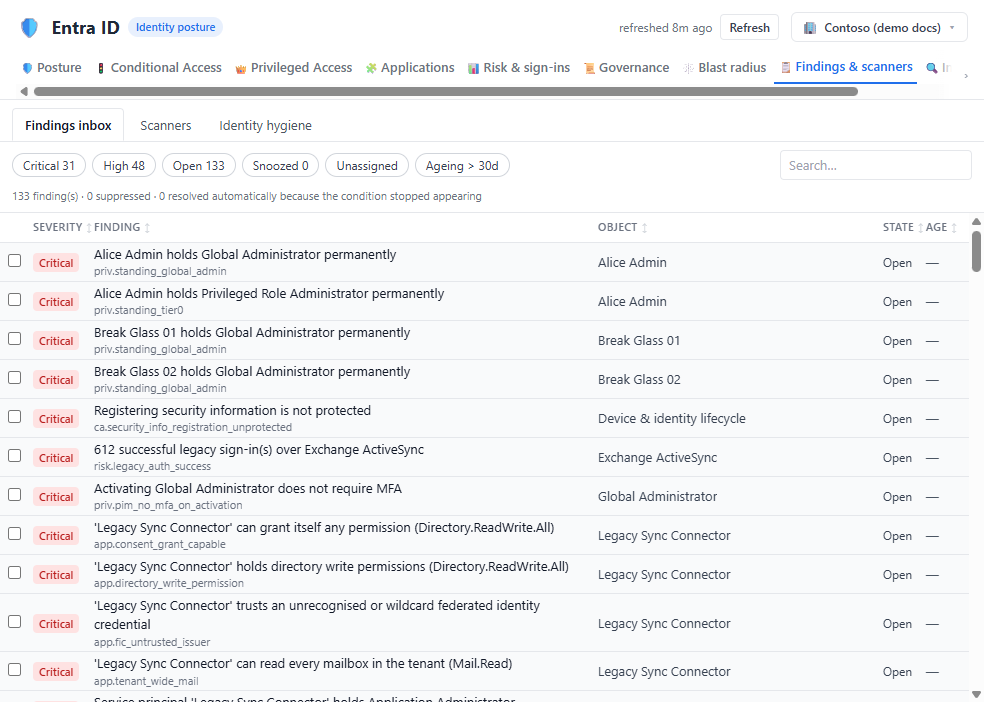
How to refresh and triage identity findings
-
Open
/entra/findingsand select the Identity hygiene sub-tab, select the connection, and choose a 30-, 60-, 90-, or custom-day window. - Check generated time,
never loaded, errors, sampled counts, and workload mapping. - Select Refresh once and wait; the slow collection does not run automatically.
- Filter by severity and mapped-only status.
- Prioritize expired/near-expiry credentials, privileged MFA evidence gaps, ownerless apps, Conditional Access review candidates, and Key Vault expiry.
- Validate each item in Entra or Key Vault before remediation.
- Refresh after the external correction.
Expected result: A prioritized, point-in-time set of identity posture findings with collector limitations visible.
Verification: Confirm subject, expiry, owner, policy state, and workload in the authoritative service. Without MFA is sampled evidence, not a tenant-wide authentication-method audit.
How to review PIM and JIT posture
-
Open
/entra/privileged, select the JIT hygiene sub-tab, and inspect the PIM snapshot age. - Run Refresh when absent or stale.
- Review the four groups with their source notes. The bundled live legacy collector currently fills standing candidates only; stale eligible, stale active and activation-review groups have no live schedule source in this pipeline. Demo rows are not live evidence.
- Check principal, role, assignment age, last activation, and justification.
- Use native
/entra/privileged/assignments,/pimand/activationsunder the/entra/privilegedprefix for schedule/configuration evidence, then validate in Entra PIM with the business owner. A legacy active-role listing alone does not prove permanence. - Move standing privilege to approved eligibility/JIT externally where appropriate.
Expected result: A verified list of privileged-access review candidates.
Verification: Confirm assignment type and activation history in Entra PIM, then refresh this tab independently.
How to review and export app registrations
-
Open
/entra/applications, select the registrations sub-tab, and select Refresh if never loaded or stale. - Follow background progress; navigating away does not cancel the job.
- Filter by owner, permission, audience, risk indicator, or credential state.
- Open a row to inspect credential expiry, owners, requested delegated/application permissions, enterprise-app state and portal link. Manifest permissions are not proof of granted consent; compare native Inventory’s granted permissions.
- Export the filtered view to CSV, or choose Excel (all sheets) for the entire completed registration cache, regardless of filters. This is not the native Entra workbook.
- Verify the export count and protect it as sensitive governance metadata.
Expected result: A bounded app inventory and review artifact without secret values.
Verification: Spot-check owners, credential expiry, audience, and high-impact application permissions in Entra.
How to investigate or create a ticket
- Validate the finding and decide which metadata may leave the product before choosing a handoff.
- Select Investigate to prefill Chat with the finding and optional workload. Review/redact the composer and confirm its scope before sending; navigation alone does not send the message.
- For a ticket, select Ticket and then a configured Jira/ServiceNow connector. Selecting the connector immediately submits the generated finding; there is no intervening editable ticket-preview form. Use the destination’s own form if redaction or extra fields are needed before creation.
- Confirm the returned success/reference before retrying, then add owner/deadline and any approved context in the destination. Avoid duplicate submissions after an uncertain response.
Expected result: A prefilled Chat composer or a real external ticket. The handoff itself does not change a directory object; any subsequent Chat execution is governed separately and is not guaranteed read-only by this page.
Verification: Open the destination and confirm tenant, subject, severity, and link are correct.
Safety and rollback
Feature collection is read-only; ticket creation writes to an external system. Exports and handoffs can disclose identity metadata. Credential rotation, owner changes, Conditional Access, and PIM changes occur externally and require overlap/testing or approved rollback. A mistaken ticket can be corrected or closed in the destination; an exported file must be securely deleted according to policy.
Freshness and partial results
The three legacy panels use separate caches. Identity hygiene can carry forward a failed empty group as showing last-known values; JIT refresh does not have that same merge. Identity hygiene requests at most 400 credential/ownerless results and samples privileged MFA checks (default 50). App registrations defaults to 500 objects, configurable 50–5,000, or Full tenant with a 100,000 safety ceiling and resumable pages. Every blank/zero must be read with the specific panel’s errors and source label.
Troubleshooting
| Symptom | Resolution |
|---|---|
| Names appear as IDs | Fix Graph permission/token resolution and refresh the affected tab. |
| Apps or owners are missing | Check tenant, Graph consent, enumeration cap, errors, and job completion. |
| Vault findings are absent | Verify ARM discovery and data-plane access on each vault. |
| Refresh appears stuck | Check progress/job state and Graph throttling; do not start duplicates. |
| Ticket action fails | Verify connector health, destination configuration, and minimum required fields. |