Sub Agents
Route: /automations/agents
Product permissions: agents.read to list and export; agents.write to create, edit, enable/disable, delete, import, and use AI drafting/enhancement. chat.use is needed to open a chat. The current shell disables agent-panel buttons/inputs without agents.write, including the read-authorized export buttons; link navigation is separate.
Purpose
Sub Agents are saved, reusable persona, instruction, model, and tool-routing configurations. Enabled agents appear in chat selectors and quick-launch surfaces. They are not separate identities, independently running workers, or an authorization boundary for Azure access. The agent registry is deployment-wide rather than tenant-scoped.
Prerequisites and data sources
Configure an AI provider before using AI draft or enhancement flows. Provider/model pickers and the saved tool-policy diagnostic use settings.read; that capability is separate from agent authoring. Configure and enable connectors before assigning connector tools. Tool availability is derived from enabled connectors plus enabled first-party built-in tools. Azure/Entra MCP catalogs are controlled separately from this connector picker.
Tabs and actions
The list supports category filtering and Group by category for Networking, Compute, Data & Storage, Security & Identity, Operations & Monitoring, Cost & Governance, and General. Cards offer an enabled switch, Chat, Enhance, Edit, Export, and confirmed Delete. Export all, Export selected, Import, Generate with AI, and New agent are library actions.
Screenshot note: This isolated native-UI example shows built-in definitions in a synthetic demonstration, not live tenant records or agent execution results. Use the library to review instruction and mode context before selecting an agent; the screenshot does not validate its tools, provider, or access.
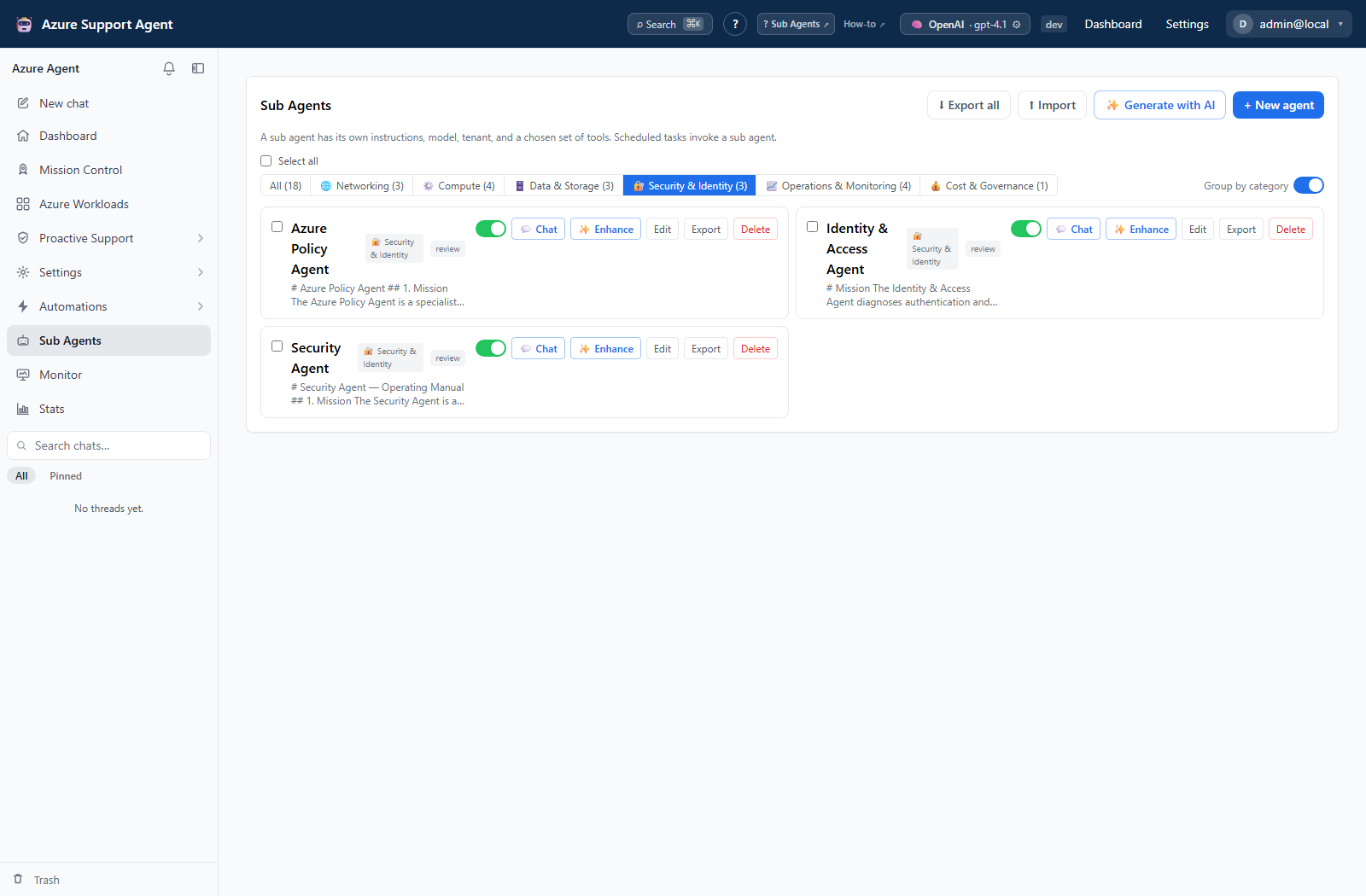
Selection also enables Set model for N: choose a provider/model and Apply to N. This updates each selected agent separately and preserves instructions/tool settings; it is not atomic. Select all selects the entire agent list, not only the current category filter. Inspect the selection count before applying.
The editor contains name, category, instructions, provider/model, Review/Autonomous mode, searchable connector tools, and Azure/Entra catalog policies. It has no connection picker even though imported/stored agent configuration can carry connection_id. Leave provider empty for defaults; in chat an agent overrides the chat model only when both its provider and model are set. Scheduled agent execution resolves provider/model defaults separately.
The Saved tool policy preview uses the saved agent and deployment default connection. It is diagnostic output, not a live validation of unsaved edits, the selected chat’s scope, or a successful Azure call.
Freshness and scope behavior
The list is application configuration, not live Azure inventory. A connector tool disappears from the available catalog when its connector is disabled or removed. Connector selections use tool names, not a uniquely selected connector instance; do not assume choosing a name establishes a destination identity when multiple connectors offer that tool.
Azure MCP defaults to allowing the full catalog. Disable Allow routing across the complete Azure MCP catalog to use selected bundles or exact names. Azure bundles are azure.compute, azure.networking, azure.storage, azure.data, azure.monitoring, azure.identity, azure.governance, azure.reads, and azure.writes.
Entra defaults to off. Opt in with the complete-catalog control or scoped bundles/names: entra.users, entra.groups, entra.applications, entra.authentication, entra.conditional_access, entra.audit, entra.roles, entra.devices, entra.reads, and entra.writes. Review any retained exact names/bundles when changing the full-catalog setting. Routing can initially expose fewer tools than are eligible; that is progressive discovery, not evidence that the saved selection was lost. First-party tools can also be attached by the chat context, so the connector picker is not a complete inventory of every possible chat tool.
How to create and verify a constrained agent
- Select New agent, enter its name, category, and instructions, and choose the intended provider/model or defaults.
- Use Review for initial validation. Select only required connector tools and constrain Azure/Entra MCP bundles or exact names instead of leaving broad catalog access unnecessarily enabled.
- Select Save. New agents default to enabled; use the card switch to disable one while it is awaiting review.
- After review, enable it and select Chat or choose it in a chat’s agent picker.
- Send a harmless read-only prompt and inspect the selected agent, connection/scope, response, and activity trace.
Expected result: The chat uses the saved persona and tool policy for subsequent turns without granting additional Azure permissions.
Verification: Check actual tool calls and target scope. A successful save or tool-policy preview is not proof of runtime access or least privilege.
How to review an AI enhancement before saving
- Select Enhance on the intended agent and answer the assessment/interview with Continue.
- Use Enhance now only to skip remaining questions; answers still typed in the current step are not included until submitted with Continue.
- Inspect What changed, the run-mode change indicator, and Compare before / after. Use Regenerate if needed.
- Select Review & save to open the normal editor, then review tools and instructions again before selecting Save. Cancel leaves the stored definition unchanged.
Expected result: Generation produces a draft; only the editor’s Save updates the agent.
Verification: Reopen Edit and compare the saved configuration. The wizard’s Retry retries draft generation, not a previous agent execution.
Interpretation of results
An enabled agent is selectable, not independently authorized. Review gates write-classified tool calls. Autonomous explicitly overrides that interactive gate, so do not describe every agent run as approval-gated. Tool availability, connection configuration, and downstream service authorization still apply. Validate AI-generated instructions and tool selection before saving.
Exports, history, scheduling, and integrations
Single/bulk exports include instructions, provider/model, connection reference, tool policies, run mode, and enabled state; they omit server IDs/timestamps and category. They do not package connector credentials, but text/default references can still identify an environment and require manual review.
Import accepts single/bulk export envelopes or bare agent objects/lists. The UI imports immediately with overwrite existing by name enabled: a matching name updates that record, while a new name creates one. Unknown connector-tool names are dropped; records lacking meaningful name/instructions are skipped or rejected. Enabled state comes from the import (default true). There is no import preview, staging dialog, or built-in version rollback.
Scheduled Tasks can target agents separately and require task permissions. This page has no run history, schedule editor, cancel, trash, restore, or purge. Review execution evidence in the associated chat or task history.
Safety and limitations
Agent changes write application configuration; they do not directly mutate Azure. AI drafting/enhancement does call the configured model provider. Running an agent can invoke Azure or external connector tools under Review/Autonomous behavior.
Disable is a selector control, not an execution kill switch. Existing chat references and scheduled tasks can still use a disabled agent. Deleting an agent does not pause its schedules; a missing reference can fall back to default agent behavior. Pause schedules and clear agent selection in affected chats before removing a definition. Delete has confirmation but no restore; importing a definition does not reconstruct earlier chat/task references automatically. Bulk edits and imports can partially apply; reopen the list after an error.
Troubleshooting
| Symptom | Cause and resolution |
|---|---|
| Agent selector is empty | Enable the intended agent and confirm agents.read; use chat.use to launch chat. |
| A tool is missing | Check whether its connector/built-in is enabled, its name was retained during import, and MCP bundle policies allow it. Reopen the editor after correcting the catalog. |
| Model choices or preview are missing | Provider configuration/model discovery and routing diagnostics use settings.read. Ask an administrator to verify access and provider availability. |
| Draft generation fails | Check the active AI provider; use the wizard’s Retry or restart the interview. No agent execution is retried by this action. |
| Import updates an existing agent | Matching names are overwritten by the UI import. Pause affected schedules before importing; use a different reviewed name for a separate copy. |
| Category changes after transfer | Category is not exported. Set it explicitly in the destination editor. |
| Disabled agent still runs on a schedule | The scheduler does not use enabled state as an execution guard. Disable the schedule itself and inspect already-running work. |
| Bulk update partly succeeded | Each selected agent is updated separately. Reopen the list, inspect every selected configuration, and correct only the remaining records. |