Scheduled Tasks
App route: /automations/tasks
Scheduled Tasks stores a recurrence and invokes a saved target. Editing the definition does not overwrite earlier task-run records. A successful schedule save does not execute or validate the target against Azure.
Screenshot note: Status switches, next-run previews and histories below are browser fixtures. No schedule was created, enabled or run, and no notification was delivered. Editors are unsaved; turn Schedule enabled off before saving a real staged schedule, even where the example switch is on.
Permissions and prerequisites
| Operation | Application permission |
|---|---|
| List schedules, archived schedules, preview cadence, read history | tasks.read |
| Create, edit, enable/disable, archive, restore, permanently delete | tasks.write |
| Run now and the run portion of Save & run now | tasks.run |
The current UI disables the whole tasks panel without tasks.write, including its history and run buttons; tasks.run alone does not enable that panel. Target pickers also need their catalog access: agents.read, workloads.read, workbooks.read, or playbooks.read. Connector selection uses connectors.manage. Opening an output requires access to its originating feature, such as chat.use or assessments.read.
The target needs valid scope, an appropriate Azure connection, and any required AI provider. These application permissions are separate from the Azure identity’s permissions. Scheduled execution calls the target services; do not treat the manual target page’s permission checks as a second approval step for every scheduled run.
Complete target catalog
| Target | Configuration and result |
|---|---|
| Sub Agent | Optional saved agent, required task details, Review or Autonomous, and New thread per run or Same thread. With no agent, the task uses its prompt and default runtime configuration. Produces a chat thread. |
| Assessment | One or more workloads; WAF (all five pillars), WARA (Reliability), WASA (Security), or custom Security, Reliability, Cost Optimization, Operational Excellence, and Performance Efficiency pillars. Optional AI executive summary, new-findings alerts, and low-confidence alerts with a completeness threshold. Produces assessment reports. |
| Workbook | Saved workbook and values for its declared parameters. Produces a workbook run. The generic form does not expose a write-confirmation setting. |
| Playbook | Saved playbook. Uses its ordered workbook steps and their saved scope/parameters; the task form has no playbook-input or connection-override editor. Produces a playbook run. |
| Retirement Radar | Created from its dedicated feature; scans a workload or subscription and can publish new/deadline-approaching items. |
| Mission Control | Created from its dedicated feature; runs selected systems for one or more workloads. |
| AI Insight Pack | Created from its dedicated feature; runs a pack against its saved scope and overrides, with materiality-gated digest delivery. |
Only the first four types are offered by New schedule. All seven can appear in the unified list. Editing a dedicated-feature target here changes the name, cadence, and notifications, not its feature-specific configuration.
Cadence and list controls
- Daily and Weekly use a time of day and IANA timezone; Weekly adds a weekday.
- Advanced (recurrence builder) generates cron for minute/hour/day intervals, selected weekdays, or a day of month and selected months. Daily/weekly/monthly patterns support additional hours at the same minute. It is cron-based, not an elapsed-duration timer; day-of-month intervals reset with the calendar.
- Custom (cron expression) accepts a cron expression and offers Hourly, Daily 08:00, Weekdays 09:00, Weekly Mon, and Monthly 1st shortcuts. Keep complex existing expressions in this mode: the visual builder parses them only on a best-effort basis.
- Run limit, Start date, End date, connector destinations, and Schedule enabled are shared controls. New schedules start enabled in the form; turn the switch off before staging one.
- The live label and next five occurrences preview cadence only. The current frontend preview request omits start/end dates and the run limit. Recheck the saved schedule rather than treating the preview as window validation.
- The list supports type/status filters, search by name/target, grouping, and sorting by name, last run, next run, or run count. Active tasks, Total tasks, and Failing filter the list; Failing means the latest task run is
failed, not that every target result is healthy otherwise. - Selection supports bulk Enable, Disable, and Delete (archive). Bulk operations are separate requests, not an all-or-nothing transaction; verify each row after an error.
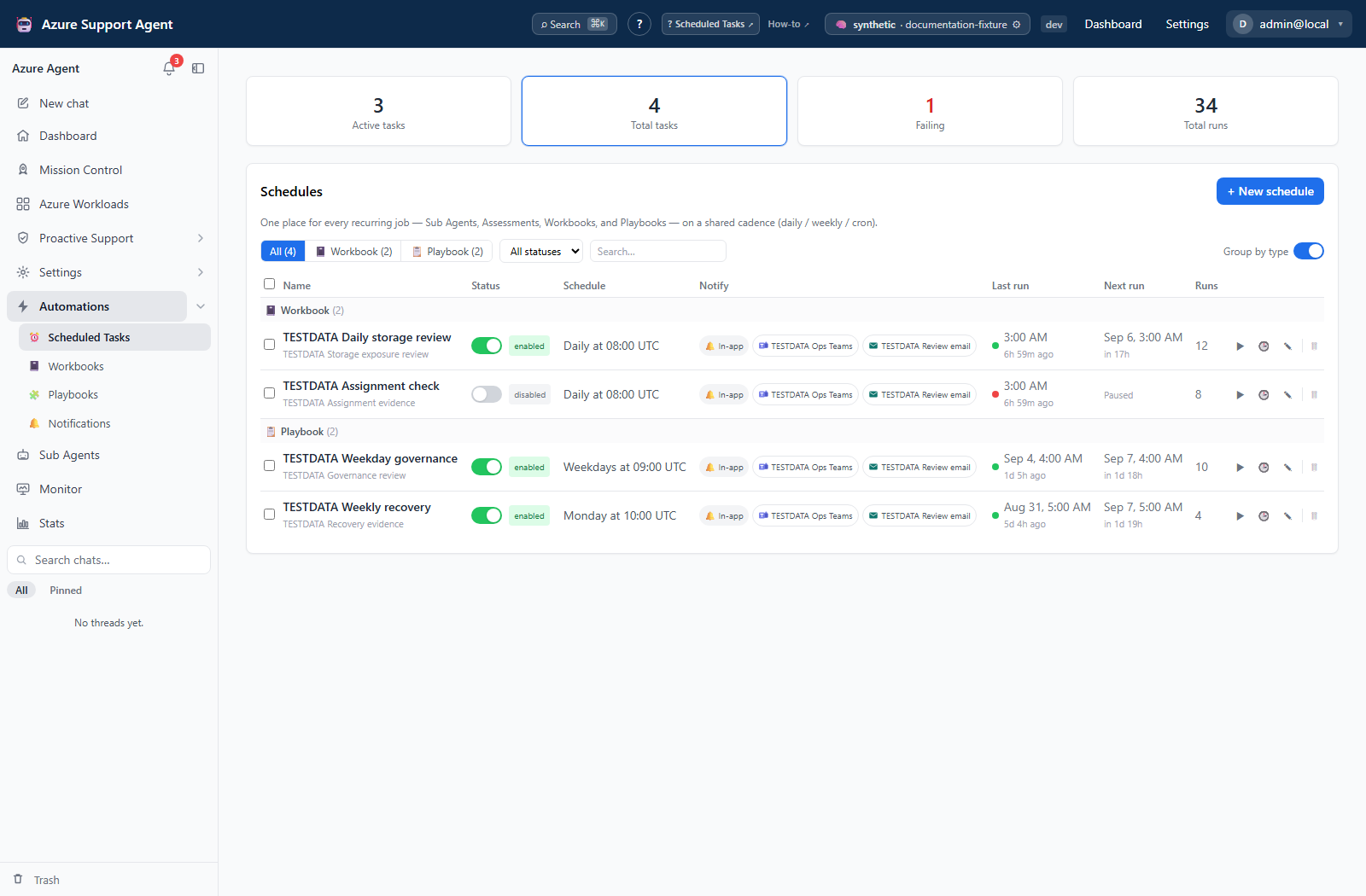
How to validate a schedule before enabling recurrence
- Select New schedule, choose the target, and supply the fields in the target catalog above.
- Select the cadence and timezone; review the live label and upcoming occurrences, including daylight-saving boundaries.
- Set any date window or run limit. Turn Schedule enabled off and select connector destinations only after reviewing their external effects.
- Select Create schedule, then Run now on the saved row. Manual runs can execute a paused schedule and count toward its run limit.
- Inspect Run history and open the target output. Enable the schedule only after confirming its scope, result, and any delivery.
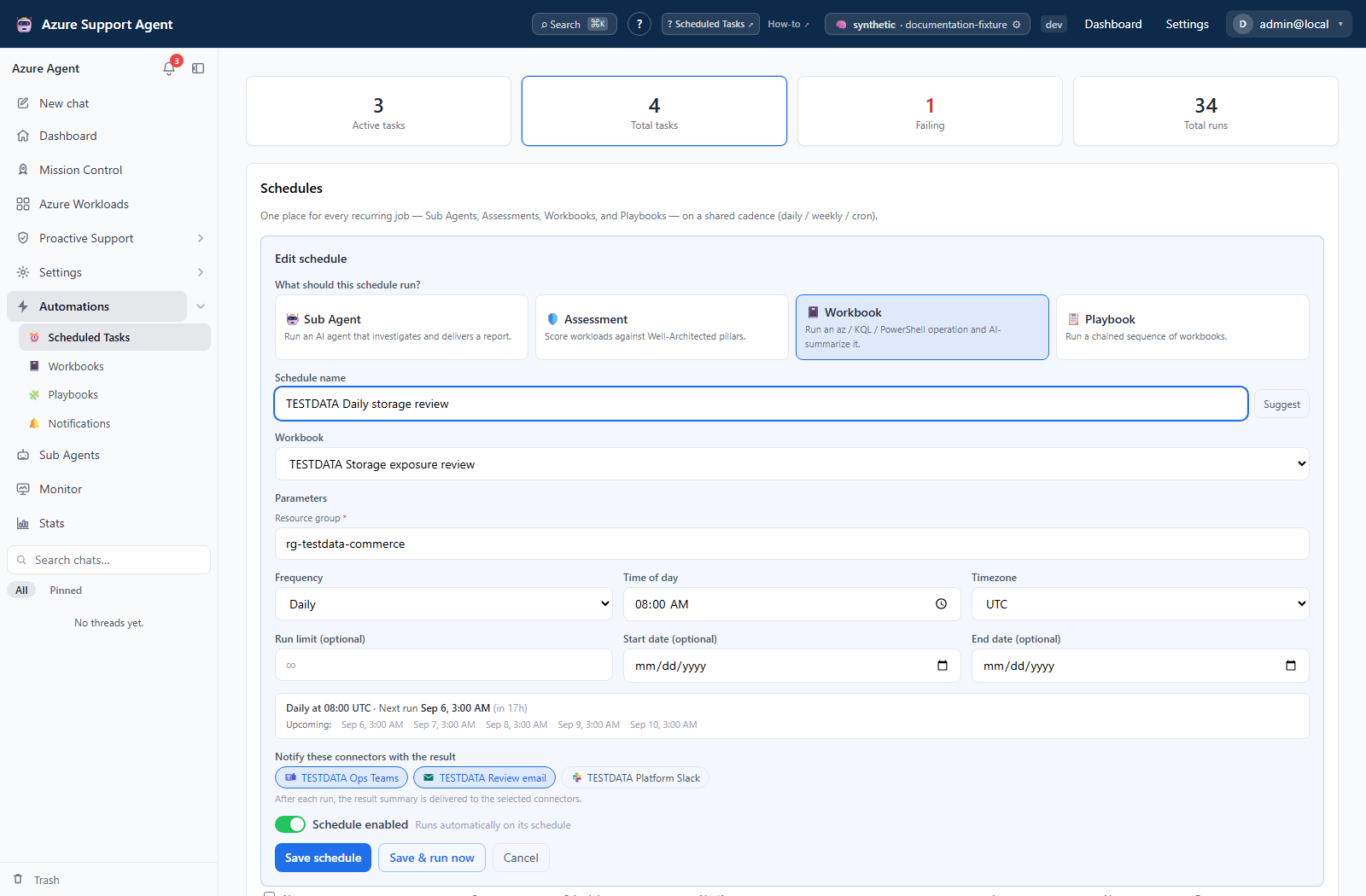
Expected result: A paused definition is validated manually before automatic recurrence begins.
Verification: Confirm the saved status, next run after enablement, manual versus schedule trigger, and the actual report/thread/workbook/playbook output. Task started is an acknowledgement, not a completion result.
History, recovery, and cleanup
Task history returns the latest 50 records and polls while a displayed run is running (or briefly while a newly opened history is empty). It shows status, start time, trigger, summary/error, and supported result links. Workbook/playbook links open their libraries, not a selected historical run; match the run in that library. There is no task-history export, per-run delete, cancel, resume, or retry-failed button.
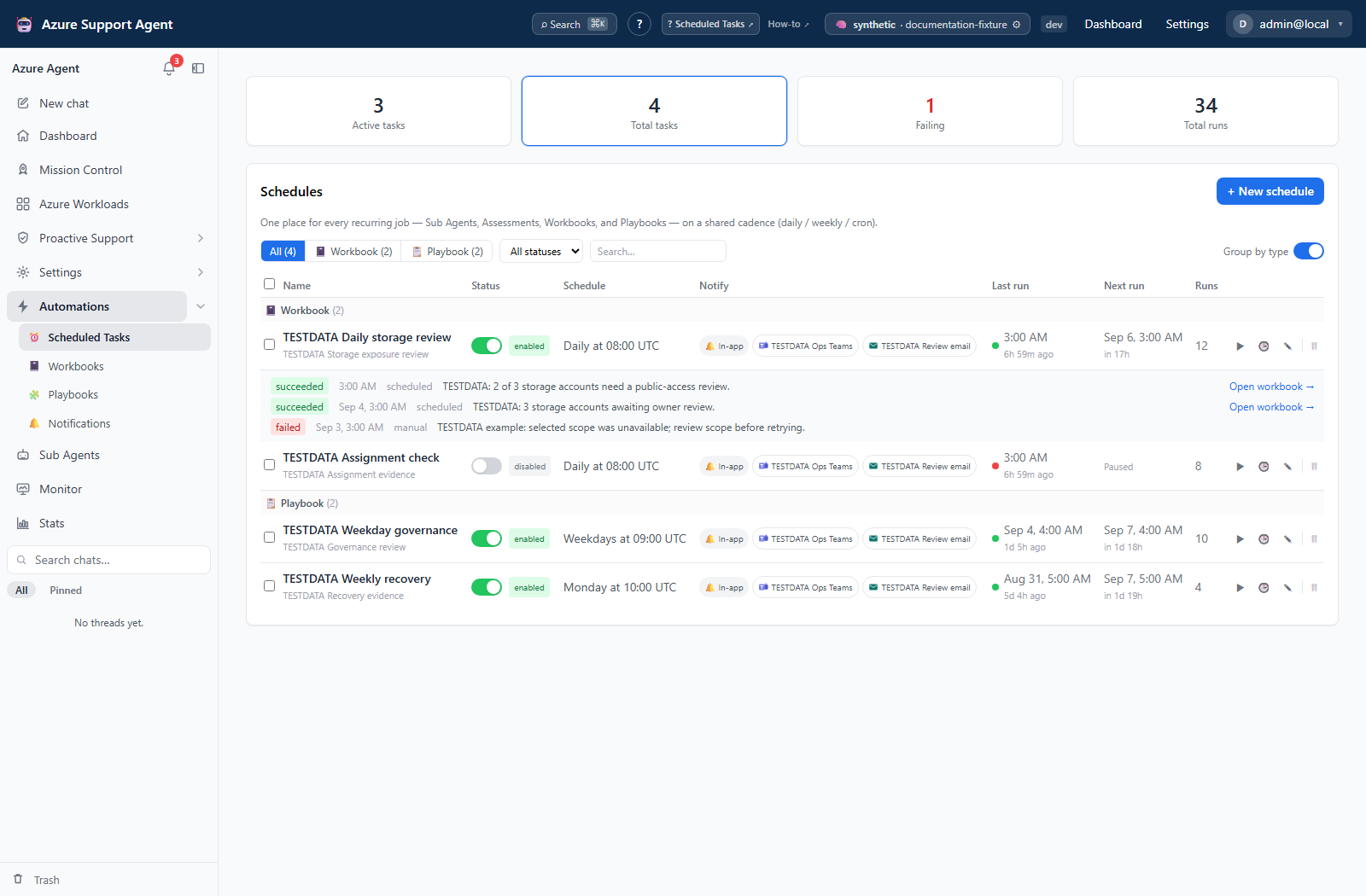
The scheduler checks approximately every 30 seconds and allows four scheduled runs per application process. Due occurrences are claimed in the database and heartbeated; an unfinished occurrence can be reclaimed after its lease expires. This is not checkpointed target execution or an exactly-once guarantee for external effects. Manual runs use a separate background path and are not subject to that scheduler semaphore. Avoid repeated Run now clicks while investigating an uncertain outcome.
Completed failures normally leave future recurrence enabled until the date window or run limit ends. A lost/manual request, interrupted workbook execution, or stale running record is not proof that nothing happened. Inspect the target and destination before starting another complete run. Assessment and mission summaries can include some completed workloads while others were not collected; inspect every intended workload, not only the task’s success badge.
How to pause, archive, and restore a schedule safely
- Disable the schedule to stop future automatic dispatch. Inspect any already-running work; disable/archive is not cancellation.
- Select Delete and confirm archival when the schedule is obsolete. Its definition and task history move to Archived schedules.
- Open archived History if evidence is still needed. Select Restore to return the schedule paused, then review its target and cadence before enabling it.
- Select Delete permanently only after deciding the schedule and its task-run history are no longer required; confirm the irreversible removal.
Expected result: Archive retains history, restore returns paused, and permanent deletion removes the schedule and its task-run records.
Verification: Check the active/archived lists and status. Purging the task does not delete separately stored chat threads, assessment reports, workbook/playbook runs, notifications, or provider-side artifacts.
Notification and write effects
Saving, toggling, archiving, and restoring a schedule write application state. Execution can read or change Azure and can deliver to external services. Review/Autonomous and thread grouping apply to agent targets only: Review gates write-classified tool calls, while Autonomous removes that interactive gate. Connection and downstream authorization still matter; a run-mode label is not a security review of the instructions.
Agent schedules record approval-required activity in the thread but do not create a resumable scheduled approval workflow. Do not assume approving later resumes the task. Disabling or deleting the referenced Sub Agent also does not stop its schedules; pause them explicitly first.
Task-level connectors receive a direct summary separately from notification-rule routing and target-generated events. These paths can duplicate external deliveries. Direct delivery failures do not roll back a completed run, and per-connector outcomes are not shown in task history. The In-app badge is not delivery proof: enabled notification rules can exclude a task event, and event publication can fail independently. See Notifications for the routing rules and full channel catalog.
For non-agent targets, task-notification failure classification currently depends on a returned error string, not solely on task-run status. A failed playbook can produce a failed task-history row but a task.succeeded event when the target supplies no error text. Treat task/target history as the execution evidence and do not rely exclusively on a task.failed routing rule to detect every failed target.
Troubleshooting
| Symptom | Cause and resolution |
|---|---|
| Unexpected next run | Check timezone, cron, and the saved date window. The preview omits window/limit fields; an unrecognized timezone falls back to UTC in schedule calculation. |
Status is ended | No next occurrence remains, or the completed-run limit was reached. Review dates and completed runs before changing the limit or enabling again. |
| Saved date/limit will not clear | The upsert excludes null fields, so clearing these inputs may leave the stored value. Reopen to verify; replace the schedule with a reviewed paused definition if necessary. |
| Due work has not started | It may be waiting for a scheduler tick/capacity, be paused/archived, or have an unfinished leased occurrence. Inspect status and history; ask an administrator to investigate scheduler errors rather than repeatedly triggering it. |
| Run now fails or controls are disabled | The API requires tasks.run; the current panel additionally requires tasks.write for interaction and tasks.read for entry/history. |
| Save & run now saved but produced no run | Saving and running are separate requests; the form can close even if the run request fails. Use the row’s Run now once to obtain visible feedback after checking history. |
| Task succeeded but no useful agent result | Inspect thread activity for a gated write, tool error, or empty-response fallback. Success does not establish that every requested action completed. |
| Delivery missing or duplicated | Check routing filters and destination results. Separate task-summary, target-alert, and agent-tool deliveries are independent; changing a rule does not retract previous deliveries. |