Connection Capability
Product permission: connections.read.
Screenshot note: These native views use synthetic browser-only matrix data and modeled diagnostic results. Verify live was never selected; no token check, Azure read, DNS lookup, SSH probe, or AI call occurred. Full cells and saved result labels are examples, not proof of access or reachability.
Purpose
App route: /capability Connection Capability is a read-only matrix of configured Azure connections and the data surfaces that features depend on. It helps explain why two scans over the same estate can return different results.
Prerequisites and data sources
- At least one configured Azure connection. An empty matrix links the problem to Settings → Connections (
/admin/tenants); editing connections requiresconnections.manage. - Static mode uses auth method, token presence/expiry metadata, workspace configuration, read-only/disabled flags, and the last cached Entra permission/license results for the tenant. It is not a new permission audit for each connection.
- Live mode needs authentication/network access to obtain or retrieve ARM and Graph tokens. It does not require write access and makes no remediation changes.
Tabs and actions
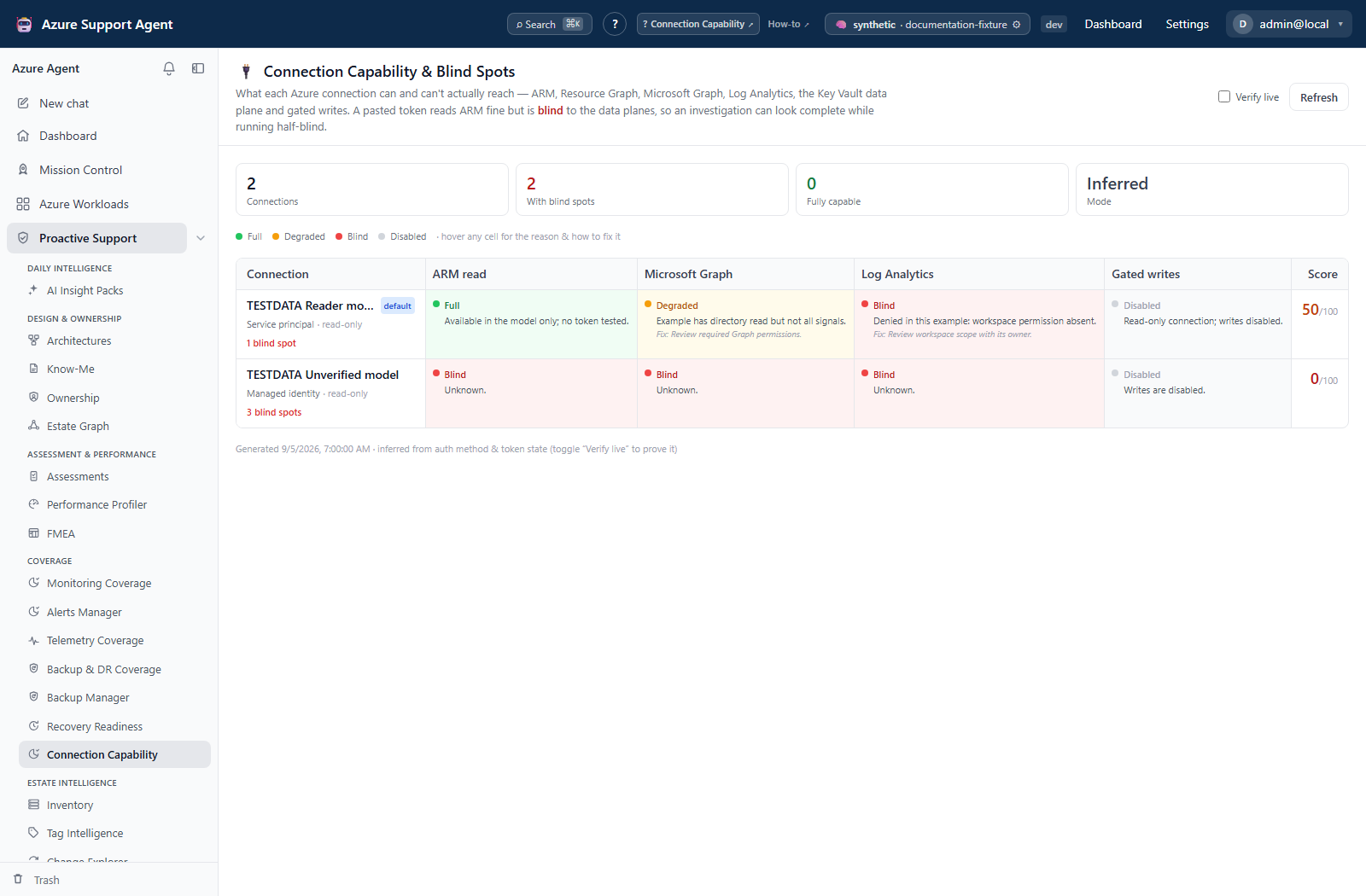
The page has one matrix rather than feature tabs. Rows are configured connections, with default/read-only/disabled indicators; Verify live changes the query mode and Refresh reruns it. Reasons and fixes are inline; hover a cell for the full text. There is no cell-detail drawer.
| Capability column | What the result is based on |
|---|---|
| ARM control plane | Auth method/token state; token helper and optional subscription listing in live mode. |
| Resource Graph | ARM capability, not an executed ARG test query. |
| Recovery posture | Inherits Resource Graph status; no recovery analysis is run. |
| Microsoft Graph token | Raw Graph token availability; separate from the MCP dependency below. |
| Entra directory (PIM / app regs) | Whether client ID plus secret/certificate can configure the Graph MCP server. A host identity or pasted token alone does not satisfy that dependency. |
| Log Analytics | Identity method and configured workspace ID; no workspace query is tested. |
| Key Vault data | Identity method; no per-vault data-plane probe. |
| Entra bulk directory read | Cached people/apps domain permission evidence. |
| Entra Conditional Access | Cached CA permission evidence and detected P1 license. |
| Entra directory roles | Cached roles-domain permission evidence. |
| Entra PIM schedules | Cached PIM permission evidence and detected P2 license. |
| Entra sign-in & audit logs | Cached people-domain permission evidence and detected P1 license; not a fresh log-read test. |
| Entra risk & governance | Cached risk/governance permission evidence and detected P2 license. |
| Gated writes | Connection read-only flag and auth method; not an evaluation of the current user’s permissions or every feature’s approval policy. |
- Full: configuration indicates the capability is available; live validation may still be scope-specific.
- Degraded: partially configured, short-lived, unverified, or missing a recommended dependency.
- Blind: the connection cannot provide that surface.
- Disabled: the connection is disabled, or the writes capability is deliberately turned off by
read_only.
The score is the rounded mean across 14 columns: Full = 1, Degraded = 0.5, Blind/Disabled = 0. With blind spots counts rows containing Blind cells only; Fully capable requires a score of 100. A deliberately read-only connection can have no blind spots yet score below 100.
Freshness and scope behavior
The backend recomputes the matrix on each request. The browser treats inferred results as fresh for 60 seconds, and live results as immediately stale; normal query refetches can therefore repeat live probes while that mode is enabled. Use Refresh after a connection correction and switch off Verify live when finished. A new generated timestamp does not mean the cached Entra permission/license evidence was refreshed.
Live checks run sequentially per enabled connection, with separate 20-second bounds for ARM token retrieval, optional subscription enumeration, and Graph token retrieval. This is not a 20-second deadline for the whole matrix. Disabled connections are not probed. ARM/Graph token failure marks the corresponding cells Blind; Resource Graph and Recovery posture follow ARM. Workspace/vault checks remain inferred and Entra domain columns still use the tenant’s cached evidence.
Workflow overview
- Open
/capabilitybefore an estate-wide scan or when a result looks incomplete. - Find blind or degraded cells on the connection used by the feature.
- Read or hover the cell explanation and distinguish auth method, token audience, workspace configuration, read-only state, cached Entra permission evidence, and license requirements.
- Where safe, enable Verify live for ARM and Graph token checks. If the Entra columns are unprobed, refresh the appropriate Entra domain separately.
- Correct the connection in the administrative connection settings—for example, use an appropriate service principal or managed identity and grant only required scope.
- Return to the matrix, verify again, and then refresh the affected feature’s data.
Do not broaden permissions merely to turn every cell green. A deliberately read-only or Azure-only connection can be correct for its purpose.
Interpretation of results
- ARM/Resource Graph blind: inventory, policy, coverage, and RBAC collection will be absent or partial.
- Graph/Entra blind: identity names, app registrations, PIM, group expansion, and actor resolution may be unavailable.
- Log Analytics degraded/blind: KQL investigation may lack a configured workspace or usable token path. Verify the actual feature’s prerequisites and intended workspace.
- Key Vault blind: secret/certificate expiry checks may be missing even when vault resources are visible through ARM.
- Gated writes Disabled on a read-only connection is intentional. A Full cell does not authorize an operation: feature-specific permissions, Azure RBAC, and approval rules still apply. The matrix reason allows for auto-execution where separately enabled; it does not promise that every write needs approval.
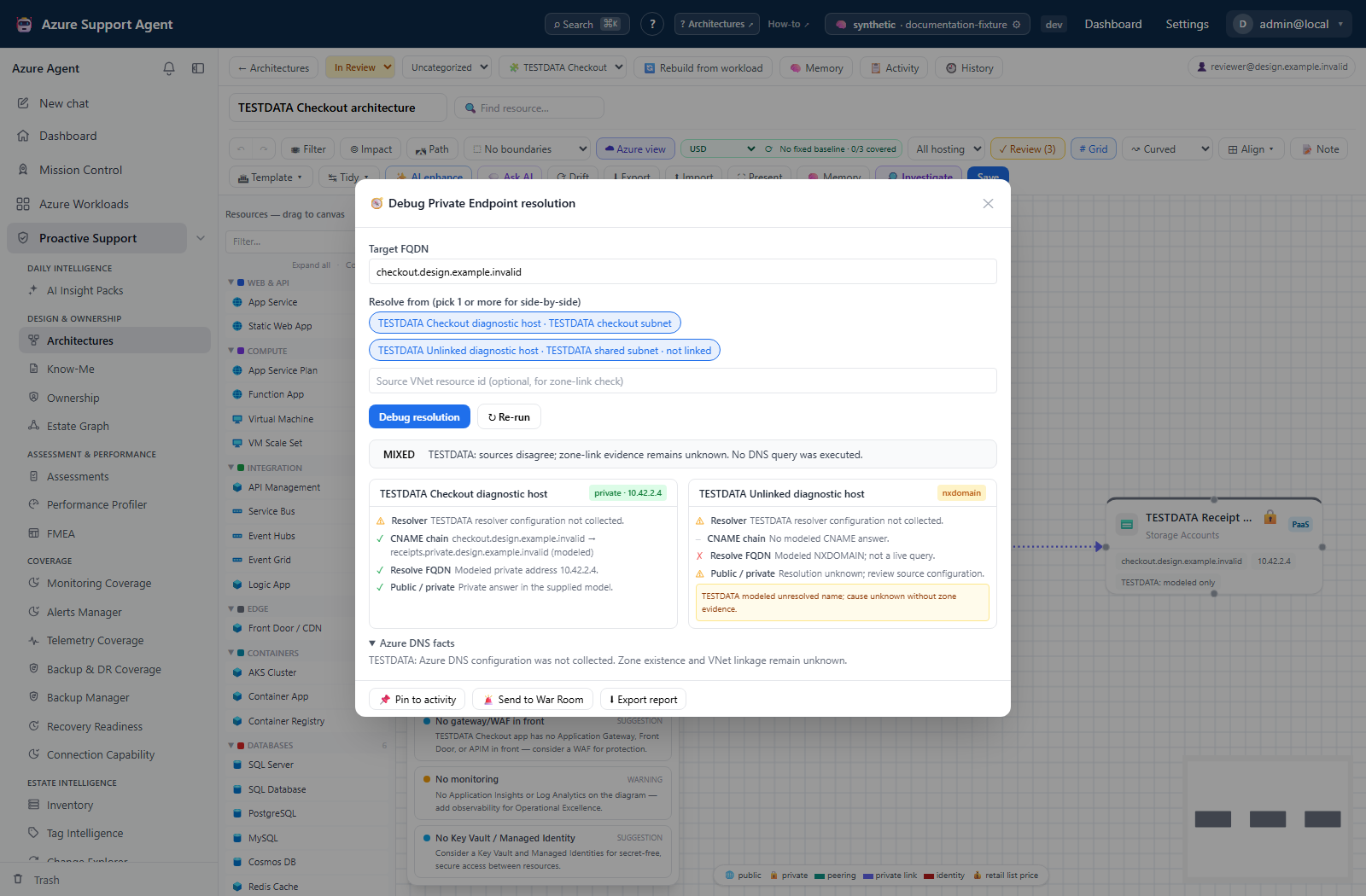
A feature’s evidence can still be unavailable even when connection metadata looks usable. The separate DNS diagnostic below illustrates that distinction; it is not a capability-cell drawer or a result of Verify live.
Safety and limitations
- The matrix returns metadata and reasons, not stored credentials or token values.
- Live token-helper success is not a Graph directory API test. Pasted tokens may simply be returned after an expiry check. Subscription enumeration failure does not necessarily turn an otherwise successful ARM cell red.
- Pasted tokens expire and often cover only one audience; an ARM token is not a Graph token.
- Managed identity behavior depends on where the app runs and the identities/roles assigned there.
- A token timeout can produce a Blind result even when Azure later recovers; retry before changing permissions.
- Changes to credentials and roles may take time to propagate.
Troubleshooting
| Symptom | Likely cause | Resolution |
|---|---|---|
| Matrix fails to load | Missing connections.read or unreachable backend. | Check the role and service availability, then use Retry; do not change Azure RBAC to fix an application permission error. |
| ARM is Full but Graph is Blind | Token audiences differ or the separate Graph token expired. | Correct Graph token acquisition/consent for the needed feature, then verify again. |
| Graph token is Full but Entra directory is Blind | The MCP-dependent feature requires a client ID and secret/certificate. | Use a suitably scoped service-principal connection for that feature; a raw Graph token is not that dependency. |
| Entra columns remain Degraded after Verify live | Cached domain permissions are unprobed or a detected P1/P2 license is absent. | Read the reason, run an Entra refresh if needed, and confirm licensing; token success alone cannot fix either. |
| Static Full becomes live Blind | Metadata inference was not current authentication proof. | Check expiry, tenant, network egress and service health, then retry the token check. |
| Key Vault/Log Analytics is Full but the feature fails | Those cells do not test resource-level access or the feature’s execution path. | Verify the actual vault/workspace RBAC and feature prerequisites at the smallest necessary scope. |
| Score is below 100 with no blind spots | Degraded/Disabled cells also reduce the score. | Preserve intentional read-only restrictions; use the required capability, not 100, as the success criterion. |