Workloads
A workload is the reusable application boundary for assessments, coverage, architecture, investigations, and Mission Control. It can contain management-group, subscription, resource-group, or individual-resource nodes, with explicit exclusions where needed.
Pages
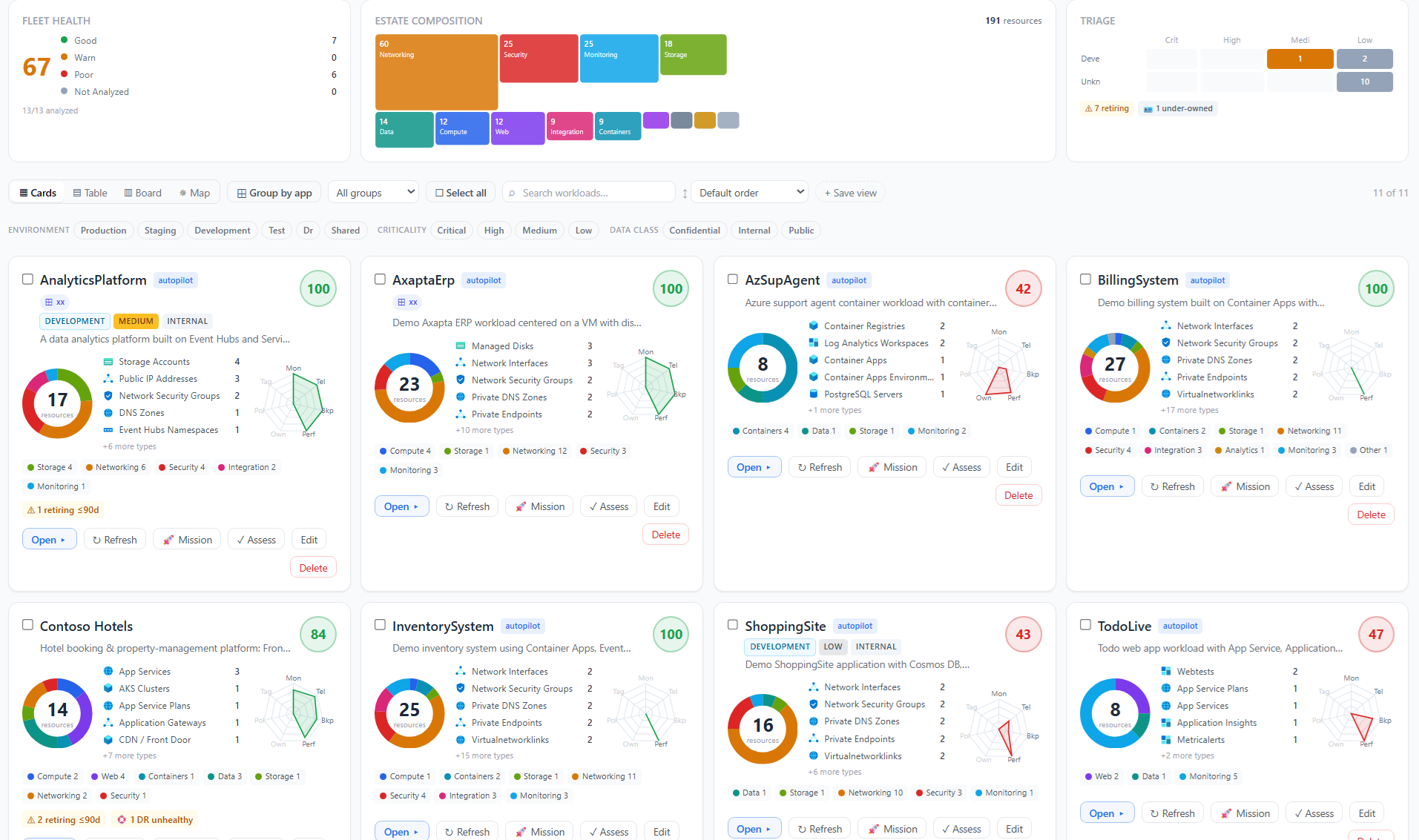
- Workload fleet — compare health, composition, criticality, and risk across workloads.
- Discovery and Autopilot — survey an estate, shape inputs, review AI candidates, and save workloads.
- Workload detail — inspect one workload’s resources and cached health signals.
- Groups and overlaps — model application families and resolve shared-resource ambiguity.
Principles
- Define boundaries around an application or service outcome, not merely an organizational subscription.
- Review Autopilot output; confidence is evidence for review, not permission to save automatically.
- Preserve legitimate shared services and document ownership rather than forcing every resource into exactly one workload.
- Treat Not analyzed as unknown. A missing health signal is not a zero score.
- Use groups for non-destructive family organization, such as production and development variants.
Permissions
Viewing, discovery, analysis, and overlap scans require workloads.read. Creating, editing, deleting, grouping, and assignment require workloads.write. Azure enumeration also requires a connection with access to the selected scope.