Troubleshoot Entra collection and coverage
Prerequisites
- Product permission
entra.readto view setup, coverage and diagnostics. - Product permission
entra.adminto re-check permissions or start a collection. - A connection that can obtain a Microsoft Graph application token for the tenant. If it cannot, every domain is blind and nothing below applies until that is fixed.
- Knowledge of which consent tier the tenant has granted and whether it holds Entra ID P1 or P2, because consent and license produce different failures that look identical on a tab.
Route
/entra/setup for coverage, permissions and collection diagnostics; /entra for the freshness badge, the progress strip and the score.
How to tell blind from unlicensed from inconclusive
-
Open
/entra/setupand read the collector coverage table. Every domain carries a state, an item count and a reason. - Read
blindas a consent problem: none of the alternative scopes in that domain’s requirement group is granted. Several domains accept alternatives, so a domain is only blind when all of them are missing. Grant the tier and collect again. - Read
unlicensedas a license problem: the scope is consented but the tenant lacks the Entra ID P1/P2 or Governance license for that data. No amount of consent will change it. - Read
partialas a truncation or sub-call failure. The domain collected, but something inside it was capped or refused. The reason states which. - Read an inconclusive probe result as “the answer is unknown”, usually throttling or a transient Graph error. Do not grant scopes in response to it — re-check later instead.
- Understand why the distinction exists: only an HTTP 403 is evidence about consent, and Microsoft answers a missing license with a 400 or a 403 carrying a license marker, so responses are classified as permitted, denied, unlicensed or inconclusive rather than all mapped to “grant more permissions”.
Expected result: Each unmeasured domain is attributed to consent, license, truncation or an unknown, and only the consent cases produce an action.
Verification: The coverage banner on the affected tab names the same limitation, and the scope it names appears as missing in the tier list.
Screenshot notes: This combined setup view is a synthetic browser fixture; no permission probe, consent change, collection or backend computation was performed. The shortened tier list, seven-day sample and diagnostic counters are illustrative, not the full permission catalog or product defaults. The sign-in lookback defaults to 30 days.
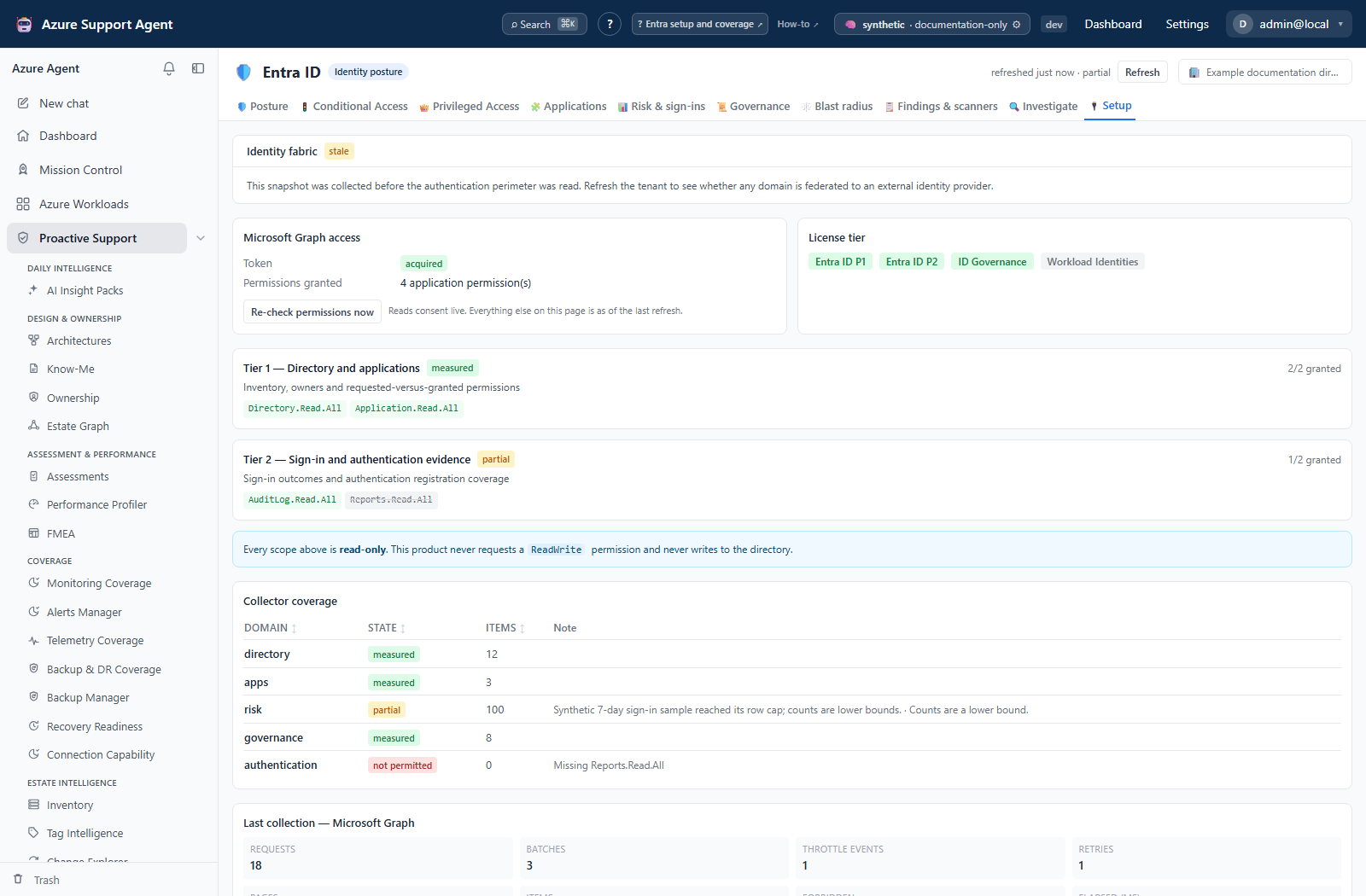
How to read the collection diagnostics
-
Stay on
/entra/setupand read the last collection’s Microsoft Graph statistics: requests, batches, throttle events, retries, pages, items, forbidden responses, and elapsed time. - Read the actual forbidden-response classification. A 403 can also carry a license marker; do not diagnose missing consent from the aggregate forbidden count alone.
- Use throttle events and retries to explain a slow or partial collection. High retries against a large item count is normal for a big directory; high throttling with few items is not.
- Compare batches against requests. The collectors batch reads deliberately, so a request count far above the batch count usually means paging over a large collection.
- Cross-read the collector errors listed with the coverage table for anything in the
errorstate, then re-read the progress log for that run.
Expected result: A factual account of what the last collection asked Microsoft for and what came back.
Verification: The diagnostics numbers correspond to the domain states — forbidden responses against blind domains, throttle events against partial ones.
How to recover from throttling, a stuck run or an interruption
-
If the progress strip stops advancing, expand log and read the transcript. Throttling appears there as retries rather than as a failure.
- Do not start a second collection. A per-tenant lock prevents duplicates, and re-clicking only confirms the job that is already running.
- If you reloaded the page or navigated away, return to
/entra. The panel re-attaches to an in-flight collection and resumes streaming its progress rather than losing the run. - Wait. Collection duration scales with directory size and with Graph throttling, and the collectors already back off and retry.
- If a run genuinely failed, read which collectors reported errors. Individual collectors fail independently: a throttled or unlicensed domain is reported as partial while the rest of the snapshot stays valid.
- Start a fresh collection after resolving the cause. Native domains are persisted independently; completed writes are not rolled back when a later collector fails, and blind/error results can replace earlier data. Do not assume the previous full snapshot survived unchanged.
Expected result: A completed collection, or a clear statement of which domains failed and why, with the previous snapshot still readable.
Verification: Check the affected domain’s collection time, status, notes and item count. A recent header is only the newest domain age; absence of its partial marker does not establish that every domain was complete.
How to confirm a new scope took effect and explain a score move
-
Select Re-check permissions now on
/entra/setupafter granting a scope. This reads consent live from Microsoft; every other figure on the page describes the permissions held when the snapshot was taken. - Read the gained list. If the scope is not there, wait for consent propagation and re-check before re-granting — “I already granted that” and “still missing” can both be true at once.
- If the scope is granted but the domain is still not measured, run a collection. A re-check deliberately never marks a domain as measured, because holding a permission and having collected the data are different facts.
- Confirm the permission was added to the correct app registration, as an Application permission. An app-only token never carries delegated scopes, so a delegated grant on the right app looks exactly like no grant at all.
- When a score moves without any directory change, compare coverage first. A pillar that could not be measured is excluded from the weighted average rather than scored zero, so gaining or losing a scope changes which pillars are counted and moves the score on its own.
- Compare measured pillars and finding evidence. Suppressed findings are excluded from the score, while snoozing alone is not exclusion. Full-domain runs can append history with partial inputs; the history
daysargument selects entries, not elapsed calendar days. - Only compare scores over time within one tenant. Two tenants with different licenses have different measurable surfaces, so the numbers are not comparable.
Expected result: Either a domain that moves to measured after the next collection, or a documented explanation for a score change that names coverage, suppression or a real finding as the cause.
Verification: The coverage percentage beside the score accounts for the movement, and the pillar breakdown shows which pillars entered or left the measurement.
How to diagnose the authentication perimeter
The Identity fabric card on /entra/setup states whether this tenant authenticates its own users. Read it before you treat any authentication figure elsewhere in the product as a description of the whole directory.
-
Read the card’s state first. It has four distinct outcomes and they must not be confused: domains federated to a named provider; every domain authenticating in Entra ID; the domain list not readable; or a snapshot collected before this check existed. Only the third is a permission problem, and only the fourth is fixed by a refresh.
- If the card reports not readable, grant
Domain.Read.All(orDirectory.Read.All) and collect again. Until then the perimeter is unknown, not clean. - If the guest sign-in row reports not readable, grant
IdentityProvider.Read.All. Nothing else in the product uses that scope, so it is commonly missing long after the rest of the perimeter is legible. - Expand each federated domain and check the MFA claim row. Unset means Entra applies the permissive default and accepts multi-factor authentication performed by the provider, so a Conditional Access policy requiring MFA can be satisfied by a system Entra does not control. This is raised as a high-severity finding, not a note.
- Read the signing and successor certificate rows together. Entra accepts either, so an expired primary with a valid successor is not an outage — it is a trust running on its successor with the overlap for the next renewal already spent. Renew before the successor’s own expiry; that date, not the primary’s, is the one that ends sign-in.
- If automatic rollover reports anything other than success, treat the certificate dates as manual work. A trust with rollover reporting
NotFoundwill not renew itself. - On a federated tenant, check whether password hash synchronisation is on. With it off there is no fallback when the provider is unreachable, and leaked-credential detection cannot run for those users at all.
- Open the Federated authentication scope on
/entra/graphto see which privileged principals the provider can issue tokens for. That set, not the user count, is the blast radius of a provider compromise.
Expected result: A named provider, a certificate date you can act on, and a list of the privileged principals reachable from outside Entra — or an explicit statement that the tenant federates nothing.
Verification: The findings list carries no open federation certificate finding, and the auth methods sub-view of Risk & sign-ins either shows the federation banner or does not need one.
Safety and rollback
Everything in this guide is read-only or local. The permission probe issues one small read per domain and modifies nothing. Collection is read-only across every collector: no directory object, credential, policy or role assignment is changed, and no secret or certificate value is retrieved. Starting a collection is the only action that calls Microsoft Graph broadly, and its worst case is throttling, not data loss.
Consent changes are not made here. Adding or removing a scope happens in the Microsoft Entra admin center, is rolled back there, and takes effect in this product only after a re-check and a collection. If you decide a tier is too broad, remove the permission in Entra, re-check permissions, and expect the affected domains to return to blind. Never paste real tenant IDs, client IDs, object IDs, user identifiers or credential values into tickets, prompts, exports or documentation taken from these screens.
Troubleshooting
| Symptom | Resolution |
|---|---|
| Every domain is blind and the token state is not acquired | Verify the connection’s tenant, client, and secret or certificate. |
| A tier reads fully granted but a domain is still blind | The snapshot predates the grant. Re-check permissions, then collect. |
| A scope granted minutes ago is still missing | Wait for consent propagation and re-check; do not re-grant. |
| The permission was granted but nothing changed | Confirm it was added to the app registration named on the setup page, as an Application permission. |
| A probe result is inconclusive | Usually throttling or a transient error. Re-check later rather than granting scopes. |
| A domain is unlicensed | The tenant lacks Entra ID P1/P2 or Governance for that data; consent cannot fix it. |
| The collection appears stuck | Expand the progress log and look for throttling. Do not start a second run. |
| A reload lost the progress strip | Return to /entra; the panel re-attaches to a job that is still running. |
| The score moved with no directory change | Compare coverage and the suppressed count before comparing the headline number. |
| Multi-factor registration looks far too low | Check the Identity fabric card. Federated users register with the provider, and Entra cannot see it. |
| A federation certificate is reported expired but sign-in works | Read the successor row. Entra accepts either certificate; renew before the successor expires. |
| The Identity fabric card says the snapshot predates the check | Refresh the tenant. This is not a permission problem. |
| Guest sign-in reports “not readable” | Grant IdentityProvider.Read.All; no other feature requires it. |
| Names appear as raw object identifiers | The resolving collector failed or lacks permission. Fix consent and collect again. |