Run an IAM escalation review
An escalation review asks whether a principal can reach greater privilege through the capabilities in the collected snapshot. A detected route is a review hypothesis; neither a role name nor an empty graph settles the question.
Prerequisites
- Product permission
iam.read.iam.simulateif you want to model the fix before proposing it. - A completed access collection, including the directory layer. Without managed identities the most common escalation class in a tenant is invisible, and the map says so rather than showing an empty graph.
- Role definitions must have been collected. Detection runs through the effective-permission engine, not through role names, so an uncollected role definition is a hole in the analysis.
- An approved external process for any change. Nothing here writes to Azure.
Route
/iam/escalation, with /iam/evaluate, /iam/bypass and /iam/simulator used to confirm and act on what it finds.
How to prepare the snapshot before reading the map
- Open
/iamand read the freshness indicator in the page header. If it is amber or red, use ↻ Rescan. - Open
/iam/diagnostics. Any collector reportingUnauthorized,ThrottledorFailedmeans that scope produced no trustworthy rows, and any escalation conclusion about it is unfounded. - Confirm the directory layer is loaded on
/iam— Overview shows its status, age, principal count and group count. Use ↻ Refresh directory if it is stale; refreshing a scope does not refresh the directory. - Open
/iam/escalationand read the cache strip above the path list. Cached, but the access data has changed since means the graph is behind the snapshot; use ↻ Rebuild, which recomputes from collected rows and does not call Azure.
Expected result: A current graph built from a snapshot whose collectors all succeeded.
Verification: The cache strip shows a build time later than the newest collection, and Diagnostics shows no untrustworthy collector for the scopes in question.
How to read the escalation graph
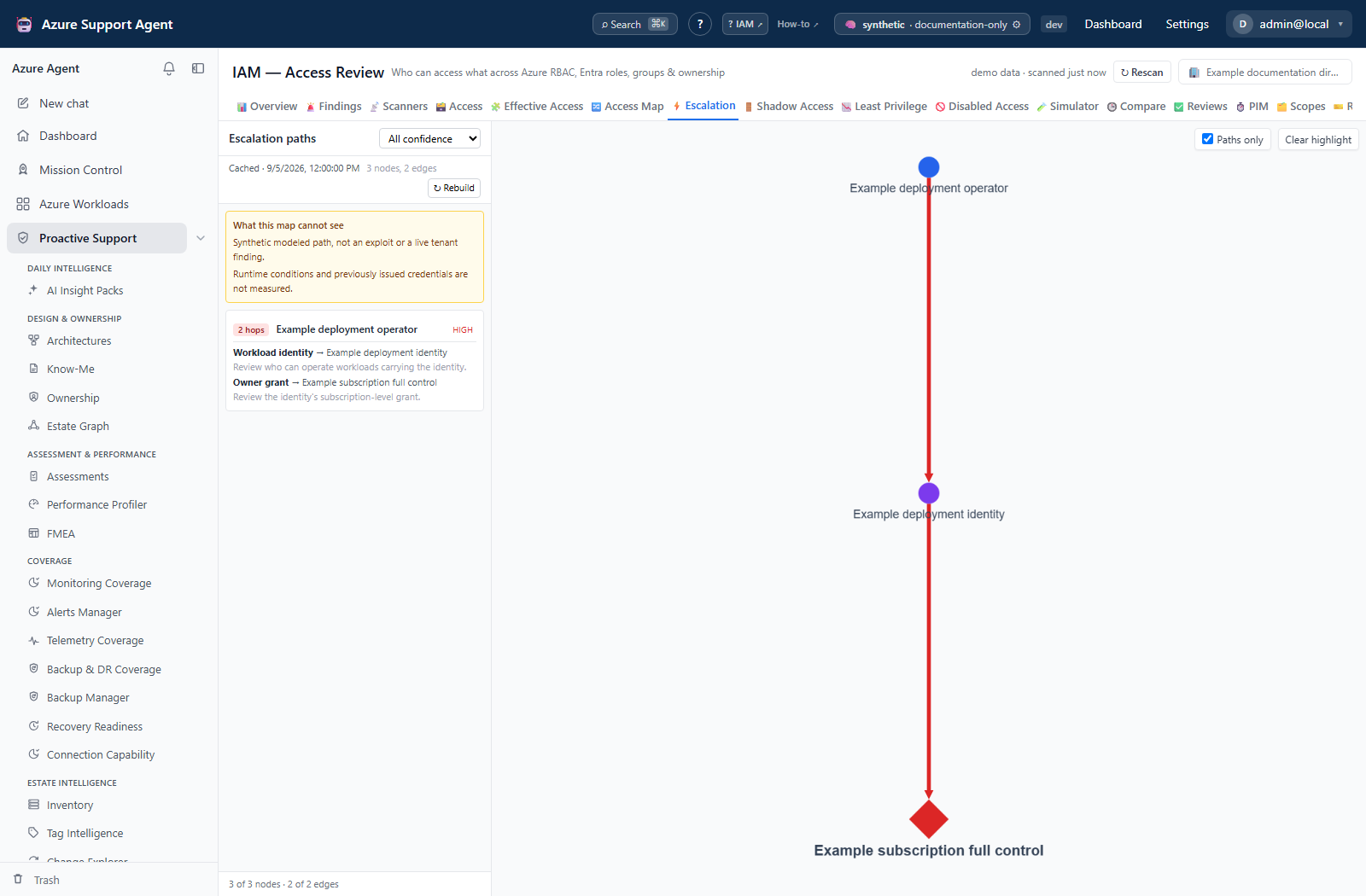
- Leave Paths only ticked. Off, the canvas draws every detected capability, which on a large tenant is a hairball; on, it draws only what lies on a route to full control.
- Read the amber What this map cannot see panel before the paths. It is rendered above the list and is never collapsed, because an escalation map that could not see managed identities showing an empty list reads as an all-clear on exactly the thing you came to check.
- Set the confidence selector to All confidence for a first pass. It filters the single cached graph rather than rebuilding, so moving it is instant and loses nothing.
- Work the path list shortest-first. Each row shows the hop count, the starting principal, and the path’s confidence — which is the weakest link in the chain, because a path is only as trustworthy as its least certain hop.
- Expand a path. Each hop names the primitive that makes it possible, the target it reaches, and the reason.
- Select a path to highlight that chain on the canvas and dim everything else. The layout is breadth-first with roots on the left: a principal nothing else points at is where an attack starts.
- Read the footer.
N of M nodesreflects Paths only;N droppedcounts edges whose endpoints were absent;fan-out cappedmeans at least one source reaches more targets than are drawn, with the real totals retained on the response.
Expected result: A ranked, explained set of routes from ordinary access to full control, with the blind spots named.
Verification: Pick one path and confirm its first hop independently in step three below. A path you cannot reproduce in the evaluator is a reporting question, not a finding.
Screenshot notes: This synthetic browser fixture supplies an illustrative graph, not live Azure reads or backend-computed escalation evidence. Paths only remains on, its default, and All confidence is selected for the walkthrough. The named path and counts are examples, not proof of exploitability or actual use.
How to confirm a hop before acting on it
- Note the principal id and the action named by the first hop of the path.
- Open
/iam/evaluatein Can this principal… mode. Enter the principal, select the scope, and pick or type the action. - Read the verdict.
allowedconfirms the hop.indeterminatemeans an unevaluated ABAC condition or an uncollected role definition is in the path — resolve that before treating the hop as either real or absent. It is never a soft no. - Switch to Who can… with the same action and scope to see the whole population holding it. Every candidate is re-evaluated, so a principal blocked by a deny assignment does not appear in the allowed list, and anything that could not be determined sits in its own box rather than being merged into the allowed names.
- Switch to What can they reach to inventory covering ancestor and descendant grants, split by plane. Despite the current UI caption, this includes grants below the scope and can include eligibility; use the action evaluator for current allow/deny questions.
Expected result: A verdict with the assignment that decided it, for the specific hop you intend to break.
Verification: Confirm the same assignment in the Azure portal or through your own tooling before proposing a change.
How to check whether revoking the role would actually close the route
- Open
/iam/bypass. Read the headline:P% ofNassessed resources have RBAC as the only door. A withheld percentage means nothing was assessed — it is explicitly not 100%. - Find the resource or service family the escalation path passes through. Storage keys, Key Vault access policies, cluster-admin credentials and local authentication all survive a role revocation.
- Expand a row and read Who can fetch the credential.
Not determinedmeans role assignments for that scope were unavailable, which is unknown, not empty. - Read the Breaks if line beside every remediation. Disabling shared-key access without knowing which clients use connection strings is how a read-only tool causes an outage.
- If the family shows a status such as
Unauthorizedin the left rail instead of counts, its resources are absent from both the findings and the denominator. Fix that before concluding the door does not exist.
Expected result: A statement about whether the escalation route survives the role change you were planning.
Verification: The resources on the path either appear as RBAC-only, or appear with a named non-RBAC door and its blast radius.
How to model the fix before proposing it
- Open
/iam/simulator(permissioniam.simulate). - Add the change you intend — typically
remove_assignment,convert_to_eligible,rescope_assignmentorreplace_role— and add every related change to the same basket so their interactions are modeled together. - Simulate, then read Retained anyway first. Access that looks revoked and is not — held through a second group, a direct assignment or an owned service principal — is the usual answer, and revoking it achieves nothing while leaving a false record of remediation behind.
- Read the orphaned-scopes panel above the columns. A scope left with no owner-level access is the outcome that gets a revocation reverted in a panic a fortnight later.
- Check the footer’s standing-privilege before-and-after, and the sampling line if the population exceeded the sampling threshold.
Expected result: A modeled outcome that distinguishes access genuinely lost from access that merely looks revoked.
Verification: After the change is executed externally and the scope re-collected, /iam/escalation → ↻ Rebuild no longer shows the path, and /iam/compare shows the corresponding removed or de_escalated change.
Safety and rollback
Every step here is read-only. The escalation Rebuild recomputes this product’s derived cache and issues no Azure call; the simulator is a pure function over the cached snapshot and cannot reach Azure at all.
Rollback belongs to whatever executes the change. Prepare it before revoking: record the principal, role and scope from the snapshot so the assignment can be recreated, and use the rollback section of a generated remediation script from Reviews where a campaign is driving the change.
Never remove break-glass, deployment or service-managed access on the strength of a graph alone. A detected path is a route that exists, not evidence that anyone used it, and not evidence that nothing depends on the grant.
Troubleshooting
| Symptom | Resolution |
|---|---|
| The graph is empty and the path list is empty | Read the limitations panel. Managed identities not being collected removes the most common escalation class. Refresh the directory, then ↻ Rebuild. |
| The first view takes tens of seconds | Expected on a large estate. The result is cached and later visits are instant until the access data changes. An elapsed counter and, where a previous build exists, an expected duration are shown. |
| The cache strip says the access data has changed since the build | Use ↻ Rebuild. It recomputes from collected rows without calling Azure; a full rescan is not required for this. |
The footer says fan-out capped | At least one (source, primitive) pair exceeds the draw limit. The true totals are retained on the response; narrow with the principal or scope filter rather than reading arrow counts as reach. |
| Fewer nodes are drawn than the footer’s total | Paths only is on by default. Untick it to see every detected capability. |
A hop evaluates to indeterminate | An unevaluated condition or an uncollected role definition is in the path. Run a full rescan to re-collect role definitions, or evaluate the condition manually. |
| The canvas is a red smear with unreadable labels | The view stops zooming out at a legibility floor and expects panning. Narrow the graph with the confidence filter or the principal parameter. |
| Shadow Access shows no rows for a resource on the path | Confirm the family was actually assessed — the left rail shows a collector status instead of counts when it was not. Absence from this tab is not evidence of absence in Azure. |
| The simulator returns an error rather than a result | An unknown or malformed change is refused, and a deleted referent is a conflict. Nothing was simulated; this is not a “no impact” result. |