IAM
Product permissions: iam.read for reads, access refreshes, scanner runs and disabled-access script previews; iam.write for usage collection, imports/purge and finding state; iam.review for campaign writes and run pinning; iam.simulate for the change simulator.
Purpose
App routes: /iam and /iam/:tab (the former /rbac URLs redirect here) IAM composes Azure role assignments, role definitions, scope hierarchy, and available Entra directory/group/ownership context into effective-access rows. It is an access-review tool and does not add or remove assignments.
The screenshots on this page use illustrative browser fixtures, not live tenant reads or evidence of backend-computed access decisions.
Prerequisites and data sources
- An ARM-capable connection with Reader access to role assignments/definitions at all intended management-group, subscription, resource-group, and resource scopes.
- Graph capability and appropriate directory-role/group/application read consent for resolved principals, transitive group paths, Entra roles, and application ownership.
- Product
iam.readaccess.
Azure Reader is enough to inspect many control-plane assignments but does not imply data-plane visibility into every service. Missing Graph access leaves Azure assignment IDs usable while reducing names and inherited/group context.
Tabs and actions
The page header
The header sits above the tab strip and stays on screen whichever tab is open. It carries the title, the freshness indicator, the full rescan control, and the connection picker.
Freshness reads as scanned 6h ago, turning amber once anything is past the refresh window and red once anything is more than a day old. Two things about that number matter:
- The headline is the newest collection across every scope and the directory. On a large estate one scope refreshing a minute ago would otherwise render “scanned just now” while everything else is days old. When the scopes genuinely disagree — some past the refresh window and some not — the indicator also names how many lag, as
N of M scopes stale. When every scope is equally old the headline already tells the whole truth and no split is shown. Hover for the newest and oldest ages and the size of the refresh window. - It reports when data was collected, not when it was verified. A delta refresh that skips an unchanged scope records a verification time and leaves the collection time alone, precisely so “four days old, verified two minutes ago” stays distinguishable from “collected two minutes ago”. This indicator is the collection.
Before the overview resolves, and while a query is failing, the indicator renders nothing rather than asserting “never scanned” — no data yet is not the same as never scanned. A tenant that genuinely has no collection says never scanned.
↻ Rescan re-collects every scope and the directory. It lives in the header, so it is reachable from every tab; a reader on Findings or PIM who sees stale data no longer has to navigate to Overview to act on it. The two narrower controls — ⚡ Quick refresh and ↻ Refresh directory — remain on the Overview tab beside the per-scope table they operate on.
Tabs
Eighteen tabs, in strip order. Four are documented in full on this page; the rest have their own reference page, linked below.
| Tab | Route | What it is |
|---|---|---|
| Overview | /iam | Thirteen KPI tiles, the per-scope freshness table, the narrow refresh controls, and the workbook export. Below |
| Findings | /iam/findings | Access findings raised against the collected estate, grouped and worked as an inbox. Findings and scanners |
| Scanners | /iam/scanners | Named selections of those checks, with a cadence, a severity floor and a delta. Findings and scanners |
| Access | /iam/effective | Server-filtered, paged, virtualized normalized grant rows. Below |
| Effective Access | /iam/evaluate | Evaluates whether a principal can perform an action on a scope, and why. Access paths |
| Access Map | /iam/accessmap | The same access drawn as a flow — principal ▸ via group ▸ role ▸ scope. Below |
| Escalation | /iam/escalation | The routes by which one grant leads to full control. Access paths |
| Shadow Access | /iam/bypass | The doors that are not Azure RBAC and would still work if every role assignment were revoked. Access paths |
| Least Privilege | /iam/leastprivilege | Granted versus actually used, and narrower role proposals. Below |
| Disabled Access | /iam/leavers | Accounts disabled in Entra ID that still hold access, rolled up per person rather than per grant. Export disabled accounts that still hold access |
| Simulator | /iam/simulator | Models a proposed access change before it is made anywhere. Change and simulation |
| Compare | /iam/compare | What changed since the previous collection, and who did it where the Activity Log can attribute it. Change and simulation |
| Reviews | /iam/reviews | Certification campaigns, decisions, remediation scripts and evidence packs, held locally. Reviews and PIM |
| PIM | /iam/pim | Standing privilege against just-in-time eligibility, and active elevations. Reviews and PIM |
| Scopes | /iam/scopes | Every cached scope with its status, grant count, freshness and per-scope refresh. Insights, scopes, roles and diagnostics |
| Roles | /iam/roles | Role definitions and the resolved principal directory. Insights, scopes, roles and diagnostics |
| Insights | /iam/insights | Thirteen counted pivots over the access rows, scoped by the filter rail. Insights, scopes, roles and diagnostics |
| Diagnostics | /iam/diagnostics | Collector status per scope, the deny-assignment warning, and every partial or failed collection. Insights, scopes, roles and diagnostics |
/iam/privileged remains a working URL and renders the Access grid with the privileged lens applied. It is no longer a separate tab in the strip — it turned out to be the Access grid with one checkbox ticked — but it stays routable so existing links and bookmarks land on the view they promised.
The tab id effective carries the label Access and the tab id evaluate carries the label Effective Access. The mismatch is deliberate: effective has always been the raw grant grid, and renaming its id would change what an existing /iam/effective URL means, so the label moved to the tab that evaluates effective permissions and the id stayed where the URL is.
Overview KPIs
Thirteen tiles, served by GET /api/iam/overview: total grants, principals, privileged, data-plane, via groups, service-principal owners, Entra roles, PIM eligible, Key Vault policies, classic admins, deny assignments, scopes and subscriptions.
Two rules govern how they render, and both exist to stop a reassuring number being produced from an absence:
- Deny assignments are not counted in Total grants. A deny removes access, so folding denies into the headline would inflate it with rows that mean the opposite. They are counted on their own tile, and they have their own surface on the access grid and their own warning banner on Diagnostics. Every other tile on this row is computed over grants only.
- A missing figure renders as an em dash, never as 0. A hard zero on a tenant that was never scanned is the most reassuring possible way to say we did not look, and it is the one rendering this product must not produce. The tile carries a not measured tooltip when it is showing a dash. Three tiles — Key Vault policies, classic admins and deny assignments — default an absent value to zero in the client rather than dashing it; the overview endpoint always computes all three, so in practice a zero on those tiles is a measured zero.
A connection with no collection at all does not reach the tiles: the tab renders a wall offering ↻ Run access scan and 🎬 Seed demo data instead. The demo dataset is synthetic and is labeled with a demo dataset pill; the control to remove it appears only once demo data is loaded, and seeding is offered only on that empty state — an adjacent “load fake data” button in the main toolbar would be one mis-click from making a review of a live tenant unreadable.
The Access grid
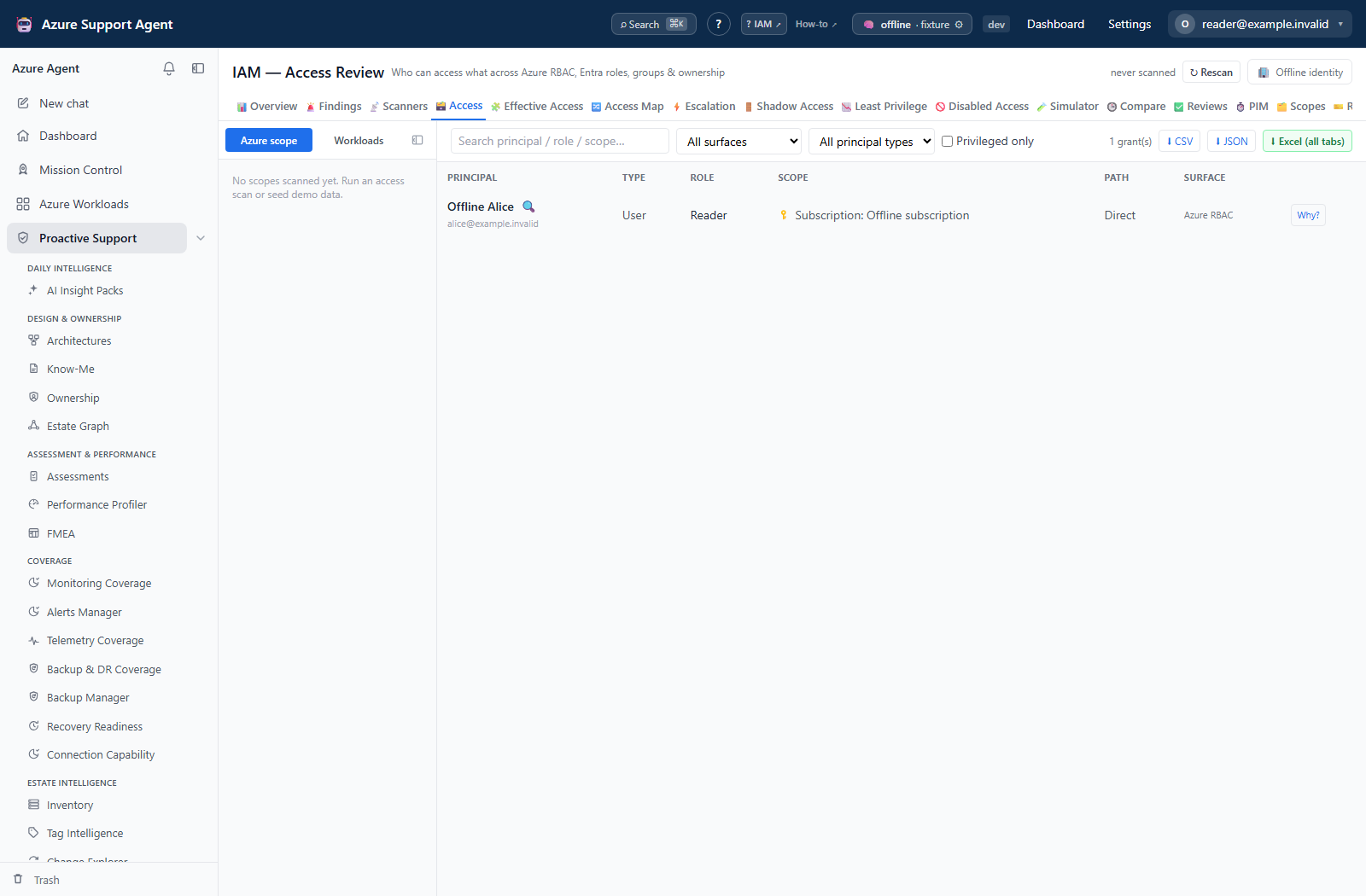
The Access tab is the raw grant grid, served by GET /api/iam/access. Rows are normalized across every surface — Azure RBAC, Entra ID RBAC, Key Vault access policies, classic administrators, deny assignments and Lighthouse delegations — and carry the principal, the effective principal where a group was expanded, the role, the assignment scope, the surface, the assignment state and the access path.
Access path is one of three values: Direct (assigned to the principal), GroupTransitive (inherited through group membership) or Owner (an application or service-principal ownership path where modeled).
Filtering is server-side and results are paged, so filtering first is both more reliable and cheaper than browsing a large unfiltered estate. Available narrowing: free-text search, the scope and workload filter rail, principal type, surface, access category and privileged-only.
CSV and JSON apply the grid filters, including search and privileged-only, to all matching cached rows rather than only loaded pages. Excel (all tabs) is different: only scope/workload narrowing reaches its access sheets; analysis sheets remain tenant-wide. The grid loads 200 rows per page, bounded by iam_max_rows (default 5,000 per request). Standard row exports carry 71 columns; the API-only fmt=scanner projection carries the frozen 46-column interchange schema.
Lighthouse delegations are a surface of their own rather than being folded into Azure RBAC, because those grants do not appear in the portal’s Access control (IAM) blade at all — folding them in would make the grid disagree with the portal for the one kind of access an operator is least likely to already know about.
The Access Map
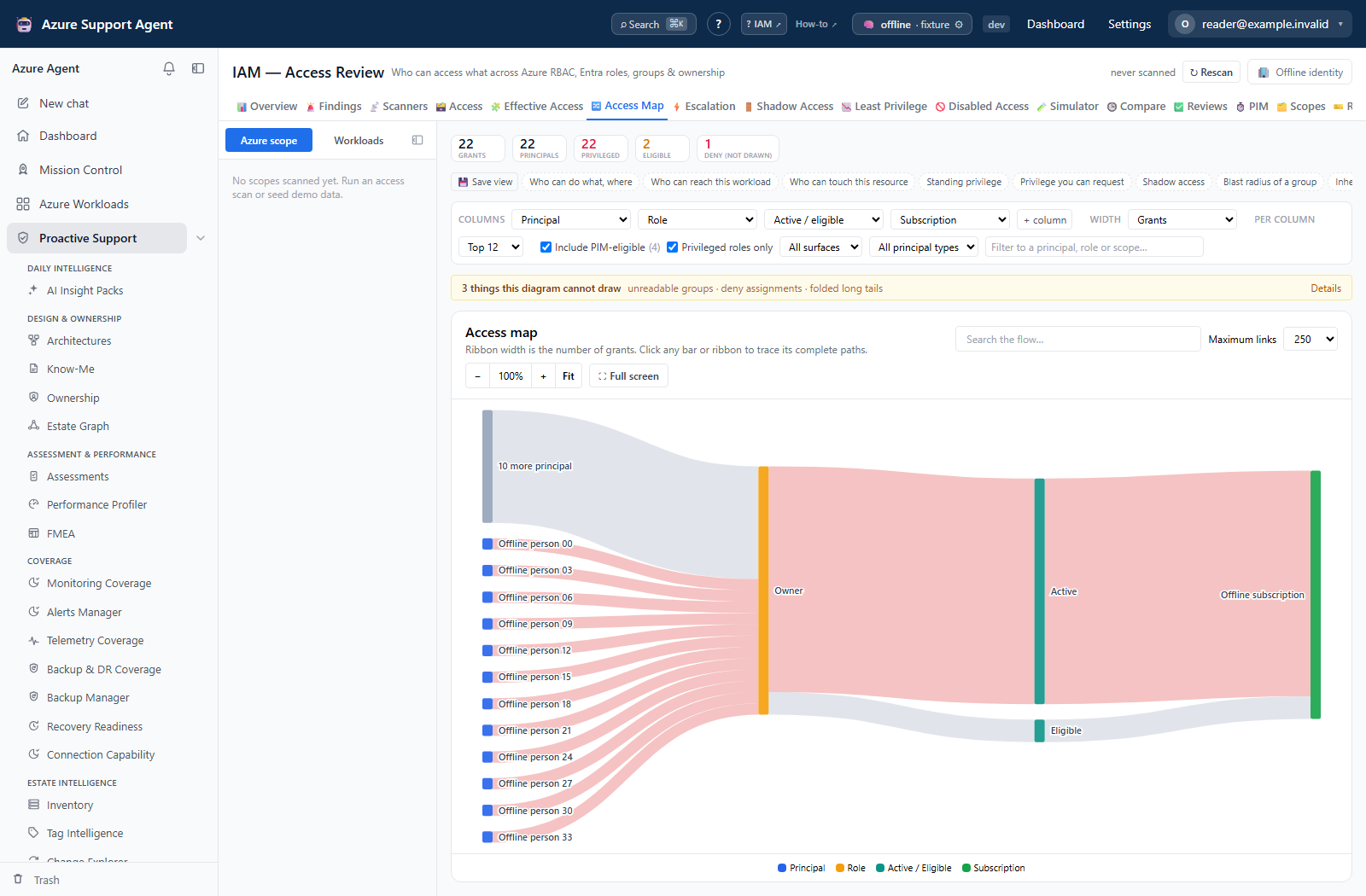
The grid lists grants. The Access Map draws them as paths — subject, then how, then verb, then object — so a question like “how does this person reach that subscription, and what would I have to change to stop them” is answered by following one ribbon rather than by reading and joining rows.
The columns are configurable rather than fixed. “Who can do what”, “who can reach this workload” and “who can touch this resource” are one question asked from three ends, so they are presets of a single column chain rather than three separate screens. Pick a preset, or set the columns yourself from: principal, principal type, via group, role, role category, privileged, surface, access path, active/eligible, management group, subscription, resource group, resource type, resource, scope level, and whether the assignment carries an ABAC condition. Saved views keep the columns, the weighting and the filters together, because restoring only the columns would reload half a view and look broken.
Use the scope and workload rail on the left to focus the map. Tenant-wide with every principal in one column is legible only after the long tail is folded (see below); narrowing to a subscription, a workload or a search term is what makes individual people visible.
The group column is not decoration. Access held through a group cannot be revoked from the person — you remove them from the group. A chain of principal ▸ role ▸ scope renders perfectly well and would prescribe a fix that does not work, so “Via group” is in the default chain.
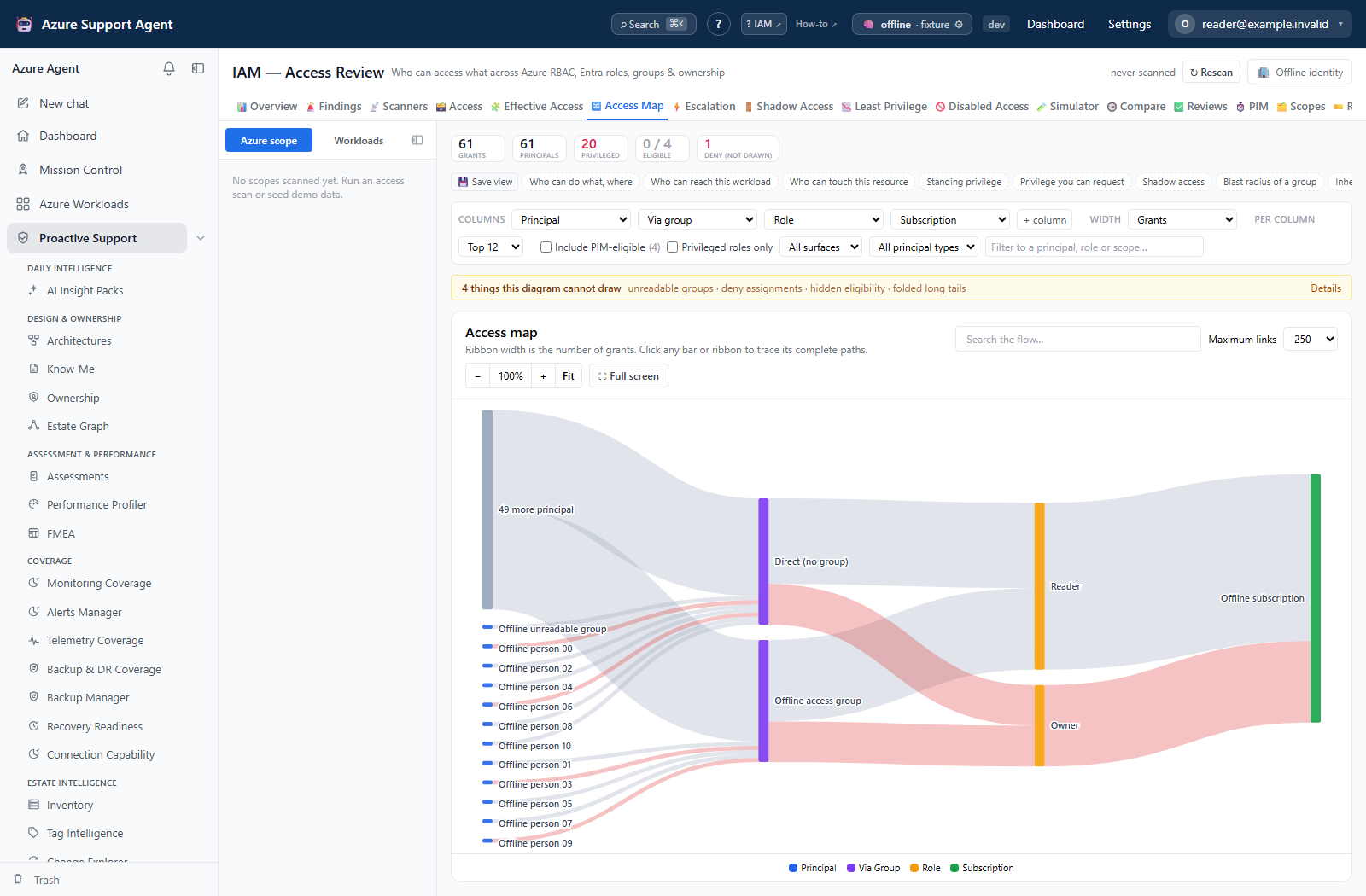
Ribbon width has a stated unit. Grants counts assignment rows and conserves across columns. Distinct principals answers “how many people flow along this ribbon” and deliberately does not add up across columns, because one person crossing two ribbons is still one person. The subtitle above the diagram always says which is in use.
Four things the diagram cannot express on its own are therefore reported beside it rather than drawn:
| Reported separately | Why it is not a ribbon |
|---|---|
| PIM-eligible grants | Eligibility is permission to ask for a role, not access anyone currently holds. Excluded by default; tick Include PIM-eligible to see what could be activated |
| Deny assignments | A deny removes access and a ribbon adds it. Drawing them together would state the opposite of the truth |
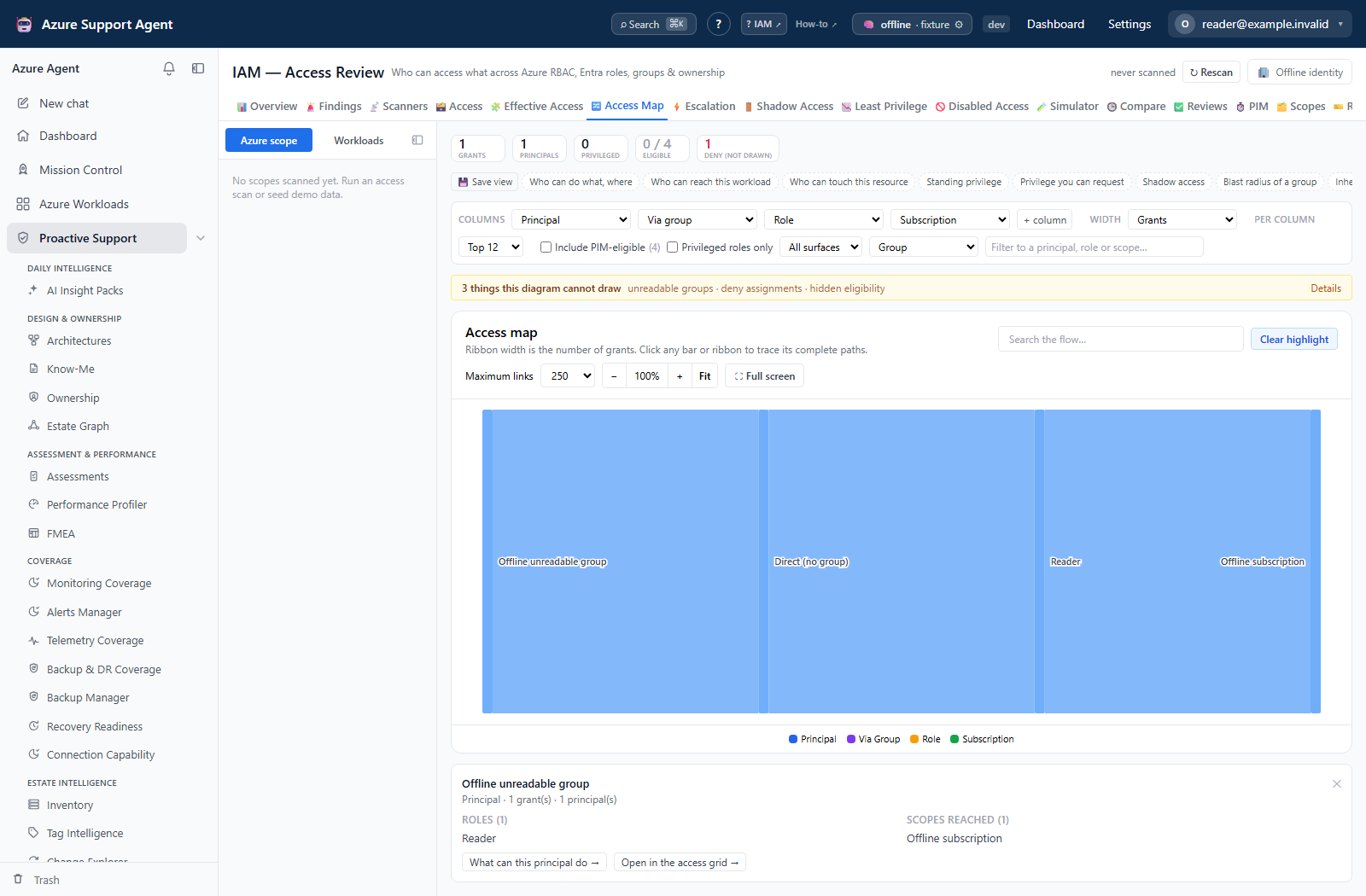
| Groups whose membership could not be read | Shown as the group itself rather than dropped, so the access stays visible even when the people are not. “We could not enumerate the group” must never render as “nobody has this” |
| The long tail of each column | Folded into one labeled “N more” bar. Every grant is still counted; raise Per column or narrow the focus to open it up |
Selecting any bar lists the principals and roles behind it and links through to the Effective Access evaluator and the access grid, so the picture is a starting point rather than the end of the trail.
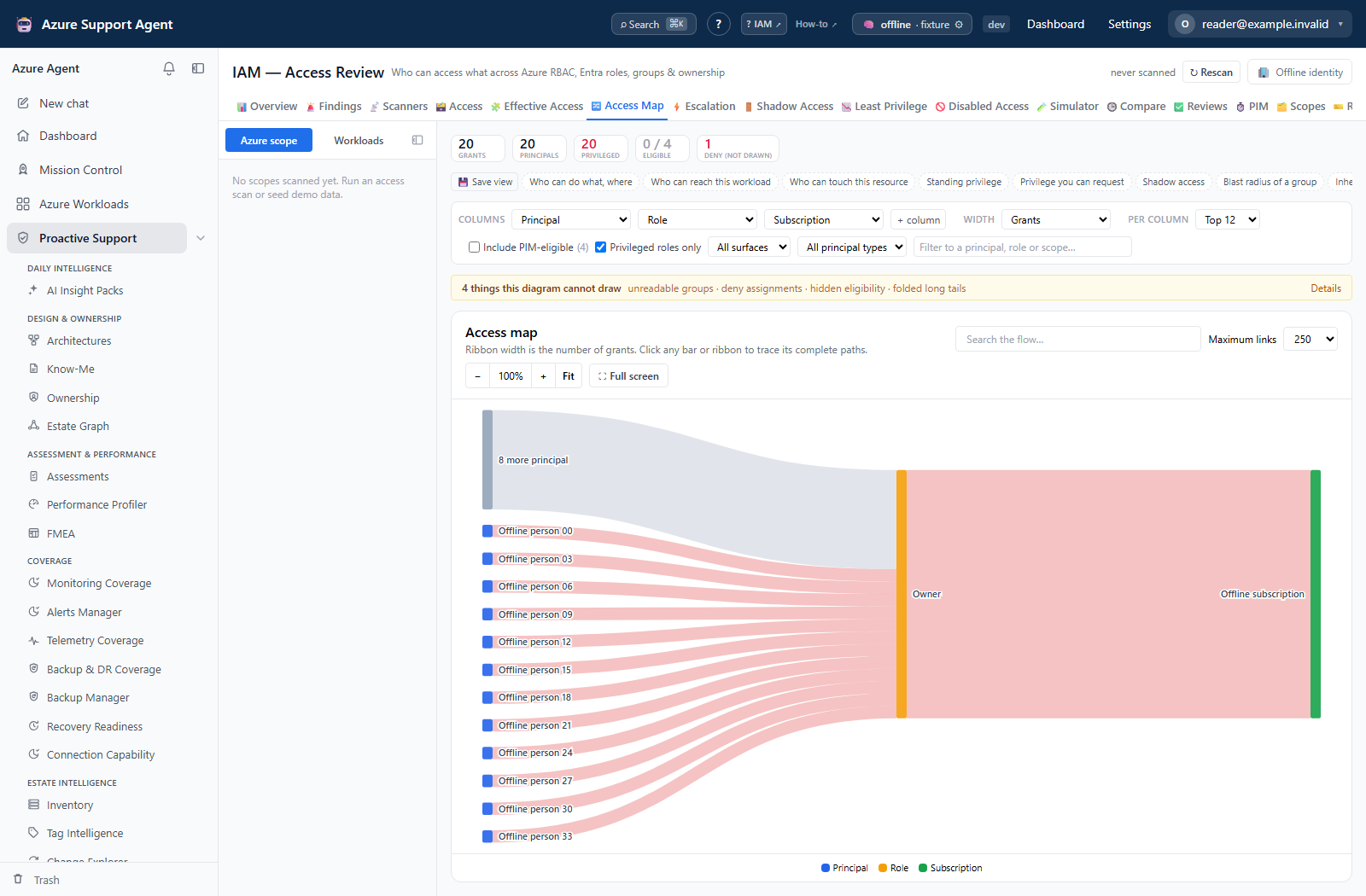
Compare the privilege presets without confusing eligibility with access that needs no activation:
Least Privilege: granted versus used
This tab compares the actions a principal’s roles can authorize against the actions they were actually observed performing, and proposes a narrower grant. Four things about it are structural:
- Not measured is a wall, not an empty list. A tenant that has never run a usage scan does not see “0 over-privileged principals”, because that is the most reassuring possible rendering of “we have not looked”. There are two distinct walls, and they carry different instructions: usage was never collected, or usage was collected but not one assignment could be compared against it because the actions its role grants were never collected. The second is rendered in red and tells you to run a full access refresh to re-collect the role definitions before re-running the usage scan.
- Usage carries its own age, separate from the access snapshot. The access data can be minutes old while usage is weeks old, and a stale denominator changes what “unused” means. The usage collection time is stated beside the figures.
- Both numbers travel together, never the ratio alone. “Used 12 of 8,000” is a fact; a bare percentage is a number designed to be quoted out of context.
- A proposal is never shown without its residual risk. Every narrower proposal states what it gives up.
The header states how many of the assessed assignments are over-privileged, and against how many distinct actions this tenant’s roles can grant. It separately reports assignments that could not be assessed because their role’s actions were never collected, and break-glass accounts, which are reported but never recommended for removal. A What this cannot see panel lists the exclusions and limitations above the recommendations.
The usage window is a lookback ending now. The picker beside Scan usage offers 7, 14, 30, 60 and 90 days plus a custom field. The custom picker clamps to 1–90 days; the API rejects requests outside that range. Verify the displayed value after applying: this collector does not query an organization’s separately archived Activity Log history.
Absolute start and end dates are deliberately not offered. The refresh takes a day count ending now, not a date range, so any absolute range would have to collapse to a lookback from today — the control would name one window while the scan read another.
The picker opens on the measured window. Selecting a window changes only the next scan; current figures keep their existing window. Scan usage requires iam.write, reads Activity Log per subscription, and is separate from the access refresh.
Freshness and scope behavior
Page visits read disk-backed caches and never trigger Azure scans. Scope slices and the directory cache are refreshed independently. ↻ Rescan in the page header re-collects everything and is available from every tab; the Overview tab additionally offers ⚡ Quick refresh, ↻ Refresh directory, and per-scope refresh. Refresh is a non-blocking background job with progress; it can continue if the browser closes.
Check per-scope age and status. A fresh subscription slice combined with a stale directory cache can show current assignments with unresolved principals or outdated group paths. Refreshing directory alone does not refresh Azure assignments.
Usage data on the Least Privilege tab has its own freshness and is not affected by any of the access refresh controls. It advances only when Scan usage runs.
Workflow overview
Access-review workflow
- Select the correct connection and inspect Overview/Scopes freshness, then open Diagnostics before reading anything — a collector reporting
Unauthorizedinvalidates everything derived from that scope. - Refresh stale and failed scopes and directory context as needed.
- On the Access grid, narrow scope, principal type, and surface before searching.
- Inspect role name and definition, assignment scope, effective principal, and access path:
- Direct is assigned to the principal;
- Group/transitive is inherited through group membership;
- Owner reflects an application/service-principal ownership path where modeled.
- Use
/iam/privileged— the Access grid with the privileged lens on — to prioritize Owner/admin-style roles and roles with data actions. - Use Insights to find cross-scope, group-derived, orphaned, and unusually broad access, and Effective Access to turn a candidate row into a verdict with its evidence chain.
- Verify each candidate against source Azure/Entra state and business ownership.
- Remediate through the organization’s approved Azure/Entra/PIM process, then refresh the relevant scope and directory.
For the illustrated offboarding workflow, including owned applications, group-derived access, recoverable accounts and separate removal/rollback previews, see Export disabled accounts that still hold access.
Interpretation of results
- Privileged is a classification based on role metadata/name and should be reviewed, not blindly revoked.
- Has data actions means the role definition can authorize data-plane operations; actual access still depends on scope, deny assignments, service controls, and conditions.
- Effective row describes a known access path. It is not a full authorization-engine simulation.
- Group expansion depends on directory collection and can become stale independently.
- An orphaned/unresolved principal may be deleted, inaccessible to Graph, or simply unresolved; confirm before removing assignments.
- Grant counts are rows/known grants, not unique people.
Exports, history, scheduling, and integrations
IAM does not execute role-assignment changes. It does provide local certification campaigns, CSV/JSON row exports, a multi-sheet Excel workbook, and generated remediation/rollback artifacts in Azure CLI, PowerShell, Bicep and Terraform formats. Campaign decisions do not revoke cloud access. Review and execute any generated artifact through the approved external change process.
Apply least privilege, but do not remove emergency access, deployment identities, inherited group access, or service-managed assignments without ownership and impact review. Prefer PIM/JIT and narrowly scoped roles where supported. Keep break-glass identities under separate controls.
Safety and limitations
- Cache composition and broad searches can be expensive at scale; use scope and principal filters.
- Text search can query the server as typed; avoid pasting sensitive content.
- Server page/row caps can limit broad results. Use pivots and scoped queries.
- Data-plane authorization, deny assignments, conditional role assignments, classic administrators, and service-specific ACLs may not be fully represented.
- Graph failure degrades principal names, group chains, PIM/Entra, and ownership context without necessarily failing Azure RBAC collection.
- The Access Map draws no deny assignments and, by default, no PIM-eligible grants. Both are counted and reported beside the diagram. Read a ribbon as “this access exists”, never as “this is the complete set of things that decide the outcome”.
- Ribbon width weighted by distinct principals does not sum across columns. Do not read column totals off a principal-weighted map.
- A folded “N more” bar carries a real total but no names. Narrow the focus before concluding that a specific person does or does not hold access.
- The usage window cannot exceed 90 days, because the Azure Activity Log does not retain more. “Unused” is always a statement about the measured window, never about all time.
- The header freshness figure is the newest collection across all scopes. Read the split indicator, or the per-scope table on Overview, before treating the whole estate as current.
Troubleshooting
| Symptom | Check |
|---|---|
| Overview is empty | Inspect Diagnostics, then refresh scope/all; page load is cache-only. |
| Principal names or groups are stale | Run Directory refresh and verify Graph consent/capability. |
| A subscription is missing | Verify connection visibility and Reader at management-group/subscription scope; inspect scope diagnostics. |
| Search is slow | Filter scope, surface, and principal type first; use Insights pivots. |
| Expected access path is absent | Check nested group collection, cache ages, role scope, assignment conditions, and unsupported authorization surfaces. |
| A campaign or usage action is denied | Campaign writes require iam.review; Scan usage requires iam.write. iam.read does not grant either. Scripts remain externally executed. |
The header says scanned just now but a tab shows old data | The headline is the newest collection across all scopes. Check for the N of M scopes stale split beside it, then open Overview for the per-scope ages. |
| The header shows nothing where freshness should be | The overview has not resolved, or its query failed. That is not the same as never scanned, so nothing is asserted. Check Diagnostics. |
| Least Privilege says usage was not measured | No usage scan has run for this connection. Set the window and use Scan usage; it is separate from every access refresh control. |
| Least Privilege says the role catalog is missing | Usage was collected but no assignment could be compared against it, because the actions its role grants were never collected. Run ↻ Rescan to re-collect role definitions, then re-run Scan usage. This is not a clean result. |
A KPI tile shows — | That figure was not measured. It is deliberately not rendered as 0. Check Diagnostics for the collector that could not read. |
| Total grants looks lower than the number of rows in the grid | Deny assignments are excluded from Total grants because a deny removes access. They have their own tile and their own surface filter. |
| A usage window becomes 90 days | The custom picker clamps to 1–90 days. The API rejects an out-of-range request; verify the picker value before starting the scan. |
| The usage window in the picker differs from the window in the figures | Expected. The picker sets the window for the next scan; the figures state the window they were measured over. |
Related pages
IAM deep dives
- IAM: findings and scanners — the findings inbox, its two-level grouping and server tallies, and the ten scanners and their deltas.
- IAM: access paths — Effective Access, Escalation and Shadow Access.
- IAM: change and simulation — Compare, its attribution, and the what-if Simulator.
- IAM: reviews and PIM — certification campaigns, evidence, and standing privilege against JIT.
- IAM: insights, scopes, roles and diagnostics — the pivots and the reference and health tabs.