Entra: governance
Product permission: entra.read for every view on this tab. No action on this tab writes anything.
Purpose
App route: /entra/governance
This tab is not an inventory of governance campaigns — the Microsoft Entra admin center already lists those. Its job is to compute what is not governed. A tenant with forty immaculate access reviews and a set of privileged roles nobody has ever reviewed has a governance problem the portal cannot show, because the portal only draws what exists.
Coverage combines inventory object classes with the collected review/package evidence. It can render when governance data is unavailable, but then unreviewed means no review was established by this snapshot—not proof that the organization never reviewed those objects elsewhere.
Prerequisites and data sources
- Product permission
entra.read.entra.adminapplies only to the write actions elsewhere in Entra ID, such as starting a collection or changing finding state; nothing on this tab requires it. - Consent tier 3 scopes:
AccessReview.Read.All,EntitlementManagement.Read.All, andLifecycleWorkflows.Read.All. See Entra setup and coverage. - Entra ID P2 is required for access reviews and entitlement management. Entra ID Governance is required for lifecycle workflows.
- The coverage sub-view depends on the people, roles, and applications domains rather than the governance domain, so it renders without any governance license.
Licensing gates most of this tab, and Microsoft answers a missing governance license with the same status code as a genuine consent failure. The collector inspects the message before blaming consent, so an unlicensed tenant is reported as unlicensed, not as denied and not as zero. Do not grant scopes in response to an unlicensed notice; the grant will not change anything.
Tabs and actions
Five sub-views, selected from the strip at the top of the tab. Each is a path segment, so /entra/governance/guests is a shareable link rather than component state. A banner above the strip reports snapshot coverage, and a counter on the right shows how many governance findings the current snapshot raised.
| Sub-view | Reads | What it shows |
|---|---|---|
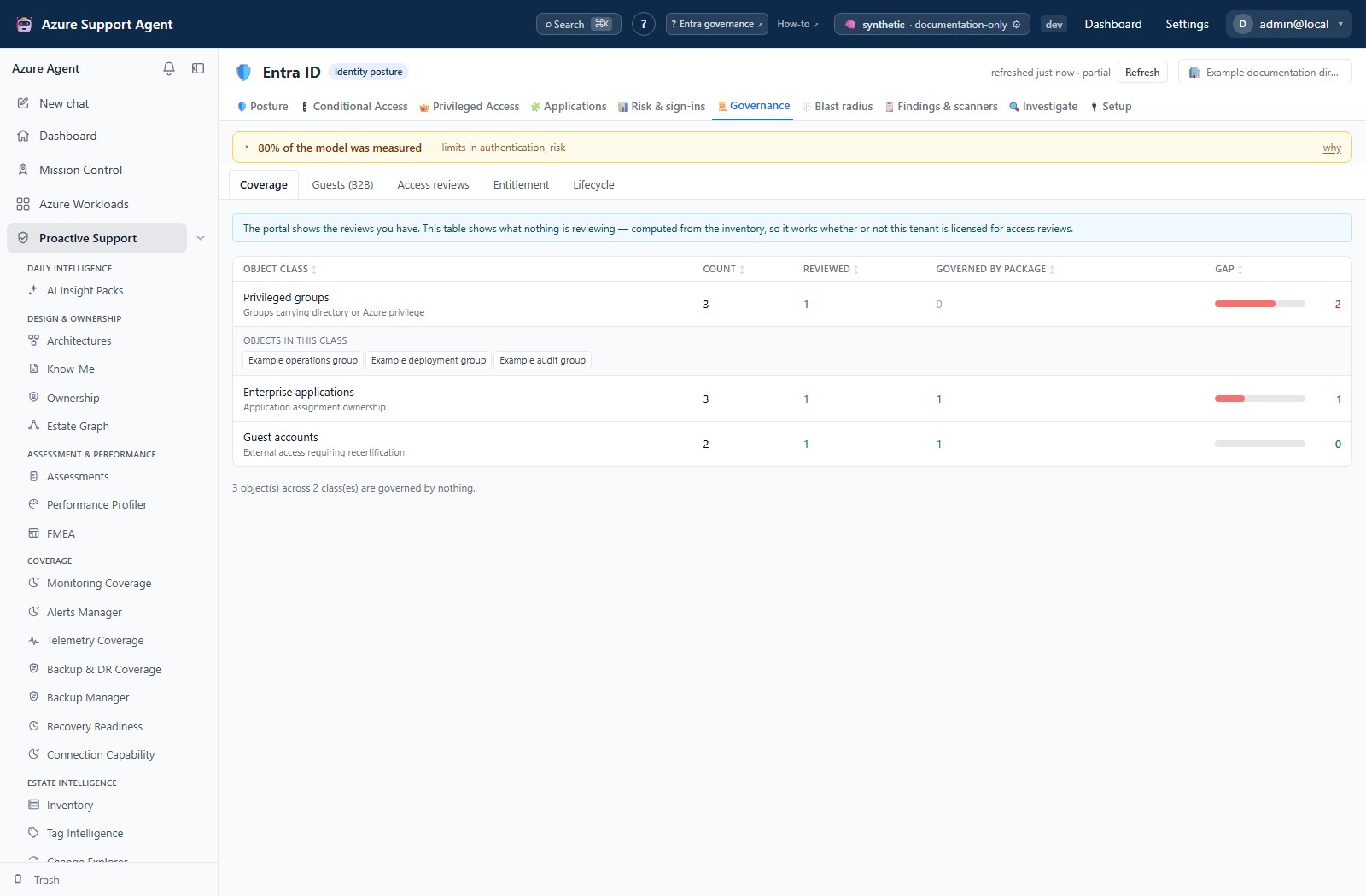
| Coverage | /governance/coverage | One row per object class with its count, how many are reviewed, how many are governed by an access package, and the resulting gap. Expanding a row lists the objects in that class |
| Guests (B2B) | /governance/guests | The whole external population as a lifecycle, a partner-organization rollup with its cross-tenant policy verdict, and the domain classes guests arrive from. See Entra: guests (B2B) |
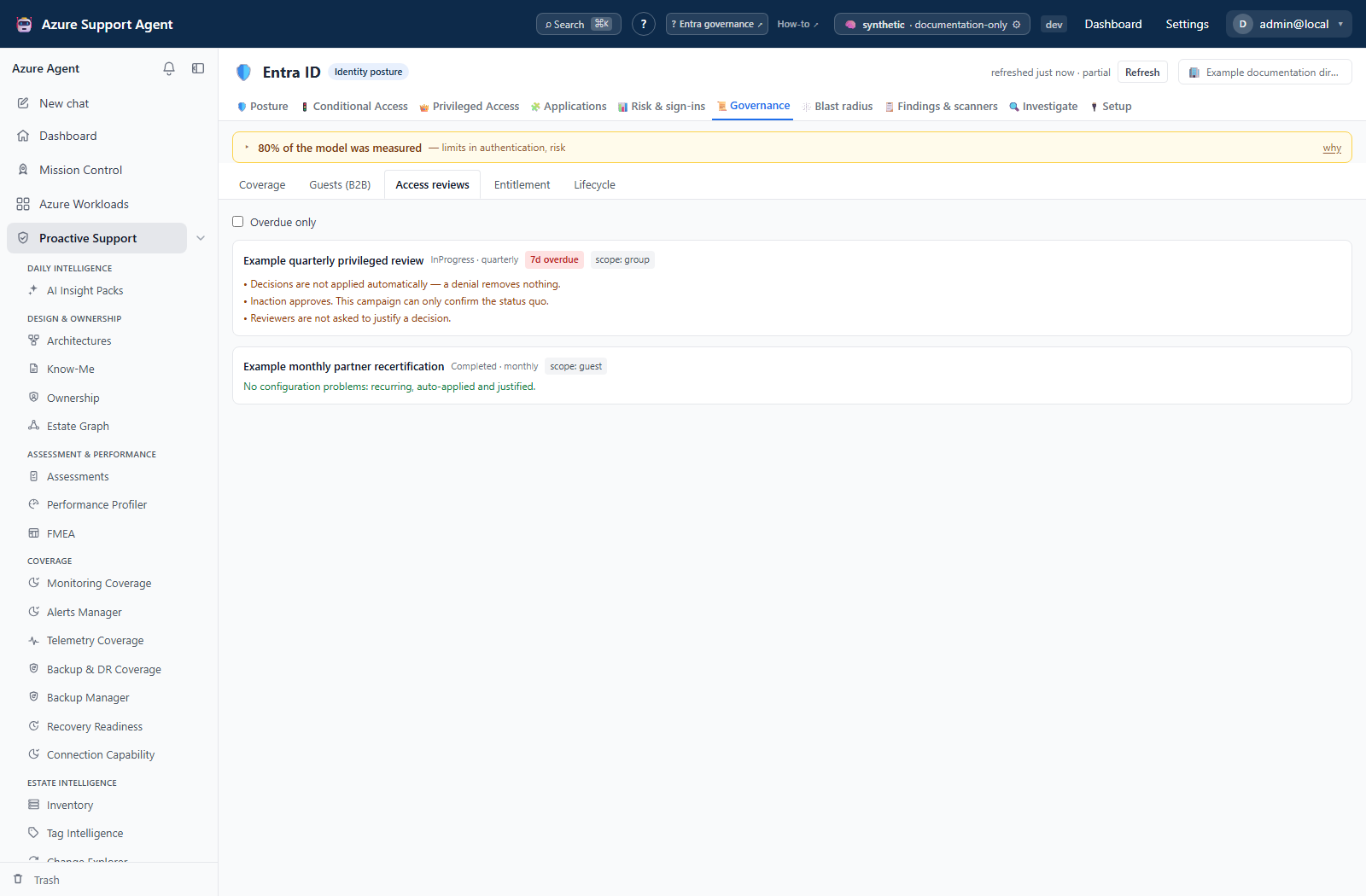
| Access reviews | /governance/reviews | Every review definition with status, recurrence, scope kind, days overdue, and named quality flags. An Overdue only checkbox filters the list |
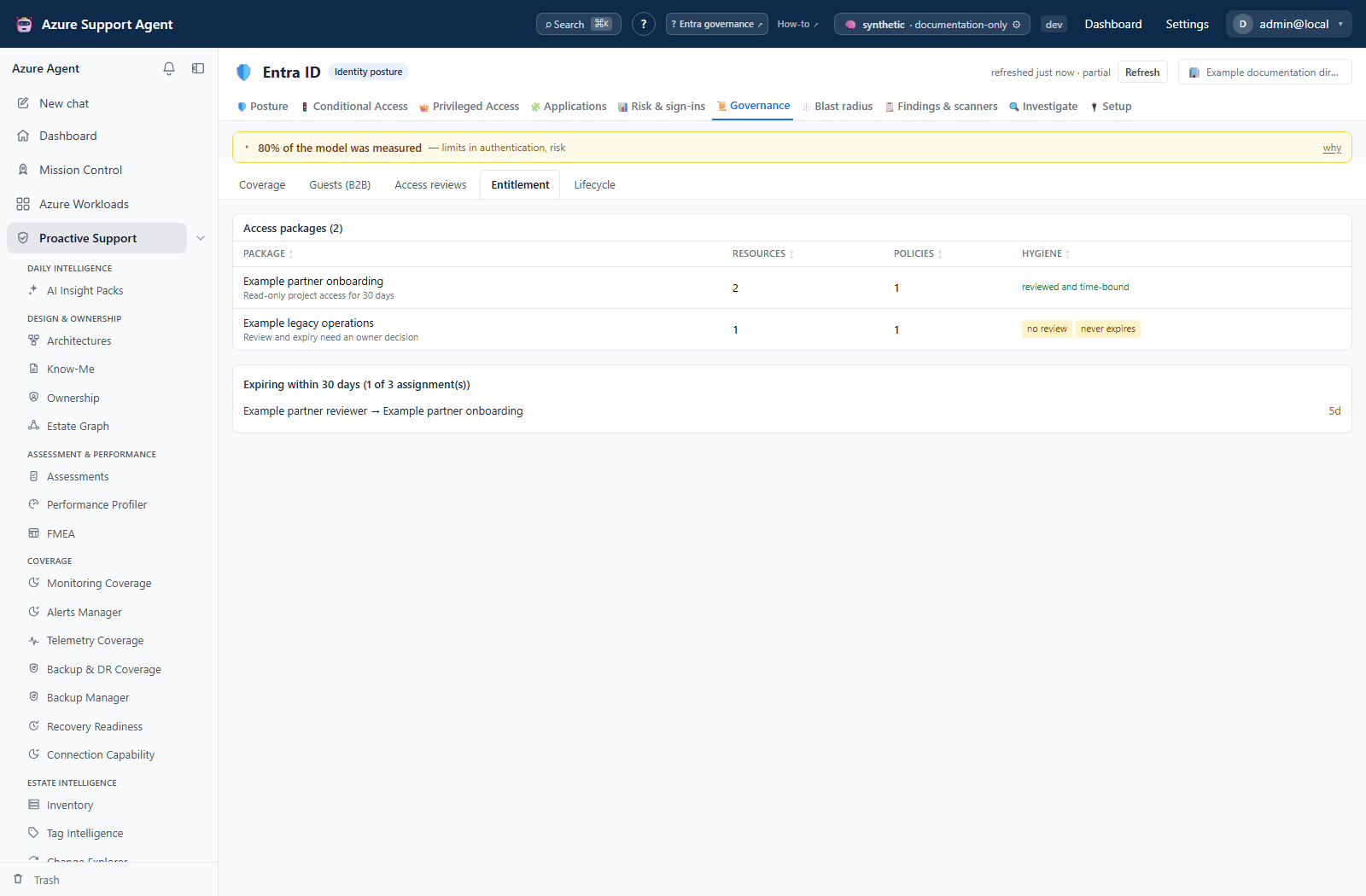
| Entitlement | /governance/entitlement | Access packages with resource and policy counts and hygiene markers, plus assignments expiring inside the window |
| Lifecycle | /governance/lifecycle | Joiner, mover, and leaver workflows with category, enabled state, task count, run count, and failure rate |
The governance overview read backing the header supplies the counts, the capability flags, and the governance-pillar findings for the snapshot.
Guest lifecycle sits here rather than under the directory inventory because it is the same class of problem as the rest of this tab: an invitation nobody accepted and a partner nobody reviews are ungoverned access in exactly the way a review campaign that never runs is. Unlike the other four sub-views it needs no governance license — it is derived from the people and tenant domains.
Object classes on the Coverage table are fixed and each carries its own justification: privileged directory roles, role-assignable groups, guest accounts, high-privilege applications, and tenant-wide delegated consent.
Screenshot notes: These synthetic browser fixtures use simplified object classes and example counts, policies and outcomes; they are not live collections or backend-computed coverage. Use the coverage rules and defaults in this text rather than treating the example rows as the shipped catalog.
Review quality flags are named conditions, not opinions. A campaign can be flagged because decisions are not applied automatically, because inaction defaults to approve, because it runs once and never again, because reviewers are not asked to justify a decision, or because the reviewer is the subject of the review.
Access packages carry two hygiene markers: no review, when no assignment policy on the package requires a recurring review, and never expires, when an assignment policy grants access with no expiry.
Expiring assignments use a configurable window; the app requests the default of 30 days. The underlying read accepts any window from 1 to 365 days.
Freshness and scope behavior
One snapshot per tenant serves every tab in Entra ID. This tab reads the same collection as Posture, Conditional Access, Privileged Access, Applications, Risk & sign-ins, and Blast radius, so a single refresh updates all of them together. Refresh from the freshness badge in the Entra ID header. Tabs never collect on their own; opening this one reads the cached snapshot.
Days overdue and days remaining are computed at request time from cached dates. Their ages can advance without a fresh collection, while review status and assignments remain stale. Record both source collection time and report time.
The governance collector degrades independently across reviews, entitlement and lifecycle. It caps review definitions and packages at 2,000 each, assignments at 20,000 and workflows at 500. It reads up to 12 instances for only the first 200 active review definitions and up to 20 runs for only the first 100 workflows. Coverage drill-downs show at most 200 object labels per class. Not every secondary cap/failure is exposed as a separate note; a zero overdue/failure count is not proof that all histories were inspected.
Interpretation of results
The gap column is a coarse coverage estimate: count - max(reviewed, governed), floored at zero. It does not calculate the exact union of reviewed and package-governed objects. Scope matching parses selected query shapes; tenant-wide delegated consent currently has no recognized review match. When review data is unreadable, verify actual reviews externally rather than reporting every object as definitively never reviewed.
Coverage counts two distinct paths to being reviewed. A review scoped directly at a role, group, guest population, or application counts. So does entitlement management: where a review targets an access package, the principals holding assignments through that package are counted as reviewed. Counting only directly-scoped reviews under-reports tenants that certify through packages.
A campaign that exists is not a campaign that works. A one-off review is accurate the day it closes and wrong the following week. A review that does not apply its own decisions removes nothing when a reviewer denies access. A review that defaults to approve can only confirm the status quo. These are the quality flags, and they are the reason the reviews sub-view is a list of configuration problems rather than a list of campaigns.
Lifecycle workflows are read for their categories and their outcomes. The missing-categories notice names which of joiner, mover, and leaver has no enabled workflow — a disabled leaver workflow counts as missing, because offboarding that does not run is offboarding that depends on somebody remembering every system. Failure rate is failed runs over total runs within the bounded run window.
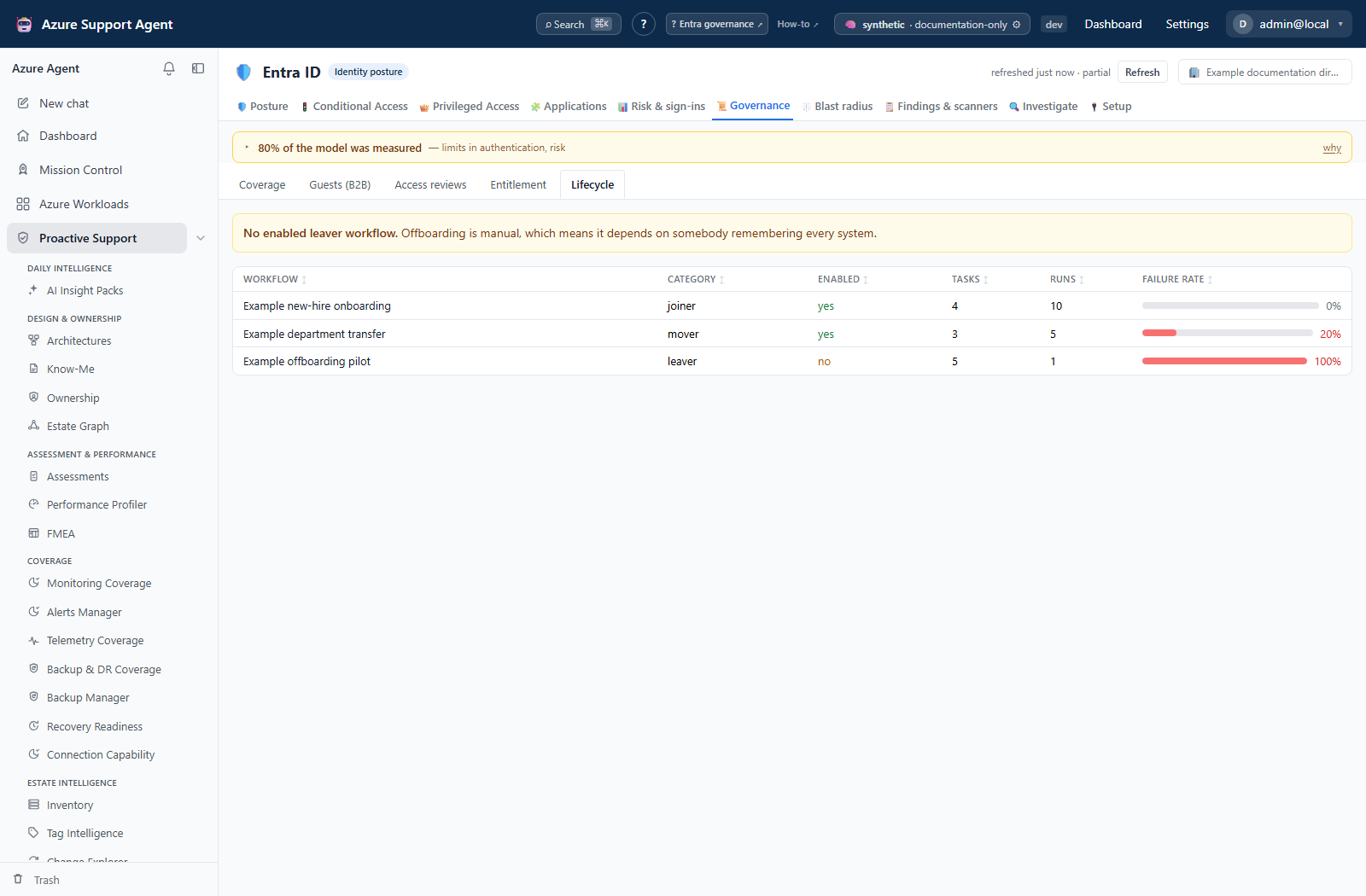
Zero and unlicensed mean different things. Zero packages supports an absence claim only if that collection was complete and readable. A workflow with zero loaded runs has no measured failure rate, even if its computed percentage is 0%. Read capability flags and collector notes before concluding anything.
Safety and limitations
- Every read on this tab is read-only. Nothing here creates, stops, or decides a review, grants or revokes an assignment, or enables a workflow. Act in the Microsoft Entra admin center or through your change process.
- Access-review scopes are OData query strings rather than typed objects, so scope kind is derived by parsing the query. An unrecognized scope shape is reported as unknown and does not count towards coverage.
- Enumeration caps mean a very large tenant may report truncated lists. Check the snapshot notes before treating a count as complete.
- Review instances are fetched only for definitions that are not already completed or applied, and only for a bounded number of them, so overdue figures cover active campaigns.
- Directory and governance changes are eventually consistent. A campaign created minutes ago may not appear until the next collection.
- Exports from this tab contain principal names, package names, and governance state. Handle them as governance material and avoid pasting live tenant, object, or user identifiers into tickets or prompts.
Troubleshooting
| Symptom | Check |
|---|---|
| Access reviews says the feature is unavailable | Entra ID P2 and AccessReview.Read.All are both required. Coverage still works without them. |
| Entitlement says the feature is unavailable | Requires Entra ID P2 and EntitlementManagement.Read.All. |
| Lifecycle says the feature is unavailable | Requires the Entra ID Governance license and LifecycleWorkflows.Read.All. |
| The domain reports unlicensed rather than not permitted | The scope is consented; the tenant lacks the license. Granting more scopes will not help. |
| Coverage shows everything unreviewed | Access reviews could not be read, so nothing counts as reviewed. The banner states this. |
| A running review is not reducing a gap | Its scope did not resolve to a recognized object class, or it targets objects outside the fixed coverage classes. |
| A package shows no review despite a configured review | Check that the review is enabled on an assignment policy of that package, then refresh. |
| Overdue days look wrong | They are computed against the snapshot. Refresh and re-read. |
| A category is listed as missing but a workflow exists | The workflow is disabled; only enabled workflows count towards a category. |
| Counts look truncated on a large tenant | An enumeration cap was hit; the snapshot notes name which list. |