Entra: Conditional Access
Product permission: entra.read for coverage, policies, conflicts, break-glass and saved simulations; entra.admin to confirm a break-glass candidate, to run a simulation and to re-run a saved one.
Purpose
App route: /entra/conditional-access
The Microsoft Entra admin center shows Conditional Access one policy at a time. Every question that matters is a join across policies: who is protected by nothing, which exclusion defeats which control, which policy is shadowed by another, and whether an emergency account is about to be locked out. This page performs that join over the cached snapshot and answers it per cohort, per application class and per control.
The analysis is a pure function of the snapshot: deterministic, testable and repeatable. Nothing on this page writes a policy, an exclusion or an assignment to the tenant.
Prerequisites and data sources
- A connection that can obtain a Microsoft Graph application token, and at least one completed collection for the tenant.
- Product permission
entra.readto view;entra.adminfor the break-glass confirmation and for any simulator run, both of which are written to the audit trail. - Read-only Graph consent. Conditional Access policies, named locations and authentication strengths come from the tier 1 policy scope; resolving a policy’s effective users through groups and roles, and knowing whether a user has an MFA method registered, depend on tier 2 group, membership, device and authentication-method scopes. See Entra setup and coverage.
- Entra ID P1 for Conditional Access itself. Without it the domain reports as unlicensed rather than empty.
Policy resolution follows rules that are easy to get wrong by hand: exclusions win at every level, All users includes guests unless a guest filter narrows it, role-scoped policies expand to eligible role holders and not only active ones, and nested groups are expanded transitively.
Tabs and actions
The page is organized into six sub-tabs, selected within the page.
| Sub-tab | What it shows |
|---|---|
| Coverage | The headline gap sentence and the cohort × application-class × control matrix |
| Exposure | One row per application class, ordered by what is actually exposed |
| Policies | Every policy normalized, with resolved user counts, controls and application scope |
| Conflicts | Set-logic detections across policies, each with an explanation |
| Break-glass | Emergency-account candidates with a local confirm or reject decision |
| Simulate | The offline change simulator and the saved simulation list |
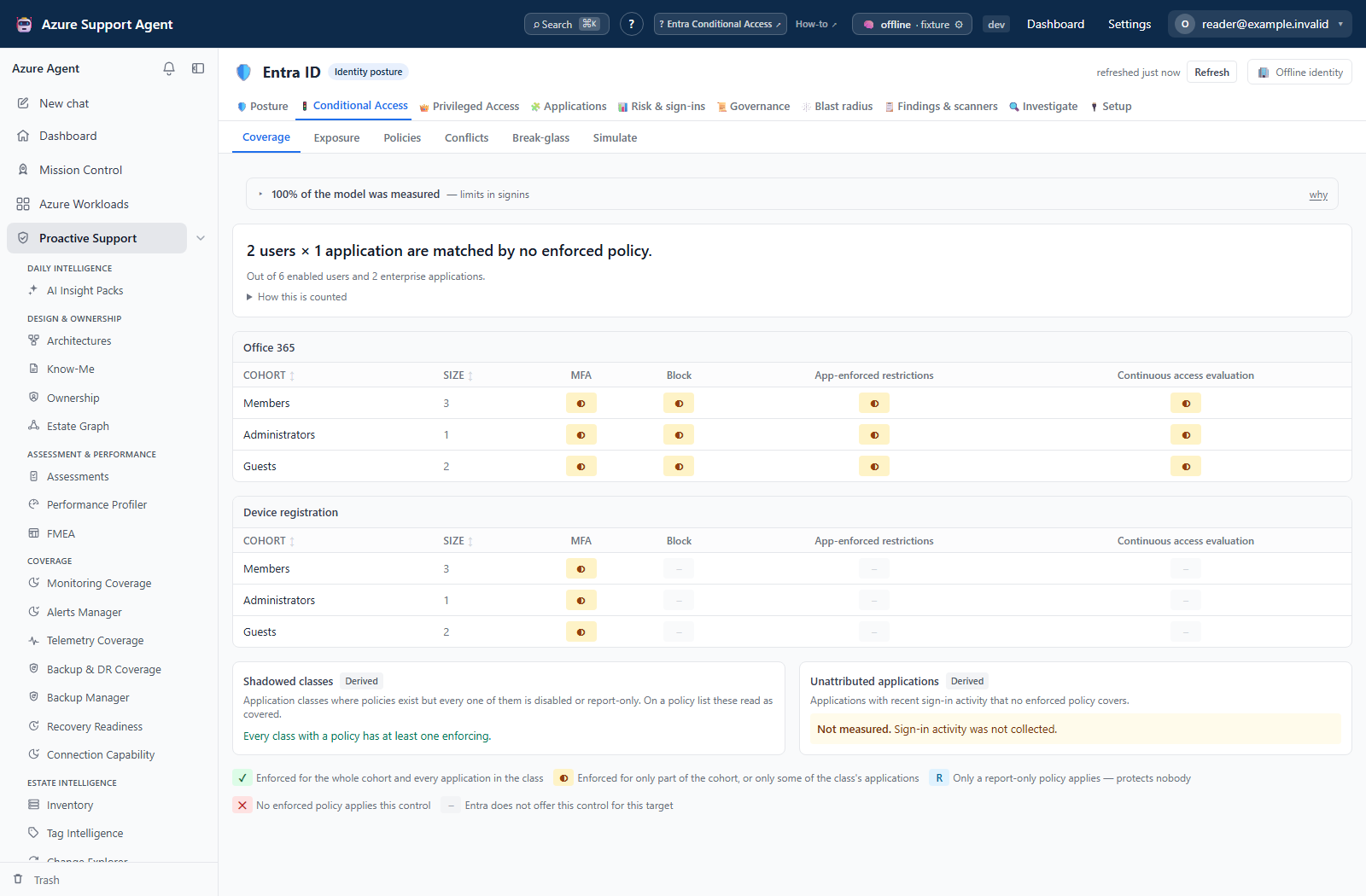
Coverage opens with the sentence the page exists for: how many enabled users and how many enterprise applications are matched by no enforced policy, how many of those principals hold privileged roles, and out of what totals. An expandable note states how the count was made — enabled policies only, exclusions applied, role-scoped policies including eligible holders, disabled accounts not counted.
Below it, one matrix per application class crosses the cohorts against the controls. The cohorts are Global Administrators, all privileged roles, break-glass accounts, members that are not privileged, guests, likely service accounts, and users with no MFA method registered.
Application classes
Applications are grouped by a versioned taxonomy rather than by the four presets the portal offers. The classes are All cloud apps, the Office 365 bundle, Collaboration and content, Admin planes, Management and automation APIs, the Legacy authentication surface, Device and identity lifecycle, Third-party SaaS, Custom line-of-business applications, and application-filter or authentication-context scoped constructs.
The distinction that matters most is between the Office 365 bundle and Collaboration and content. The bundle is whatever Microsoft currently says it is; its membership changes without notice and without anyone editing a policy. Collaboration and content is the smaller set that actually holds organizational data. A policy can name the bundle and still not reach every application inside it, which is what the bundle does not cover all its members finding reports.
Membership is resolved against the tenant’s own service principals. Microsoft publishes the Office 365 suite by name and directs you to resolve the identifiers in your own tenant, so the taxonomy matches on published names rather than inventing GUIDs for them. Where Microsoft does publish a stable identifier — SharePoint Online, Exchange Online, Azure Resource Manager, Microsoft Graph, the admin centers — the taxonomy records it along with the source it came from and a confidence level.
The control axis
Fourteen controls are tracked: MFA, authentication strength, phishing-resistant, compliant or hybrid device, approved client app, app protection policy, block, terms of use, sign-in frequency, persistent browser, app-enforced restrictions, Cloud App Security proxy, continuous access evaluation, and legacy authentication blocked.
The session controls are tracked separately rather than as one “session limits” column. A policy that sets a sign-in frequency and one that enforces app-enforced restrictions are doing different jobs, and collapsing them hides the data-handling gap on content services entirely. Approved client app and app protection policy are likewise distinct: one governs which application may connect, the other governs what that application may do with the data once it has it.
Continuous access evaluation is a mode, not a switch. A policy that explicitly disables it is not treated as having the control.
How to read a cell
A cell reports coverage on two axes, and is green only when both are complete:
| State | Meaning |
|---|---|
| Covered | Every member of the cohort and every application in the class is reached by an enforced policy applying that control |
| Partial | Some of the cohort, or some of the class’s applications, are not reached |
| Report-only | Only a report-only policy applies. This protects nobody |
| Uncovered | No enforced policy applies this control |
| Not available | Entra does not offer this control for this target. It is not a gap |
The application axis exists because a policy can reach every user in a cohort and still miss half the applications a class contains — Teams but not the SharePoint and Exchange underneath it. A matrix that counted only users would render that as fully covered.
“Not available” is a real state rather than a gap. Entra permits only MFA and authentication strength on the Register or join devices user action; showing the other eleven controls as missing would invent work that cannot be done.
Selecting a cell opens a drill-down listing the policies that produced it, the applications in the class that are not reached, and the members of the cohort left uncovered, flagging those with no MFA method. Both lists are capped samples and say so.
The screenshots below illustrate coverage and exposure with browser fixtures. Their figures are not a computed security assessment of a tenant.
Derived classes
Two groups sit below the matrix and are labeled Derived, because they are conclusions drawn from the analysis rather than targets a policy can name. Neither has a control axis: there is no policy anyone could write to turn them green.
Shadowed classes are application classes where policies exist and every one of them is disabled or in report-only. On a policy list these read as covered.
Unattributed applications are applications with recent sign-in activity that no enforced policy covers. This requires per-application sign-in activity, which needs AuditLog.Read.All and an Entra ID P1 license. When it has not been collected the panel says not measured and explains why. It never shows an empty list, because an empty list here would read as “nothing wrong” when the truth is “nobody looked”.
Exposure
Exposure is the same analysis collapsed into an order of work. The matrix is the right shape for an audit and the wrong shape for deciding what to do on a Tuesday morning; ten classes across fourteen controls is a hundred and forty cells, and they do not sort themselves.
Each row is one application class with its worst open finding, how many findings it has, and how many applicable controls are covered. Rows are ordered by severity first and by the proportion of uncovered controls only as a tie-break — a class with thirteen minor controls satisfied and one critical control missing is not 93% safe.
Expanding a row gives, for each finding, what the exposure means, its blast radius, and the first step to close it. That text is static and human-reviewed rather than generated at request time: an operator acting on it is about to change production, and a sentence produced on the fly cannot be reviewed before they do. Where a class-specific statement has not been written the page says so and falls back to the detector’s own explanation.
The row set is exportable as CSV from the button on the page, or from /api/entra/ca/exposure/export?fmt=csv.
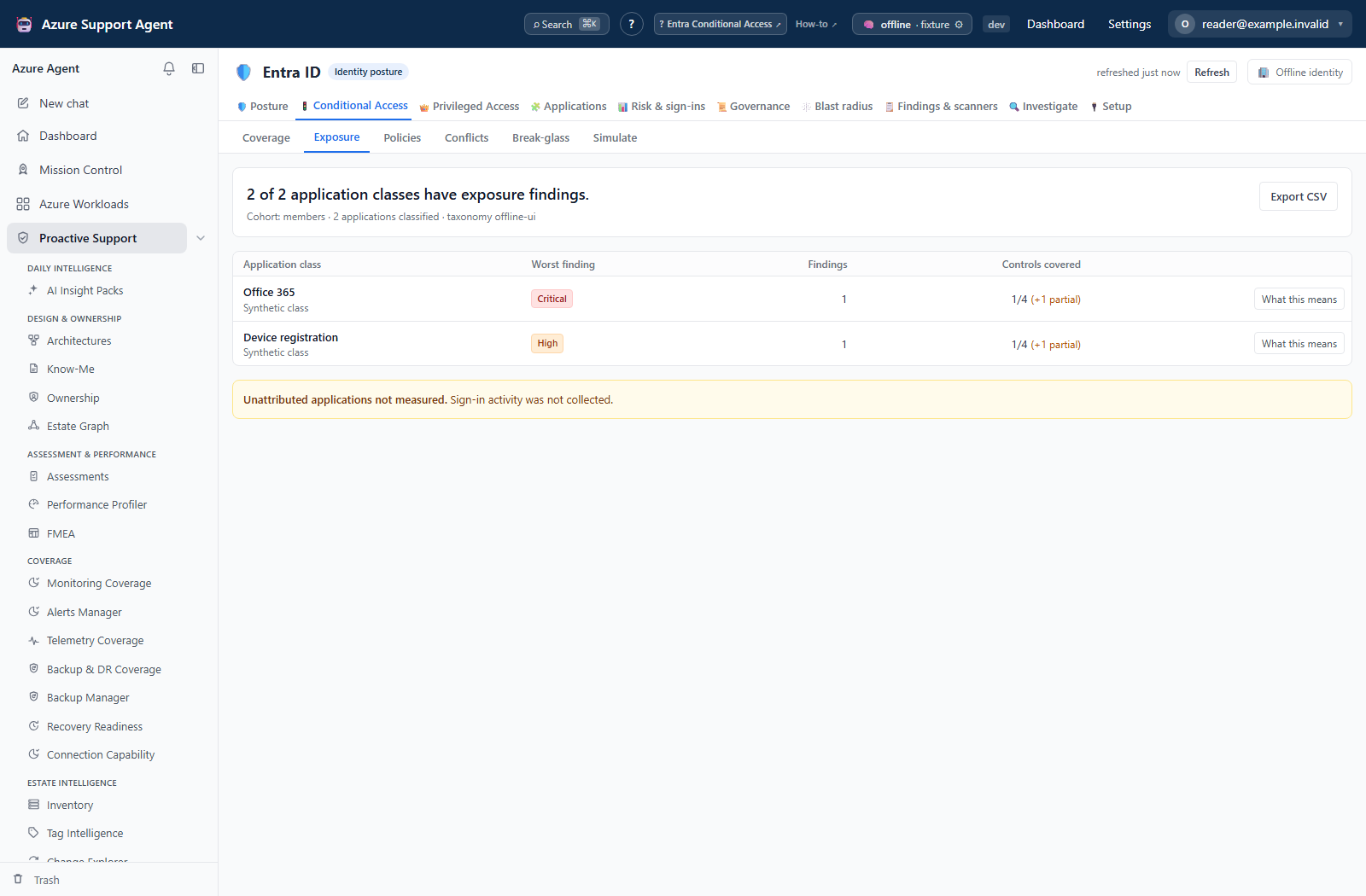
For the expanded impact and first-step view, see How to prioritize application-class exposure.
Policies is a filterable table of policy name, state, effective user count, excluded user count, controls and application scope. Opening a policy shows its resolved detail together with a sample of the users it effectively covers, a sample of the users excluded from it, and any conflicts that involve it. The samples are capped; large identifier lists are deliberately not sent to the grid.
Conflicts lists every detection with a kind, the policies involved, an explanation and the number of principals affected.
Break-glass ranks candidate emergency accounts by a heuristic score with the reasons that produced it, whether the account holds Global Administrator, which security policies cover or exclude it, and whether it has an MFA method registered. Confirm or reject each candidate; the page warns when a confirmed emergency account is covered by a control it cannot satisfy.
Simulate is described under its own heading below.
A policy export is served by the API at /api/entra/ca/export in JSON or Markdown; there is no policy-export button in the current CA tab. Markdown is a policy book. JSON contains normalized analysis fields, not an unmodified Microsoft Graph create/update payload, so it is review evidence—not a directly re-applicable policy backup.
The simulator
The simulator compares baseline and proposed outcomes per principal and context, in six categories: newly blocked, protection lost, newly challenged, newly granted, session restricted and unchanged. These counts are cases, not unique users; one person can contribute in several contexts. Confirmed break-glass impact has its own distinct-principal count and is rendered first.
A run posts to /api/entra/ca/simulate with a list of changes, an optional list of sign-in contexts, an optional list of cohorts, a sample size that defaults to 400 and is clamped between 50 and 5000, and optional save and label fields. The change vocabulary is closed: enable, disable, set to report-only, delete, add and modify. Anything else is rejected rather than ignored. The page builds single-policy enable, disable, report-only and delete changes.
Contexts and cohorts are published by /api/entra/ca/simulate/contexts, which also returns the cohorts that are always evaluated in full and the model’s limitations. The default contexts cover browser on an unmanaged device, desktop client on a compliant device, Exchange ActiveSync, other legacy clients, browser from a trusted location, Microsoft admin portals, Azure management, SharePoint/Exchange/Teams content, the Office 365 suite, a third-party SaaS application, registering security information, registering or joining a device, and a high-risk sign-in. Break-glass, break-glass candidates, Global Administrators and all privileged principals are always evaluated in full regardless of sample size; the remainder is a seeded sample so that repeated runs stay comparable.
The two user-action contexts behave differently from the application ones, and the difference is not cosmetic. In Entra a policy targets cloud applications, or user actions, or an authentication context — the three are mutually exclusive on the target blade. A policy scoped to All cloud apps therefore does not protect device registration or security-information registration, and the simulator models that. Treating the wildcard as covering user actions would report almost every tenant as protected against an attack it is wide open to.
Saving stores the input and result locally, retaining the latest 50 runs per tenant. The list shows label, timestamp, counts, break-glass impact and age relative to the snapshot. Re-run updates that saved record’s result and timestamp in place; preserve earlier evidence before using it. Invalid new changes return 400, missing saved records 404, and stale saved policy references can return 409. The current list offers Re-run, not an open-result or delete control.
The 13 default contexts share a 20,000 principal/context evaluation budget; only the first 100 changed cases are returned for display. Inspect sampling.case_budget_exhausted in the response: the UI does not separately surface this flag. Always-full cohorts avoid random sampling only within the selected pool; they do not override the global case budget. An empty result cannot certify unprocessed cases.
Freshness and scope behavior
One snapshot per tenant serves every Entra tab, so a single refresh from the freshness badge updates Conditional Access alongside posture, privileged access, applications, signals, governance and blast radius. Opening a sub-tab reads the cached snapshot; no tab collects on its own.
If Conditional Access has never been collected for the tenant, the simulator and the analysis endpoints report that plainly instead of returning an empty result. Coverage and the simulator both report a blind or unlicensed Conditional Access domain with a route to Setup & coverage rather than showing a clean matrix. The two Conditional Access user actions are reported separately even though they share one application class. A policy protecting security-information registration says nothing about device registration, and Entra offers a different set of controls for each — only MFA and authentication strength are available on Register or join devices.
The break-glass consistency finding is tagged reliability rather than security, and the distinction is deliberate. An emergency account excluded from four policies and forgotten in the fifth is not a hardening gap; it is an account that will fail during the incident it exists for. Closing it by removing the exclusion would make the tenant less recoverable, not more secure.
Interpretation of results
Report-only policies protect nobody. They are visible in the policy list and can produce a report-only cell in the matrix, but they never count towards coverage, never appear in the headline sentence and never block anyone in a simulation.
Conflict kinds each mean something specific:
| Kind | Meaning |
|---|---|
| Privileged exclusion | A privileged principal is excluded from a security control |
| Block contradicts grant | An unconditional block always wins, so an overlapping grant can never be satisfied |
| Exclusion sprawl | A large share of the targeted population is excluded |
| No effect | The policy resolves to zero users, or to no application |
| Unreachable condition | Every included platform or location is also excluded |
| Redundant | Fully subsumed by another policy — same or narrower users, applications and controls |
| Duplicate | Identical conditions and grants to another policy |
The application-class detectors that feed the Exposure tab each answer a different question:
| Finding | What it means |
|---|---|
| Application class never targeted | No enforced policy names this class, directly or through All cloud apps |
| Bundle does not cover all its members | A policy names the Office 365 bundle but does not reach every application currently inside it |
| Front-end app protected, its data services are not | Teams is covered while the SharePoint and Exchange holding its content are not |
| No session control on content services | Authentication is controlled but nothing governs the session that follows |
| Security info registration unprotected | Nothing stops an attacker with a stolen password from enrolling their own MFA method |
| Device registration unprotected | Any account with a valid password can join a device, which then becomes an identity that may satisfy your device controls |
| Break-glass account excluded inconsistently | A confirmed emergency account is excluded from some blocking policies and not others. Tagged reliability, not security |
| Guests held to a weaker standard | Members are fully covered by a control on a class and guests are not |
| Portal protected, API is not | Admin portals require a control that the management APIs beneath them do not |
| Class covered only by inactive policies | Every policy covering the class is disabled or report-only |
| Exclusion carves a hole in a sensitive class | An all-apps policy excludes an application in a class that matters |
| Grant accepts its weakest branch | An OR grant lets a user satisfy the policy by meeting any single control |
| Application signed into but never covered | An application with real sign-in traffic that no enforced policy governs |
Break-glass detection is a heuristic and is labeled as one everywhere it appears. It scores signals such as not being covered by any enforced security policy, being explicitly excluded from one, holding Global Administrator, being cloud-only, matching an emergency naming pattern, having no department or job title, and having no recent interactive sign-in. Guests are never candidates. The decision to accept a candidate is always the operator’s, and it is a local annotation: confirming or rejecting an account is stored with the finding state for this product and is never written to Entra.
The simulator distinguishes a challenge from an effective block using modeled capabilities. Unknown MFA registration is assumed satisfiable, with a warning that real blocks may be higher; it is not an indeterminate verdict. OR grants use a fixed preferred-control order rather than evaluating every satisfiable branch. Named locations, application classes, device state and user-action targeting are approximations. A low blocked count is not evidence that missing/partial inputs were safely resolved.
Every result is labeled Modelled locally. Session restrictions are reported separately from sign-in verdicts: adding one can produce Session restricted, and removing one can produce Protection lost. The model cannot establish what SharePoint/Exchange actually permits, CAE revocation timing, workload authentication-context behavior or live device compliance. No Microsoft evaluation call runs in this endpoint. Only enabled policies are evaluated; risk contexts are hypothetical inputs.
Safety and limitations
- The simulator is an offline model of the snapshot, not a Microsoft what-if evaluation. It must never be the sole evidence for enabling, disabling or deleting a policy. Use it to find the population a change would break, then validate in the Microsoft Entra admin center and roll out through report-only mode and your approved change process.
- Nothing on this page writes to the directory. No policy is created, enabled, disabled or deleted, and no exclusion is added.
- Break-glass confirmations and saved simulations are local annotations only. They never reach Entra and are not a substitute for a documented emergency access procedure.
- Coverage, conflict and simulation results are only as current as the snapshot. A policy changed after the last collection is not reflected until the next refresh.
- Uncovered lists, effective user samples and excluded user samples are capped and the page states the cap. Treat them as evidence of a gap, not as a complete membership export.
- Service-account identification is a heuristic based on naming, missing MFA registration and absent interactive sign-in. Verify before excluding anything from a rollout on that basis.
- Application-class membership is resolved against this tenant’s service principals. Microsoft controls what the Office 365 bundle contains and changes it without notice, so a class that is fully covered today can gain an unreached member without any policy being edited. The bundle-divergence finding exists to catch that, but it can only report what the last snapshot saw.
- Where the taxonomy records an application identifier that Microsoft does not publish on a documentation page, it is marked with a lower confidence level and a note saying so. Verify those against your own tenant before relying on them.
- “Unattributed applications” requires per-application sign-in activity. Without
AuditLog.Read.Alland an Entra ID P1 license the panel reports not measured rather than an empty list. Do not read a not-measured panel as a clean result. - Exports and drill-downs contain identity metadata. Handle them as governance material and avoid pasting live tenant, object or user identifiers into tickets or prompts.
Troubleshooting
| Symptom | Check |
|---|---|
| The page says nothing has been collected | Start a collection from the freshness badge; sub-tabs never collect on their own. |
| The Conditional Access domain reports blind | Grant the missing policy read scope on Setup & coverage, then re-collect. |
| The domain reports unlicensed | The tenant lacks Entra ID P1; more consent will not help. |
| A policy shows far fewer users than expected | Exclusions are applied at every level; open the policy and read the excluded sample. |
| A role-scoped policy covers more users than the portal suggests | Eligible role holders are included, not only active assignments. |
| The matrix shows a report-only cell | Only a report-only policy applies, which protects nobody. |
| The simulator refuses to run | Conditional Access has not been collected, or no change was supplied. |
| A saved simulation cannot be re-run | It references a policy that no longer exists in the current snapshot. |
| A saved simulation is marked as based on older data | It predates the current snapshot; re-run it before relying on the numbers. |
| A simulation or break-glass action returns a permission error | Both require entra.admin, not entra.read. |