Entra: risk and sign-ins
Product permissions: entra.read for views; changing the lookback requires settings.write, and the subsequent recollection requires entra.admin. These actions change product configuration/cache, not directory objects.
Purpose
App route: /entra/signals (tab label Risk & sign-ins)
This tab answers who is authenticating, how, whether it worked, and who Microsoft currently considers risky. It combines two very different data sources: a bounded, sampled read of the sign-in log folded into counters, and Identity Protection’s own risk verdicts joined to privilege and to what each account can actually do about it. It does not re-implement Microsoft’s detections; it joins them to the rest of the tenant.
Read it as a shape, not a ledger. Sign-in analysis on this tab is sampled over a bounded lookback window and is not an authoritative audit of the tenant.
Prerequisites and data sources
- Product permission
entra.read.entra.adminis only needed for the write actions that live elsewhere in Entra ID — starting a collection, changing finding state — not for reading this tab. - Consent tier 2 for sign-in analysis and registration coverage (
AuditLog.Read.All,Reports.Read.All,UserAuthenticationMethod.Read.All), consent tier 3 for Identity Protection (IdentityRiskyUser.Read.All,IdentityRiskEvent.Read.All,IdentityRiskyServicePrincipal.Read.All). See Entra setup and coverage. - Entra ID P1 is required for sign-in log retention. Without it the overview, legacy authentication, failures, and patterns sub-views report that sign-in analysis is unavailable.
- Entra ID P2 is required for Identity Protection. Risky workload identities additionally require Entra Workload Identities Premium.
- Registration coverage comes from the tenant registration report in the people domain, not from the sign-in log, so it still works when sign-in analysis does not.
Each capability degrades on its own. A tenant with P1 and no P2 gets every sign-in view and an unavailable notice on risky users, not an empty grid.
Tabs and actions
Six sub-views, selected from the strip at the top of the tab.
| Sub-view | Reads | What it shows |
|---|---|---|
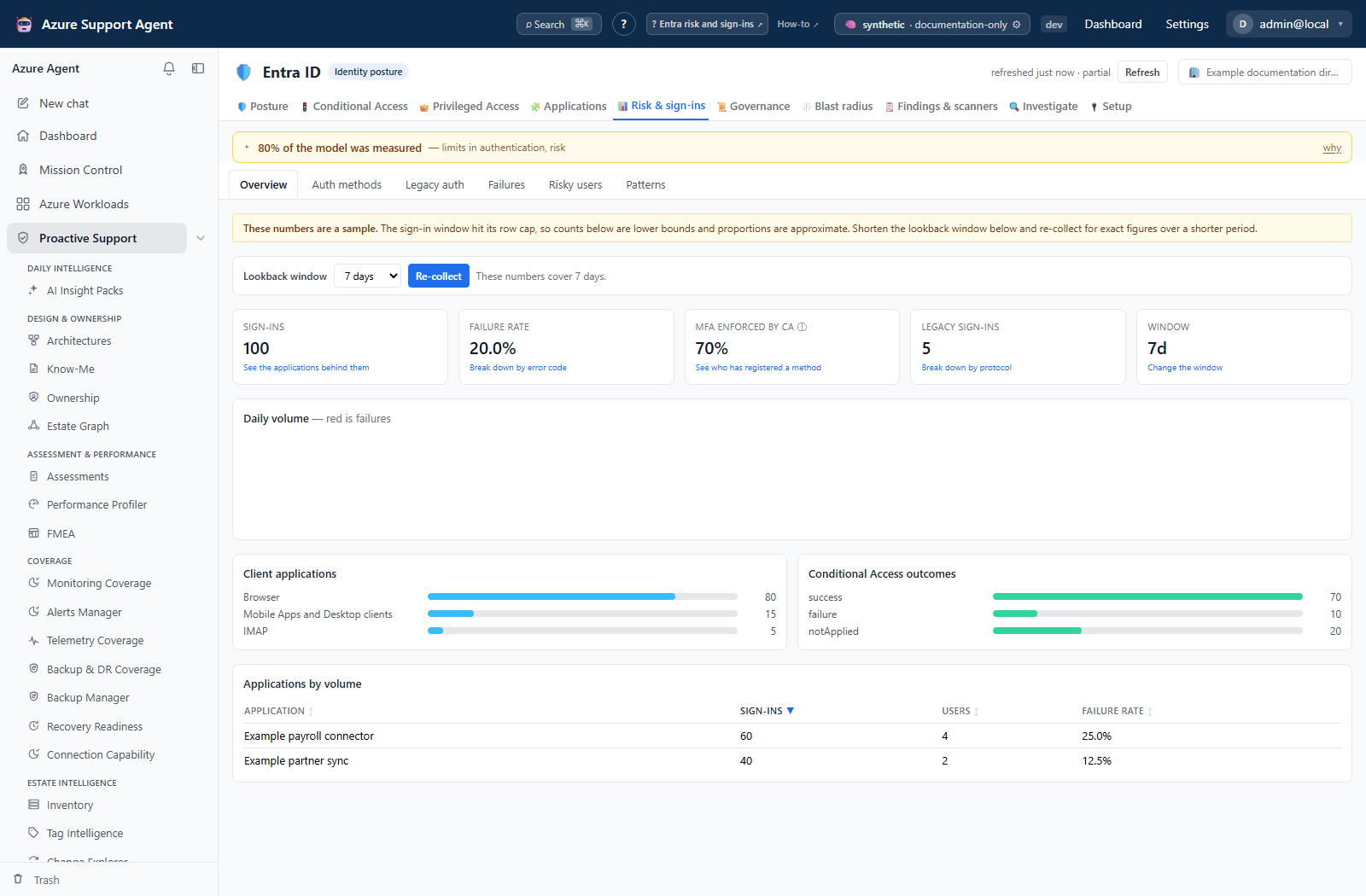
| Overview | /signals/overview | Sign-in volume, failure rate, MFA rate, legacy volume, the lookback window, a daily volume chart split by outcome, client application mix, Conditional Access outcomes, and applications ranked by volume |
| Auth methods | /signals/auth-methods | Registration coverage for administrators and for all enabled users, method distribution, and the registration gap list |
| Legacy auth | /signals/legacy-auth | Legacy protocol breakdown with attempts, successes, users, apps and last success; the Conditional Access policies that block legacy clients; and whether a gap remains |
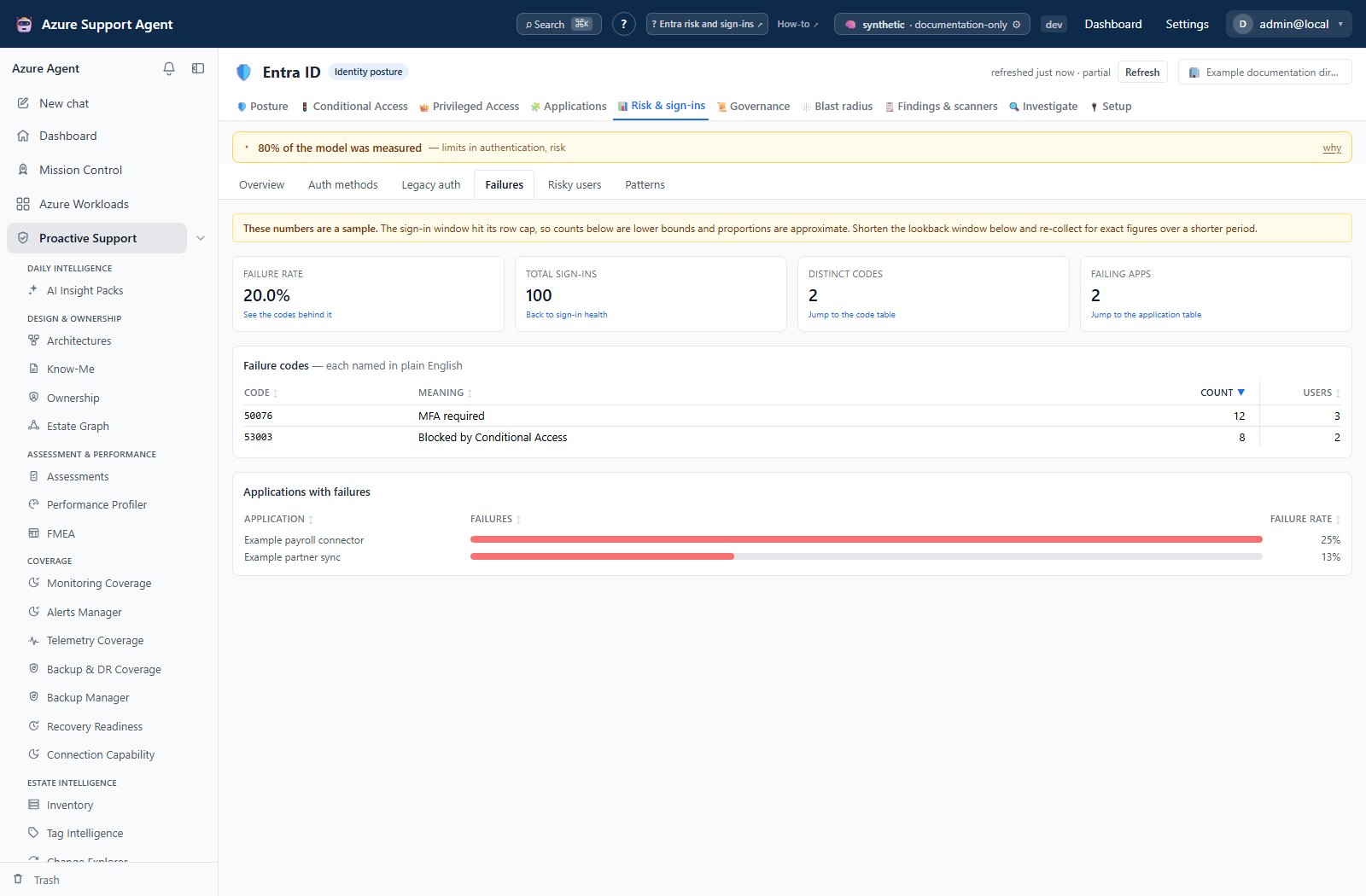
| Failures | /signals/failures | Failure clustering by Entra error code with a plain-English meaning, per-day trend, and the applications carrying the failures |
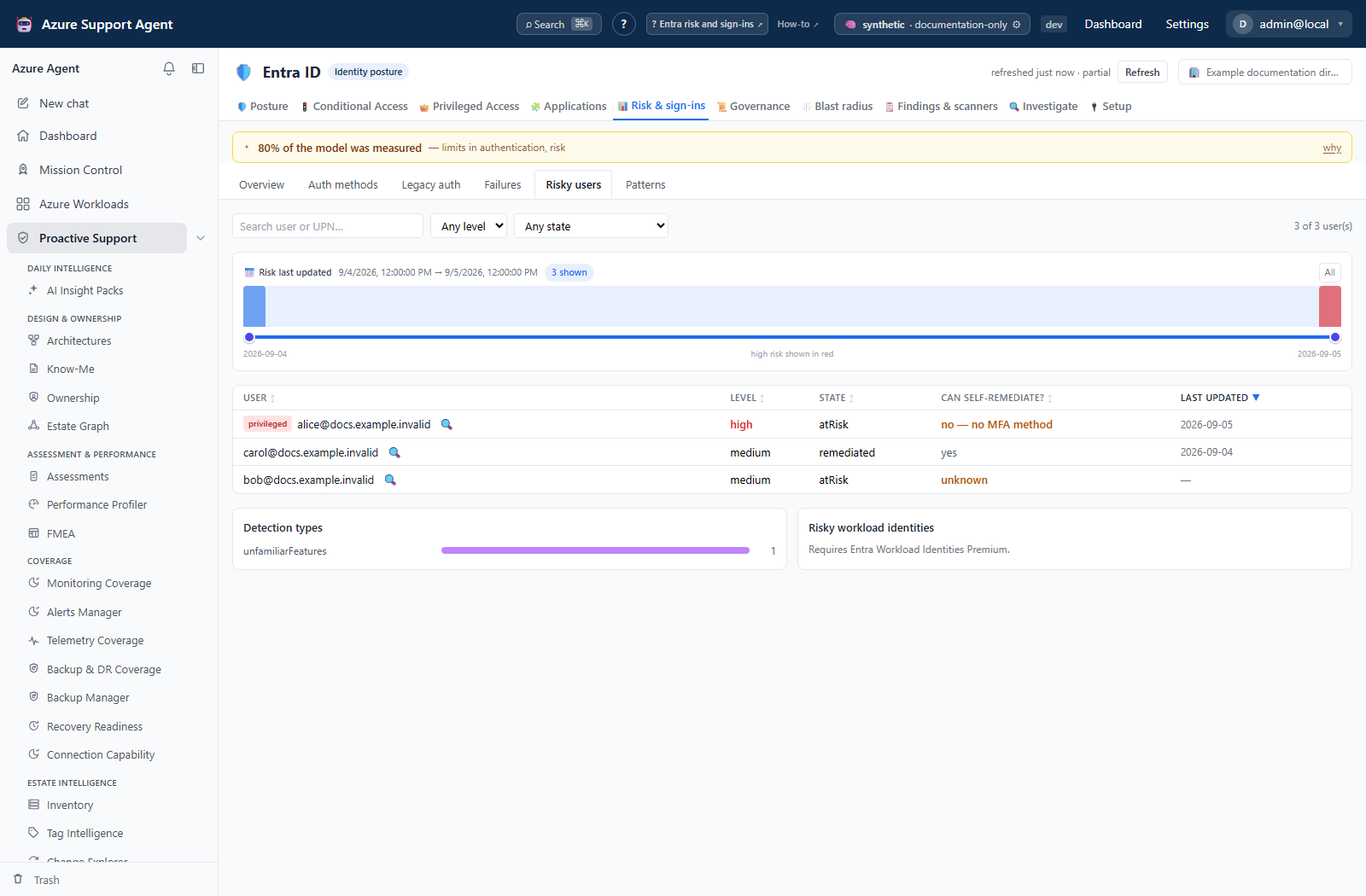
| Risky users | /signals/risky-users | Identity Protection risky users filtered by level and state, detection type counts, and risky workload identities |
| Patterns | /signals/patterns | Deterministic sign-in patterns, each carrying the rule and thresholds that produced it |
The Reads column names API suffixes under /api/entra, not app routes. App sub-tab IDs are overview, auth-methods, legacy, failures, risky and patterns, all under /entra/signals/.
Controls are the sub-view strip, the risky-users filters (search, risk level, risk state, and a brushable last-updated window), and the lookback control on Overview.
Screenshot notes: These synthetic browser fixtures do not represent live Graph reads, backend aggregation or actual Identity Protection detections. The selected seven-day sign-in window is an example, not the default 30-day lookback; the displayed counts and rates are illustrative.
The lookback window
The Overview sub-view carries a lookback window selector offering 1, 3, 7, 14, 30, 60 and 90 days, with Apply and re-collect beside it. It is the only lever against the row cap: on a busy tenant the cap is reached long before a 30-day window closes, and every count on the tab becomes a lower bound. A shorter window buys exact figures over a shorter period.
The window is an application setting, not a query filter or a per-reader preference. Applying it saves entra_signin_lookback_days, then requests the risk domain, which owns the sign-in aggregation. If saving succeeds but refresh is denied, the setting has changed while the displayed data has not. Check both the configured window and the measured window; a shorter request is not automatically complete if it still reaches a cap.
Saving the setting requires the settings.write permission, because the window governs collection for every reader of the tenant. Without it the selector still reports the current window; the apply action reports that it needs the permission.
Auth methods deserves a specific note. Only users the registration report actually returned are scored. Enabled accounts absent from the report — typically newly created ones the report has not caught up with — are excluded from every figure and reported separately as unreported, rather than being counted as a gap.
Legacy auth raises a distinct condition: a blocking policy exists, is enforced, and legacy sign-ins still succeeded in the window. That combination is the finding, not the presence or absence of the policy.
Freshness and scope behavior
One snapshot per tenant serves every tab in Entra ID, so this tab reads the same collection as Posture, Conditional Access, Privileged Access, Applications, Governance, and Blast radius. Refresh from the freshness badge in the Entra ID header. Tabs never collect on their own; opening this one reads the cached snapshot and nothing else.
The sign-in read is the largest data volume in the product and the slowest read in a collection. No raw sign-in row is ever stored — rows are paged, folded into counters, and only the counters persist. The read is bounded by a row cap and by the configured lookback window (default 30 days, adjustable between 1 and 90 from the Overview sub-view). When the cap truncates the window, the snapshot is marked sampled and every affected view renders a sampling banner above its charts.
Identity Protection risk is a current-state read, not a windowed one: it reflects Microsoft’s verdicts at collection time.
Interpretation of results
Three claims on this tab are narrower than they look, and treating them as broader is the most common way to draw the wrong conclusion.
- Sampled is not total. When the sampling banner is shown, every count is a lower bound and every proportion is approximate. Do not quote a sampled figure as a tenant total. Narrow the lookback window for exact figures over a shorter period.
- Registered is not enforced, and is not used. The auth methods sub-view measures what each user has registered. It does not measure whether any policy requires a second factor, and it does not measure whether one was used. A tenant can show high registration and enforce nothing. Enforcement is a Conditional Access question; check it there.
- MFA rate is a Conditional Access statement. Microsoft Graph v1.0 does not expose a per-sign-in authentication requirement, so the overview reports sign-ins where a Conditional Access policy enforced multi-factor authentication. It excludes MFA required by other means, such as per-user MFA, and therefore understates the real figure.
The administrator row on the auth methods sub-view is the number that matters. Tenant-wide coverage is close to meaningless while a privileged account is unregistered, which is why the gap list sorts privileged accounts first and the summary states the administrator gap explicitly.
Risky users are joined to two things Identity Protection does not know: whether the account holds a privileged directory role, and whether it has a registered MFA method and can therefore self-remediate. A medium-risk administrator with no registered method is a different conversation from a medium-risk user with a phishing-resistant credential.
Federated tenants change how the auth methods figures must be read. When a domain is federated, its users register their factors with the identity provider, not with Entra, so their multi-factor authentication is invisible here. The sub-view says so in a banner naming the provider and the number of users affected, and the figures describe the cloud-authenticated population plus anyone who separately registered an Entra method. Without that caveat the screen reports a registration gap it structurally cannot see — the same “blind is not zero” failure the score model avoids. See Entra setup and coverage for the full picture of the tenant’s authentication perimeter.
The risky users grid narrows in four ways. Level and state are server-side filters. A search over user and UPN and a risk last updated window are client-side slices of what came back, the latter a brushable histogram with high-risk users stacked in red. Every column sorts, starting descending, and the orderings are semantic rather than alphabetical: level runs high to none, state runs confirmed-compromised to confirmed-safe, and self-remediation places unknown between no and yes because it is evidence of neither. Users Identity Protection never stamped with a last-updated time sort to the bottom in both directions and are excluded while a window is brushed — the page says how many.
Patterns are counting rules, not predictions. Each result states its rule and carries the raw counts, so the claim can be verified rather than trusted. The rules are deterministic: distinct users failing invalid-credential attempts from a single IP address, repeated multi-factor denials or timeouts by one user, daily failures exceeding a multiple of the trailing median for the window, and successful interactive sign-ins from devices reported as non-compliant. The unmanaged-device pattern is reported once in aggregate with the worst accounts, not once per account.
Safety and limitations
- Nothing here dismisses risk, confirms compromise, blocks users or edits directory policies. Lookback changes do persist local settings and trigger a read-only collection. Remediate directory findings externally.
- Sign-in analysis is sampled and bounded. It cannot prove absence: “no legacy sign-in succeeded in this window” is a statement about the window, not about the tenant.
- The window is also bounded by Microsoft’s own sign-in log retention for the tenant’s license. Events older than retention were never available to read.
- Unbounded dimensions are truncated to a top slice before storage — applications, failure codes, IP addresses, and users by volume. Counts outside a top slice are not shown.
- Missing license produces an explicit unavailable notice naming P1, P2, or Workload Identities Premium. It never produces a zero.
- Exports and screenshots from this tab contain user principal names and risk verdicts. Handle them as identity material; do not paste live tenant, object, or user identifiers into tickets or prompts.
Troubleshooting
| Symptom | Check |
|---|---|
| Every sign-in sub-view says analysis is unavailable | Either the tenant lacks Entra ID P1 or AuditLog.Read.All is not granted; the notice names which. |
| Risky users says Identity Protection is unavailable | Entra ID P2 and IdentityRiskyUser.Read.All are both required. Sign-in views work without either. |
| Risky workload identities is empty with a license note | Requires Entra Workload Identities Premium; consent will not help. |
| Auth methods says the registration report is unavailable | Requires Entra ID P1 and Reports.Read.All. Grant, re-check permissions, then collect. |
| A sampling banner is shown on every chart | The row cap truncated the window. Reduce the sign-in lookback window and collect again. |
| Registration percentages exclude accounts you expect | Those users are absent from the registration report; the unreported count states how many. |
| A blocking policy is listed but legacy sign-ins still succeed | Check the policy’s exclusions and the protocol rows; an enforced policy with successful legacy traffic is the finding. |
| MFA rate looks lower than the tenant’s real posture | The metric counts Conditional Access enforcement only and excludes per-user MFA. |
| Numbers did not change after a directory change | The snapshot predates it. Refresh from the freshness badge. |