Entra: posture and score
Product permission: entra.read to read every surface on this page; entra.admin to start a collection.
Purpose
App route: /entra (the default tab, also reachable as /entra/posture)
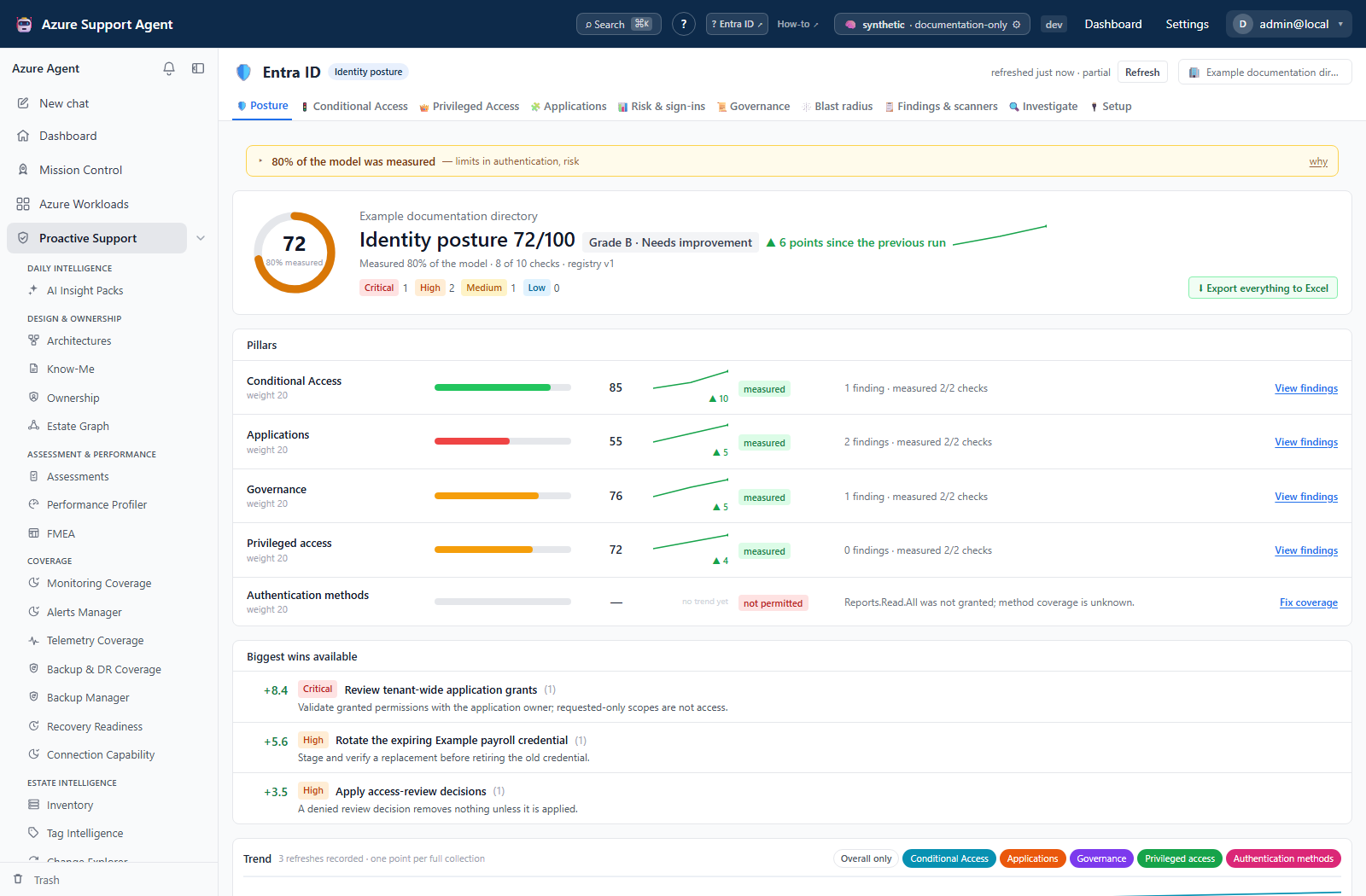
Posture is the summary of the current snapshot: one tenant score out of 100, the eight pillars that produced it, the fraction of the model that could actually be measured, the largest recoverable points, the trend, and the directory counts behind it. It exists so that a tenant can be described in one number without that number lying — the score is always published together with its coverage, and anything that could not be measured is named rather than averaged away.
The number is deterministic. The same snapshot and the same context produce the same score, and every lost point traces back to a signal, and every signal traces back to the objects that triggered it.
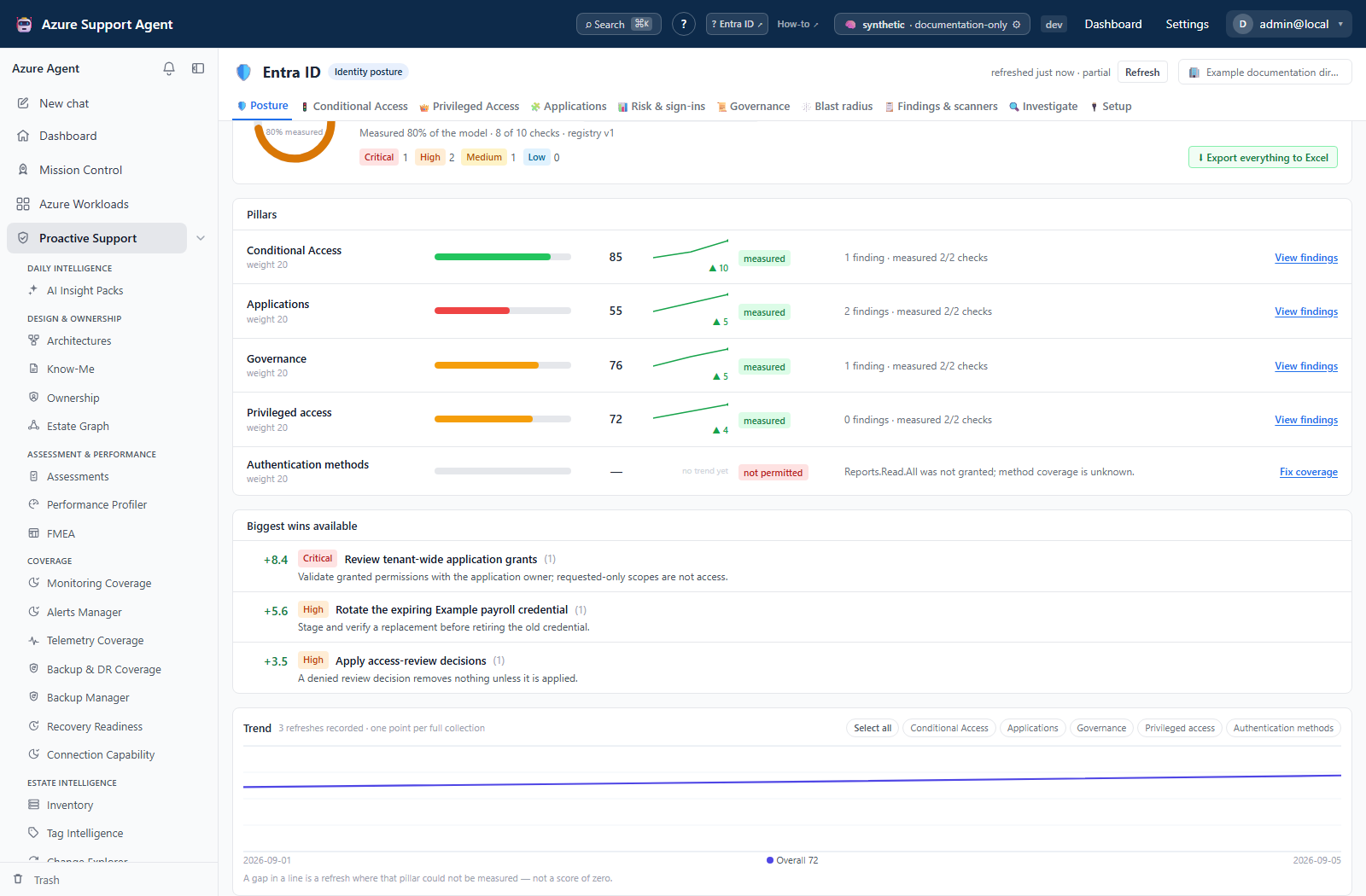
Screenshot notes: These are synthetic browser fixtures, not live collections or backend-computed assessments. The simplified pillar set, weights, scores and history are illustrative; the eight-pillar model and its actual weights are documented below.
Prerequisites and data sources
- A connection that can obtain a Microsoft Graph application token for the tenant, and at least one completed collection.
- Product permission
entra.read. Write actions elsewhere in the feature, including starting a collection, requireentra.admin. - Admin-consented, read-only Graph application permissions. Tier 1 alone produces a score, but a low-coverage one; tier 2 and tier 3 raise coverage rather than change the model. See Entra setup and coverage.
- Entra ID P1 for the authentication and Conditional Access data behind several pillars, and Entra ID P2 for Identity Protection risk, PIM depth and governance. A pillar whose data is license-gated reports
unlicensed, not a low score.
All data comes from the cached snapshot for the selected connection. The page never calls Microsoft Graph directly.
Tabs and actions
Posture is a single scrolling page, not a set of sub-tabs.
- Coverage banner at the top states whether the snapshot is complete and links to Setup & coverage when it is not.
- Federation line in the title row names the external identity provider, if any, together with the number and percentage of users behind it. It is placed before the score deliberately: on a federated tenant the authentication pillars describe only the population Entra itself signs in, and that has to be known before the score is read. A cloud-only tenant shows nothing here. The full perimeter is on Setup & coverage.
- Score header shows the score out of 100 with a coverage ring, the grade or the reason a grade was withheld, the change in points since the previous run with a sparkline of the whole recorded history, the percentage of the model measured, the number of checks measured out of the total, the signal registry version, and finding counts by severity.
- Pillars lists all eight pillars with weight, score, state, finding count and how much of that pillar’s own model was measured, each with its own sparkline and its movement since the previous run. A pillar that could not be measured shows its reason instead of a score and offers a route to fix coverage.
- Biggest wins available ranks signals by the tenant-score points that would be recovered by clearing them, with the remediation sentence for each.
- Trend draws the tenant score across every recorded refresh on a fixed 0–100 frame, with a chip per pillar to overlay that pillar’s own series. Until a second full collection has been recorded the card says so instead of drawing a single point.
- Inventory counts summarize the people, apps, roles and Conditional Access domains of the snapshot.
Supporting reads are exposed by the API: pillar detail at /api/entra/posture/pillar/{pillar}, history at /api/entra/posture/history, diff at /api/entra/posture/diff, and the registry at /api/entra/signals. Despite its name, the history days parameter (1–365, default 90) slices the latest entries, not a calendar-day interval. View findings navigates to the inbox; it does not open the API pillar dossier or prefilter that inbox.
History is appended when a full-domain refresh reaches the history step. A targeted subset refresh does not append, but a full run with degraded collectors can still append; full does not mean every domain succeeded. Each point records score, coverage, pillar scores, severity counts and registry version. Storage keeps 365 points and Posture shows the latest 90. Coverage changes can move the line without remediation.
The pillar drill-down returns the pillar row, every signal in that pillar with its finding count and its measured flag, the reason for each signal that was not measured, and the pillar’s findings capped at 500. An unknown pillar key is rejected rather than returned empty.
The signal registry returns the pillar definitions and every signal’s identifier, title, question, rationale, pillar, severity, weight and remediation, together with a registry version. It is the catalog behind the score, the findings list and the scanners; nothing is scored that is not in it.
Freshness and scope behavior
One snapshot per tenant serves every Entra tab. Refresh from the freshness badge in the page header; opening Posture never triggers a collection on its own, and neither does any other tab. A single refresh therefore updates posture, Conditional Access, privileged access, applications, signals, governance and blast radius together.
Score history is appended per completed collection, so the trend line has as many points as there have been refreshes, not as many as there have been days. The diff compares the current findings with those of the previous completed refresh; with only one collection there is nothing to diff against.
Interpretation of results
The tenant score is a weighted roll-up of eight pillars.
| Pillar | Key | Weight |
|---|---|---|
| Conditional Access | ca | 20 |
| Privileged Access | priv | 20 |
| Authentication | auth | 15 |
| Applications & Consent | app | 15 |
| Users & Guests | ppl | 10 |
| Risk Signals | risk | 8 |
| Governance | gov | 7 |
| Monitoring & Hybrid | mon | 5 |
Each signal has a weight and a severity, and severity scales the cost of its findings:
| Severity | Factor |
|---|---|
| Critical | 1.0 |
| High | 0.7 |
| Medium | 0.4 |
| Low | 0.2 |
| Informational | 0.0 |
How many findings a signal needs before it costs its full weight depends on the signal’s impact shape: a binary signal is a tenant-level fact that is either true or not, a ratio signal is normalized by population so that growth alone never moves the score, and a saturating signal reaches full cost after a small number of findings because one permanent Global Administrator is already bad and thirty is not ten times worse than three.
A pillar score is the share of its measurable weight that survived its findings. The tenant score is the weighted average of the pillars that were measured — blind is not zero. A pillar with no measurable signal is excluded from the denominator and reported with a state instead of a score:
| Pillar state | Meaning |
|---|---|
measured | Every signal in the pillar was evaluated |
partial | Some signals were evaluated, the rest carry a reason |
blind | A missing Graph permission prevented measurement |
unlicensed | The tenant lacks the Entra ID license for that data |
error | A collector failed for another reason |
not_collected | The domain was not collected in this snapshot |
not_implemented | No shipped check covers this pillar yet |
Coverage is reported separately from the score: it is the weighted fraction of the model that could be measured. Below 60 percent coverage the letter grade is withheld entirely and the page says why, because a grade computed over a minority of the model misleads more than it informs.
Read the two numbers together. A score that moves without any directory change is usually a coverage change — a permission granted, a license added, or a collector that failed last time. Compare scores over time within one tenant, never across tenants whose measurable surface differs.
Biggest wins available converts a signal’s cost back into tenant-score points, so it ranks work by score impact rather than by finding count. It is a prioritization aid, not a risk ranking: a critical finding worth few points is still critical.
The diff classifies findings by fingerprint into new, resolved and persisting, and returns the new and resolved sets in full with a persisting count. It answers “what changed since the last refresh” and is the same payload used for notification, so a stable tenant produces a quiet diff rather than a repeat of everything already known.
Findings themselves are produced by evaluating the registry against the snapshot; they are triaged, filtered, assigned and suppressed on Findings and scanners, not here.
Safety and limitations
Export everything to Excel on Posture downloads the native Entra snapshot, raw directory and derived sheets. It does not include the separate legacy Application Registrations snapshot, a live Investigate activity response or saved simulation inputs/results. Browser page caps are lifted, but collector and per-signal limits remain. Use Coverage & blind spots and sheet notes rather than assuming every sheet is complete or identical to the UI.
- Everything on this page is read-only against the directory. Exports contain identity and public certificate metadata, not credential secret values or private keys.
- The score is a model of what this product measures, not an absolute measure of tenant security, and it is not a Microsoft Secure Score.
- A score is only comparable within one tenant over time. Different licenses and different consent tiers produce different measurable surfaces.
- Finding counts per signal are capped, so a very large tenant may see a truncated list while the score still reflects the cap honestly.
- Suppressed fingerprints are removed before scoring and can raise the score without fixing the tenant. They are also absent from ordinary findings/inbox results, so a state filter is not a complete suppression register. Preserve the fingerprint and reason when suppressing; use the state API to reopen when necessary.
- Directory changes are eventually consistent. A change made minutes ago will not appear until the next collection.
Troubleshooting
| Symptom | Check |
|---|---|
| The page says nothing has been collected | Start a collection from the freshness badge; tabs never collect on their own. |
| No grade is shown, only a reason | Coverage is below the threshold at which a grade would be meaningful; raise consent and re-collect. |
| A pillar shows a dash instead of a score | Read its state and reason — blind, unlicensed, error, not collected, or not yet implemented. |
| The score changed without a directory change | Compare coverage and measured checks between runs before assuming a regression. |
A pillar reports unlicensed | The tenant lacks Entra ID P1 or P2 for that data; more consent will not help. |
| The trend line is empty | Only one completed collection exists; history is per refresh. |
| The diff shows nothing | There is no previous completed refresh to compare against. |
| Remediating a finding did not move the score | Its signal may be ratio-shaped or already saturated; check the pillar drill-down. |