IAM: access paths
Product permission: iam.read for all three tabs, including the escalation cache rebuild.
Purpose
App routes: /iam/evaluate — tab label Effective Access; /iam/escalation — tab label Escalation; /iam/bypass — tab label Shadow Access
Three ways of asking who can reach what. Effective Access evaluates a specific action against a specific scope and returns a verdict with the assignment that decided it. Escalation asks the follow-up question — this principal is not an Owner; can they become one? — and draws the routes. Shadow Access asks the question both of the others take for granted: if every role assignment were revoked, which doors would still open?
The tab id evaluate and the label Effective Access deliberately do not match. The id effective has always belonged to the raw grant grid on the Access tab, and renaming it would change what an existing /iam/effective link means. The label moved to the tab that evaluates effective permissions; the id stayed where the URL is.
Screenshot notes: These synthetic browser fixtures illustrate verdicts, paths and collection gaps; no live provider calls or backend access analysis was performed. Principals, scopes, selected actions and counts are examples, not default access or verified authorization results.
Prerequisites and data sources
- Product permission
iam.read. - A cached access snapshot. All three tabs read the cache; none of them issues an Azure call, including the escalation Rebuild control.
- Directory collection for principal names, group expansion and managed-identity facts. Escalation is materially weaker without managed identities, and says so.
- Role definitions must have been collected for the evaluator to know what a role authorizes. An uncollected role definition produces an
indeterminateverdict, never an assumed yes or no. - Shadow Access additionally requires a resource sweep. Families the connection cannot read are reported with their status rather than as empty.
Tabs and actions
Effective Access
Three modes across the top; each names what it answers.
| Mode | Question | Endpoint |
|---|---|---|
| Can this principal… | One principal, one action, one scope — a verdict and the assignment that decided it | GET /api/iam/effective |
| Who can… | Everyone who can perform this action here | GET /api/iam/resource-access |
| What can they reach | Role-level grants above or below the selected scope, split by plane | GET /api/iam/principal/{principal_id}/access |
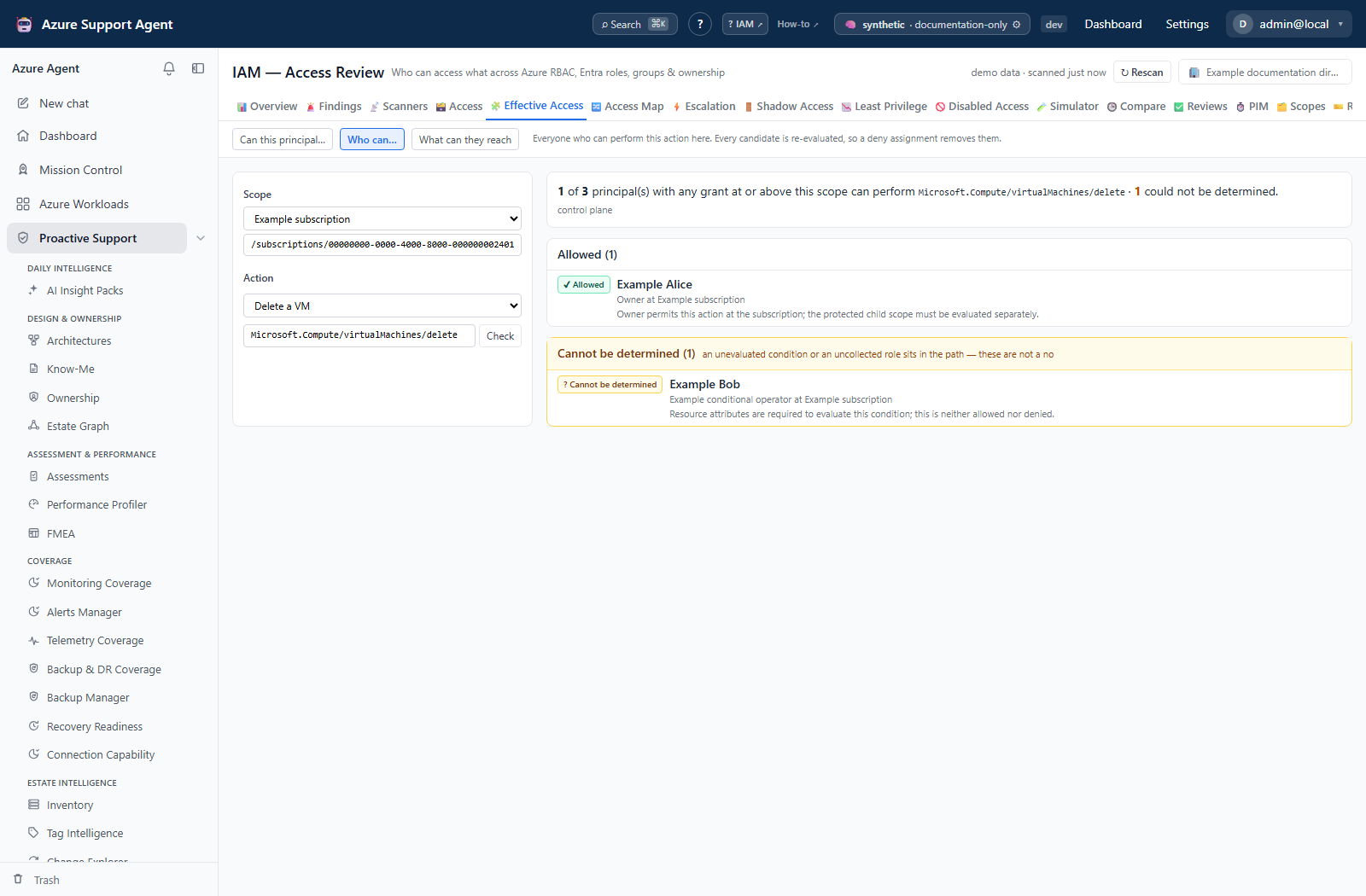
Controls. A principal field backed by the cached directory, a scope selector built from GET /api/iam/scope-tree with a free-text field beneath it for a resource id, and an action picker with common actions. The mode, principal, scope and action are all read from the URL query string on load, so a deep link from the access grid’s why-panel lands on the question the reader was already looking at.
The picker states the size of what it is offering. The caption under the principal field reads N principal(s) in the cached directory, because an empty picker on a tenant that was never scanned looks identical to a tenant with no principals. The option list itself is capped for rendering; type an object id directly for anything outside it.
The scope tree’s synthetic root is not offered. The tree’s top node is an “all scopes” sentinel used by the access grid’s filter, and its id is the empty string. Offering it here would pose a question Azure cannot answer — who can delete a virtual machine at all scopes — and selecting it would leave the query disabled, rendering no verdict, no error and no prompt. It is dropped and its children are lifted to the top level. When no scope is selected, the results panel says so rather than sitting empty, because an empty results panel is not an answer.
Verdicts. The evaluator returns allowed, denied, not_granted or indeterminate. When no unconditional known grant resolves the question, an unevaluated ABAC condition or missing role definition produces indeterminate. An independent unconditional grant can still produce allowed, with competing conditions/unknown roles listed. PIM eligibility is excluded from the action-level allow decision.
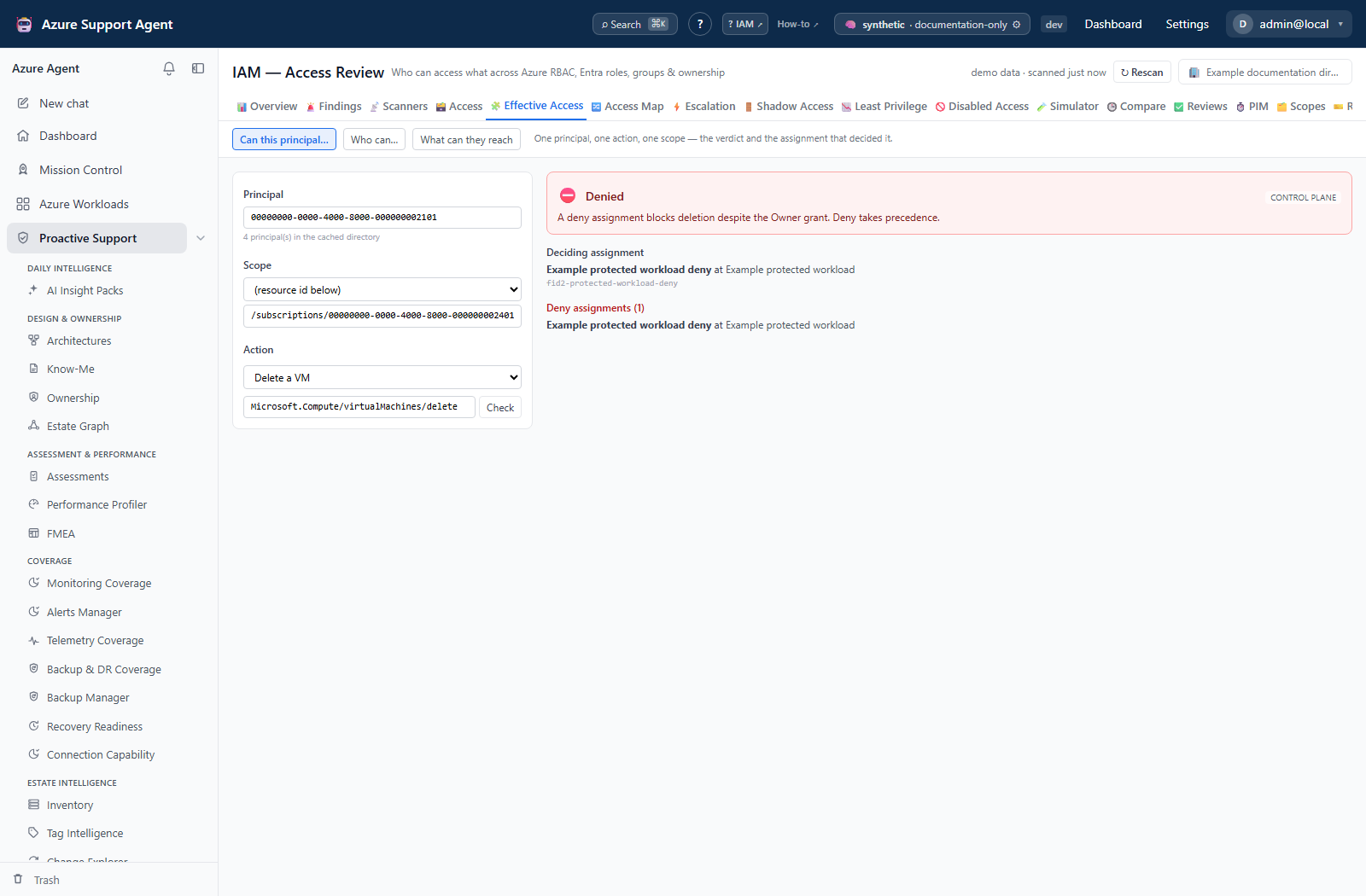
Indeterminate is kept separate from allow and from deny, everywhere. In Who can… it is a second box below the allowed list with its own heading and count, never merged into it, and the headline counts it separately: A of C principals with any grant at or above this scope can perform this action · I could not be determined. A reader scanning a list of names will not notice a per-row qualifier, so the qualifier is the box.
Who can… re-evaluates every candidate. It is not a “who holds a matching role” query. Each candidate goes back through the same evaluator, so a principal blocked by a deny assignment does not appear in the allowed list. candidates is the number of principals holding any grant at or above the scope that were considered; the response is bounded, and the allowed and indeterminate lists together stop at that bound. When candidates is zero the tab states that no principal holds any grant at or above this scope in the cached scan, and that this is not the same as nobody being able to do it.
What can they reach includes both covering ancestor assignments and descendant assignments under the selected scope, despite the current UI’s narrower at or above caption. It is a role inventory, not a per-action verdict; inspect assignment state because eligible rows can appear here. It separates control/data planes, denies and unresolved role definitions. Who can… returns at most 200 allowed/indeterminate entries by default (API maximum 500 combined); its candidate total is not the number fully evaluated once that cap is reached.
Escalation
Served by GET /api/iam/escalation. The tenant-wide graph is cached; GET /api/iam/cache reports how old it is and how long it took to build, and ↻ Rebuild (POST /api/iam/cache/rebuild) recomputes it from the rows already on disk without calling Azure.
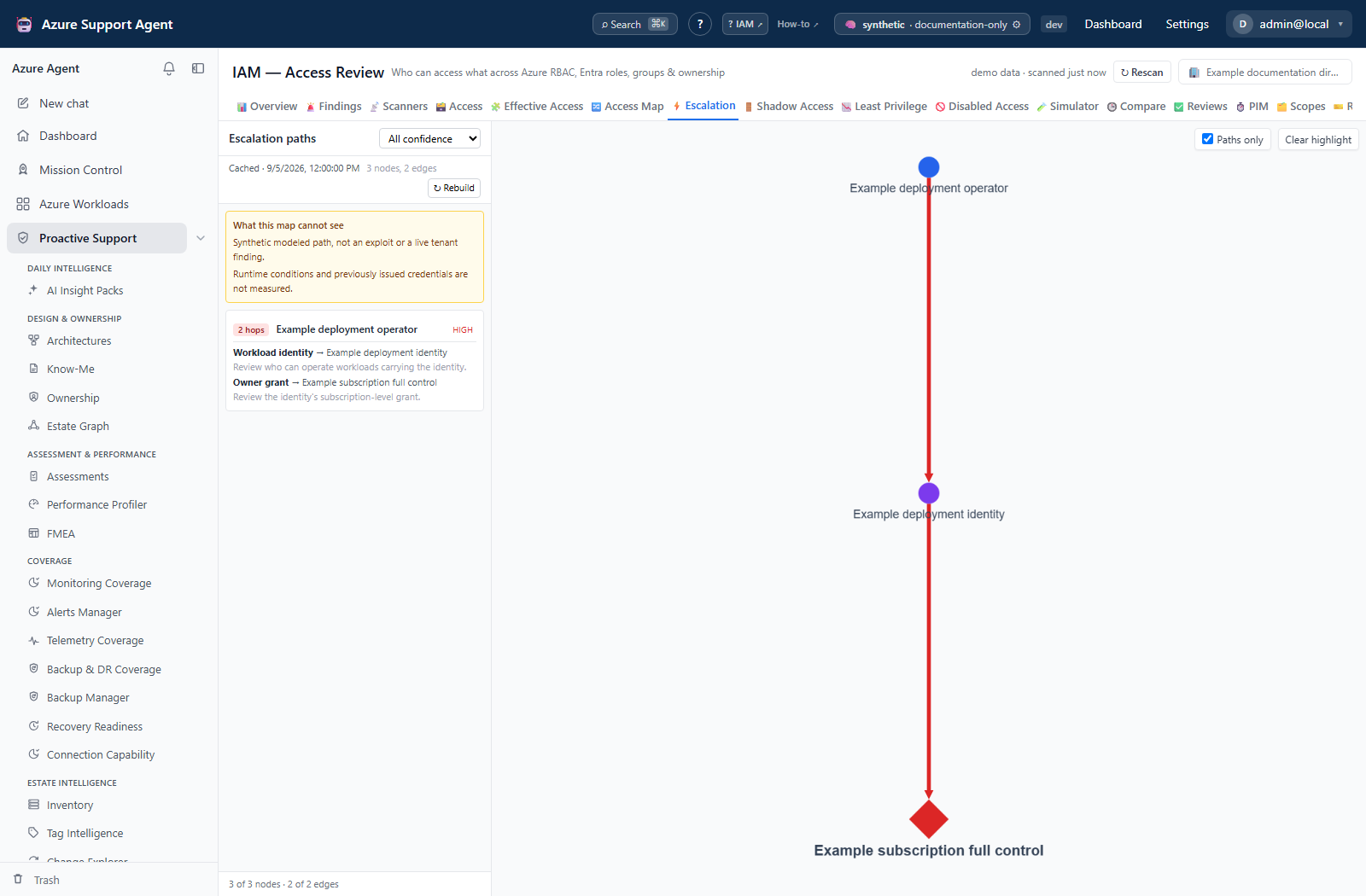
What an edge means. A primitive is a rule of the form (this principal effectively holds action A) → (capability C). Detection runs through the same effective-permission engine as the Effective Access tab rather than matching role names, so a custom role that happens to grant Microsoft.Authorization/roleAssignments/write is caught exactly as Owner is. Thirteen primitives are registered, covering self-granting roles, removing deny assignments, Key Vault control-plane-to-data-plane pivots, listing storage keys, obtaining cluster-admin credentials, adding a federated credential to a managed identity, onboarding a subscription to another tenant, removing resource locks, running code as a resource’s managed identity on virtual machines, web apps, container instances and automation accounts, and deploying as a policy remediation identity. Everything converges on one capability node labeled Owner / full control.
The layout is a breadth-first DAG, not a force graph. The roots are the nodes nothing points at — a principal nobody else can reach is where an attack starts, and that is the column to scan first. A force layout produced an illegible ball at this size; the reader needs to scan from where an attack starts to full control, and only a layered layout shows that. The canvas stops zooming out below a legibility floor and lets you pan instead, because a picture nobody can read is not a smaller picture — it is a different and false claim that there is nothing to see. The node and edge counts under the path list say how much is off-screen.
Controls.
| Control | Effect |
|---|---|
| Confidence selector | All confidence, Medium and up, High only. Derived from the single cached graph rather than rebuilt, so moving it is instant |
| Paths only (default on) | Draws only the nodes and edges lying on a route to full control. Off draws every detected capability, which on a large tenant is a hairball |
| Selecting a path | Highlights that chain and dims everything else |
| ↻ Rebuild | Recomputes the cached graph from the collected rows. No Azure call |
Fan-out is capped and the true total is kept. No more than twelve edges are drawn per (source, primitive) pair; beyond that the real count is retained and the footer states fan-out capped. One principal producing hundreds of arrows adds no information and costs the legibility that is the entire point of the view — but the count is never quietly lowered to match what is drawn.
A higher-confidence edge wins, and the loser is kept. Where two primitives connect the same pair of nodes, the stronger one is drawn and the weaker is retained on the edge as also_via rather than discarded. It is still a route, and hiding it would make the map look narrower than the tenant is. A path’s stated confidence is the weakest link in the chain, because a path is only as trustworthy as its least certain hop.
Limitations are rendered above the path list and are never hidden or collapsed. An escalation map that could not see managed identities showing an empty list reads as an all-clear on exactly the thing the reader came to check. The published limitations state when managed identities were not collected — identity-hijack paths are then absent from the picture but not from Azure — when federated credentials were not collected on a tenant that has user-assigned identities, and always that policy remediation identities are not inventoried, so deployment-as-policy-identity paths are inferred from the deployment right alone.
Edges whose endpoints are not present are dropped and counted rather than drawn, and the graph is capped at a maximum node count. Both are reported in the footer.
Shadow Access
Served by GET /api/iam/bypass. This tab reports the doors that are not Azure RBAC — account keys, SAS rules, local authentication, admin users, cluster-admin credentials, SQL authentication, basic publishing credentials, run-as identities, anonymous public access and absent key-expiry policies — the access that would still work if every role assignment in the tenant were revoked.
The headline is a ratio that never appears without its denominator: P% of N assessed resources have RBAC as the only door · B have another way in. When nothing was assessed the percentage is withheld and the tab states No resources assessed — RBAC-only coverage is unknown, not 100%, because 0% and “we looked at nothing” are opposite claims that a bare ratio cannot tell apart.
Fourteen service families are swept independently: storage, Cosmos DB, Service Bus, Event Hubs, App Configuration, Event Grid, AI Search, Redis, AKS, SQL, Synapse, Container Registry, Key Vault and Batch. The left rail lists each with affected/assessed. A family that could not be read shows its collector status — Unauthorized, Throttled or Failed — instead of a clean zero, and its resources are absent from both the findings and the denominator, which the limitations panel states.
Absent means enabled. Almost every property these checks read was added to Azure long after the resource types existed, so it is missing on older resources and its absence means the bypass is on. Reading a missing field as “off” would report an estate that is wide open as an estate that is locked down, so each check states its default explicitly rather than inferring one.
Severity is computed, not fixed. Each check carries a base severity, raised one step when the resource’s environment tag marks it as production and lowered one step when it marks it as non-production, and raised again when ten or more principals can fetch the credential. A shared key in a sandbox is not the same finding as a shared key in production, and treating them as one is how a findings list stops being read.
Who can fetch the credential is a three-state answer, not a list. Where a check names a control-plane action that yields the credential, the row joins that action to the effective-access engine. Not determined means role assignments for that scope were unavailable, so the holder set is unknown rather than empty; a stated zero means no principal holds that action at a covering scope; otherwise the holders are listed with the scope each holds it at, and a +N more line when the list is truncated. An empty list with the join unavailable must never read as nobody holds this credential.
Remediation and its blast radius are one unit. Every remediation is published with the Breaks if line that qualifies it. Telling somebody to disable shared-key access without telling them it breaks every connection-string client is how a read-only tool causes an outage.
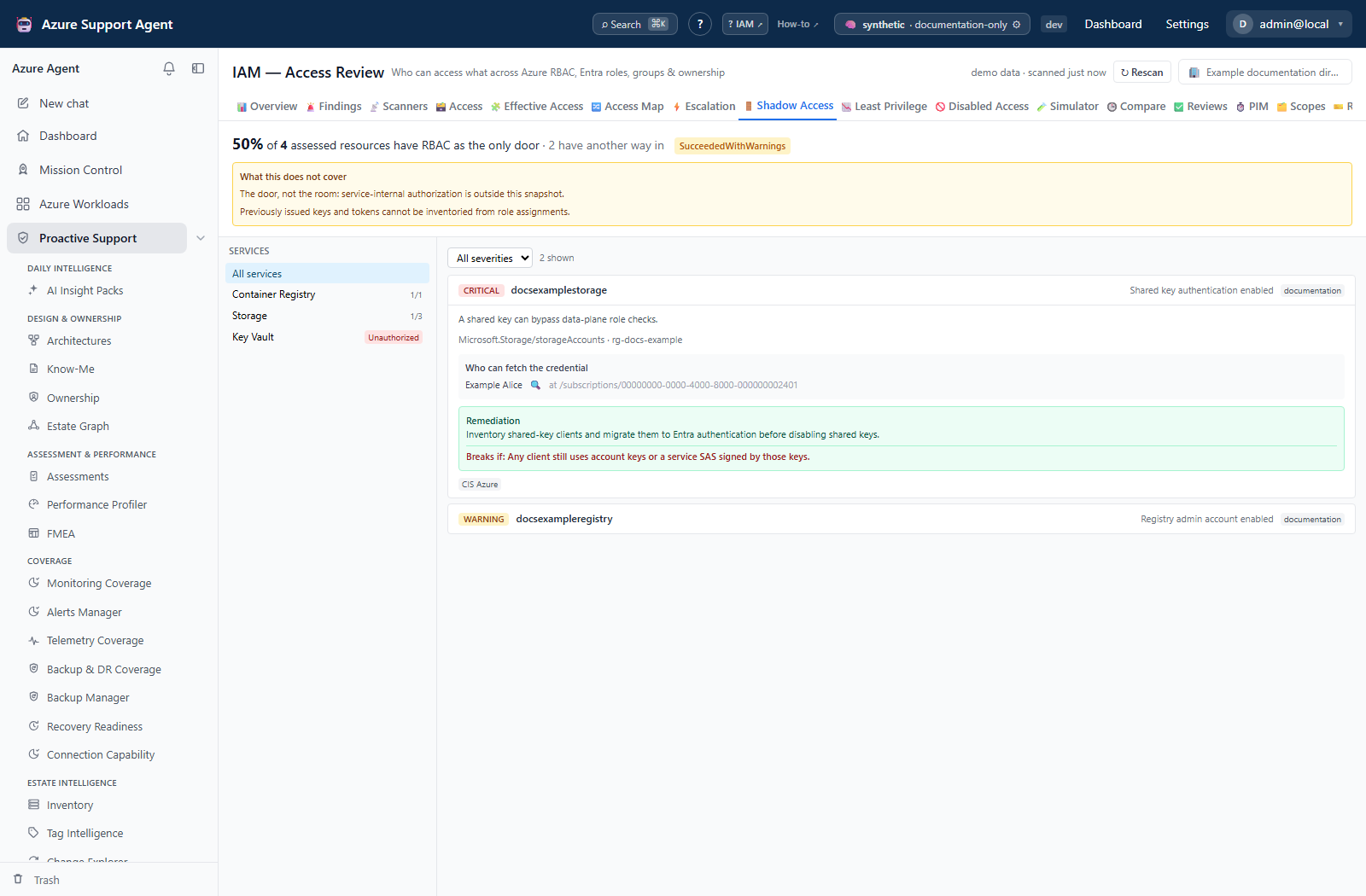
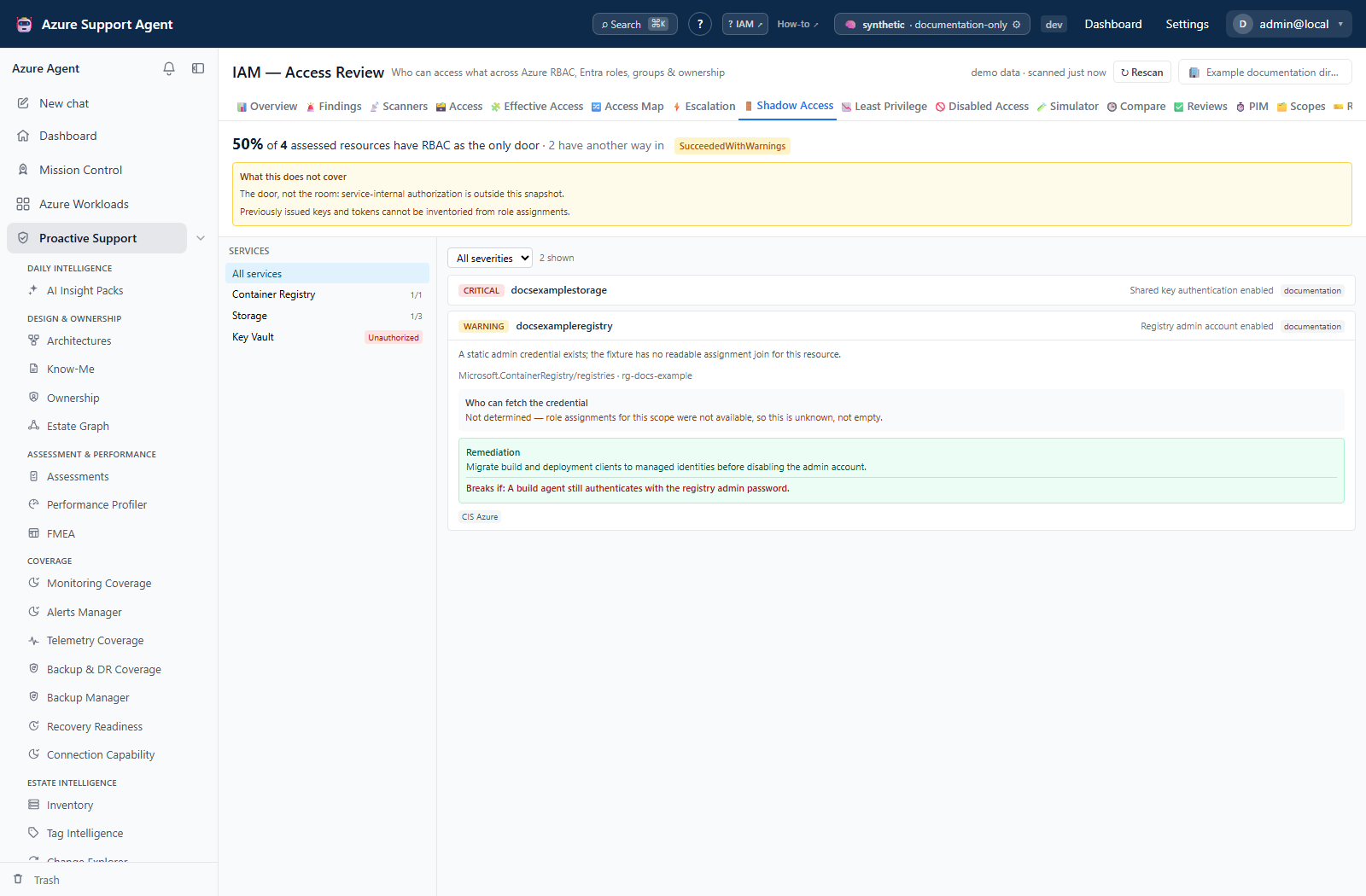
Limitations, always shown: this reports the door, not the room. Kubernetes RBAC objects, in-database SQL users and mailbox permissions are not read, so a cluster listed here has not had its internal authorization assessed.
Filters: service family (left rail) and severity. Rows are sorted worst severity first, then by resource name. A tenant where the sweep has never run says so, and states that nothing on the screen is an all-clear.
Freshness and scope behavior
- All three tabs read the cached snapshot. The header freshness indicator is the age of that snapshot; see IAM.
- The escalation graph has its own derived cache with its own age, reported by the cache strip above the path list and by
GET /api/iam/cache. It is invalidated automatically when the underlying rows change; the strip says cached, but the access data has changed since when it is behind. Rebuild recomputes from collected rows; it is not a refresh and does not read Azure. - Building the tenant-wide graph is expensive on a large estate. The screen shows an elapsed counter while it computes, and — only when the server has a measured previous build to base it on — how long it took last time.
- The Shadow Access sweep has its own generated time and collector statuses, both published on the response.
- None of these tabs honours the scope and workload filter rail. Escalation and the evaluator accept scope and principal narrowing through their own controls and query parameters.
Workflow overview
- Start on Escalation with Paths only on and the confidence filter at
All confidence. Read the limitations panel before the paths. - Work the paths shortest-first. Expand one to read its hops: each names the primitive, the target it reaches and the reason.
- Take the first hop of a path you care about to Effective Access in Can this principal… mode and confirm the verdict and the assignment that decided it.
- Use Who can… on the same action and scope to see the full population holding it, then What can they reach on any principal that surprises you.
- Open Shadow Access and check whether the resources involved have a non-RBAC door. Revoking a role assignment achieves nothing on a storage account whose keys are still live.
- Verify every candidate against Azure before proposing a change, and remediate through the approved external process.
Interpretation of results
indeterminateis not a soft no. It means an unevaluated condition or an uncollected role definition sits in the path. Resolve the collection gap, or evaluate the condition manually, before acting.- An empty escalation graph is a claim about what was collected, not about Azure. Read the limitations panel first — the tab says so in its own empty state.
- A path’s confidence is its weakest hop. A
lowpath may still be real; it is the certainty of the reasoning that is low, not necessarily the risk. fan-out cappedmeans the picture is narrower than the tenant. The retained totals are on the response; do not read the drawn arrow count as the reach.- Shadow Access reports the door, not the room. A resource absent from this tab has not had its service-native authorization assessed.
Not determinedin the credential-holder panel is not zero. It is the one rendering on this tab that must never be read as “nobody”.rbacOnlyPossible: falseon a row means disabling the bypass is not an option for that service today; reporting it as remediable would be wrong.
Exports, history, scheduling, and integrations
- The Excel workbook from the Overview tab carries the shadow-access sweep, the escalation paths with their blind spots, and the data-plane coverage statement alongside the access sheets.
GET /api/iam/dataplanepublishes the data-plane catalog: which services hold data, which doors reach it, which authorization models this product cannot read, and a four-step grading of what a role reaches —credential(the data is a credential, so reading it is an identity takeover),write(can modify or destroy the data),read(can read the data),meta(names and properties only, never the value). It is ranked withcredentialabovewritedeliberately. The catalog backs the data-plane signals and the workbook’s coverage sheet; it is not the source of the Shadow Access tab’s service list, which comes from the bypass check table, and no screen currently renders the catalog directly.GET /api/iam/identitiesjoins the managed-identity inventory to what each identity holds, including federated credentials. It answers which resource is this service principal? and has no screen today.- The Escalation tab exposes no export of its own; use the workbook.
Safety and limitations
- Every tab here is read-only. Nothing writes to Azure, and the escalation rebuild writes only this product’s derived cache.
- The evaluator is an evidence-backed model of a known access path, not a full authorization-engine simulation. Deny assignments, ABAC conditions, service-native authorization and resource-level controls can all change the real outcome.
- Deny rows conservatively block any modeled action at their covering scope because normalized rows lack per-action deny lists. Key Vault access-policy fallback treats a vault policy as a data-plane grant without checking each permission in its label. Verify the requested operation in the authoritative service; neither fallback is exact authorization proof.
- Escalation is capped in three ways — per-source fan-out, total nodes, and dropped edges whose endpoints are absent. All three are counted and published; none is silent.
- The graph reflects capability, not intent or exploitability. A detected path is a route that exists, not evidence that anyone has used it.
- Shadow Access assesses only the fourteen families listed, only the resources the sweep could read, and only the doors in the check table. Absence from this tab is not evidence of absence in Azure.
- Remediating a bypass can break production clients. Read the
Breaks ifline and confirm the callers before changing anything.
Troubleshooting
| Symptom | Check |
|---|---|
| The escalation graph is empty | Read the limitations panel above the path list. Managed identities not being collected removes the most common escalation class in a tenant. Refresh the directory, then Rebuild. |
| Escalation takes tens of seconds on first view | Expected on a large estate. The result is cached and later visits are instant until the access data changes. The cache strip states the age and the last build duration. |
| The cache strip says the access data has changed since the graph was built | The graph is behind the snapshot. Use ↻ Rebuild — it recomputes from collected rows and does not call Azure. |
The footer says fan-out capped | More than twelve targets exist for at least one (source, primitive) pair. The drawn edges are a sample; the retained totals are on the response. Narrow with the principal or scope filter. |
| The graph shows fewer nodes than the footer’s total | Paths only is on, which is the default. Untick it to draw every detected capability. |
An evaluation returns indeterminate | An unevaluated ABAC condition or an uncollected role definition is in the path. The response names which. Re-collect role definitions with a full rescan if a role is unknown. |
Who can… returns nobody and candidates is 0 | No principal holds any grant at or above that scope in the cached scan. The tab says so explicitly. Run an access scan before concluding nobody can perform the action. |
A plane value is rejected | The single-action /api/iam/effective endpoint accepts only control or data when explicitly supplied. Use the correct plane rather than inferring it from a role name. |
| The scope list is empty | No management group or subscription is in the cached scan. Type a resource id into the field beneath the selector, or run an access scan. |
| Shadow Access headline says coverage is unknown | Nothing was assessed. Check the family statuses in the left rail and Diagnostics — this is deliberately not rendered as 100%. |
A service family shows Unauthorized instead of counts | The sweep could not read it. Its resources are excluded from both the findings and the denominator; fix the permission and re-collect. |
| A shadow-access row lists no credential holders | Check whether it says Not determined — that means role assignments for the scope were unavailable, which is unknown, not empty. |
| The Shadow Access tab says the sweep has never run | No bypass sweep exists for this tenant. Run a full rescan from the page header. Nothing on the screen is an all-clear until it has. |