Connect with host identity
Authenticates as the machine the application runs on, with no credential stored in the product. In Azure this is the platform managed identity; on a developer machine it is the host’s az login session. This is the default selection for a new connection.
When to choose this
Choose it for the single tenant the application is deployed into, and for local development against a tenant you are already signed in to. It is the only method with no credential to rotate or leak.
Do not choose it if you need Entra or Microsoft Graph features, or a second tenant — see the limits below.
How it resolves the identity
The application detects the platform managed identity when the runtime exposes a token endpoint (IDENTITY_ENDPOINT or MSI_ENDPOINT), which Azure Container Apps and App Service set when an identity is assigned. When no such endpoint exists, it falls back to the host’s Azure CLI session. Local development therefore needs a current az login, and the cloud deployment does not.
Step 1 — Assign an identity to the host
For an Azure Container App or App Service:
- Open the resource → Settings → Identity.
- Enable System assigned, or attach a User assigned identity.
- Save, and copy the resulting object or client ID.
For local development, sign in on the machine running the application instead:
az login --tenant <TENANT_ID>
Step 2 — Grant Azure access
Assign a role to that identity at the scope you intend to read.
- Open the management group or subscription.
- Select Access control (IAM) → Add role assignment.
- Assign Reader for read-only use.
- Under members, choose Managed identity and select the host identity from step 1. For a local
az loginsession the principal is your own user account, which already carries your assignments.
Step 3 — Select a user-assigned identity (only if used)
A system-assigned identity needs no further configuration. For a user-assigned identity, the deployment selects it through the standard AZURE_CLIENT_ID environment variable — this method exposes no client ID field in the form. Set AZURE_CLIENT_ID to the user-assigned identity’s client ID on the container or app, then restart it.
Step 4 — Fill the form
Open /admin/tenants and select Add connection.
| Field | Value |
|---|---|
| Display name | A non-sensitive label |
| Tenant ID | The tenant the host identity belongs to |
| Azure cloud | The cloud the tenant lives in |
| Authentication method | Host identity (managed identity / az login) |
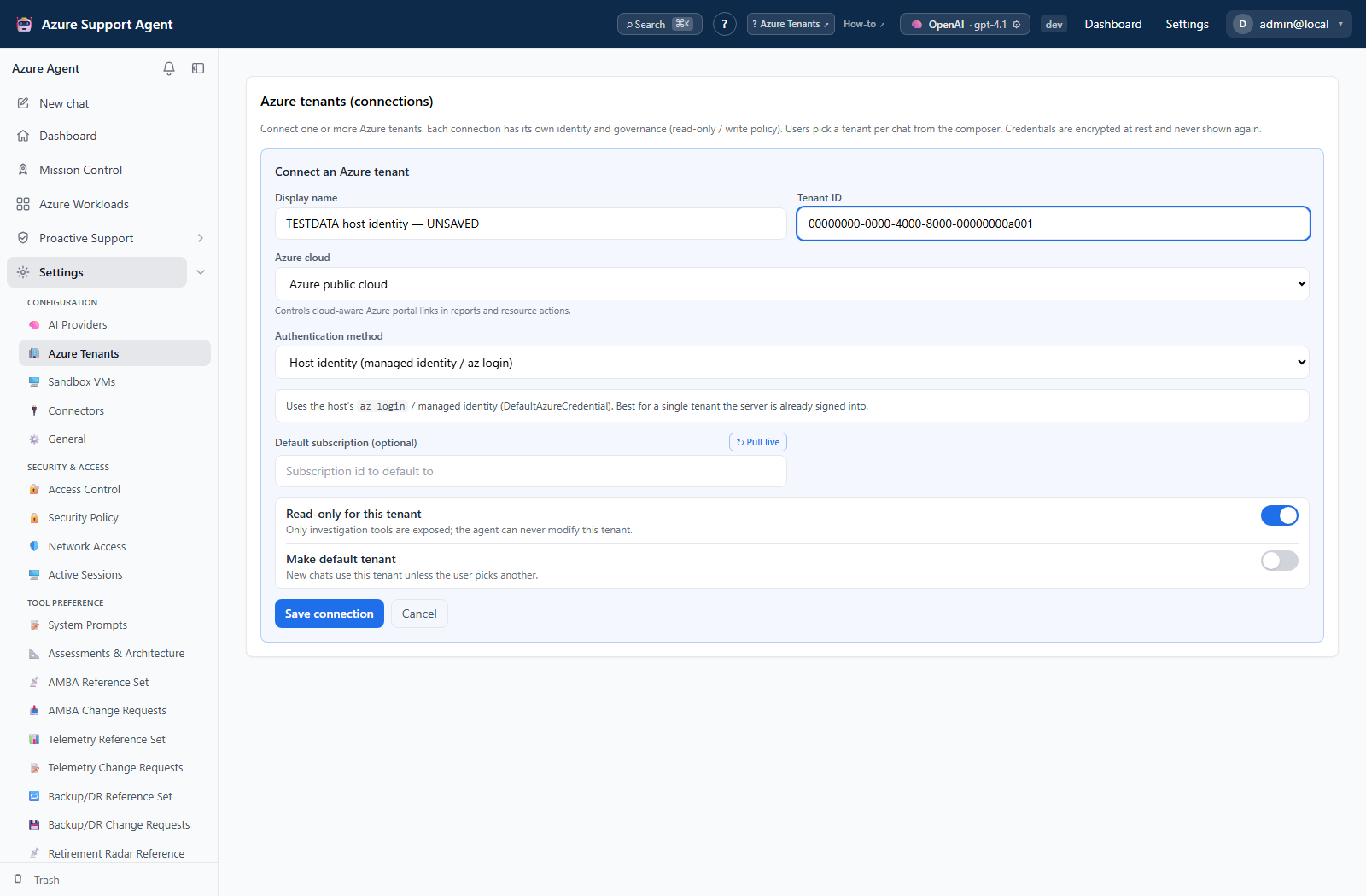
There are no credential fields — the method shows an explanatory panel instead. Save, then Test and Discover.
Capabilities and limits
ARM, Resource Graph, and Log Analytics all work. Two limits are structural:
- Single tenant. The host has one identity, so this connection reaches only that tenant. Use a service principal for any additional tenant.
- No Microsoft Graph application access. Entra and identity features require an explicit service-principal identity with a client secret or certificate, and report that rather than returning empty results. Validate EntraID is therefore unavailable here.
Rotation and revocation
There is no credential to rotate. Access is controlled entirely by the identity’s role assignments; remove them in Azure to revoke access, or disable the identity on the host.
Troubleshooting
| Symptom | Resolution |
|---|---|
| Test fails locally | The host has no current CLI session. Run az login --tenant <TENANT_ID> on the machine running the application. |
| Test fails in Azure | No identity is assigned to the container or app. Complete step 1, then restart the revision. |
| The wrong identity is used | A user-assigned identity is selected by AZURE_CLIENT_ID. Set it on the deployment and restart. |
| Test succeeds but Discover returns nothing | The identity has no role assignment. Complete step 2. |
| Entra features are unavailable | Expected. Add a service-principal connection for Microsoft Graph. |