Test connectivity between two nodes
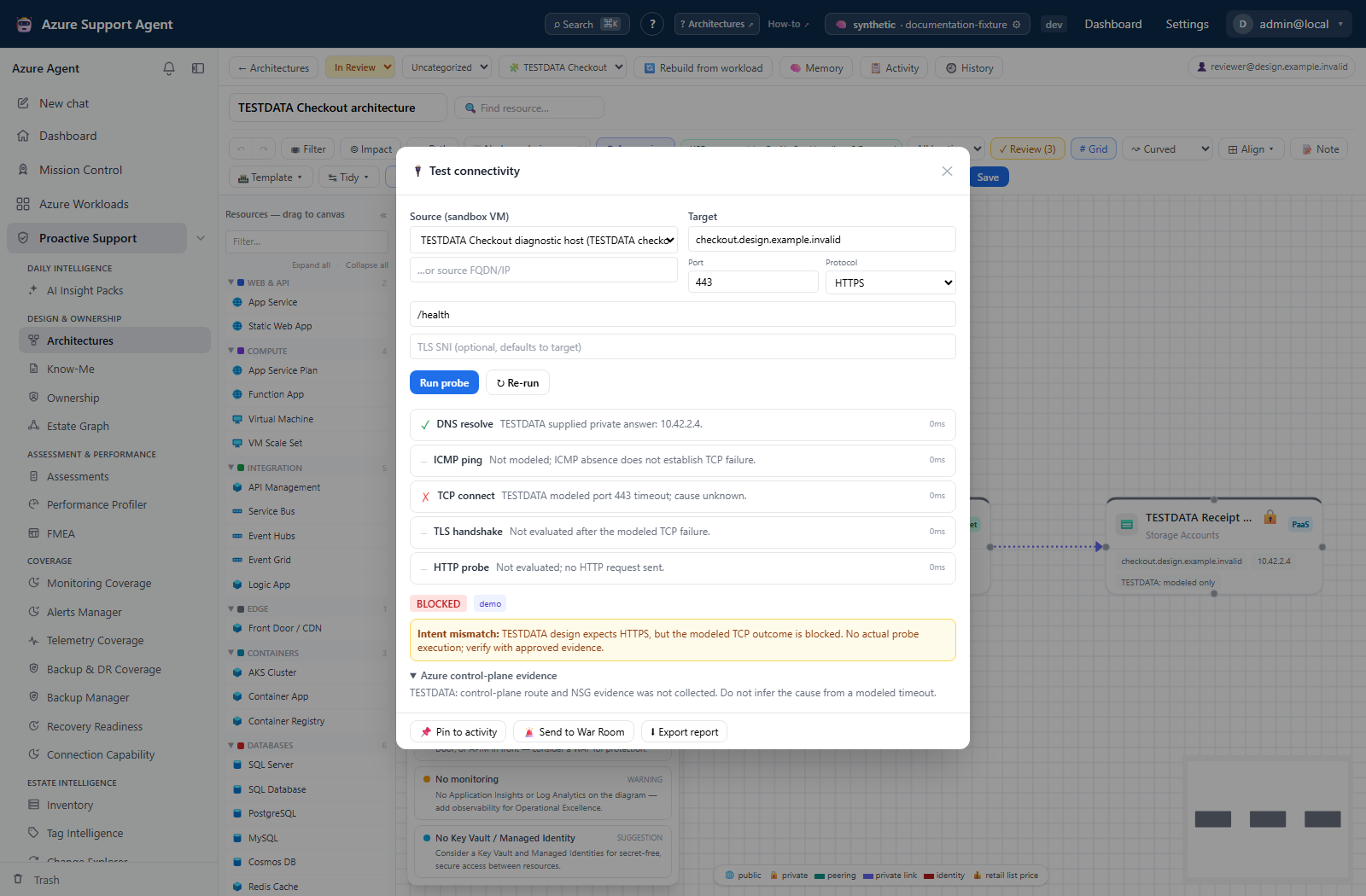
Screenshot note: These native input and result views use synthetic browser-only data. Saved results are modeled, not actual probe execution: no DNS, SSH, TCP, TLS, HTTP, Azure read, or AI call occurred. The blocked result does not establish a real outage or identify a confirmed NSG rule.
Prerequisites
- Product permission
netdiag.run. - A Sandbox VM onboarded and reachable in the network the traffic should originate from. See Manage Sandbox VMs.
- Sandbox tooling enabled by an administrator.
- For the deny-rule evidence panel, an Azure connection able to read effective routes, NSG rules, and peerings for the source NIC.
- The target’s FQDN or private IP, and the port the application actually uses.
Route
- Open
/architectures/:idand select the architecture containing the two nodes.
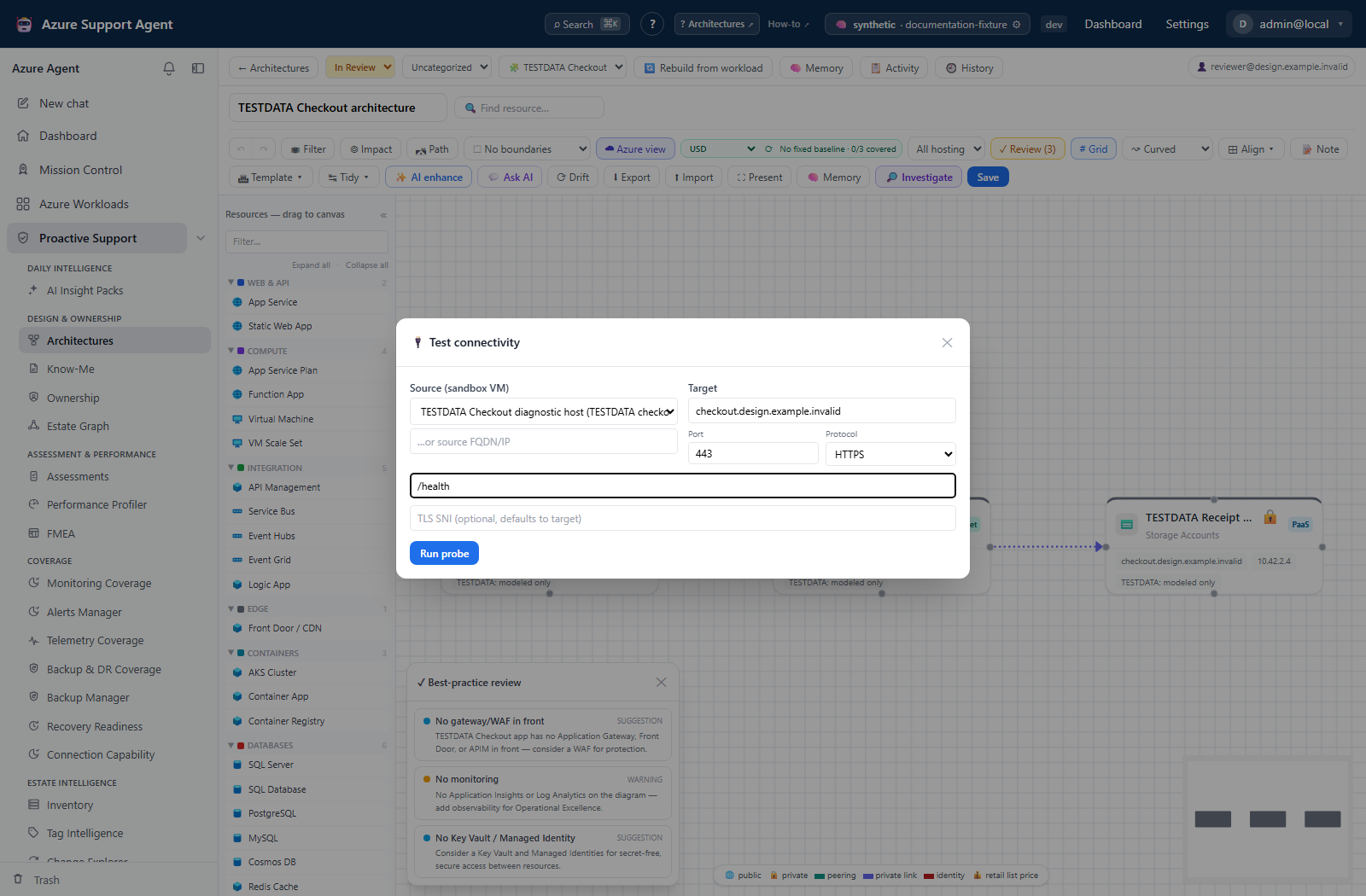
How to run a connectivity test
- Right-click the target node on the canvas and choose 🔌 Test connectivity, or select the node and use the same button in the inspector panel. The target field is pre-filled from the node’s
fqdn,private_ip, oripmetadata. - Choose the source Sandbox VM. Confirm it sits in the network the real client traffic comes from — a VM in a different subnet answers a different question.
- Check the target, set the port, and choose the protocol:
tcp,tls,http, orhttps. Supply the HTTP path or TLS SNI when those fields appear. - Start the test and watch the steps stream: DNS, ICMP, TCP, then TLS and HTTP where the protocol requires them.
- Read the verdict —
reachable,degraded, orblocked— and then read the step that produced it rather than the verdict alone. - If the verdict is
blocked, open the evidence panel and look for a matched deny rule naming the NSG, rule name, priority, and direction.
Expected result: A verdict backed by a per-step transcript, each step showing its command, status, evidence line, and duration.
Verification: Confirm the source, target, and port in the result header are the ones you intended. Ignore a failed ICMP step when TCP succeeded — blocking ping while allowing TCP is normal.
How to compare a run against the previous one
- Run the test before the change, using the same source, target, and port.
- Make the change through your normal process.
- Run the test again with identical inputs. Runs are keyed by architecture, source, target, and port, so the tool compares against the prior run automatically.
- Read the diff: which steps changed status, and whether the overall verdict moved.
Expected result: A step-level delta rather than two transcripts to compare by eye.
Verification: The last 20 runs per key are retained. If the expected baseline is missing, it was pruned or the inputs differ — check the source, target, and port match exactly.
How to preserve the result as evidence
- Use Export report to download a self-contained Markdown record of the run, including the matched deny rule and any intent mismatch.
- Use Pin to record the run on the architecture’s activity feed, optionally routing it to the War Room.
Expected result: A durable, shareable record that survives the modal closing.
Verification: Reopen the activity feed and confirm the pinned entry references the correct run and verdict.
Safety and rollback
This test performs no Azure writes and creates nothing that needs rolling back. The risk is in over-reading the result.
A verdict describes exactly one source, one target, one port, and one moment. It does not generalise to other clients, other ports, or other times. Per-step timeouts are short — around 2 seconds for DNS and ICMP, 5 for TCP, 8 for TLS and HTTP — so a slow but functioning path can present as a failure; repeat before acting on a single timeout. When the evidence panel reports itself unavailable, the probe result still stands, but the deny-rule attribution does not exist for that run.
Probes execute on a host inside your network under the sandbox VM’s own account, so the strict-mode and audit boundaries described in Sandbox VM diagnostics apply here too.
Troubleshooting
| Symptom | Resolution |
|---|---|
| “No sandbox VM is onboarded for this architecture’s workload” | Register a VM at /admin/sandboxvms and link it to the workload, or select one explicitly. |
| A source host was entered but probes do not run | A typed source only labels the run. Select an SSH-reachable sandbox VM as well. |
| “Sandbox VM tools are disabled by the administrator” | The master kill switch is off. Do not work around it; raise it with the administrator. |
| Picker warns no VM is linked to this workload | Every sandbox VM is being offered. Verify the one you choose is in the right network before trusting the verdict. |
| A step reports that a command needs approval | The VM is in strict mode and a required tool is missing. Install it through the VM’s maintenance process. |
Evidence panel reports available: false | Control-plane reads failed. Check the Azure connection’s networking read access. |
Verdict is blocked but no deny rule is named | The block was not attributable to an NSG rule the connection can read. Check routes, peerings, and any firewall outside Azure’s control plane. |
| Verdict contradicts recorded intent | The run is flagged with an intent mismatch. Treat it as a discrepancy to investigate, not as proof either side is wrong. |