IAM: change and simulation
Product permission: iam.read for Compare and for the attribution run. iam.simulate for Simulator — modeling is read-only and cheap, but it produces a very confident-looking artifact, so it is a separate capability from plain read.
Purpose
App routes: /iam/compare — tab label Compare; /iam/simulator — tab label Simulator
Compare answers what changed since the last scan, is it worse, and who did it. Simulator answers the same question in the other direction: if I make this change, what actually happens — before it is made anywhere.
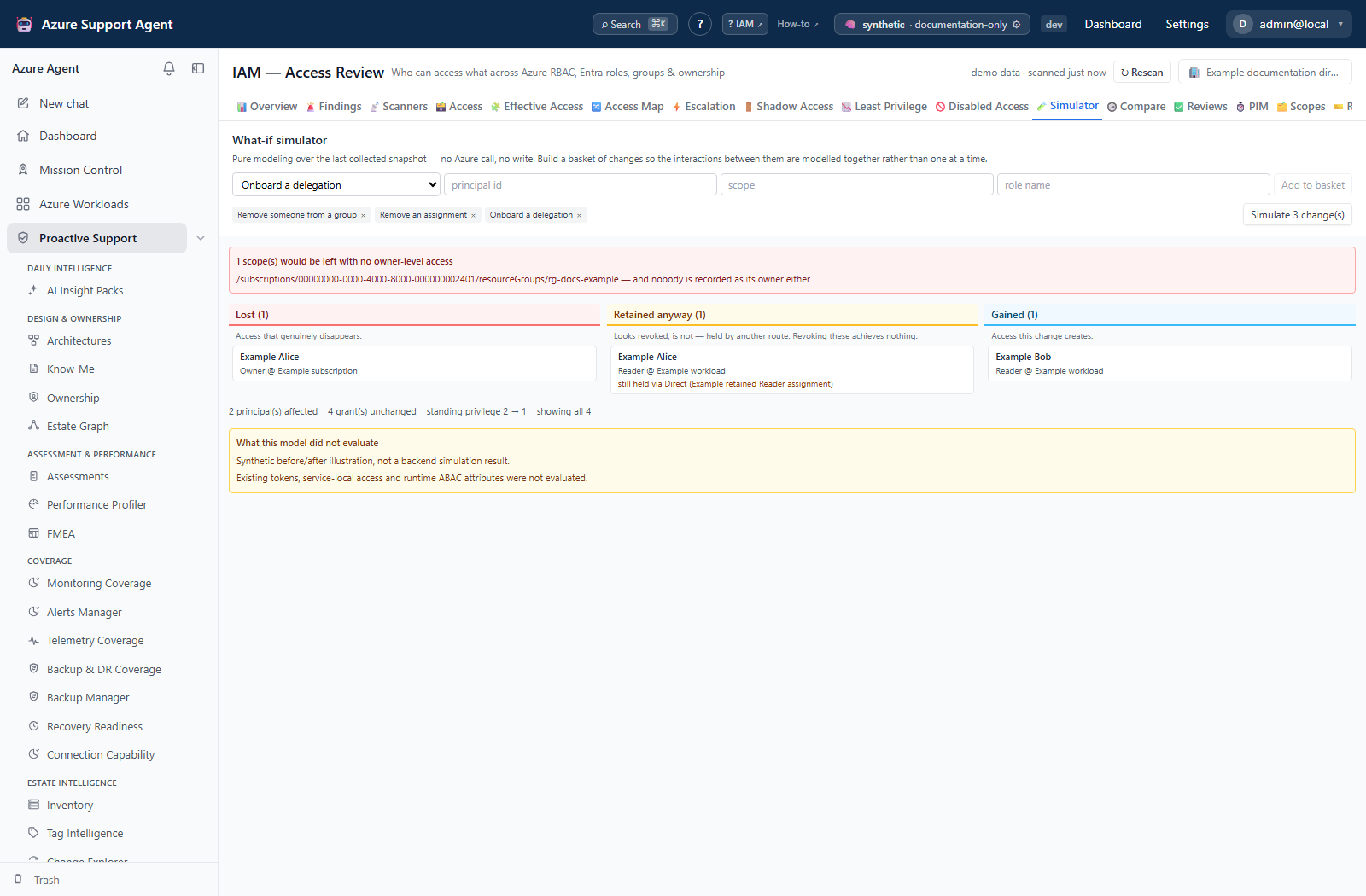
Screenshot notes: These synthetic browser fixtures show saved attribution and illustrative what-if output, not live Activity Log reads or backend-computed results. Find out who was not invoked for the capture. Counts and selected changes are examples, not defaults or proof of cloud changes.
Prerequisites and data sources
- Product permission
iam.read;iam.simulatefor the Simulator. - At least two access collections for Compare to have anything to compare. One collection produces
available: false, which the tab renders as an explicit statement rather than as an empty change list. - The Azure Activity Log, read per subscription, for attribution. This is a separate, slow collection with its own freshness — it is not part of an access refresh.
- The Simulator reads the cached snapshot, the cached directory and the usage collection’s age. No Azure call is reachable from the simulation path, and none should ever become reachable: the value of a simulator is that it is safe to run on a whim.
- Ownership records, where present, are cross-referenced so the Simulator can say whether a scope it would leave without owner-level access has a recorded owner to ask.
Tabs and actions
Compare
Served by GET /api/iam/diff. With no run ids the endpoint serves the cached diff for the latest run, which is what the tab requests.
What is diffed, and how the key is chosen. The whole access surface, not just privileged rows, and each change is classified. The interesting movements are the ones that keep the row count identical — a role widening, a scope broadening, an eligible assignment being activated, direct access quietly becoming group-derived.
Two decisions carry the model:
- The key is the effective principal, not the assignment’s principal. A user who gains access by being added to a group is the most common way privilege appears in a tenant, and a diff keyed on the assignment’s principal sees the group’s assignment unchanged and reports nothing at all.
- The assignment state is part of the key, which makes an eligible-to-active transition a first-class change rather than an invisible one. That transition is precisely the event a reviewer is looking for.
The change vocabulary. Nine classes, all selectable in the change-type filter:
| Class | Label | Direction |
|---|---|---|
added | Added | Increases risk |
escalated | Escalated | Increases risk |
re_scoped | Re-scoped | Increases risk when the new scope is broader |
activated | Activated | Increases risk |
orphaned | Orphaned | Increases risk |
removed | Removed | Narrows access |
de_escalated | De-escalated | Narrows access |
deactivated | Deactivated | Narrows access |
path_changed | Path changed | Neither — the route changed, the access did not |
Color encodes direction, in both directions. Widening changes are red, orange or amber; narrowing changes are green; a path change is blue. Only the five widening classes count towards changes that increase risk, the header’s N increase risk figure and the Only changes that increase risk filter, and only those classes raise drift findings — a de-escalation is a change worth showing and never worth alerting on. A row also carries a broader scope marker when a re-scope moved outwards rather than in.
Escalation is decided by tier, not by role name. Roles are placed in coarse ordered tiers — none, read, write, admin, owner — because comparing role names cannot tell you whether a change was an escalation. A deny row sits at the bottom tier. An unrecognized custom role is placed at write, never at none, so an unclassified role is never reported as a de-escalation from Reader. Scope movement is judged by depth: tenant root, management group, subscription, resource group, resource. The tiering is used only to label a change; whether somebody is actually allowed to do something is the evaluator’s job on the Effective Access tab.
Nothing to compare against is not an all-clear. When the comparison could not be made the header reads not comparable, the change count is replaced with an em dash, and a banner states that there is no earlier snapshot and that this is not a clean bill of health. A tenant with one scan must never be told its estate is stable on the day the product was installed.
Attribution: who made the change. Find out who runs POST /api/iam/attribute, which joins the current diff to the Azure Activity Log per subscription. It is slow and is deliberately separate from the refresh. The summary line reports X exact, Y inferred, Z unknown over the last N days.
- exact — matched on the assignment id.
- inferred — matched on scope and time rather than on the assignment id, and labeled as such on the row.
- unknown actor — no Activity Log event matched, because the retention window rolled past the change or because the match was ambiguous and was refused rather than guessed.
An unattributed change is rendered as the words unknown actor, never as a blank cell, because an empty actor column reads as nobody did this. Where the actor is real it becomes a second investigable identity on the row — whose access changed and who changed it are different investigations, and the second is usually the next question. A change source is shown when the log carries one.
Before attribution has ever been run, the tab states that every actor below is unknown for that reason rather than because no event exists. It does not report 0 exact, 0 inferred, 0 unknown for a tenant where the join has never been attempted.
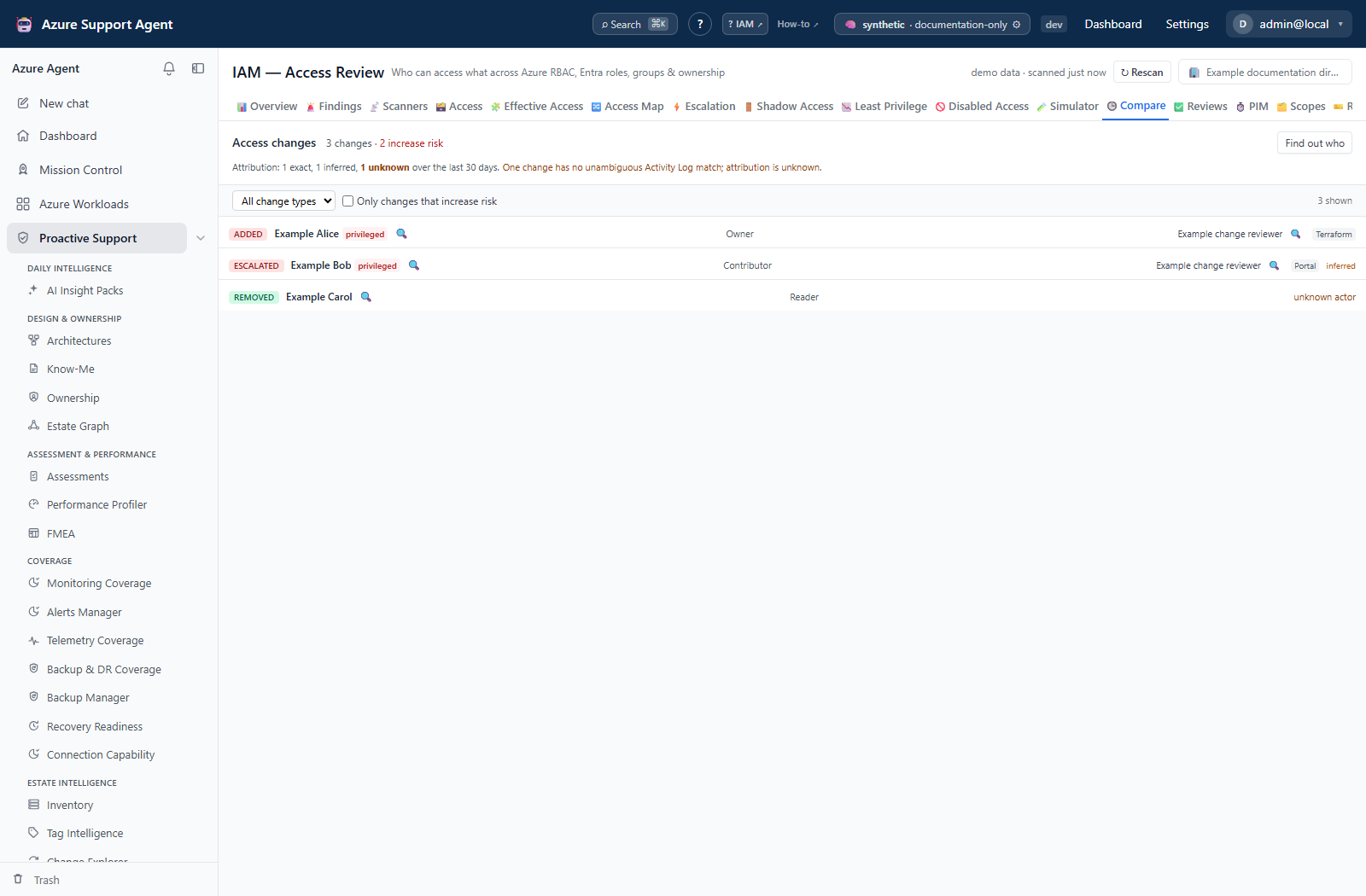
Controls. Change-type selector, Only changes that increase risk, and Find out who. A truncation banner states Showing the first N of M changes when the page cap bites.
Run selection is an API capability, not a tab control. GET /api/iam/diff accepts from_run and to_run to compare two specific collections; the tab itself always shows the cached diff for the latest run. Comparing two named runs requires that full rows still exist for both, and retention keeps full rows only for the most recent run plus anything pinned — so a request naming a run whose rows have aged out returns available: false and a note saying which side is missing and that pinning is how to keep a baseline. POST /api/iam/run/{run_id}/pin (permission iam.review) is what retains a run indefinitely; there is no pin control on any screen today.
Simulator
Served by POST /api/iam/simulate.
Nine change kinds, each with its own fields:
| Kind | What it models | Fields |
|---|---|---|
remove_assignment | Remove an assignment | assignment id |
remove_group_member | Remove someone from a group | group id, principal id |
remove_group | Delete a group entirely | group id |
convert_to_eligible | Convert standing access to PIM-eligible | assignment id |
rescope_assignment | Narrow an assignment’s scope | assignment id, target scope |
replace_role | Swap one role for another | assignment id, target role |
disable_bypass | Disable a bypass credential | resource id |
assume_principal | Assume a principal is compromised | principal id |
add_delegation | Onboard a delegation | principal id, scope, role name |
Changes are added to a basket and simulated together, so the interactions between them are modeled rather than each one being modeled in isolation.
The result has three columns and one panel above them.
| Section | Meaning |
|---|---|
| Lost | Access that genuinely disappears |
| Retained anyway | Access that looks revoked and is not, because the principal holds it by another route. Each row names the other path |
| Gained | Access this change creates |
| Orphaned scopes (above the columns) | Scopes that would be left with no owner-level access, each stating whether an owner is recorded so somebody can be asked |
The middle column is why the tab exists. Removing somebody from a group frequently revokes nothing — they may hold the same role directly, through a second group, or through a service principal they own — and a tool that only reports what it removed encourages revocations that achieve nothing while leaving a false record of remediation behind. The orphaned panel is the second reason: after this change, these scopes have nobody with owner-level access is the outcome that gets a revocation reverted in a panic a fortnight later, and it is knowable in advance.
A failed simulation is never a green tick. An unknown change kind or a malformed change is rejected as a 400 and a change whose referent has since been deleted is a 409; both are surfaced with their message and the explicit statement that nothing was simulated and this is not a result showing no impact. An ignored change would produce a reassuring “nothing happens” from a typo, which is the worst possible output because it looks like an answer.
Sampling applies to the Lost output, not the input estate. Changes are applied to all cached rows. If truly lost rows exceed 5,000, that output keeps every privileged lost row and a seeded sample of the remainder (20260801). Retained and Gained are not sampled by this function. The footer’s population is therefore lost rows—not all scanned grants or distinct people. No separate guest or break-glass sampling rule is implemented here.
Model boundary. Retained access is matched by principal, role name, active state and covering scope, not full permission equivalence between different roles. disable_bypass leaves access rows unchanged and reports a limitation; it does not simulate shared-key revocation. assume_principal also leaves rows unchanged and does not produce a separate compromise-reach report. Neither kind’s empty columns establish no impact. Orphan detection checks owner-level rows at each exact assignment scope, so inherited owners need an independent check.
The footer also reports principals affected, grants unchanged, and standing privilege before and after. A limitations panel names what the model did not evaluate.
Freshness and scope behavior
- Compare reads the cached diff, which is written when a run completes. It is as current as the last collection.
- Attribution has its own window and its own freshness, and is stored back onto the cached diff. The tab requests a 30-day window; the endpoint accepts 1 to 90, bounded by Azure Activity Log retention.
- The Simulator models the last collected snapshot. A simulation over a stale snapshot answers a question about a tenant that has since moved.
- Neither tab honours the scope and workload filter rail;
GET /api/iam/diffaccepts a scope prefix filter as a query parameter.
Workflow overview
- Open Compare after a refresh. If the header reads
not comparable, stop — there is no baseline, and the empty list means nothing. - Tick Only changes that increase risk and work the red rows first.
- Run Find out who. Read the exact/inferred/unknown split before reading any individual actor.
- For a change you intend to reverse, open Simulator, add the corresponding change, and simulate it.
- Read the Retained anyway column before doing anything. If the access survives the change, the change is not the remediation.
- Read the orphaned panel. If a scope would be left with nobody holding owner-level access, resolve that before proceeding.
- Execute through the approved external process, refresh the affected scope and directory, and confirm the row appears in the next Compare as
removedorde_escalated.
Interpretation of results
available: falsemeans the comparison could not be made. It is not “nothing changed”, and the tab never renders it as one.unknown actormeans the join found nothing or refused an ambiguous match. It does not mean the change happened by itself, and it does not mean nobody is recorded in Azure — the Activity Log window may simply have rolled past it.inferredwas matched on scope and time, not on the assignment id. Treat it as a lead, not as attribution.path_changedis not a widening. The access is the same; the route to it changed, which usually still matters for how it would be revoked.- A tier-based escalation label is coarse by design. Confirm what a custom role actually authorizes before treating an
escalatedrow as a privilege increase. - The Simulator models access, not Azure’s behavior. It does not validate that a change is permitted, that it will succeed, or that a dependent workload will keep running.
Retained anywayis the column to act on. A change with rows there does less than it appears to.
Exports, history, scheduling, and integrations
GET /api/iam/runsandGET /api/iam/run/{run_id}list and read the retained run history. Neither has a screen today.POST /api/iam/run/{run_id}/pin(permissioniam.review) retains a run’s full rows indefinitely so it can serve as a campaign baseline or as evidence. There is no pin control in the UI.GET /api/iam/principal/{principal_id}/timelineconsiders at most 30 retained runs. It has a client method but no dedicated IAM tab. Runs recorded before classified diffing contribute nothing; gaps do not prove inactivity.GET /api/iam/simulate/kindspublishes the accepted change kinds and the sampling seed. The tab renders its own kind list rather than reading this.- Compare and Simulator have no export of their own. The Excel workbook from the Overview tab is the export surface for the access data they operate on.
- Refresh runs are recorded in the audit log; pinning a run is recorded with its reason.
Safety and limitations
- Nothing on either tab writes to Azure. The Simulator is a pure function over a cached snapshot.
- Attribution writes the joined result back into this product’s cached diff. It reads the Azure Activity Log and nothing else.
- Attribution cannot see further back than Azure Activity Log retention. Changes older than the window are unattributable by construction, not by failure.
- Run retention is bounded: full rows are kept for the most recent run plus pinned runs. A two-run comparison naming an aged-out run is refused with a note rather than silently answered from partial data.
- The diff is computed over the collected surface. Scopes that were never collected cannot produce changes, and their absence is not stability.
- Simulation results are bounded by sampling above the threshold. The footer states the sample; do not read column counts as population counts when it does.
Troubleshooting
| Symptom | Check |
|---|---|
Compare shows not comparable | There is no earlier snapshot for this connection. Run a second collection; the first one has nothing to be compared against. |
| A two-run comparison returns nothing and a note about retained rows | Full rows are kept only for the most recent run and pinned runs. Pin a run before you need it as a baseline. |
Every actor reads unknown actor and there is no attribution summary | Find out who has not been run for this diff. The banner above the list says so explicitly. |
| Attribution ran but most changes are still unknown | The Activity Log window did not contain a matching event, or the match was ambiguous and was refused. Widen the window through the endpoint, or accept that changes older than retention are unattributable. |
An actor is marked inferred | The match was on scope and time, not on the assignment id. Verify in the Activity Log before recording it as fact. |
| A change I expected is absent from the diff | Check that both collections covered the scope. An uncollected scope produces no changes, which is not the same as no change having happened. |
| A group membership change produced no diff rows | Confirm the directory was refreshed. Group expansion is what turns a membership change into effective-access changes. |
| The Simulator returns an error instead of a result | An unknown or malformed change is a 400 and a deleted referent is a 409. The message names which. Nothing was simulated — this is not a “no impact” result. |
| The Simulator’s Lost column is empty but I expected a revocation | Read Retained anyway. The principal almost certainly holds the same role by another route, which is the outcome this tab exists to surface. |
| The Simulator footer says results were sampled | More than 5,000 truly lost rows were produced. Privileged lost rows are retained; the remainder is sampled. Reduce the change set and inspect each result without treating its count as the estate population. |
| The Simulator tab returns a permission error | Simulation requires iam.simulate, which is separate from iam.read. |