Entra: guests (B2B)
Product permission: entra.read. Every view on this sub-tab is read-only; nothing here invites, disables, or removes a guest.
Purpose
App route: /entra/governance/guests — the Guests (B2B) sub-tab of /entra/governance
The Microsoft Entra admin center lists guests. This sub-tab answers a different question: which external access do we still want, and who do we ask to end it? Guest lifecycle is treated as governance for the same reason access reviews are — an invitation nobody accepted and a partner nobody reviews are the same class of problem as a review campaign that never runs.
Lifecycle, partner classification and activity interpretation are derived from collected evidence. Read Interpretation of results before using them to propose access removal.
Prerequisites and data sources
- Product permission
entra.read.entra.adminis needed only to start a collection or change finding state, neither of which happens on this sub-tab. - Tier 1 consent for the user inventory itself. Guests, their state, their creation time, and their mail address come from the same
/usersread that populates the rest of the people domain. - Tier 2 consent plus Entra ID P1 for sign-in activity. Without it, every guest is reported as Not measured rather than as dormant.
- A completed collection for the tenant. This sub-tab never calls Microsoft Graph; it reads the cached snapshot.
Everything on this screen is derived from data already gathered by two collectors:
| Source | Supplies |
|---|---|
| People domain, inventory pass | Every user whose type is Guest, enabled or disabled, with createdDateTime, external user state and its change stamp, mail address, creation type, company, department, job title, and license count |
| People domain, sign-in pass | Interactive, non-interactive, and last successful sign-in, plus the flag recording whether sign-in was measured at all |
| People domain, sponsor pass | The sponsor relationship for the guest population, read as one paged query rather than per guest |
| People domain, partner-tenant pass | Each distinct guest email domain resolved to a partner tenant id and display name, batched twenty domains per request |
| Tenant domain | The cross-tenant access policy default, and the per-partner configuration list used for the governance verdict |
No additional consent is required for the partner resolution. Both the tenant-information lookup and the cross-tenant partner list were verified against v1.0 with the scopes the product already holds. A domain that does not resolve is usually a domain with no Entra tenant behind it — a consumer mailbox provider, or an organization that is not on Entra ID at all. That is a fact about the domain, not a permission you are missing.
Disabled guests are included. A disabled guest still carries its group memberships and app assignments, and “disabled but still assigned” is one of the findings this sub-tab exists to surface. Filtering them out would make it unreachable.
Tabs and actions
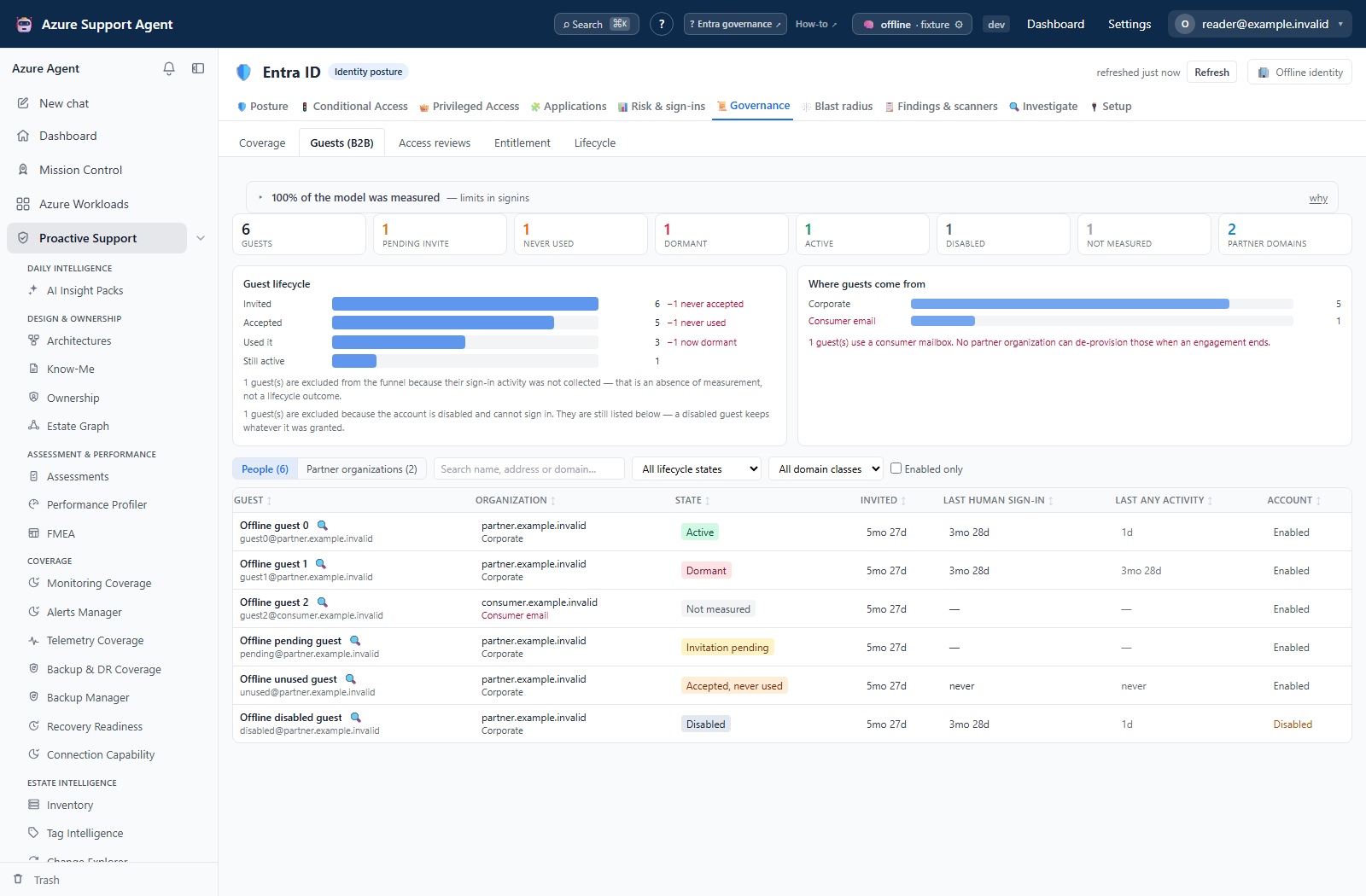
The sub-tab opens on a tile row, a lifecycle funnel, and a domain-class breakdown, then a segmented control switches between the two grids.
| Control | What it does |
|---|---|
| Tile row | Guests, pending invite, never used, dormant, active, disabled, not measured, and partner domains |
| Guest lifecycle funnel | Invited → accepted → used it → still active, naming the loss at each step |
| Where guests come from | Guest count per domain class, with an explicit line when any guest is on a consumer mailbox |
| People / Partner organizations | Switches between the per-guest grid and the per-organization rollup |
| Search | Matches display name, sign-in address, mail, and domain |
| Lifecycle filter | Restricts the grid to one of six states, including Disabled |
| Domain-class filter | Corporate, consumer email, government, education, or unresolved |
| Enabled only | Hides disabled guest objects |
| Domain chip | Set by clicking an organization in either grid; clears from the chip itself |
| Workbook handoff | Return to Posture and use Export everything to Excel; the current Guests toolbar has no export button |
| 🔍 Investigate | Opens /entra/investigate for that guest |
Every column header in both grids sorts.
The People grid columns are: guest (name and sign-in address), organization with its domain class, state, invited, last human sign-in, last any activity, and account enabled or disabled. The last two are separate columns on purpose; see rule 3 below.
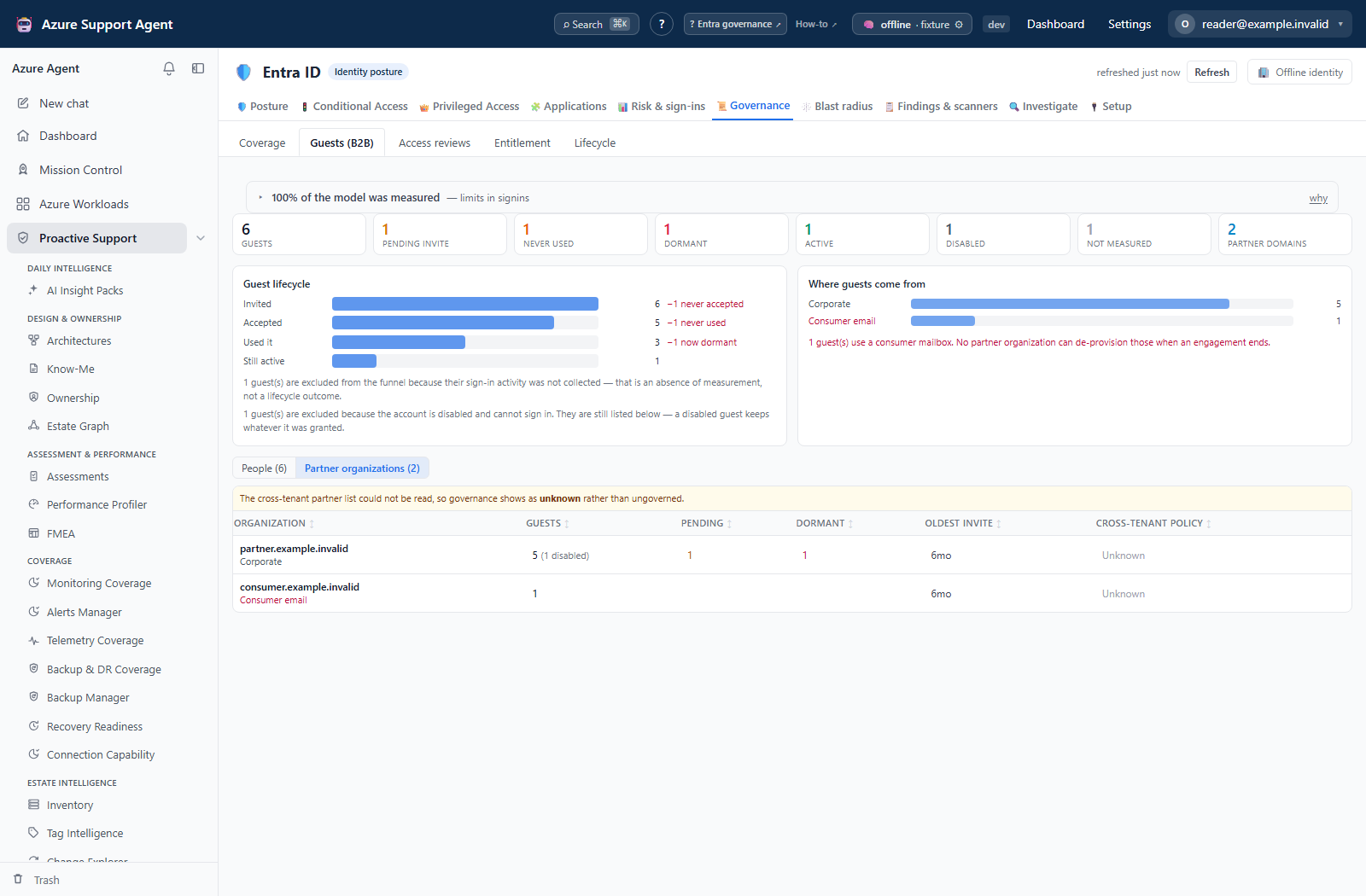
The Partner organizations grid columns are: organization (partner display name where it resolved, otherwise the domain), guests with a disabled count, pending, dormant, oldest invite, and cross-tenant policy verdict. The verdict’s reason is the cell’s tooltip. Selecting an organization switches to the People grid filtered to it.
The People grid renders the first 1,000 matching rows. The native Entra workbook writes all collected guests, ignoring local grid filters; it cannot recover users omitted by collection caps or permission failures.
Freshness and scope behavior
One snapshot per tenant serves every tab in Entra ID. This sub-tab reads the same collection as Posture, Conditional Access, Privileged Access, Applications, Risk & sign-ins, Governance, and Blast radius, so a single refresh updates all of them together. Refresh from the freshness badge in the Entra ID header. Opening this sub-tab reads the cached snapshot and nothing else.
Ages/lifecycle are computed from cached timestamps at report time; the browser also formats some calendar ages. They can advance while the underlying account and sign-in evidence remains unchanged. Check source collection age separately.
The dormancy bar is the entra_guest_stale_days setting — 90 days by default, clamped to 1–730. It is deliberately separate from entra_stale_days, which governs members, so external access can be held to a stricter standard than employee accounts. See General settings.
The coverage banner above the tiles reports what the people domain could and could not measure. A tenant with no guests at all renders a clean empty state rather than an empty grid.
Workflow overview
- Read the funnel first. It names where external access leaks: invitations nobody accepted, acceptances nobody used, and access that has gone quiet.
- Check the Not measured tile before reading Dormant. If sign-in was not collected, dormancy is unknown for those guests and the funnel excludes them.
- Switch to Partner organizations. This is the unit a review is actually decided on — an engagement ends with a supplier, not with one identity at a time.
- Sort by guests to lead with the largest exposure, or by cross-tenant policy to find partners no policy names.
- Select an organization to drop into the People grid filtered to it, and confirm the individual rows.
- Export the workbook and work the campaign offline; the two guest sheets are the working document.
- Act in the Microsoft Entra admin center or through your change process, then refresh and re-read.
Interpretation of results
The six lifecycle states are mutually exclusive
| State | Shown as | Means |
|---|---|---|
disabled | Disabled | Account disabled; takes precedence over sign-in-based lifecycle states, but does not remove assignments |
pending | Invitation pending | Invited and never accepted. A directory object nobody needs |
accepted_never_used | Accepted, never used | The identity is live and carries whatever it was granted, and nobody has ever used it |
active | Active | Signed in inside the dormancy window |
dormant | Dormant | Used at least once, not since the dormancy window |
unknown | Not measured | Sign-in activity was not collected for this guest |
The following browser-fixture views illustrate lifecycle and partner review; they are not live directory reads or evidence that a tenant’s guest controls were assessed.
Rule 1 — the invitation date is destroyed on acceptance
externalUserStateChangeDateTime means invited at while the guest is pending, and silently becomes accepted at the moment they accept. The original invitation time is then gone from that field forever, which is why a report built on it shows every long-standing partner as freshly invited.
Invited is therefore always createdDateTime — the user object is created when the invitation is sent. Accepted is read from the state-change stamp only when the state actually says Accepted; while an invitation is pending, that same field holds the invitation time, and reporting it as an acceptance would state an acceptance that never happened.
Rule 2 — the guest’s organization is not the UPN suffix
A fictional guest UPN can encode ada@example.com as ada_example.com#EXT#@<host-tenant>.onmicrosoft.com. Its suffix is the host tenant, not the partner organization. The partner is derived from mail or the encoded external address.
Organization comes from the guest’s mail address, because that is where the invitation was actually sent. When mail is absent it falls back to the segment after the last underscore of the #EXT# prefix. A plain address in the UPN is used last, and the host tenant’s own onmicrosoft.com domain is never reported as a partner.
Rule 3 — non-interactive sign-in is not evidence of a human
lastNonInteractiveSignInDateTime moves whenever a token is refreshed. A guest who left the partner organization months ago therefore keeps looking active on any dashboard that reads “last sign-in” without asking which kind — and that is exactly the account inherited when a departed contractor’s session was never revoked.
The grid reports both, in separate columns, and they are not interchangeable:
- Last human sign-in uses the interactive timestamp unless it is provably a refused attempt. It is evidence to investigate, not proof that the person is still employed or engaged.
- Last any activity prefers the last successful sign-in across interactive/non-interactive activity. Older attempt-only records can remain as limited evidence because successful-sign-in history was not backfilled.
A provably rejected attempt is shown as refused, not successful use. Recent non-interactive activity without recent interactive evidence is a reason to inspect sessions and ownership, not proof that a token is currently valid or that no person is involved.
Rule 4 — “Not measured” is never “not used”
When the sign-in pass did not run — no Entra ID P1, or the permission was not granted — the lifecycle is unknown. It is never dormant, it is never folded into the dormant count, and it is excluded from the funnel with a line saying so.
Telling somebody an account is unused when nobody looked is how live access gets revoked for the wrong reason. Not measured is an absence of measurement, not a position on the lifecycle.
The partner-organization rollup
Guests are grouped by email domain, then each domain is resolved to a partner tenant id and display name where Microsoft can answer. The rollup carries the guest count, enabled and disabled splits, the per-state counts, and the oldest and newest invitation ages, sorted by guest count so the largest exposure leads.
The cross-tenant verdict is the join no Entra blade offers: the partner list is keyed by tenant id, the guest population is keyed by email domain, so without this nobody can see “this many guests from one company, and no policy naming them”.
| Verdict | Shown as | Means |
|---|---|---|
governed | Named in policy | A cross-tenant access policy names this partner tenant |
default_only | Default only | No cross-tenant policy names this partner; it inherits the tenant default |
unknown | Unknown | Could not read. Either the partner list was unavailable, or this domain did not resolve to a partner tenant |
unknown does not mean ungoverned. When the cross-tenant partner list cannot be read, the grid says so in a banner above it and every row reports unknown — rendering hundreds of partners as ungoverned because a read failed would be the loudest false claim this screen could make. Each verdict carries its reason as a tooltip.
Domain classes
| Class | Why it is a separate class |
|---|---|
| Corporate | The default. There is a counterparty organization to ask when an engagement ends |
| Consumer email | A free mailbox provider such as outlook.com or a personal Gmail address. No partner organization can de-provision it — there is no admin to ask and no leaver process to inherit, so access outlives the relationship by default |
| Government | A public-sector counterparty. The review conversation differs, and the domain cannot be assumed to belong to one manageable tenant |
| Education | Same reasoning as government, with different retention and turnover characteristics |
| Unresolved | No domain could be derived at all |
The funnel reports counts, not a conversion rate
Invited, accepted, used it, and still active each have a different denominator. A single percentage would invite the reader to quote one number that means four different things, so the funnel names the absolute loss at each step and no percentage is offered.
Exports, history, scheduling, and integrations
Posture’s Export everything to Excel produces the native Entra workbook. Two Governance sheets support this review:
| Sheet | Contents |
|---|---|
| Guests | One row per guest: name, sign-in address, organization, domain class, lifecycle, account state, invited, invited days, accepted, last human sign-in and its age, last any activity and its age, whether sign-in was measured, sponsors, company, and license count |
| Guest partner orgs | One row per organization: partner name, domain, partner tenant, domain class, guest count, enabled, disabled, pending, never used, dormant, active, not measured, oldest invite in days, the cross-tenant verdict, and the reason for it |
Both sheets use the collected population rather than the 1,000-row display subset. Date cells remain dates or blanks: distinguish Lifecycle, Sign-in measured and Last refused sign-in before interpreting a blank. The workbook does not put the literal words never and not measured into every date cell.
If the people domain could not be read, both sheets are replaced by a sheet stating the reason instead of appearing empty.
Three signals feed the findings inbox from guest hygiene, in addition to the existing guest signals:
| Signal | Raises when |
|---|---|
ppl.guest_accepted_never_used | The invitation was accepted, so the identity is live and carries what it was granted, and nobody has ever signed in |
ppl.guest_human_dormant | Non-interactive activity is inside the guest window but there has been no interactive sign-in — a live token with no person behind it |
ppl.guest_consumer_domain | Enabled guests are on a consumer mailbox domain, aggregated one finding per domain rather than one per person |
All three are medium severity, use the entra_guest_stale_days window, and are selected by the Guest and lifecycle hygiene scanner, which runs the whole people pillar weekly. Work them from Findings and scanners.
Safety and limitations
- This sub-tab is entirely read-only. It does not invite, re-invite, disable, remove, or reset a guest, does not revoke sessions, and does not change a cross-tenant access policy. Every remediation happens in the Microsoft Entra admin center or through your change process.
- Dormancy depends on sign-in activity, which needs Entra ID P1 and the audit-log scope. Without them the dormant and active counts are structurally empty and everything lands in Not measured.
- Domain-class assignment is a classification over a known list of consumer providers and public-sector and academic suffixes. A corporate domain that is not on those lists is classified as corporate; verify before treating the class as authoritative.
- A partner display name is whatever Microsoft returns for that domain. It is a convenience for the review conversation, not an assertion about the legal entity behind it.
- Guest counts are objects in the directory. One person invited from two addresses is two rows.
- User collection is capped for very large tenants; when the cap is hit the snapshot carries a note and the counts are a lower bound.
- Directory changes are eventually consistent. A guest invited minutes ago may not appear until the next collection.
- Exports name real people and real partner organizations. Handle them as governance material and never paste tenant IDs, object IDs, sign-in addresses, or partner names into tickets, prompts, or shared examples.
Troubleshooting
| Symptom | Check |
|---|---|
| Every guest shows Not measured | The sign-in pass did not run. It needs Entra ID P1 and AuditLog.Read.All; the coverage banner names the reason. Do not read this as “nobody used their access”. |
| Dormant is zero on a tenant with obviously stale guests | Same cause — dormancy cannot be graded without sign-in activity, so those guests are counted under Not measured instead. |
| Every guest’s organization is your own company | Not possible from this screen — organization is derived from the mail address, never the UPN suffix. If a row shows your own domain, that guest genuinely has an internal mail address recorded. |
| A guest looks active but the review says nobody works there | Compare the two activity columns. Recent Last any activity with an old or empty Last human sign-in is a refresh token, not a person. |
| Invitation dates all look recent on long-standing partners | They should not, because Invited uses the object creation time. If a date looks wrong, confirm it against the user object; the state-change stamp is not used for this. |
| Every partner shows Unknown for cross-tenant policy | The partner list could not be read for this snapshot; a banner above the grid says so. Treat it as unknown, not as ungoverned. |
| One partner shows Unknown while others resolve | That domain did not resolve to an Entra tenant. Consumer mailbox providers and organizations not on Entra ID have no tenant to resolve to. |
| Partner organizations shows more domains than expected | Every distinct guest mail domain is a row, including one-off consumer addresses. Filter the People grid by domain class to separate them. |
| The People grid stops at 1,000 rows | Display cap. Filter further, or export — the workbook writes every row. |
| A disabled guest appears in the counts | Intended. Disabled guests keep their group memberships and app assignments, and that combination is a finding. Tick Enabled only to exclude them. |
| Counts differ from the Entra admin center | The snapshot has an age and the portal is live. Refresh from the Entra ID header, then compare. |